

DVI Dual Link vs Single Link: Choose the Right Cable
DVI Dual Link vs Single Link: What You Need to Know Before You Buy
If you have ever stared at the back of a monitor or a graphics card and wondered what all those pins actually mean, you are not alone. DVI connectors look nearly identical at a glance, but there is a meaningful difference between single link and dual link configurations, and choosing the wrong cable or port can absolutely affect your display quality. This guide breaks it all down in plain language so you can make a smarter, more confident purchase without wading through a wall of specs that go nowhere.
What Is DVI and Why Does It Still Matter
DVI, which stands for Digital Visual Interface, was introduced in 1999 and quickly became the standard connector for connecting computers to monitors. Even now, in a world dominated by HDMI and DisplayPort, DVI remains relevant. A huge number of monitors, projectors, workstations, and legacy displays still use it, and many professionals working in video production, CAD, or multi-monitor setups continue to rely on DVI connections every day. Understanding the distinction between single link and dual link is especially important if you are pushing higher resolutions or refresh rates, because the two configurations are not interchangeable in terms of performance.
How DVI Single Link Works
A DVI single link connection uses one set of TMDS, or Transition Minimized Differential Signaling, transmitter channels to send video data from the source to the display. In practical terms, this means you are working with a single data pathway. Single link DVI supports a maximum resolution of 1920 x 1200 at 60Hz, which handles standard 1080p and WUXGA displays just fine. The connector contains 18 pins dedicated to data transmission along with the standard ground pins and optional analog pins depending on the DVI type. For most everyday computing tasks, single link DVI is completely adequate and performs reliably. It is a cost-effective solution for anyone running a standard desktop monitor at typical resolutions.
How DVI Dual Link Works
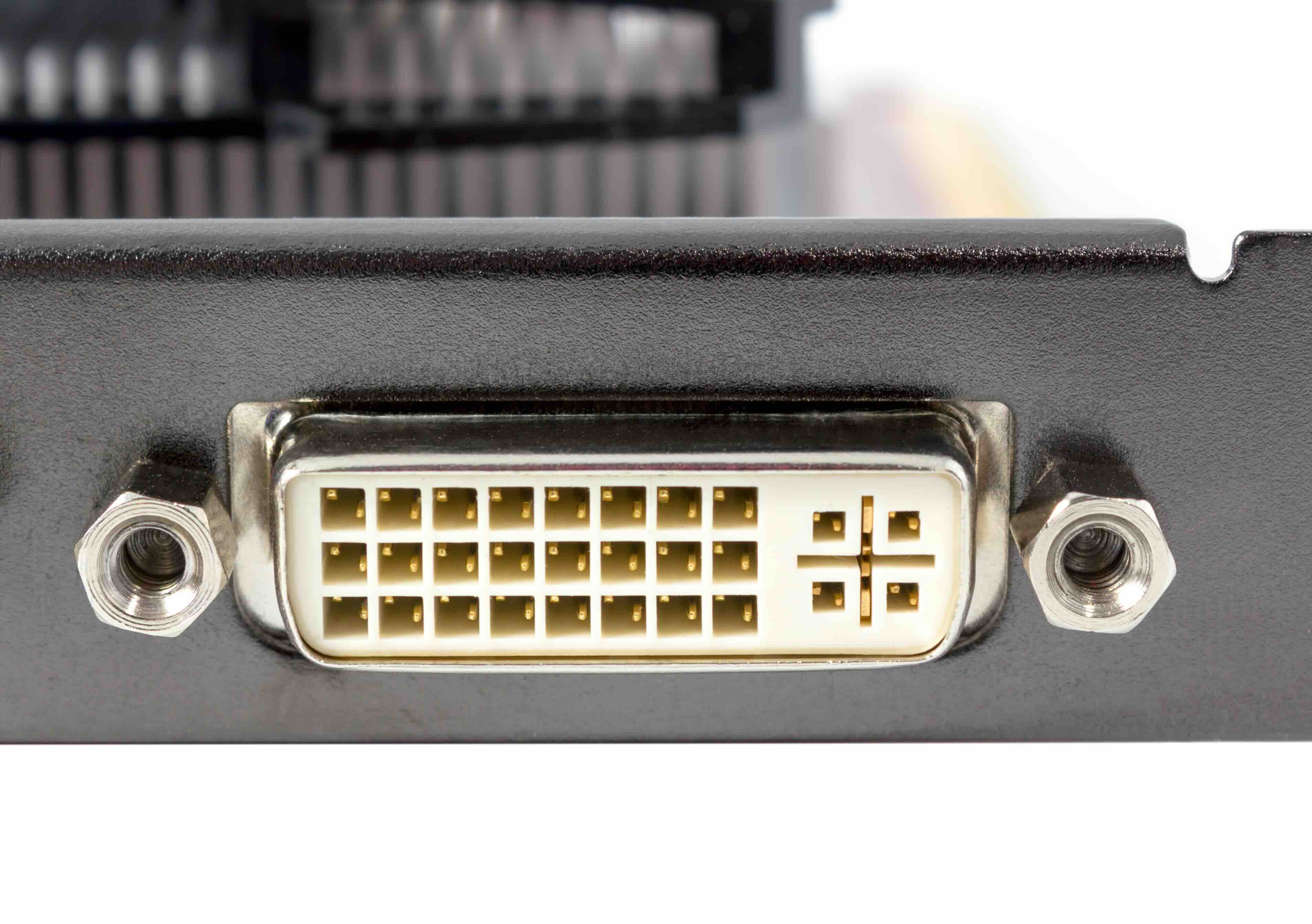
Dual link DVI doubles the number of TMDS channels, essentially adding a second data pathway alongside the first. That might sound like a small technical adjustment, but the impact on resolution and bandwidth is significant. Dual link DVI can support resolutions up to 2560 x 1600 at 60Hz, which opens the door to 30-inch displays, high-resolution workstation monitors, and demanding visual environments. The dual link connector has 24 pins for data transmission instead of 18. Physically, the connector looks the same from the outside, but those extra six center pins are what differentiate it. If you plug a single link cable into a setup requiring dual link bandwidth, you will likely see a degraded or downscaled image, or no signal at all above certain resolutions.
DVI-A, DVI-D, and DVI-I: Understanding the Types
Before you can fully understand single link vs dual link, you also need to know the three main DVI connector types, because they each behave differently depending on your hardware setup.
- DVI-A carries analog signal only, similar to VGA
- DVI-D carries digital signal only and comes in both single and dual link versions
- DVI-I carries both analog and digital signals and also comes in single and dual link versions
Most modern graphics cards and monitors use DVI-D or DVI-I. The key takeaway here is that even within those categories, single link and dual link are distinct configurations. Always check your hardware documentation before purchasing cables or adapters, because assumptions here can cost you time and money.
Key Advantages of DVI Dual Link
Going dual link comes with real, measurable advantages that matter in specific use cases. If you are running a high-resolution display, working in professional graphics, or need precise color accuracy at larger screen sizes, dual link is the right call.
- Supports resolutions up to 2560 x 1600 at 60Hz
- Doubles the available bandwidth compared to single link
- Delivers sharper, more detailed images on large format displays
- Ideal for 30-inch monitors and high-end workstation setups
- Handles more complex visual data without signal degradation
For standard office use or casual computing, these advantages may not be immediately noticeable. But in professional environments where screen real estate and visual accuracy directly impact workflow, dual link DVI is a foundational requirement, not an optional upgrade.
Drawbacks and Limitations to Consider
DVI dual link cables and components tend to cost more than their single link counterparts. Not every graphics card supports dual link output, so you need to verify compatibility before committing to a cable or display. Beyond cost and compatibility, DVI in general has some limitations worth noting. It does not natively support audio, so if you are building a home theater or multimedia workstation, you will need a separate audio solution. DVI also does not support the adaptive sync protocols available through DisplayPort, and it tops out at 60Hz, which means it is not suited for competitive gaming setups that demand 120Hz or higher refresh rates. For those applications, DisplayPort or HDMI is the stronger choice.
Single Link vs Dual Link: How to Choose the Right One
The decision between single link and dual link DVI comes down to three things: your display resolution, your graphics card output, and your budget. If your monitor maxes out at 1920 x 1200 or below, single link DVI is all you need and adding a dual link cable will not improve anything. If you are working with a display that exceeds that resolution, you need dual link, full stop. Check the specs on your monitor and your graphics card outputs and match them accordingly. Using a dual link cable with a single link graphics card port will not unlock higher resolution output. Both ends of the connection need to support dual link for it to function as intended. When in doubt, pull the product documentation for both devices.
Common Mistakes People Make with DVI Cables
One of the most frequent issues is assuming all DVI cables are the same. They are not. Purchasing a single link cable for a dual link monitor is one of the most avoidable mistakes, and it happens more often than it should. Another common error is confusing DVI-D with DVI-I and attempting to use an adapter that does not match the source signal type. DVI-D to VGA adapters do not work without active conversion circuitry, which passive adapters cannot provide. Always verify the pin configuration on your cable before purchase. Check whether the center slot is flat or has a pin, because that single detail tells you whether you are dealing with a digital-only or analog-compatible connector.
Why Monoprice Is the Right Source for Your DVI Cable Needs
When it comes to DVI cables, you do not need to spend a premium to get reliable, high-quality performance. Monoprice has spent years building a reputation as a trusted supplier of cables, connectors, and AV infrastructure for both home users and professional integrators. If you are shopping for a high-performance DVI dual link cable for your monitor setup, Monoprice delivers the quality you need at a price point that makes sense. The product lineup covers single link and dual link configurations across multiple DVI types, so finding the right match for your hardware is straightforward. Beyond pricing, Monoprice backs its products with solid warranties and transparent specifications, so you know exactly what you are getting before it ships. Whether you are an IT professional spec-ing out a workstation lab or a creative professional upgrading a high-resolution display, Monoprice is the practical, value-driven choice that does not require compromise.
Frequently Asked Questions About DVI Dual Link vs Single Link
What is the maximum resolution supported by DVI single link?
DVI single link supports a maximum resolution of 1920 x 1200 at 60Hz, which covers standard 1080p and WUXGA displays without issue.
What is the maximum resolution supported by DVI dual link?
DVI dual link supports resolutions up to 2560 x 1600 at 60Hz, making it suitable for 30-inch and other high-resolution professional displays.
Can I use a dual link cable with a single link graphics card port?
You can physically connect a dual link cable to a single link port, but you will not gain any additional bandwidth or resolution. Both the source and the display must support dual link for the connection to operate at dual link capability.
How do I identify a dual link DVI connector?
A dual link DVI connector has 24 data pins arranged in three rows of eight, compared to the 18 data pins found on a single link connector. The extra six pins in the center rows are the defining physical difference.
Does DVI support audio?
Standard DVI does not carry audio signals. If you need audio alongside your video connection, you will need a separate audio cable or should consider using HDMI or DisplayPort, which both support audio natively.
Is DVI still worth using in 2024?
For resolutions up to 2560 x 1600 at 60Hz and on hardware that does not support HDMI or DisplayPort, DVI remains a perfectly valid and reliable connection standard. It is particularly relevant for legacy systems and professional workstation monitors.
What is the difference between DVI-D and DVI-I?
DVI-D transmits only digital video signals, while DVI-I transmits both digital and analog signals. Both come in single link and dual link versions, and they are physically distinguishable by the presence or absence of four analog pins surrounding the flat blade on the connector.
Can I convert DVI to HDMI or DisplayPort?
Yes, passive DVI to HDMI adapters work for digital-only connections without audio. DVI to DisplayPort conversion typically requires an active adapter, as the two interfaces use different signaling protocols.
Will a dual link DVI cable improve image quality on a 1080p monitor?
No. If your monitor operates at or below 1920 x 1080 resolution, a dual link cable will not improve image quality over a single link cable. The benefit of dual link is only realized when the display resolution exceeds what single link can support.
What should I check before buying a DVI cable?
Verify the DVI type on both your graphics card and monitor, confirm whether your hardware supports single link or dual link, check the maximum resolution of your display, and match the connector type accordingly. Reviewing the product specifications on both devices before purchasing will prevent compatibility issues.


