

What Is Mini HDMI? Uses, Benefits, and Buying Tips
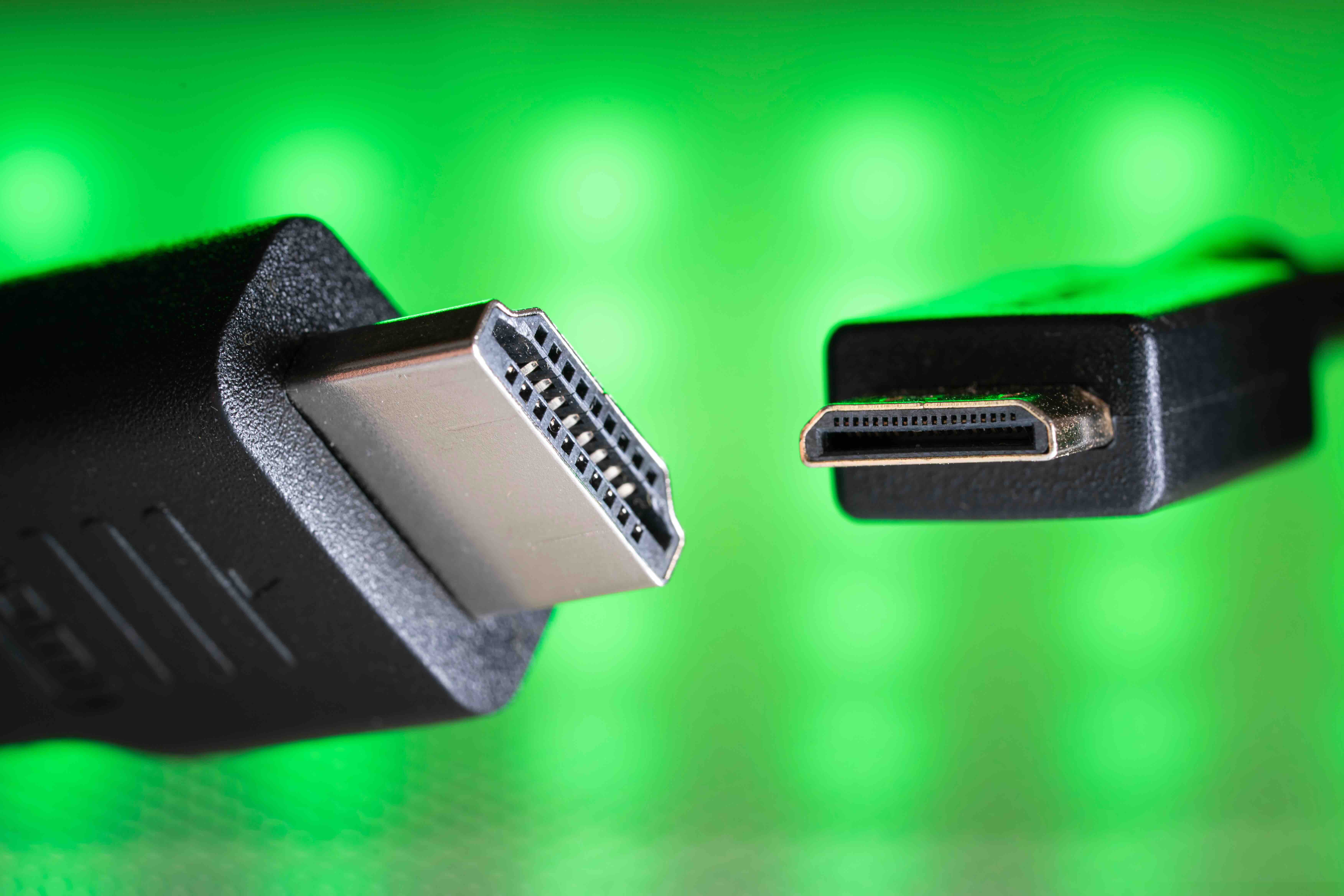
What Is a Mini HDMI? A Complete Guide to the Smaller HDMI Connector
You have probably run into a situation where your device has a small port that looks like HDMI but is noticeably smaller. That is Mini HDMI. It is a real thing, it has a real purpose, and if you are trying to connect a camera, tablet, or compact device to a monitor or TV, understanding it matters. This guide breaks down exactly what Mini HDMI is, how it works, where you will typically find it, and what to think about before you buy a cable or adapter. No fluff, just the stuff you actually need to know.
Mini HDMI Defined: The Basics You Need to Know
Mini HDMI is a smaller version of the standard HDMI connector. Officially designated as HDMI Type C, it was introduced as part of the HDMI 1.3 specification. The standard HDMI connector, the one you see on most TVs and monitors, is Type A. Mini HDMI sits between Type A and Micro HDMI, which is even smaller and officially called Type D. Mini HDMI measures approximately 10.42mm by 2.42mm, making it significantly more compact than the 13.9mm by 4.45mm Type A connector. Despite the size difference, it carries the same signal. Same audio, same video, same data throughput, just in a smaller physical form factor. That is the whole point of it. Devices that cannot accommodate a full-size port still need HDMI connectivity, and Mini HDMI delivers that without sacrificing performance.
Where You Will Find Mini HDMI Ports
Mini HDMI shows up in places where space is limited but display output is still a priority. It is common on DSLR and mirrorless cameras, which is probably the most frequent use case people encounter. Videographers and photographers often need to connect their camera to an external monitor or field recorder during a shoot. Mini HDMI makes that possible without bulking up the camera body. Beyond cameras, you will find Mini HDMI on some older tablets, portable monitors, Raspberry Pi boards in certain configurations, graphics tablets, and some laptops that were designed before USB-C became the dominant standard. If you are working with any of these devices and need to push a signal to an external display, knowing that the port is Mini HDMI rather than Micro HDMI will save you a frustrating trip back to the store.
How Mini HDMI Works
Functionally, Mini HDMI works exactly the same way standard HDMI does. The connector is smaller, but the underlying technology is identical. It supports the same transmission of uncompressed digital video and audio over a single cable. Depending on the version of HDMI the device supports, you can push resolutions up to 4K and higher, though the capability depends on the host device and not the connector size itself. A Mini HDMI cable or adapter connects to a full-size HDMI input on the other end, typically using a Mini HDMI to HDMI cable. That cable handles the signal bridging without signal loss or quality degradation. The pin layout differs from Type A, but the electrical signals and data protocols are consistent across all HDMI connector types.
Mini HDMI vs. Micro HDMI: Clearing Up the Confusion
This is where people trip up constantly. Mini HDMI and Micro HDMI are not interchangeable. They are physically different connectors and you cannot force one into the other port. Mini HDMI is Type C. Micro HDMI is Type D. Micro HDMI is even smaller, closer in size to a Micro USB connector, and is typically found on smartphones and ultra-compact devices. Before purchasing any cable or adapter, check your device documentation or measure the port carefully. Most manufacturer spec sheets will identify the port type directly. Getting this wrong means the connector simply will not fit. It is one of the more common buying mistakes in the cable category, and it is entirely avoidable with a quick spec check.
Key Advantages of Mini HDMI
Mini HDMI offers real benefits for the right use cases. Understanding those benefits helps you decide whether a cable or adapter is the right solution for your setup.
- Space efficiency for compact devices
- Full HDMI signal quality with no compromise on audio or video fidelity
- Compatibility with standard HDMI displays, monitors, and projectors via a simple cable
- Widely available in various lengths and configurations
- Supports HDMI features including CEC, ARC in compatible implementations, and high-bandwidth resolutions
- Cost-effective compared to proprietary or wireless display solutions
Common Drawbacks Worth Knowing
Mini HDMI is not without its limitations. Being informed about them helps you plan better and avoid headaches down the road.
- Less durable than full-size HDMI connectors under repeated use
- Easier to accidentally damage if cables are bent or pulled at an angle
- Being phased out on newer devices in favor of USB-C with DisplayPort Alt Mode
- Not as universally available as standard HDMI cables in retail stores
- Can be confused with Micro HDMI, leading to purchasing mistakes
Practical Tips for Using Mini HDMI Cables and Adapters
If you are working with Mini HDMI regularly, a few practical habits will keep things running smoothly. First, always label your cables if you have both Mini HDMI and Micro HDMI in your kit. They look similar enough at a glance to cause confusion during a fast-paced shoot or setup. Second, support the cable at the port connection point rather than letting it hang freely, especially on cameras where the port is often located in a spot that sees movement. Third, invest in a quality cable rather than grabbing the cheapest option available. The signal path on a Mini HDMI cable is short by definition, but a poorly shielded cable can introduce interference, particularly in environments with a lot of wireless activity or electrical noise. Fourth, consider a right-angle Mini HDMI connector if you are running cables along a camera rig or tight panel. It reduces strain on the port significantly. And fifth, if your newer devices have moved to USB-C but you still use older Mini HDMI equipment, a USB-C to HDMI adapter paired with a Mini HDMI to HDMI cable is a completely viable chain as long as each component is rated for the resolution you need.
Is Mini HDMI Still Relevant Today?
Yes, but with context. Mini HDMI is not going to dominate new product designs. USB-C has largely taken over in compact devices because it handles power, data, and video over a single connector. However, a massive installed base of cameras, tablets, and equipment still uses Mini HDMI, and that equipment is actively in use. Professional photographers and videographers running Canon or Nikon DSLRs from the last decade are almost certainly dealing with Mini HDMI ports on a regular basis. Field monitor manufacturers still produce units with full-size HDMI inputs specifically to support this workflow. So while it is not the future, it is very much the present for a significant portion of working professionals and hobbyists. Knowing how to work with it, and having reliable cables and adapters on hand, is practical knowledge that pays off.
Why Monoprice Is the Right Source for Mini HDMI Cables and Adapters
When you need Mini HDMI cables or adapters, the quality of what you buy matters more than people typically assume. A poorly constructed cable introduces risk, whether that is signal degradation, physical connector failure, or intermittent drops during a critical shoot or presentation. Monoprice has built a reputation over years as a trusted source for high-performance connectivity products at honest prices, and the Mini HDMI category is no exception. The cables are built to spec, properly shielded, and available in configurations that cover real-world use cases. If you are sourcing gear for a production kit, outfitting a monitoring station, or just need a reliable cable to connect your camera to an external display, browsing Mini HDMI cables and video connectivity solutions at Monoprice gives you access to professional-grade options without the inflated price tag that often comes with specialty AV accessories. That combination of performance and value is what Monoprice consistently delivers across every product category, and it is exactly what the connectivity market needs more of.
Frequently Asked Questions About Mini HDMI
What is the difference between Mini HDMI and standard HDMI?
Mini HDMI, designated HDMI Type C, is a smaller version of the standard HDMI Type A connector. Both carry the same audio and video signals, but Mini HDMI is designed for compact devices where a full-size port would not physically fit.
Is Mini HDMI the same as Micro HDMI?
No. Mini HDMI is Type C and Micro HDMI is Type D. They are different sizes and shapes and are not interchangeable. Always verify which type your device uses before purchasing a cable or adapter.
What devices use Mini HDMI ports?
Mini HDMI is commonly found on DSLR and mirrorless cameras, older tablets, portable monitors, Raspberry Pi boards, and certain laptops produced before USB-C became the standard output option.
Does Mini HDMI support 4K resolution?
The connector itself does not limit resolution. 4K support depends on the HDMI version supported by the device. If the host device supports HDMI 2.0 or higher, 4K output is possible through a Mini HDMI connection.
Can I use a Mini HDMI to HDMI cable without an adapter?
Yes. Mini HDMI to HDMI cables are widely available and connect your Mini HDMI device directly to a standard HDMI input on a monitor, TV, or display without requiring a separate adapter.
Will any Mini HDMI cable work with my camera?
Generally yes, as long as the cable is a proper Mini HDMI Type C cable rated for the resolution and feature set you need. Confirm your camera uses Type C and not Micro HDMI Type D before purchasing.
Is Mini HDMI being phased out?
On newer devices, yes. USB-C with DisplayPort Alt Mode has largely replaced Mini HDMI in current product designs. However, a large installed base of existing equipment still uses Mini HDMI, keeping demand for cables and adapters active.
Can Mini HDMI carry audio as well as video?
Yes. Mini HDMI carries both uncompressed digital audio and video, identical to standard HDMI. You do not need a separate audio connection when using a Mini HDMI cable for display output.
How do I know if my device has Mini HDMI or Micro HDMI?
Check your device's user manual or manufacturer specification sheet. Mini HDMI ports are slightly larger than Micro HDMI. When in doubt, measure the port or look up the exact model number online to confirm the connector type.
Are right-angle Mini HDMI cables a good idea for camera rigs?
Yes. Right-angle Mini HDMI connectors reduce strain on the port and the cable, which is particularly useful in camera rig configurations where cables are routed along rails or frames and stress on the connection point is a real concern.


