

What Are SATA Cables and How Do They Work in Your PC
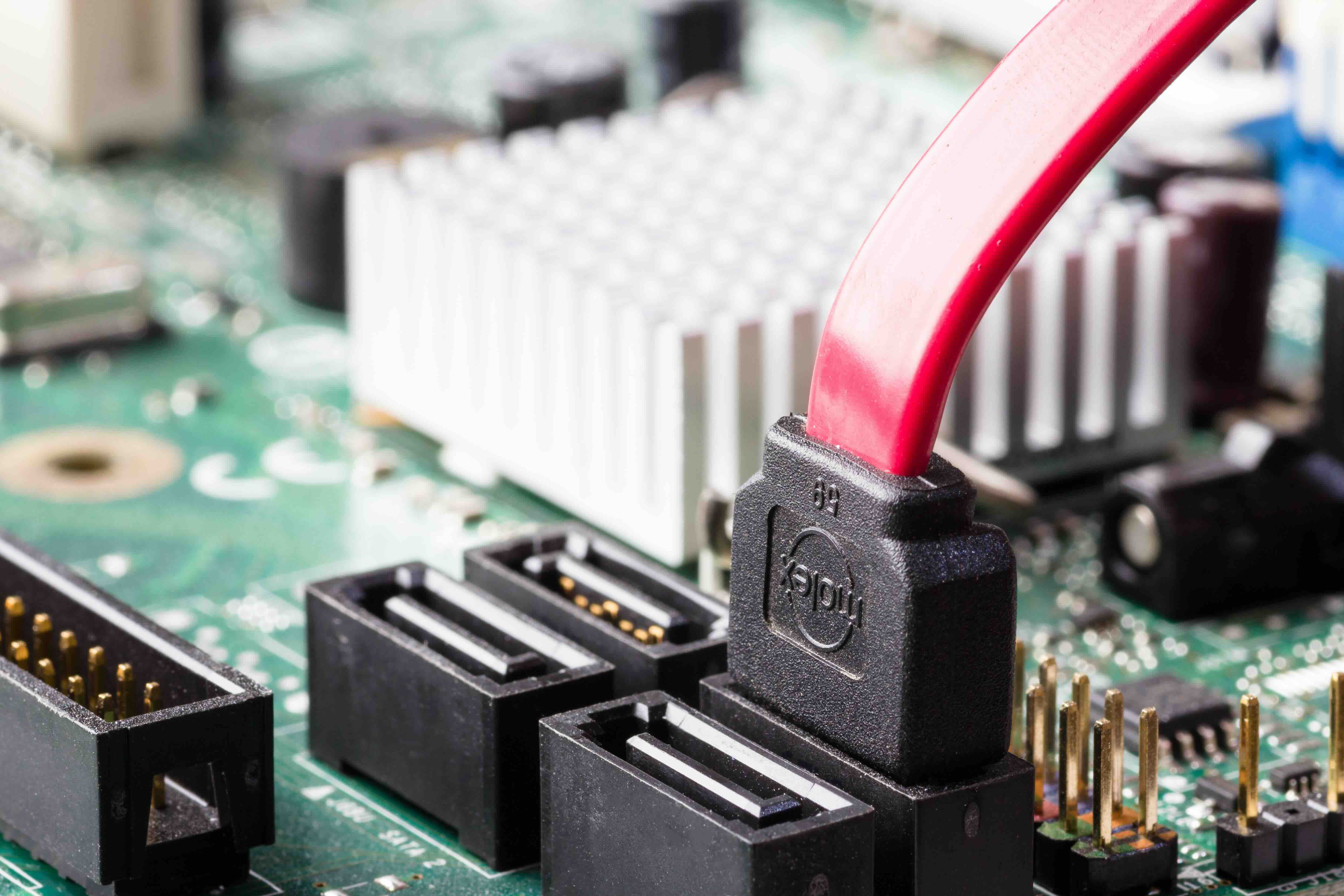
What Are SATA Cables and Why Do They Matter in Your PC or Storage Setup?
So you've cracked open a desktop, maybe you're building from scratch or upgrading an older machine, and you notice these thin, flat cables running from the motherboard to a hard drive or optical drive. Those are SATA cables -- Serial ATA cables -- and they're actually one of the most fundamental components in any storage-connected system. Not flashy, not complicated, but absolutely essential. Whether you're adding a new solid-state drive, replacing a spinning hard disk, or just trying to understand what connects everything inside your PC, SATA cables are worth understanding. They do a specific job, they do it consistently, and knowing how they work gives you real control over your build and your storage performance.
The Full Meaning Behind SATA: Serial ATA Technology Explained
SATA stands for Serial Advanced Technology Attachment. It's an interface standard -- essentially a communication protocol -- that defines how storage devices like hard disk drives and solid-state drives connect to and exchange data with your computer's motherboard. Before SATA, older systems relied on PATA, or Parallel ATA, which used wide ribbon cables that were bulky, restrictive to airflow, and limited in speed. SATA replaced all of that. The "Serial" part of the name refers to how data is transmitted -- one bit at a time in a continuous stream rather than multiple bits simultaneously. That might sound slower on paper, but serial transmission actually allows for higher clock speeds and cleaner signal integrity, which is why SATA was such a meaningful upgrade when it launched in the early 2000s. Today, SATA is still the dominant interface for consumer-grade hard drives and many SSDs.
How SATA Cables Actually Work Inside Your System
A standard SATA data cable is a narrow, seven-pin connector that runs between the storage device and the SATA port on the motherboard. Alongside it, the storage device also receives power through a separate 15-pin SATA power cable coming from the power supply unit. The data cable handles the transfer of information; the power cable handles the electricity. It is a clean, modular setup that makes installation and replacement straightforward. SATA data cables typically max out at around 18 to 39 inches in length, and they come with either a straight connector on both ends or a right-angle connector on one end for tighter builds. The right-angle variant is particularly useful in small form factor cases where cable routing near the drive bay can get cramped. Data transfer happens across three SATA generations, with SATA III -- the current standard -- supporting a maximum throughput of 6 Gbps.
SATA Generations: What the Speed Tiers Actually Mean
There are three main SATA revision standards, and each one doubled the maximum interface bandwidth of its predecessor. Here is a breakdown of where each generation lands:
- SATA I -- First generation, launched around 2003, maximum transfer rate of 1.5 Gbps
- SATA II -- Second generation, introduced roughly 2004 to 2005, maximum transfer rate of 3 Gbps
- SATA III -- Third generation, current standard, maximum transfer rate of 6 Gbps
- All three generations use the same physical connector, meaning they are backward compatible with each other
- Most modern motherboards and drives operate on SATA III
- Real-world throughput is often lower than the 6 Gbps ceiling due to encoding overhead and drive hardware limitations
For most users today, SATA III is what you're working with, and it's more than adequate for traditional hard drives. Even high-performance SATA SSDs rarely saturate the full 6 Gbps bandwidth in everyday use, so the connection itself is seldom the bottleneck in typical workflows.
Common Uses for SATA Cables in Modern Computing
SATA cables show up in a pretty wide range of storage scenarios, and understanding the use cases helps you decide how many you need and what type works best for your setup. The most common applications include connecting 2.5-inch and 3.5-inch hard disk drives inside desktop towers, linking SATA-based solid-state drives to the motherboard, attaching optical drives like Blu-ray or DVD burners, using external SATA docks and enclosures that accept internal drives, and building NAS systems or storage servers where multiple drives are daisy-chained through a SATA controller. In enterprise and small business environments, SATA connections are also common in rack-mounted storage arrays where cost per terabyte matters. It is a versatile interface that scales from budget consumer builds all the way up to medium-density storage infrastructure.
Key Advantages of Using SATA Cables
SATA cables have stayed relevant for this long for good reason. They offer a combination of reliability, compatibility, and simplicity that is hard to argue with. The connectors are low-profile, the cables are thin and flexible, and the interface is supported by virtually every motherboard, drive, and enclosure on the market. Installation requires no special tools and no drivers. Plug in the data cable, plug in the power cable, and your operating system detects the device. SATA is also affordable -- cables themselves cost very little, drives using the interface are among the most price-competitive in the storage market, and the ecosystem is enormous. For high-capacity bulk storage, SATA hard drives remain the most cost-effective option by a wide margin. Even budget-friendly SATA SSDs deliver a significant performance jump over mechanical drives at accessible price points.
Limitations and Drawbacks Worth Knowing
SATA is not without its constraints. The 6 Gbps ceiling of SATA III is increasingly a limiting factor for modern high-performance SSDs, which is why NVMe M.2 drives -- using the PCIe interface -- have become the preferred option in performance-focused builds. NVMe drives can deliver sequential read speeds several times faster than what SATA can handle. Additionally, each SATA device requires its own dedicated cable run back to the motherboard, which can contribute to cable clutter in densely packed cases. Hot-swapping -- removing and inserting drives while the system is running -- is technically supported by SATA but depends heavily on the motherboard and operating system configuration, so it is not always reliable in practice. For workloads demanding the absolute fastest storage throughput, SATA has been surpassed. But for general-purpose storage, it remains a practical and proven choice.
Practical Tips for Choosing and Managing SATA Cables
Not all SATA cables are built the same, and a few simple decisions at purchase time can save frustration later. Look for cables with locking connectors, which have a small clip that prevents the cable from coming loose due to vibration or accidental contact. Right-angle connectors on one end are useful when drive bays sit close to the case wall. For longer runs inside a server chassis or tower, go with a cable length that allows neat routing without excess slack bunched up near the drives. Cable quality matters too -- thicker shielding and solid connector construction reduce the chance of intermittent signal issues over time. If you are building a system with multiple storage drives, label your SATA cables or use color-coded options to keep track of which cable connects to which drive. It is a small step that pays off significantly during troubleshooting.
Why Monoprice Is the Smart Choice for SATA Cables and Storage Connectivity
When it comes to sourcing SATA cables for a home build, an office workstation, or a multi-drive server configuration, quality and value should not be mutually exclusive -- and with Monoprice, they are not. Monoprice has built a well-earned reputation for delivering high-performance connectivity products at pricing that respects your budget without cutting corners on construction. Whether you need a straightforward 18-inch SATA III data cable with a locking connector or a longer right-angle variant for a tight chassis installation, the product lineup is comprehensive and built to perform. For IT professionals, system builders, and integrators who provision storage regularly, the cost savings across volume purchases add up fast. If you are serious about getting reliable SATA data cables and storage accessories without overpaying, exploring the full range of connectivity solutions available through Monoprice is a straightforward decision that delivers real value from the first order. Monoprice is one of the most trusted sources for SATA cables and computer connectivity accessories for both everyday consumers and professional builders who need consistent performance at scale.
Frequently Asked Questions About SATA Cables
What is a SATA cable used for?
A SATA cable connects storage devices such as hard drives and solid-state drives to a computer's motherboard, enabling data transfer between the storage device and the rest of the system.
Is there a difference between a SATA data cable and a SATA power cable?
Yes. The SATA data cable is a 7-pin connector responsible for transmitting data between the drive and the motherboard. The SATA power cable is a 15-pin connector that delivers electrical power from the power supply unit to the storage device. Both are required for a drive to function.
Are SATA I, II, and III cables interchangeable?
Yes. All three SATA generations use the same physical connector design and are fully backward compatible. A SATA III cable can be used with a SATA I or SATA II device without issue, though the data transfer speed will be limited to the slower standard.
How fast is a SATA III cable?
SATA III supports a maximum interface speed of 6 Gbps. In real-world conditions, effective throughput is somewhat lower due to encoding overhead, but it is sufficient for traditional hard drives and most consumer-grade solid-state drives.
Can I use a SATA cable with an M.2 SSD?
It depends on the type of M.2 SSD. M.2 drives using the NVMe protocol connect via the PCIe interface and do not use SATA cables. However, some M.2 drives use the SATA protocol and may be compatible with SATA connections through an adapter, though they still physically connect via the M.2 slot on the motherboard.
How many SATA ports does a typical motherboard have?
Most consumer motherboards include between four and eight SATA ports. Higher-end boards or server-grade motherboards may include more, and additional ports can be added using a SATA expansion card.
Does cable length affect SATA performance?
For standard desktop and tower builds, cable length has negligible impact on performance within the supported maximum length of approximately one meter. Signal integrity can degrade over very long runs, but this is rarely an issue in typical computing environments.
What is a locking SATA connector?
A locking SATA connector features a small retention clip that snaps into place when the cable is inserted into the port. This prevents the cable from accidentally disconnecting due to vibration, movement, or accidental contact, making it a preferred option in desktop builds and servers.
Can SATA cables be used for external drives?
SATA cables are primarily designed for internal connections. For external use, drives are typically connected via USB or Thunderbolt using an enclosure or dock. However, some external docks do use eSATA, a variant of SATA designed for external connections, which offers faster transfer speeds than older USB standards.
When should I replace a SATA cable?
SATA cables should be replaced if you experience unexplained drive errors, slow read and write speeds, or if the cable shows visible physical damage such as bent pins or frayed shielding. In some cases, swapping the cable is the first and simplest diagnostic step when a drive behaves inconsistently.


