VGA vs DVI: Key Differences in Signal Quality and Use Cases
VGA vs DVI: What You Actually Need to Know Before You Buy
If you have ever stared at the back of a monitor or graphics card and genuinely could not tell which port was which, you are not alone. VGA and DVI have been fixtures in the display world for decades, and yet a lot of people still mix them up or just grab whatever cable is nearby and hope for the best. That works sometimes. But if you care about image quality, compatibility, or future-proofing your setup even just a little, it is worth taking a few minutes to understand what each connection actually does and where each one belongs. This guide breaks it all down without overcomplicating it.
What Is VGA and How Does It Work
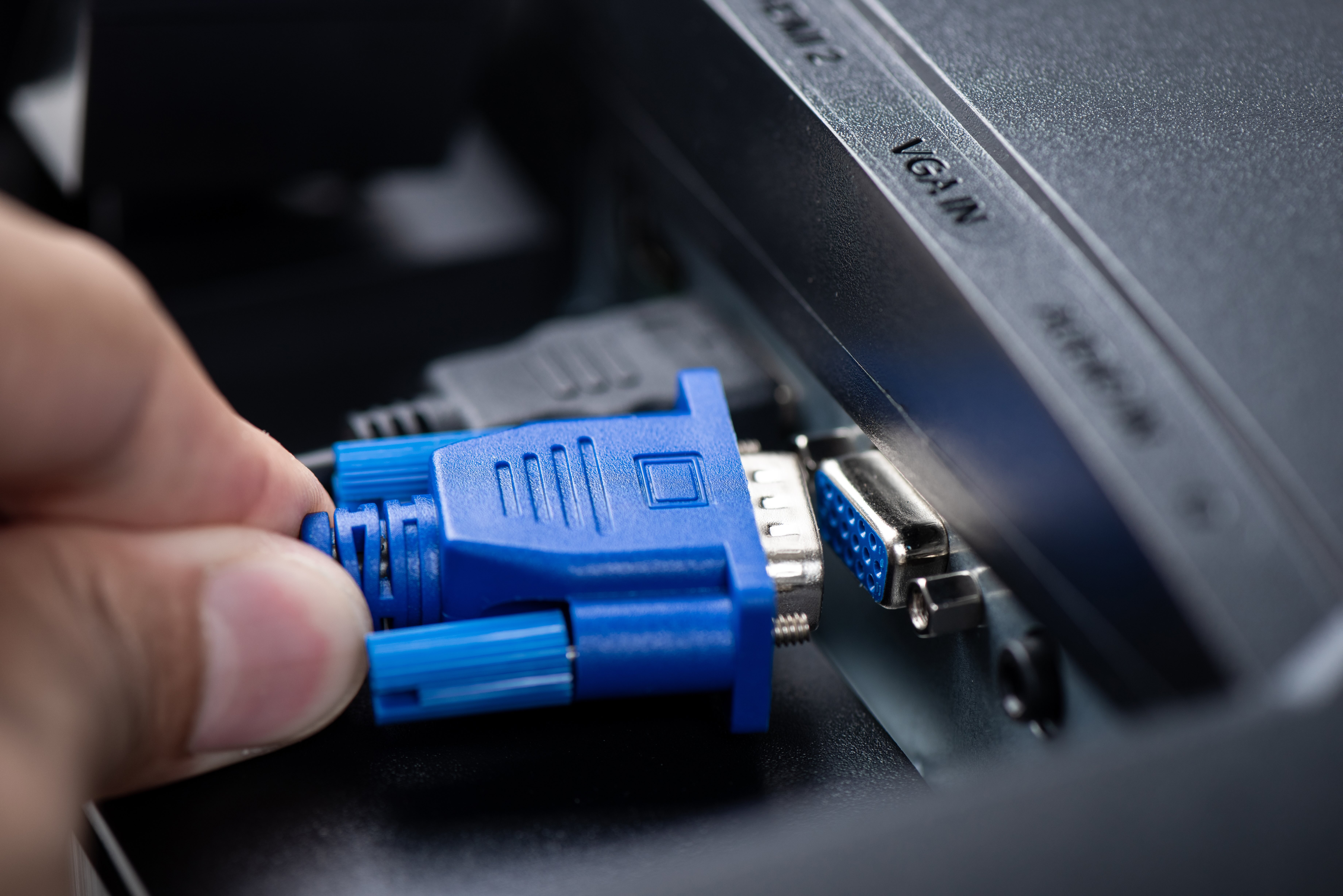
VGA stands for Video Graphics Array. It was introduced by IBM back in 1987, which tells you a lot about its age. The connector itself is that familiar blue trapezoid-shaped plug with 15 pins arranged in three rows. What matters most about VGA is that it is an analog signal. That means the video data gets converted from a digital format inside your computer into an analog signal, travels through the cable, and then gets converted back to digital at the display. Every conversion introduces a small amount of signal degradation. At lower resolutions, like 640x480 or even 1024x768, this barely matters. At higher resolutions or across longer cable runs, that degradation becomes visible as softness, noise, or color inaccuracy. VGA has a maximum practical resolution of about 1920x1080, but by that point the analog limitations are pretty noticeable. It also carries only video, no audio, so audio routing requires a separate cable entirely.
What Is DVI and How Does It Work
DVI stands for Digital Visual Interface and was introduced in 1999 as a direct response to the limitations of VGA. The connector is larger and more rectangular, and depending on the variant it can carry analog signals, digital signals, or both. That last part is where people get confused. There are several DVI types worth knowing. DVI-A carries analog only, DVI-D carries digital only, and DVI-I carries both analog and digital. Within DVI-D and DVI-I, there is also a distinction between single link and dual link, where dual link supports higher resolutions and refresh rates. The digital nature of DVI-D means the signal does not undergo the same analog conversion degradation that VGA does. You get a cleaner, sharper image, especially at higher resolutions. DVI supports resolutions up to 2560x1600 on dual link configurations, which is a meaningful jump over what VGA can reliably deliver.
Signal Quality Differences That Actually Matter
This is where the practical difference becomes very real. VGA uses analog transmission, and analog signals are susceptible to interference from nearby cables, power sources, and even the build quality of the cable itself. A cheap VGA cable on a long run to a 1080p display will often produce a noticeably blurry or washed-out image. You might not notice on a small screen, but on anything 24 inches or larger it becomes apparent. DVI, specifically DVI-D, transmits digitally and delivers a pixel-perfect signal because the data is discrete rather than continuous. There is no conversion loss. The image you get on screen is precisely what the source sent. For users doing graphic design, video editing, or any work that demands color accuracy and sharpness, this distinction is not trivial. Even for general office use or gaming, DVI-D at 1080p or higher looks visibly cleaner than VGA at the same resolution.
Resolution and Refresh Rate Support Compared
Resolution support is one of the clearest practical differences between these two standards. VGA can technically output up to 2048x1536 under ideal conditions, but in real-world use, quality degrades significantly above 1280x1024. Most people using VGA at 1920x1080 are already pushing the format past its comfortable operating range. DVI single link supports up to 1920x1200 at 60Hz cleanly. DVI dual link steps that up to 2560x1600 at 60Hz, making it genuinely capable for higher-end monitors. Neither standard supports refresh rates above 60Hz at higher resolutions, and neither carries audio. These are shared limitations that point toward why both VGA and DVI have largely been superseded by HDMI and DisplayPort in modern systems. But for legacy hardware, projectors, and older commercial displays, both remain relevant.
Key Advantages of VGA
VGA has stayed around for this long for reasons beyond inertia. It is universal in older hardware. Practically every projector, older monitor, and legacy workstation includes a VGA port, which makes it a reliable fallback when modern ports simply are not present. Adapters are widely available and inexpensive. Setup is plug-and-play with no driver dependencies or handshake protocols to worry about. For presentations, basic office setups, and educational environments running older equipment, VGA still does its job without friction. It is also worth noting that for low-resolution applications like displaying simple desktop interfaces or running basic productivity software on older displays, the analog limitations are largely invisible at normal viewing distances.
Key Advantages of DVI
DVI delivers cleaner image quality at higher resolutions, plain and simple. For a display running at 1080p or 1200p, the digital transmission through DVI-D produces a noticeably sharper result compared to VGA on the same hardware. Dual link DVI expands that further, supporting large format displays and higher resolution monitors that VGA simply cannot serve well. DVI is also more resilient over longer cable runs than VGA because digital signals do not degrade the same way analog signals do. If you are working with a monitor and a graphics card that both have DVI ports, there is little reason not to use DVI. It is the better technical choice within the constraints of that connector family, and quality DVI cables are widely available at practical prices.
Common Drawbacks of Both Standards
Neither VGA nor DVI is future-proof. Both lack audio support, which forces users to run separate audio cables or use alternative connections for multimedia setups. Neither supports the higher refresh rates that modern gaming monitors demand, and neither carries the bandwidth required for 4K content. DVI dual link comes closest to modern relevance but still falls short of what DisplayPort and HDMI offer today. VGA's analog nature makes it inherently unsuitable for premium display applications. Both formats also have bulkier connectors compared to modern standards, which can be a practical concern in tight cable management situations. The locking screws on both connectors are useful for stability in professional installs but add time to setup and teardown in portable applications.
When to Use VGA vs DVI in Real-World Scenarios
Choosing between VGA and DVI comes down to your hardware and what you are trying to achieve. Here are the situations where each one makes sense.
Use VGA when:
- Your monitor or projector only has a VGA input
- You are connecting legacy hardware that predates DVI
- The application is low-resolution and display quality is not a priority
- You need a universally compatible cable for mixed hardware environments
Use DVI when:
- Both your display and source device support DVI-D or DVI-I
- You are running a 1080p or 1200p monitor and want clean digital output
- You are working with graphics or content that requires color accuracy
- You want better performance without upgrading to a newer connection standard
Why Monoprice Is the Right Choice for VGA and DVI Cables
When you need reliable connectivity without overspending, Monoprice delivers. Whether you are maintaining a legacy display setup, outfitting a classroom, or building out a workstation where DVI is the right fit, the quality of the cable matters more than most people assume. A poorly shielded VGA cable introduces noise. A low-quality DVI cable can compromise the signal integrity you switched to digital to achieve in the first place. Monoprice engineers cables to perform the way they are supposed to, using quality materials and construction standards that hold up in real environments. If you are looking for high-quality VGA and DVI display cables for professional and home use, exploring the full lineup available through Monoprice display cables and video connectivity solutions is a practical starting point. The catalog covers the full range of connector types, lengths, and configurations so you get exactly what your setup requires without paying for more than you need. That combination of precision, performance, and value is what Monoprice is built on.
Frequently Asked Questions About VGA vs DVI
Is DVI always better than VGA?
DVI-D is generally better than VGA for image quality because it transmits a digital signal without the conversion losses that affect analog VGA. However, for very low-resolution applications on older hardware, the difference may not be visible in practice.
Can I connect a VGA monitor to a DVI port?
Yes, if the DVI port is DVI-I or DVI-A, which carry an analog signal. A DVI-to-VGA adapter will work in that case. A DVI-D port carries only digital and cannot connect to a VGA monitor without an active signal converter.
Does VGA support 1080p resolution?
VGA can technically output 1920x1080, but the analog signal quality at that resolution is often noticeably degraded compared to digital connections. For consistent 1080p quality, DVI-D or a modern digital interface is a better choice.
What is the maximum resolution supported by DVI?
DVI single link supports up to 1920x1200 at 60Hz. DVI dual link supports up to 2560x1600 at 60Hz, making it capable for higher-end monitors within the limitations of the 60Hz refresh ceiling.
Do VGA or DVI cables carry audio?
Neither VGA nor DVI carries audio signals. Both are video-only connections. If your setup requires audio, you will need a separate cable or should consider HDMI or DisplayPort, which support audio natively.
What is the difference between DVI-D, DVI-A, and DVI-I?
DVI-D carries only digital signals. DVI-A carries only analog signals and is functionally similar to VGA. DVI-I carries both analog and digital signals and offers the most flexibility for connecting to different display types.
Is DVI good enough for gaming?
DVI-D handles 1080p and 1200p gaming well at 60Hz. However, it does not support the higher refresh rates that modern gaming monitors offer. For 144Hz or higher gaming, DisplayPort or HDMI are the appropriate standards.
How long can a VGA or DVI cable run before signal quality degrades?
VGA signal quality begins to degrade noticeably beyond 10 to 15 feet, especially at higher resolutions. DVI maintains quality over longer runs due to its digital nature, though very long DVI runs beyond 15 to 20 feet may still benefit from signal boosting in professional installations.
Can I use a DVI to HDMI adapter without losing quality?
Yes. DVI-D and HDMI share the same digital video signal structure, so a passive DVI-to-HDMI adapter transfers video without quality loss. The only difference is that DVI does not carry audio, so the HDMI output will still lack audio unless routed separately.
Should I upgrade from VGA or DVI to HDMI or DisplayPort?
If your hardware supports HDMI or DisplayPort, upgrading is worthwhile for better resolution support, audio integration, and higher refresh rates. If your existing VGA or DVI setup meets your current needs and your hardware lacks newer ports, staying with what you have is a practical and cost-effective decision.