

VGA Cable Guide: What It Is and Why It Still Matters
What Does VGA Stand For? A Complete Guide to the Video Graphics Array Standard
If you have spent any time around older computers, projectors, or display hardware, you have almost certainly come across the term VGA. It shows up on monitor ports, cable ends, adapter packaging, and tech specification sheets with a frequency that suggests it still matters, even today. And honestly, it still does in more places than people expect. VGA stands for Video Graphics Array, and understanding what that means, where it came from, how it works, and when it is still useful can genuinely help you make smarter decisions about your display setup, whether you are building out a conference room, connecting legacy equipment, or just trying to figure out why your older laptop has a port that nothing in your bag seems to fit anymore.
The Origin of VGA: Where It All Started
IBM introduced the Video Graphics Array standard back in 1987 as part of its PS/2 line of personal computers. That is not a typo. This technology has been in circulation for well over three decades. When it launched, VGA represented a significant leap forward in display resolution, supporting up to 640 by 480 pixels at 16 colors, or 320 by 200 pixels at 256 colors. For its time, that was genuinely impressive output. The 15-pin DE-15 connector that carried the signal became one of the most widely recognized shapes in consumer and professional electronics, and it stuck around far longer than anyone probably anticipated when IBM first introduced it. The reason for that longevity is simple: it worked reliably, it was universally supported, and the cost to implement it stayed low across decades of hardware manufacturing.
How VGA Works: The Technical Basics Explained Simply
VGA transmits video using an analog signal. That distinction matters because it separates VGA from modern standards like HDMI, DisplayPort, and USB-C, all of which carry digital signals. The analog nature of VGA means the signal is a continuous electrical wave rather than discrete binary data. The cable carries separate signals for red, green, and blue color channels, along with horizontal and vertical sync signals, through its 15-pin connector. Because the signal is analog, it is inherently more susceptible to interference, signal degradation over longer cable runs, and quality loss when the signal needs to be converted to a digital format. On short cable runs with quality shielded cable, VGA performs cleanly. On longer runs or with poorly built cables, you start to notice ghosting, color distortion, or a soft, slightly blurry image quality that digital connections simply do not produce.
Key Advantages of VGA Connections
Despite its age, VGA has real advantages that explain why it has not completely disappeared from the market. Here are the situations where VGA continues to deliver genuine value:
- Universal legacy compatibility with older monitors, projectors, and display hardware
- Low cost for both cables and adapters
- Simple plug-and-play operation with no driver requirements
- Broad support across older operating systems and embedded systems
- Availability in almost any electronics environment globally
- Reliable performance for standard definition and basic display tasks
- No licensing costs built into the hardware, keeping device prices lower
For environments running legacy infrastructure, particularly in education, industrial controls, or older enterprise environments, VGA compatibility can be the difference between a functioning system and an expensive hardware overhaul. That practical value is real and worth recognizing.
Common Drawbacks and Limitations of VGA
Here is where things get honest. VGA has real limitations that matter in modern display environments. The analog signal caps out at 640 by 480 in its native specification, though many implementations extended support to higher resolutions over time. Even so, VGA struggles to cleanly deliver the sharp, high-contrast visuals that today's HD, 4K, and beyond displays are capable of rendering. The absence of audio transmission is another gap. Unlike HDMI, VGA carries no audio signal, meaning users need a separate audio cable when connecting to a display with built-in speakers. There is also no support for HDCP content protection, which means VGA connections cannot pass protected digital content from streaming services and Blu-ray players. And because converters from VGA to modern digital formats require active electronics to handle the analog-to-digital conversion, signal quality can vary based on the quality of that conversion hardware.
VGA vs. Modern Display Standards: How It Compares
Comparing VGA to current standards puts its position in proper context. HDMI and DisplayPort carry uncompressed digital video and audio over a single cable with full support for 4K, 8K, HDR, high refresh rates, and content protection. USB-C with DisplayPort Alt Mode or Thunderbolt pushes that further by combining power delivery, data transfer, and video in one connection. VGA offers none of those capabilities. What it does offer is near-universal backward compatibility with hardware that predates these standards. In a practical sense, VGA exists today primarily as a bridge between older equipment and modern workflows, rather than as a forward-looking connection standard. Active adapters, like VGA to HDMI converters, are widely available and provide a workable solution when you need to connect legacy sources to modern displays, though they add a step and a potential point of quality variation.
When You Still Need a VGA Cable
VGA cables remain relevant in several specific scenarios that come up regularly in real-world technology environments. Conference rooms with older projectors often require VGA input from laptops via an adapter. Industrial control systems and point-of-sale terminals running older hardware frequently use VGA outputs. Educational institutions with aging computer labs or presentation systems may still depend on VGA infrastructure. IT professionals supporting mixed-generation hardware environments encounter VGA regularly during equipment transitions. If you are maintaining or refreshing any kind of legacy display infrastructure, having quality VGA cables on hand is a practical necessity, not an afterthought. Cable quality matters more than many people realize with analog signals, so investing in well-shielded, properly built VGA cables reduces the interference and signal degradation that cheap cables introduce.
Practical Tips for Getting the Best Performance from VGA
If you are working with VGA, a few straightforward practices make a noticeable difference in output quality. Keep cable runs as short as practically possible, ideally under 15 feet, to minimize signal degradation. Use cables with proper shielding to reduce electromagnetic interference, particularly in environments with dense electrical equipment. Secure connectors fully and use thumbscrews when available to maintain consistent contact. When using VGA-to-digital adapters, choose active adapters over passive ones, as active adapters include the electronics needed to properly handle the analog-to-digital conversion. Check that your monitor or projector resolution settings are matched to the output resolution of your source device, as mismatched settings can produce blurry or improperly scaled images. These are small things, but each one contributes to a cleaner, more stable picture.
Is VGA Going Away?
The honest answer is that VGA is in a long, slow phase-out rather than an abrupt disappearance. Most new laptops and desktop graphics cards no longer include native VGA ports, and new monitors rarely offer VGA inputs as a primary connection. However, the installed base of VGA-equipped hardware remains enormous globally, and that installed base does not simply stop being useful overnight. Projectors, legacy monitors, certain industrial displays, and older computing equipment will continue to require VGA support for years to come. The cable and adapter market for VGA remains active for exactly this reason. Understanding VGA means understanding it as a technology with a defined role rather than a universal solution. It belongs in a specific part of your cable and connectivity toolkit, available when legacy compatibility is the requirement on the table.
Why Monoprice Is the Right Source for Your VGA Cable and Adapter Needs
When you are sourcing VGA cables or adapters, cable quality genuinely affects the performance you get from an analog connection. That is not a marketing point; it is a technical reality tied directly to how analog signal transmission works. Monoprice has built a well-earned reputation as a trusted source for high-performance connectivity products at prices that make sense for both individual buyers and large-scale procurement. Whether you need a straightforward VGA cable for a conference room projector, an active VGA-to-HDMI adapter for connecting legacy hardware to a modern display, or bulk quantities for an institutional refresh project, Monoprice delivers reliable, well-built products without the inflated margins that brand-name retailers attach to commodity connectivity hardware. Explore the full range of VGA cables and display connectivity solutions at Monoprice and see how much further your technology budget can stretch when quality and value are built into the same product line. For integrators, IT managers, and everyday users who need display connections that simply work, Monoprice is the straightforward, practical choice.
Frequently Asked Questions About VGA
What does VGA stand for?
VGA stands for Video Graphics Array. It is a display standard and connector type introduced by IBM in 1987 that uses an analog signal to transmit video from a source device to a monitor or projector.
What does a VGA cable look like?
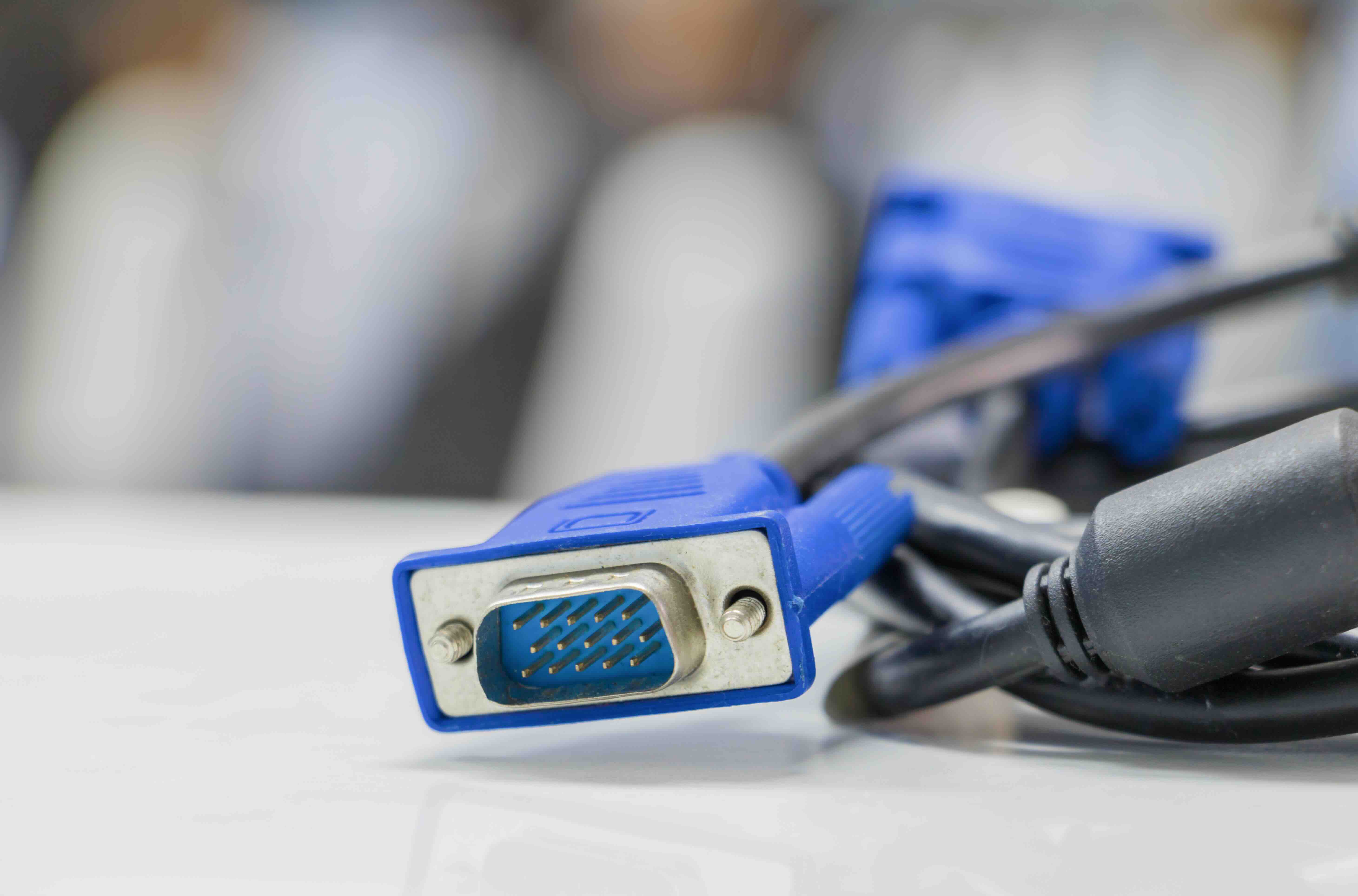
A VGA cable uses a 15-pin DE-15 connector, also called a DB-15, arranged in three rows of five pins. The connector is trapezoidal in shape and typically secured with thumbscrews on each side. Cables are usually blue, though the color is not standardized.
Does VGA carry audio?
No. VGA transmits video only and does not carry an audio signal. If you need audio alongside a VGA video connection, a separate audio cable is required.
What resolution does VGA support?
The native VGA specification supports 640 by 480 pixels. Many implementations extended this to higher resolutions such as 800 by 600 (SVGA) and 1024 by 768 (XGA), but VGA connections generally struggle to deliver sharp results at full HD and above due to the limitations of analog signal transmission.
Can I connect a VGA device to an HDMI monitor?
Yes, but you need an active VGA-to-HDMI adapter. Because VGA is analog and HDMI is digital, a passive cable will not work. The active adapter contains electronics that convert the analog VGA signal to a digital HDMI signal, and many adapters also include a separate audio input to merge audio into the HDMI output.
Is VGA still used today?
Yes, VGA is still in active use across legacy computing environments, older projectors, educational institutions, industrial control systems, and point-of-sale terminals. While new hardware rarely includes native VGA ports, the installed base of VGA-equipped devices remains large enough to keep the standard relevant.
What is the maximum VGA cable length before signal quality degrades?
For reliable signal quality, VGA cable runs are generally recommended at 15 feet or under. Longer runs are possible with high-quality shielded cable, but signal degradation, ghosting, and color distortion become increasingly likely beyond that distance.
What is the difference between VGA and HDMI?
VGA carries an analog video-only signal, while HDMI carries a fully digital signal that includes both video and audio. HDMI supports high resolutions including 4K and 8K, HDR, and content protection. VGA supports only standard definition and lower resolutions and carries no audio or content protection capability.
Why do some new laptops not have a VGA port?
Manufacturers have removed VGA ports from new laptops because modern display standards like HDMI, DisplayPort, and USB-C offer significantly superior performance and are sufficient for the current display ecosystem. VGA ports add physical space requirements that conflict with the slim form factors of modern laptops, and adapters are available for legacy compatibility when needed.
Are all VGA cables the same quality?
No. Because VGA is an analog connection, cable construction quality directly affects signal integrity. Cables with better shielding, tighter pin connections, and quality conductor materials produce cleaner signals with less interference and ghosting compared to cheaply built alternatives, particularly over longer cable runs.


