

Serial ATA Cables: Everything You Need to Know
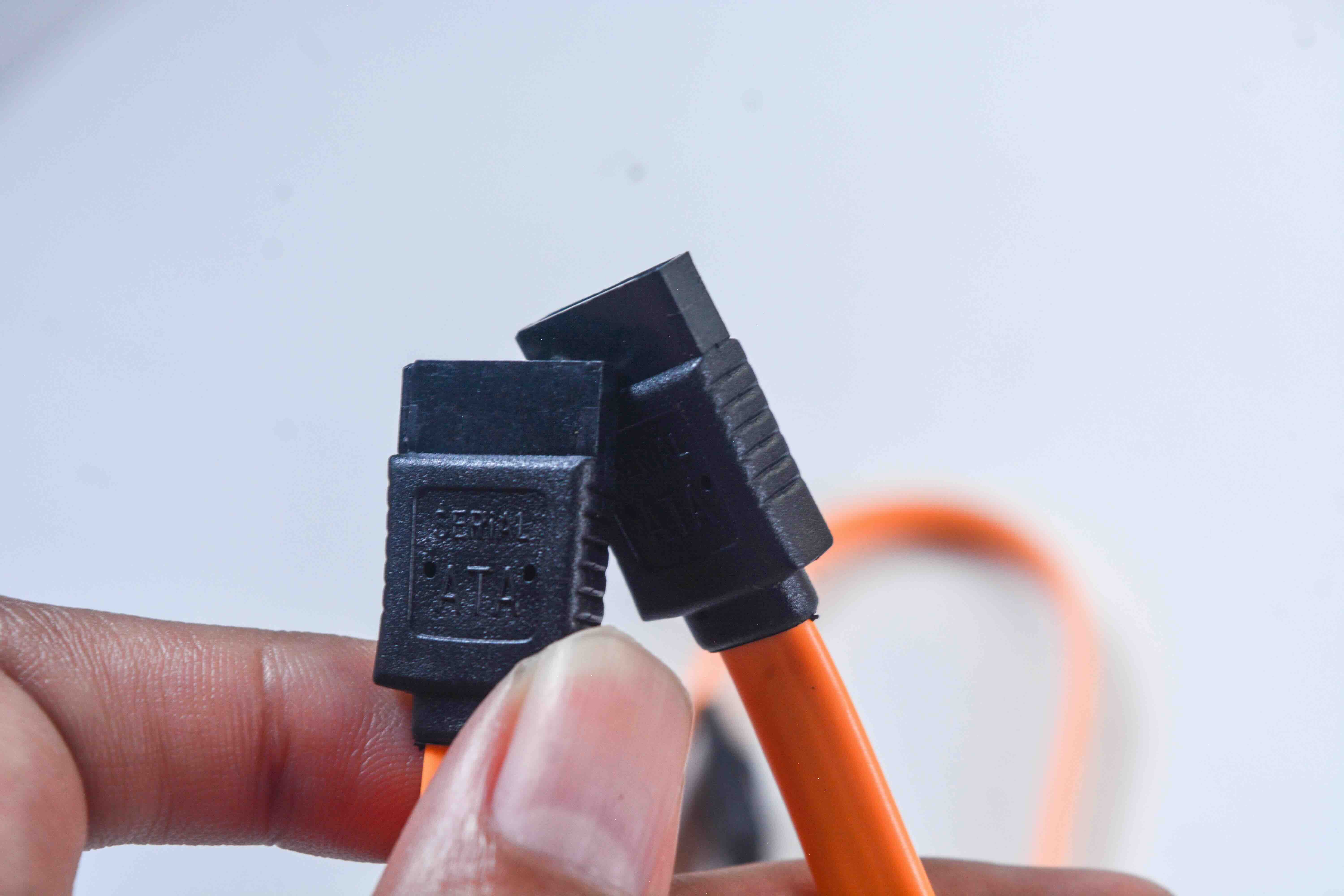
What Is a Serial ATA Cable and Why Does It Matter for Your Build?
If you have ever cracked open a desktop PC or swapped out a hard drive, you have almost certainly dealt with a Serial ATA cable whether you knew what it was called or not. It is that thin, flat connector running from your motherboard to your storage drive. Simple enough looking, right? But there is actually a fair amount going on with SATA cables that is worth understanding, especially if you are building a system from scratch, upgrading aging hardware, or sourcing components for a small business deployment. Getting the right cable in the right configuration matters more than people realize, and skipping over the details can lead to real performance headaches down the line.
A Brief History of SATA: How We Got Here
Before Serial ATA became standard, the industry relied on Parallel ATA, also called PATA or IDE. Those wide, flat ribbon cables were clunky, restricted airflow inside cases, and had real limitations when it came to speed and scalability. Serial ATA arrived in the early 2000s as a direct answer to those problems. The shift from parallel to serial data transmission allowed for thinner cables, faster transfer rates, and a much cleaner internal layout. SATA has gone through several revisions since then, with SATA III being the most widely deployed standard today, supporting transfer rates up to 6 Gbps. That is a meaningful jump from the original SATA I spec at 1.5 Gbps, and it still holds up well for traditional hard drives and many SATA-based SSDs in modern consumer and enterprise environments.
How a Serial ATA Cable Actually Works
The mechanics are worth understanding at a basic level. A SATA cable transmits data in a serial stream, meaning bits move one at a time over a single channel rather than simultaneously over multiple parallel channels. While that sounds slower in theory, the actual implementation is dramatically faster due to reduced signal interference and higher allowable clock frequencies. Each cable has two connectors, one for the drive and one for the motherboard, using a distinctive L-shaped plug that only seats in one orientation, which is a genuinely useful design detail that prevents incorrect installation. The data cable is separate from the power cable, which uses a wider 15-pin connector. Together, they handle everything your drive needs to function. Straightforward, but worth knowing before you start pulling cables out of a case.
SATA Cable Types and Configurations You Should Know
Not all SATA cables are built the same, and picking the right style for your setup can save real frustration during installation. Here are the main variations you will run into:
- Straight-to-Straight: Both ends have standard straight connectors, good for open layouts with easy cable routing.
- Straight-to-Right-Angle: One end has a 90-degree connector, ideal for tight spaces where a straight plug would stress the connector or obstruct airflow.
- Latching Connectors: Some cables feature a small latch or locking tab to prevent accidental disconnection, especially useful in server racks or high-vibration environments.
- Cable Length Options: SATA cables commonly come in 18-inch and 36-inch lengths. Longer cables offer routing flexibility, shorter ones help manage clutter.
- Shielded vs. Unshielded: Shielded cables offer better signal integrity in electrically noisy environments, a consideration worth making in dense server configurations.
Choosing the right combination of length, connector orientation, and shielding is not overthinking it. It is just good planning, and it reflects directly on the stability and cleanliness of the finished build.
Key Advantages of Using SATA Cables
SATA cables have remained relevant for a long time, and there are clear reasons for that. The interface is mature, well-supported, and widely compatible across generations of hardware. Most motherboards still ship with multiple SATA ports precisely because HDDs and SATA SSDs remain the go-to storage option for budget builds, NAS systems, and secondary storage drives. The cables themselves are affordable, easy to replace, and hot-swappable in supported configurations, which is a real operational convenience in server environments where uptime matters. Signal integrity over a properly made SATA cable is solid, and the connector design holds up well with repeated connections and disconnections. From a pure cost-per-gigabyte standpoint for storage, SATA-connected drives are still incredibly competitive. The cable is part of an ecosystem that is efficient, dependable, and proven.
Common Drawbacks and Limitations to Consider
SATA is excellent for what it does, but it does have real ceilings. The 6 Gbps theoretical max of SATA III translates to roughly 550 MB/s in real-world sequential read speeds, which is where fast SATA SSDs already max out. For workloads demanding higher throughput, such as 4K video editing, large database operations, or intensive virtualization, NVMe drives connected via M.2 or PCIe slots are significantly faster. It is also worth noting that SATA cables, while durable, are not immune to physical wear. The data connector in particular is relatively fragile at the drive end, and repeated rough handling can damage the port on the drive itself. Cable management discipline is not optional in a professional rack installation, it directly protects hardware longevity. Also, while SATA is backward compatible across generations, pairing a SATA III drive with a SATA I controller will cap your drive at the controller's max speed, something that catches people off guard during upgrades.
Practical Tips for Buying and Using SATA Cables
A few things to keep in mind when shopping for or installing Serial ATA cables:
- Always match cable length to your actual routing path rather than defaulting to the longest available option. Excess cable creates clutter and restricts airflow.
- Use right-angle connectors near the bottom of vertical cases where clearance is limited. It takes real pressure off the connector and the port.
- If you are running a NAS or server with multiple drives, latching cables are worth the small price premium. They eliminate accidental disconnections during maintenance.
- Check your motherboard documentation before assuming all SATA ports are equal. Some boards have shared bandwidth between certain ports, meaning using both at once can reduce performance.
- Replace any cable showing signs of wear, fraying near the connectors, or cracked insulation. A failed cable is a frustrating and entirely avoidable cause of data read errors.
SATA vs. NVMe: Understanding When Each Makes Sense
The comparison between SATA-based storage and NVMe is a frequent point of discussion, and it is worth addressing directly. NVMe drives connected through M.2 slots can reach sequential read speeds of 3,500 MB/s or higher on PCIe Gen 3, and well beyond that on Gen 4 and Gen 5 hardware. That is a substantial gap. However, for typical home users running an operating system, streaming media, and handling everyday productivity applications, SATA SSDs deliver excellent real-world responsiveness at a lower cost. For secondary storage, backup drives, and high-capacity HDDs in NAS arrays, SATA remains the practical standard. The cable itself is part of that broader conversation. Knowing when SATA is the right call versus when you should be reaching for an NVMe solution is foundational knowledge for anyone configuring modern storage infrastructure.
Why Monoprice Is the Right Source for Your SATA Cable Needs
When it comes to sourcing reliable connectivity hardware without overpaying, the calculus is actually pretty simple. Monoprice has built a well-earned reputation for delivering high-quality cables, connectors, and infrastructure components that perform consistently without inflated pricing. For anyone configuring a desktop build, upgrading a NAS, or provisioning storage for a small business environment, finding dependable Serial ATA cables and data connectivity solutions at a fair price point is exactly what Monoprice delivers. The product lineup covers the configurations most builds actually require, from straight-to-right-angle options to latching designs suited for rack environments, all backed by the same commitment to quality that IT professionals and integrators have come to rely on. Whether you need one cable or a dozen, getting the right component from a source you trust removes one more variable from an already complex project. That is practical value, and it is exactly what Monoprice is built on.
Frequently Asked Questions About Serial ATA Cables
What is a Serial ATA cable used for?
A Serial ATA cable connects storage devices such as hard drives and SSDs to the motherboard inside a computer, allowing data to be read from and written to those drives.
What is the maximum speed of a SATA III cable?
SATA III supports a theoretical maximum transfer rate of 6 Gbps, which translates to approximately 550 MB/s in real-world sequential read performance on a high-quality SATA SSD.
Are all SATA cables the same?
No. SATA cables vary in length, connector orientation, and whether they include locking latches. Choosing the right configuration for your specific case layout and drive placement matters for both performance and physical cable management.
Can I use a SATA III cable with a SATA I or SATA II drive?
Yes, SATA is backward compatible. However, the connection will operate at the speed of the slower device or controller in the pairing, so a SATA III cable paired with a SATA I controller will still be limited to SATA I speeds.
What is the difference between a SATA data cable and a SATA power cable?
The data cable is a narrow 7-pin connector that handles data transfer between the drive and motherboard. The power cable is a wider 15-pin connector that supplies electrical power to the drive. Both are required for a drive to function.
How long can a SATA cable be before signal quality degrades?
The SATA specification supports cable lengths up to one meter, which is approximately 39 inches. Most consumer and prosumer builds use 18-inch or 36-inch cables, well within the reliable performance range.
Should I use a right-angle SATA connector or a straight one?
It depends on your case layout and available clearance. Right-angle connectors are ideal when a straight plug would be physically obstructed or would place stress on the drive's connector port.
Is SATA still relevant compared to NVMe?
Yes. SATA remains the standard interface for traditional hard drives, budget SSDs, and high-capacity storage in NAS systems. NVMe offers significantly higher speeds for primary drives, but SATA is still the practical and cost-effective choice for secondary and mass storage applications.
What causes a SATA cable to fail?
Physical damage to the connectors from rough handling, bent pins, frayed insulation near the cable ends, and repeated disconnection without care are the most common causes of SATA cable failure.
Do SATA cables need to be replaced when upgrading to a new drive?
Not necessarily. If the existing cable is undamaged and the correct length and configuration for your new drive placement, it can be reused. However, replacing older cables during a major storage upgrade is a low-cost precaution worth taking.


