

Modular Power Supply Guide: Clean Builds Start Here
What Is a Modular Power Supply and Why Does It Matter for Your PC Build?
If you have spent any time researching PC builds, you have probably come across the term modular power supply and wondered whether it actually makes a difference or if it is just another way to spend more money. Fair question. The short answer is that it absolutely matters, especially once you factor in airflow, cable management, and the general sanity of whoever is routing wires inside a mid-tower case at midnight. A modular PSU gives you control over which cables you actually use, which sounds simple until you realize how much unnecessary bulk a fully non-modular unit introduces into a clean build. This guide covers what modular power supplies are, how they work, what the different types mean for you, and when the upgrade is genuinely worth it.
Modular vs. Semi-Modular vs. Non-Modular Power Supplies Explained
There are three main categories here, and understanding the difference between them saves you a lot of confusion at the checkout stage. A non-modular power supply has all of its cables permanently attached. Every single cable comes out of the unit whether you need it or not. That means you are stuffing unused SATA, Molex, and PCIe cables behind your motherboard tray or bundling them awkwardly in corners. A semi-modular PSU keeps the essential cables hardwired, typically the 24-pin ATX and the CPU EPS connectors, while everything else is detachable. That covers most builds reasonably well. A fully modular unit has zero permanently attached cables; every connection plugs in on demand. You use only what your system requires, which directly affects heat, airflow, and build aesthetics. Each tier comes with a cost premium, but the tradeoff is meaningful depending on the build type and case size.
How a Modular Power Supply Actually Works
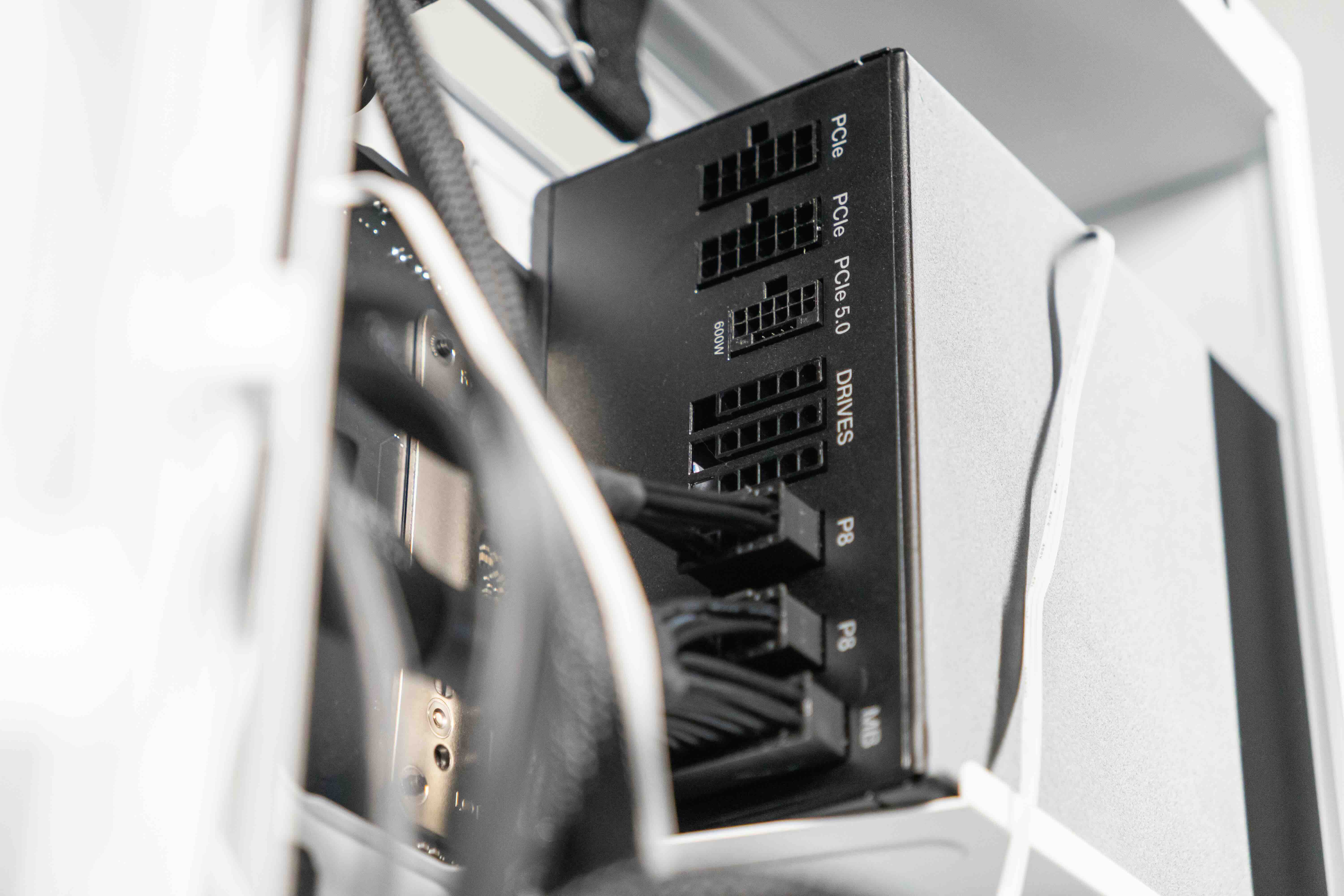
At its core, a PSU converts AC power from your wall outlet into the DC voltages that your components need, primarily 3.3V, 5V, and 12V rails. The modular aspect does not change the conversion process itself; it changes how power is delivered to components through the cable interface. On the rear panel of a modular or semi-modular unit, you will find a series of labeled ports or sockets. Cables plug into those ports on one end and into your components on the other. The internal circuitry, efficiency rating, and voltage regulation remain unchanged by the modular design. What changes is physical organization. You connect a PCIe cable only if you have a GPU that needs it. You skip the extra SATA daisy chain if you only have two drives. Less clutter means better airflow around critical components, which can contribute to lower sustained temperatures under load.
Key Advantages of Going Modular
The benefits stack up faster than most people expect, particularly for anyone building in a compact case or planning a high-wattage system with multiple GPUs or storage drives.
- Cleaner cable management with no unused wires crowding airflow paths
- Easier troubleshooting because individual cables can be swapped without replacing the unit
- Shorter build time since you are not wrestling with a full harness of unnecessary connectors
- Better resale value as modular units are generally perceived as premium components
- Simplified future upgrades when adding a GPU or additional storage drives
Beyond aesthetics, the airflow improvement is practical. Restricting airflow with a bundle of unused cables can raise case temperatures by a few degrees, which matters in sustained gaming or workstation loads. The cleaner the interior, the more predictable and consistent your thermals become over time.
Common Drawbacks to Keep in Mind
Modular PSUs are not without their downsides, and it is worth going in with clear expectations. The most obvious one is cost. A fully modular unit from a reputable brand will run noticeably higher than an equivalent wattage non-modular option. For budget-focused builds, that price gap can be redirected toward a better GPU or faster RAM, which have more measurable performance impact. There is also a cable compatibility concern worth noting: modular cables are not universally interchangeable between brands or even between models from the same manufacturer. Using the wrong proprietary cable on a modular PSU can cause serious damage. Always use the cables that came with your specific unit or verified replacements from the same product line. Finally, every detachable connection introduces a contact point, which means the quality of those connectors matters considerably.
What Wattage and Efficiency Rating Should You Target?
Modular or not, the PSU wattage and efficiency rating are foundational decisions. The 80 Plus certification system is the standard benchmark here, ranging from 80 Plus White at the entry level up through Bronze, Silver, Gold, Platinum, and Titanium. Most PC builders land somewhere between Gold and Platinum for a solid balance of efficiency and price. Gold-rated units typically hit 87 to 90 percent efficiency at 50 percent load, which is where most gaming rigs operate during typical sessions. For wattage, a common mid-range gaming build with a modern GPU and CPU typically lands between 650W and 850W. High-end systems with multiple GPUs or overclocked processors may push closer to 1000W or beyond. It is generally better to leave 20 to 30 percent headroom above your calculated peak draw to allow the PSU to operate in its most efficient range and handle transient spikes without issue.
Modular PSUs in Small Form Factor and ITX Builds
Compact builds are where the modular advantage becomes especially clear. ITX cases often have extremely limited interior volume, and cable management in those environments is almost entirely dictated by how few cables you need to route. A fully modular PSU paired with individually sleeved or flat ribbon cables can make the difference between a build that closes cleanly and one that requires significant force just to seat the panel. SFX and SFX-L form factor PSUs are a subset worth knowing about here. These smaller units are designed specifically for compact cases and are frequently available in semi-modular or fully modular configurations. They maintain the same voltage conversion quality as full-size ATX units while fitting into a fraction of the space, which makes them a go-to choice for home theater PCs, portable LAN rigs, and high-performance small desktops.
Practical Tips Before You Buy a Modular Power Supply
There are a few things worth checking before committing to a specific modular PSU, regardless of brand or wattage tier.
- Verify that the cable included count matches your planned component list before purchasing
- Check the connector types for your GPU since newer cards may require 16-pin 12VHPWR connectors
- Confirm the PSU length fits your case as some modular units run longer than standard ATX dimensions
- Review independent PSU test reports from hardware labs for voltage regulation data under real load
- Factor in warranty length as quality units typically come with 5 to 10 year manufacturer coverage
One detail that catches people off guard: the included cable set in a modular PSU box is not always comprehensive. Some units include only the cables expected for a basic build configuration. If you are planning a multi-GPU setup or a dense storage array, verify that additional cables are available for your specific model before you finalize your component list.
Why Monoprice Is a Smart Source for Your PC Power and Cabling Needs
When it comes to building or upgrading a PC, the power delivery chain only works as well as every component in it, and that includes the cables running from your PSU to your components. Monoprice has built a dependable reputation in the technology space for delivering high-quality connectivity solutions at prices that make sense for both individual builders and professional integrators. Whether you need precision-spec ATX power extension cables, organized cable management solutions for modular PSU setups, or peripheral accessories to complete a clean build, the product catalog is deep and the quality standard is consistent. Builders who want reliable results without overpaying will find that PC power cables and cable management accessories from Monoprice deliver exactly the performance and value a well-planned system deserves. That combination of practical pricing and professional-grade reliability is what makes Monoprice a trusted resource for both first-time builders and experienced system integrators working across budget and enterprise projects alike.
Frequently Asked Questions About Modular Power Supplies
What is the main difference between a modular and non-modular PSU?
A modular PSU allows you to attach only the cables your build requires, while a non-modular unit has all cables permanently attached whether you need them or not. This affects cable management, airflow, and interior cleanliness.
Is a fully modular PSU worth the extra cost?
For mid-range to high-end builds, yes. The cleaner cable management, improved airflow, and easier future upgrades typically justify the price difference. For very budget-focused builds, a semi-modular unit often provides most of the benefits at a lower cost.
Can I use cables from a different brand with my modular PSU?
No. Modular PSU cables are not universally interchangeable. Pinouts vary between manufacturers and even between models from the same brand. Using incompatible cables can damage components or cause fires. Always use the original cables or verified replacements for your specific unit.
What efficiency rating should I look for in a modular PSU?
80 Plus Gold is the most practical target for the majority of gaming and workstation builds. It offers strong efficiency at typical load ranges without the significant price premium of Platinum or Titanium-rated units.
How much wattage do I need for a modern gaming PC?
Most gaming builds land between 650W and 850W depending on the GPU and CPU combination. High-end configurations with power-hungry components should target 1000W or higher with 20 to 30 percent headroom above peak calculated draw.
Does a modular PSU improve PC temperatures?
Indirectly, yes. By eliminating unused cables that block airflow inside the case, a modular PSU contributes to better thermal circulation. The improvement is most noticeable in compact cases where every centimeter of open airflow space matters.
What is a semi-modular PSU and who is it best suited for?
A semi-modular PSU has essential cables permanently attached, typically the 24-pin ATX and CPU EPS connectors, with all other cables being detachable. It is a solid middle-ground option for builders who want better organization than a non-modular unit without paying full-modular pricing.
Are SFX modular power supplies compatible with standard ATX cases?
SFX PSUs are physically smaller than standard ATX units and are designed for compact cases. Most standard ATX cases will not natively fit an SFX unit without an adapter bracket, though those adapters are widely available and affordable.
How long should a quality modular PSU last?
A well-built modular PSU from a reputable manufacturer should last 8 to 12 years under normal operating conditions. Look for units with 5 to 10 year warranties as a reliable indicator of build quality and manufacturer confidence.
What cables do I need to connect a modern high-end GPU to a modular PSU?
Newer high-end GPUs, particularly those in the current generation from major manufacturers, may require a 16-pin 12VHPWR connector. Older cards typically use one or two 8-pin PCIe connectors. Always check your GPU specifications before selecting or ordering a modular PSU.


