

Composite Video Cables: What They Are and How They Work
What Is a Cable Video Composite? A Clear, Practical Guide for Everyday Users
If you have ever connected an older game console, VCR, or camcorder to a television, there is a good chance you used a composite video cable without even realizing it. That familiar yellow RCA connector -- paired with red and white for audio -- has been a fixture in home entertainment setups for decades. And while the technology is decidedly analog, understanding how it works still matters today. Whether you are setting up a retro gaming station, digitizing old recordings, or just troubleshooting a legacy AV system, knowing what composite video is and how it operates can save you time, money, and a fair amount of frustration. So let us get into it.
The Basic Definition: What Is Composite Video?
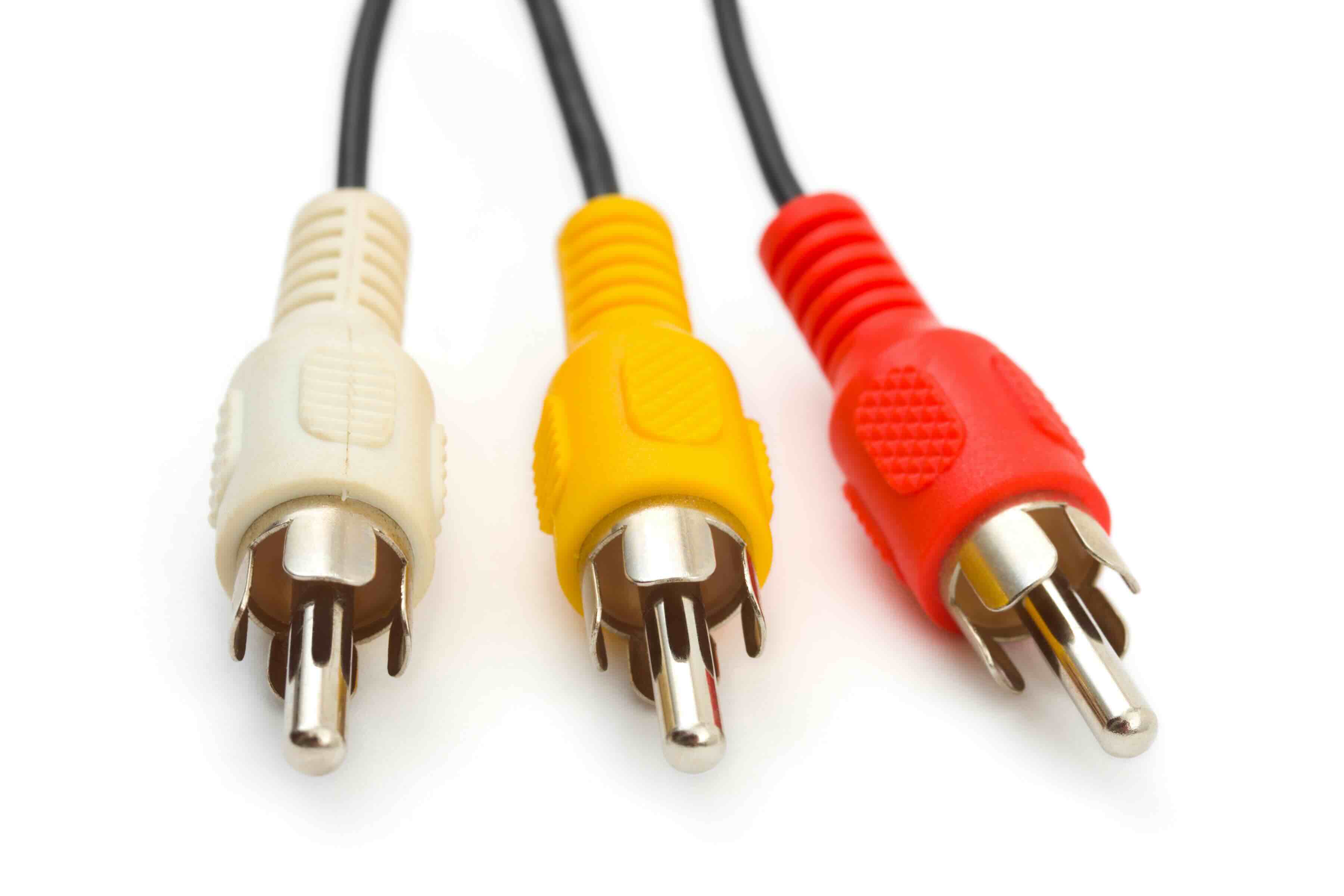
Composite video is an analog video signal format that combines all visual information -- brightness, color, and sync data -- into a single channel transmitted through one cable and connector. It is typically identified by the yellow RCA plug in a standard three-cable bundle, where the red and white connectors carry stereo audio. The term "composite" is apt here: everything needed to reconstruct the image is compressed into one signal path. This was a major step forward when it became the broadcast and consumer standard in the 1980s and 1990s, offering a simple, universally compatible way to connect video devices without requiring complex wiring setups. It is not a high-resolution solution by modern standards, but for its era and for certain niche applications today, it remains a functional and relevant format.
How Composite Video Signals Actually Work
The signal itself is an analog waveform that carries luminance -- the brightness component -- alongside chrominance, which handles the color information, all encoded together. When the signal reaches a display, the television or monitor's decoder separates these components to reconstruct the image on screen. This encoding process is where composite video runs into limitations. Because the color and brightness data share the same channel, there is inherent interference between them, which can result in a soft, slightly blurry image with occasional color bleeding or dot crawl artifacts. The signal typically supports a maximum resolution of around 480i for NTSC systems -- the North American standard -- or 576i for PAL systems used in Europe and other regions. It is standard definition, full stop. But again, for legacy content and devices, that is exactly what you need.
Where You Still See Composite Video in Use Today
Composite video has not completely disappeared, even in an era dominated by HDMI and DisplayPort. There are several contexts where it still shows up regularly, and they are worth knowing about. Retro gaming is probably the biggest one -- consoles like the original Nintendo Entertainment System, Super Nintendo, Sega Genesis, and PlayStation all output composite video natively. Home video archivists also rely on composite connections to digitize footage from VHS tapes, Hi8 camcorders, and LaserDisc players. Certain industrial and security camera systems, particularly older installations, still use composite outputs as well. And there are some entry-level multimedia projectors and monitors that retain composite inputs for compatibility purposes. The format persists wherever legacy hardware needs to interface with the modern world.
Composite Video vs. Other Analog Video Formats
It helps to understand how composite video compares to the other analog formats it coexisted with, because the differences are meaningful when you are evaluating which connection to use. The main competitors in the analog space were S-Video, Component Video, and RGB/SCART.
- S-Video separates luminance and chrominance into two distinct channels, eliminating the cross-interference that causes composite's dot crawl artifacts -- the result is a noticeably sharper image with more accurate color.
- Component video goes further by splitting the signal into three separate channels: one for luminance and two for color difference signals. This supports higher resolutions and is often used for standard and high-definition content up to 1080i.
- RGB video, common via SCART connectors in Europe, carries red, green, and blue channels independently and is generally regarded as the cleanest analog signal path available on consumer hardware.
- Composite video sits at the bottom of this hierarchy in terms of picture quality, but it wins on simplicity and near-universal compatibility. Nearly every analog device ever made supports it, which is why it persists.
Key Advantages of Using Composite Video Cables
Despite its limitations, composite video brings some real and practical benefits to the table -- especially for users working with older hardware or constrained budgets.
- Universal compatibility with legacy consumer electronics spanning four decades of hardware
- Simple single-connector setup that reduces cable clutter in basic AV configurations
- Low cost -- composite cables and adapters are among the most affordable AV accessories available
- Widely available at retail and online, making sourcing and replacement straightforward
- Adequate image quality for standard-definition content on smaller displays where resolution differences are less perceptible
- Reliable and passive -- no active components, no firmware, no compatibility issues to troubleshoot
Common Drawbacks and Limitations to Know
The trade-offs are real, and you should go in with clear expectations. The image quality ceiling is low -- 480i is the maximum for NTSC, and the encoding method introduces artifacts that better formats avoid entirely. Color accuracy can suffer due to chroma-luma interference, and fine detail in complex images or fast motion can appear smeared or blurry. Composite is also entirely unsuitable for high-definition content; it simply was not engineered for resolutions above standard definition. Long cable runs can degrade signal quality more noticeably than with some other formats. And on modern displays -- especially large 4K panels -- upscaling a 480i composite signal tends to look poor, with visible artifacts and a soft, murky picture. Using the right upscaler hardware or capture card can help, but it adds complexity and cost.
Tips for Getting the Best Results From Composite Video Connections
If you are working with composite video, a few practical adjustments can meaningfully improve your results. Use quality cables with proper shielding to minimize interference and signal degradation over the cable run. Keep cable lengths as short as your setup reasonably allows -- signal quality decays with distance in analog systems. If you are digitizing content, invest in a decent USB capture card that supports composite input and offers clean analog-to-digital conversion. Adjust the sharpness settings on your display downward when viewing composite signals -- modern televisions often over-sharpen standard-definition content, which amplifies artifacts rather than reducing them. And if your source device supports S-Video output in addition to composite, prioritize that connection for a noticeable quality improvement without significant added complexity.
Why Composite Video Still Matters for AV Professionals and Enthusiasts
There is something worth appreciating about a technology that has outlasted its intended era by decades. Composite video is embedded in the history of consumer electronics in a way that makes it genuinely relevant to anyone working in AV integration, content archiving, retro gaming, or media preservation. Understanding the format -- its strengths, its quirks, its proper use cases -- is part of being a well-rounded AV professional or enthusiast. It is not a format you would spec into a new installation, but it is one you will absolutely encounter in the field, and being prepared for that matters. Good cable quality, proper termination, and appropriate signal routing make a real difference, even with a 40-year-old video standard.
Why Monoprice Is the Right Source for Your Composite Video and AV Cable Needs
When it comes to sourcing composite video cables and legacy AV accessories without overpaying, Monoprice delivers exactly what the situation calls for: reliable performance, proper shielding, and honest pricing. Whether you are digitizing a VHS archive, wiring a retro gaming setup, or integrating legacy devices into a modern AV rack, the cable quality you choose directly affects your results -- and that is not a place to cut corners on value. Monoprice has built a trusted reputation among AV integrators, IT professionals, and home enthusiasts precisely because the products perform at a level that exceeds their price point. If you are looking for high-quality composite video cables and RCA AV accessories for legacy and modern AV systems, Monoprice offers a deep catalog of connectivity solutions to match virtually any setup requirement. The combination of product depth, reliable specifications, and straightforward pricing is the kind of value that makes a real difference when you are sourcing gear for a project, whether it is one cable or a hundred.
Frequently Asked Questions About Composite Video Cables
What does a composite video cable look like?
A composite video cable uses a single yellow RCA connector for the video signal. It is almost always bundled with a red RCA connector for right-channel audio and a white RCA connector for left-channel audio, forming the classic yellow, red, and white three-cable AV bundle.
What resolution does composite video support?
Composite video supports standard definition resolution only. For NTSC systems used in North America and Japan, the maximum is 480i. For PAL systems common in Europe and other regions, it is 576i. It does not support high-definition resolutions.
Can I connect a composite video device to a modern HDMI television?
Not directly, but you can use a composite-to-HDMI converter or upscaler to bridge the connection. These active adapters convert the analog composite signal to a digital HDMI output that modern televisions can accept.
Is composite video the same as component video?
No. Composite video uses one cable for all video information combined. Component video uses three separate cables to carry split color and brightness signals, which results in significantly better image quality and supports higher resolutions including 1080i.
Why does composite video have blurry or color-bleeding artifacts?
Because composite video encodes both luminance and chrominance on a single channel, the two types of information interfere with each other during transmission. This interference causes soft edges, color bleeding, and dot crawl artifacts that are visible on screen.
What devices commonly use composite video output?
Older game consoles including the NES, SNES, Sega Genesis, and original PlayStation use composite video. VCRs, Hi8 camcorders, LaserDisc players, DVD players, and older televisions also commonly use composite connections.
Does cable quality matter for composite video?
Yes, meaningfully so. Composite is an analog signal, which means cable construction and shielding directly affect signal integrity. Low-quality cables introduce interference and signal degradation that can visibly worsen image quality, especially over longer runs.
Can composite video cables be used for audio as well?
The yellow composite video cable carries only the video signal. Audio is carried separately by the red and white RCA cables in the standard three-cable bundle. All three cables are typically needed for complete audio-visual connectivity.
Is S-Video better than composite video?
Yes. S-Video separates the luminance and chrominance signals into two distinct channels, which eliminates the cross-interference inherent in composite video. The result is a sharper image with more accurate color rendition and fewer artifacts.
Are composite video cables still manufactured and sold today?
Yes. Composite video cables remain in production and are widely available. They are commonly used for retro gaming, legacy AV system maintenance, video digitization projects, and compatibility with older consumer electronics that are still in active use.


