Monoprice Ergonomic Wireless Split 105-Key Keyboard, 2.4GHz Wireless, 13 Multimedia Hotkeys Functions, Auto‑Power Save Mode, Built‑in Wrist Cushion Support
Product # 44520
UPC # 889028189870
$99.99
In Stock
Save for Later
*Affirm is not available for business or international orders
Qty: 1
$99.99
Qty: 2-9
$96.99
Qty: 10-19
$93.99
Qty: 20-49
$89.99
Qty: 50+
$84.99
Customers Also Shopped For
Questions and Answers
Do not include HTML, links, references to other stores, pricing or contact info.
My question is about:

If your question is about more than one item, click + to add them.

Browse 7 questions
Browse 7 questions
and 9 answers
Some of the key functions are not obvious, and I don't see them mentioned in the manual. For instance, what is the key about the shift key where the Caps Lock should be? It has an arrow pointing down on it.
A shopper
on Apr 15, 2025
BEST ANSWER: The key above the Shift key is the CAPS LOCK key, they just use a strange symbol for it. My only complaints are that the back legs don’t lift it up very far and the battery case cover is hard to remove.
- Reply
- Inaccurate
- James S on Apr 16, 2025
- Purchased on Sep 24, 2024
BEST ANSWER: The key above the Shift key is the CAPS LOCK key, they just use a strange symbol for it. My only complaints are that the back legs don’t lift it up very far and the battery case cover is hard to remove.
- Reply
- Inaccurate
- James S on Apr 16, 2025
- Purchased on Sep 24, 2024
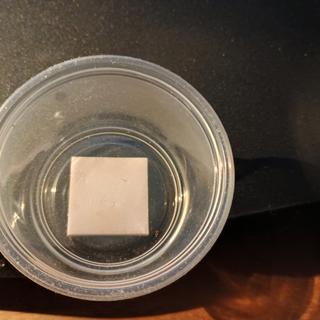
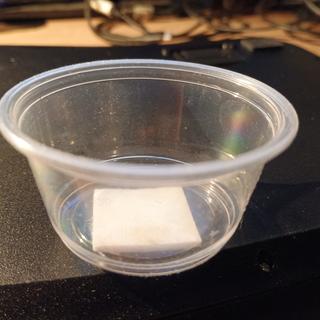
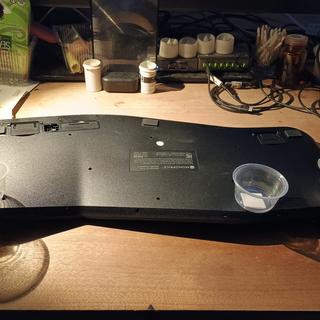
That key is the caps lock key. I have added three upside down 2oz plastic cups at the back to get it high enough for the angle I like. Still a great buy.
- Reply
- Inaccurate
- James W on Jan 29, 2026
- Purchased on Apr 1, 2024
Vote for the best answer above!
Does this keyboard have a caps lock light?
A shopper
on Jan 29, 2026
BEST ANSWER: Good day, the CAPS lock indicator is located on the upper right part of the keyboard. I hope this helps.
- Reply
- Inaccurate
- Jhomar R Staff on Jan 29, 2026
BEST ANSWER: Good day, the CAPS lock indicator is located on the upper right part of the keyboard. I hope this helps.
- Reply
- Inaccurate
- Jhomar R Staff on Jan 29, 2026
Yes, it has numlock and capslock indicators in the upper right corner.
- Reply
- Inaccurate
- Paul F on Jan 29, 2026
- Purchased on Dec 24, 2025
Vote for the best answer above!
Does it have a launch calculator button or way of programing that in?
A shopper
on Jan 26, 2024
BEST ANSWER: Zoom in the picture and it looks like f11 is also "launch calculator".
- Reply
- Inaccurate
- Paul B on Jan 27, 2024
BEST ANSWER: Zoom in the picture and it looks like f11 is also "launch calculator".
- Reply
- Inaccurate
- Paul B on Jan 27, 2024
Vote for the best answer above!
Will this work with a macbook?
A shopper
on Jan 26, 2024
Vote for the best answer above!
Does it have backlit key?
A shopper
on Jan 26, 2024
BEST ANSWER: Hello,
Thank you for your inquiry. This device is not backlit.
Thank you for your inquiry. This device is not backlit.
- Reply
- Inaccurate
- Coty R Staff on Jan 30, 2024
BEST ANSWER: Hello,
Thank you for your inquiry. This device is not backlit.
Thank you for your inquiry. This device is not backlit.
- Reply
- Inaccurate
- Coty R Staff on Jan 30, 2024
Vote for the best answer above!
Do you have to give up a USB port for that little thing or does it work with Bluetooth without it? I don't want to use one of my USB ports
A shopper
on Mar 27, 2024
BEST ANSWER: Thank you for your inquiry. Yes, you will need to use the USB dongle and connect it to one of the USB ports of your computer or laptop.
- Reply
- Inaccurate
- Jake S Staff on Mar 28, 2024
BEST ANSWER: Thank you for your inquiry. Yes, you will need to use the USB dongle and connect it to one of the USB ports of your computer or laptop.
- Reply
- Inaccurate
- Jake S Staff on Mar 28, 2024
Vote for the best answer above!
Can I still connect if I lost my USB receiver?
A shopper
on Jun 4, 2024
BEST ANSWER: Hi, You would need the USB receiver to connect the keyboard to the PC. I hope this helps
- Reply
- Inaccurate
- Jhomar R Staff on Jun 4, 2024
BEST ANSWER: Hi, You would need the USB receiver to connect the keyboard to the PC. I hope this helps
- Reply
- Inaccurate
- Jhomar R Staff on Jun 4, 2024
Vote for the best answer above!

Questions For Similar Products
Reviews
5.0 / 5.0
3 Reviews
5 Stars
4 Stars
3 Stars
2 Stars
1 Star
3
0
0
0
0
Rated 5 out of 5
I think I lucked out
I paid only $9.99 for this perfect piece of equipment in Jan of 2026.
- Was this review helpful? Yes (0) No (0)
- Flag as Inappropriate
- Was this review helpful? Yes (0) No (0)
- Flag as Inappropriate
Rated 5 out of 5
Works well.
I'm a professional writer and I have used split ergonomic keyboards for 30 or 40 years. This one works well and has been reliable. There are two minor problems that you may encounter:
1. I have added three 2oz plastic cups with double sided tape to the bottom back to get the angle up to my preferred slant. See photos.
2. It is not waterproof or spill resistant. Keep your drinks away from it. This happens to me once every 3 to 4 years, and can't be fixed. That's why I have 3 spare keyboards and 2 spare mice.
Great value for the price. Even better value when it's on sale.
1. I have added three 2oz plastic cups with double sided tape to the bottom back to get the angle up to my preferred slant. See photos.
2. It is not waterproof or spill resistant. Keep your drinks away from it. This happens to me once every 3 to 4 years, and can't be fixed. That's why I have 3 spare keyboards and 2 spare mice.
Great value for the price. Even better value when it's on sale.
- Was this review helpful? Yes (0) No (0)
- Flag as Inappropriate
- Was this review helpful? Yes (0) No (0)
- Flag as Inappropriate
Rated 5 out of 5
Beyond expectation.
Works flawlessly on my Mac, though battery compartment a bit tight. Otherwise a very good buy, beyond expectation.
- Was this review helpful? Yes (2) No (1)
- Flag as Inappropriate
- Was this review helpful? Yes (2) No (1)
- Flag as Inappropriate
Reviews for Similar Products