

What Is an HDMI Adapter? Types, Uses & Buying Tips
What Is an HDMI Adapter and Why Does It Matter?
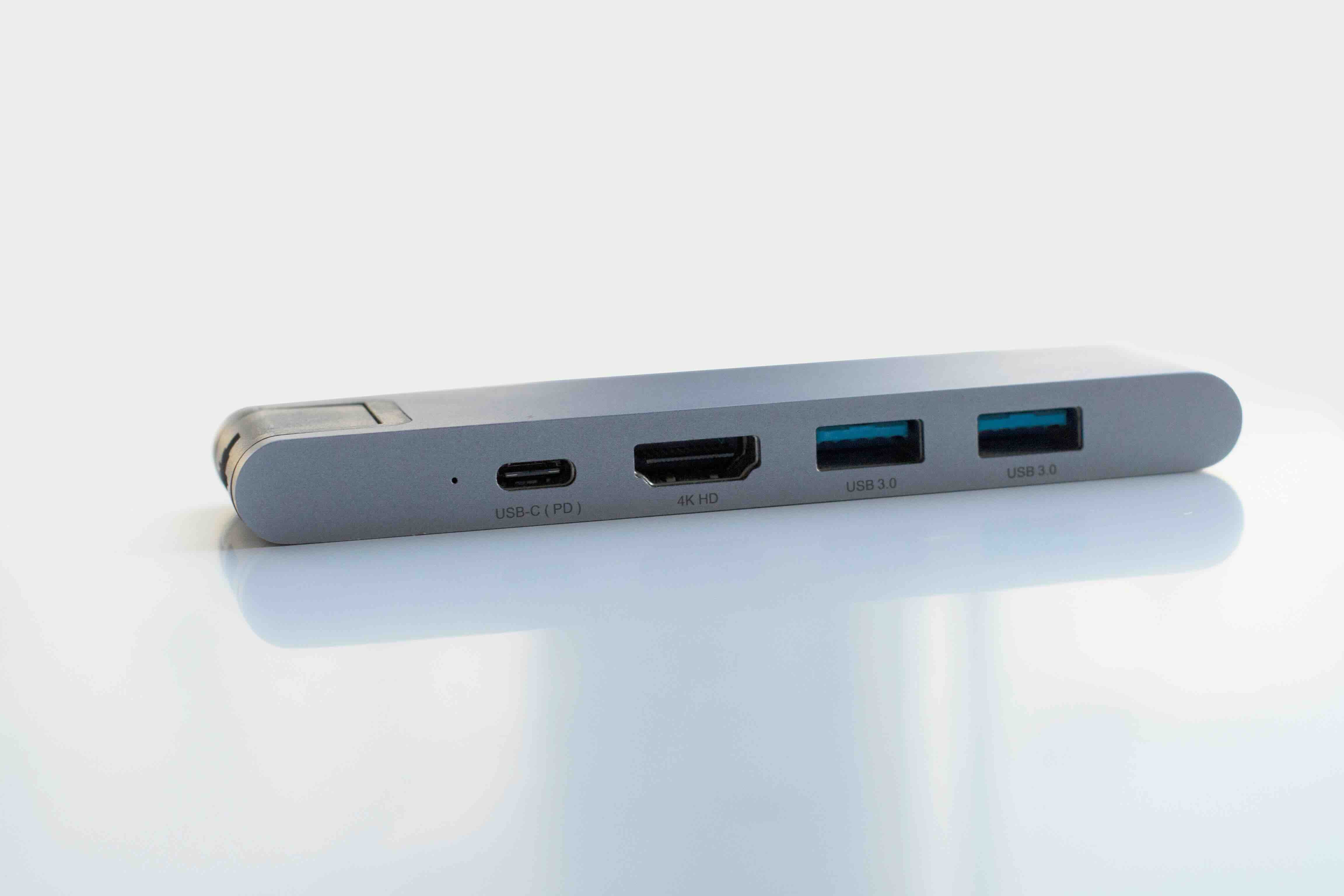
If you have ever stared at the back of a monitor, projector, or television and realized your cable just does not fit -- yeah, that is where an HDMI adapter comes in. An HDMI adapter is a small connector or converter that allows devices with different port types to communicate through an HDMI signal. It bridges the gap between what your source device outputs and what your display device accepts. That is really the whole idea. Whether you are connecting a laptop with a USB-C port to an HDMI-equipped monitor, or hooking up older AV equipment to a newer display, an HDMI adapter handles that translation. They are compact, often inexpensive, and genuinely one of those things that once you have the right one, you kind of forget how much trouble it used to cause.
How Does an HDMI Adapter Actually Work?
At its core, an HDMI adapter either converts a signal type or simply changes the physical connector form factor -- and those are two very different things worth understanding. A passive adapter just reshapes the plug. Think of a full-size HDMI to Mini HDMI adapter; the signal is not being altered, just the physical interface. Active adapters, on the other hand, contain internal circuitry that actually converts one signal format to another. A DisplayPort to HDMI adapter, for instance, is actively translating a DisplayPort signal into something the HDMI display understands. The electronics inside handle that handshake. USB-C to HDMI adapters work in a similar way, leveraging what is called DisplayPort Alt Mode over USB-C to carry video data and then translate it to HDMI output. The distinction between passive and active matters for compatibility and performance, so it is worth paying attention to which type you need before purchasing.
Common Types of HDMI Adapters Available Today
There are quite a few adapter types in this category, and knowing the differences will save you a return shipment and a headache. Here is a practical breakdown of what is out there:
- USB-C to HDMI adapter -- converts a USB-C or Thunderbolt 3/4 port to HDMI output, widely used with modern laptops and tablets
- DisplayPort to HDMI adapter -- converts DisplayPort signal to HDMI, common in desktop PC setups
- Mini HDMI to HDMI adapter -- physical size change only, passive conversion, used with camcorders and some tablets
- Micro HDMI to HDMI adapter -- even smaller form factor, often found on action cameras and compact devices
- VGA to HDMI adapter -- active conversion required, bridges analog VGA output to digital HDMI displays
- DVI to HDMI adapter -- converts digital DVI signals to HDMI, common with older monitors and graphics cards
Each of these solves a specific compatibility problem. The right one depends entirely on what ports your source and display devices have available. Checking both ends before buying is the move.
Key Advantages of Using an HDMI Adapter
The most obvious benefit is straightforward compatibility. You should not have to replace a perfectly good monitor or projector just because your new laptop dropped a port type. An adapter extends the useful life of your existing equipment, which is a genuinely smart use of money. Beyond that, HDMI adapters tend to be compact and portable -- they slip into a bag without any real weight or bulk, which matters for professionals moving between workspaces or presenting in different conference rooms. High-quality HDMI adapters also support current standards, including 4K resolution, HDR passthrough, and high refresh rates, so you are not sacrificing display performance just because you needed a connector change. That last part is important. A well-built adapter from a reputable manufacturer should be fully transparent to the signal -- what goes in should come out without degradation.
Common Drawbacks and Limitations to Know
Not everything is frictionless here. Active adapters, particularly USB-C to HDMI, require that the source device actually supports DisplayPort Alt Mode over its USB-C port -- and not all of them do. Some USB-C ports are power-only or data-only, with no video output capability at all. That is a frustrating discovery to make after the fact. Resolution and refresh rate support can also vary significantly between adapter models. A cheaper, poorly spec'd adapter might cap out at 1080p when you actually need 4K output. Analog-to-digital conversions, like VGA to HDMI, can introduce noticeable latency or signal quality issues if the adapter circuitry is subpar. And then there is the matter of HDCP compliance -- some content protection schemes require that every link in your signal chain, including the adapter, be HDCP certified. Bottom line: quality and specification accuracy matter more in this category than many people initially assume.
How to Choose the Right HDMI Adapter for Your Setup
Start by identifying the output port on your source device and the input port on your display. That determines the adapter type you need. From there, check what resolution and refresh rate your display supports, and confirm the adapter you are considering is rated for at least that performance level. If you are working with 4K at 60Hz or higher, do not cut corners on the adapter spec. Check whether an active or passive adapter is required for your specific port combination. Look for adapters that are certified or tested against current HDMI standards -- that certification is not just a label, it indicates the product has been validated for signal integrity and compliance. Also consider build quality for long-term use; a reinforced connector housing and quality cable braiding will outlast a flimsy alternative in any professional or daily-use environment.
HDMI Adapter Use Cases Across Different Industries
HDMI adapters show up across a surprisingly wide range of professional contexts. In corporate and education environments, presenters rely on USB-C to HDMI adapters constantly to connect newer laptops to legacy conference room displays and projectors. In broadcast and photography, Micro HDMI to full HDMI adapters connect cameras to field monitors for live preview and capture. Home theater enthusiasts use DVI or DisplayPort to HDMI adapters to integrate PC graphics cards into multi-display entertainment setups. For IT professionals managing hybrid work deployments, having a stock of reliable USB-C to HDMI adapters on hand is practically a baseline operational requirement. Even in live event and stage production, adapters are used to bridge signal chains where equipment from different eras or manufacturers needs to co-exist. Versatility is one of the defining characteristics of this product category.
Practical Tips for Getting the Most Out of Your HDMI Adapter
A few habits will help you avoid the most common problems. Always verify port compatibility before purchasing -- do not assume USB-C means video output. Check the adapter specifications for maximum supported resolution and refresh rate, and match those to your display requirements. When traveling or presenting frequently, carry a backup adapter. They are small enough that keeping a spare in your laptop bag costs nothing in terms of convenience. For permanent installations, avoid using low-profile adapters that place mechanical stress on the port over time -- use an adapter with a short cable pigtail to reduce leverage on the connector. Clean contacts matter too; keep adapters in a case or pouch when not in use. And if something is not working after connection, check the display source input selection before assuming the adapter is faulty. That one gets people more than it should.
Why Monoprice Is the Smart Choice for HDMI Adapters and Video Connectivity
When it comes to sourcing reliable, well-spec'd HDMI adapters without overpaying for a brand name, Monoprice consistently delivers where it counts. The product catalog covers the full range of adapter types -- USB-C to HDMI, DisplayPort to HDMI, DVI to HDMI, VGA to HDMI, and more -- with clear specification data so you know exactly what you are getting before checkout. Every adapter is built to meet or exceed current HDMI standards, with support for 4K resolution, HDR, and high refresh rates across compatible models. For IT managers, AV integrators, and everyday users alike, that combination of specification accuracy and value pricing is exactly what makes Monoprice a reliable procurement choice. If you are ready to solve your connectivity challenges without overspending, explore the full range of HDMI adapters and video connectivity solutions at Monoprice and find the right fit for your setup. The quality is there. The price point reflects a brand that understands value is not about being cheap -- it is about being smart.
Frequently Asked Questions About HDMI Adapters
What is an HDMI adapter used for?
An HDMI adapter is used to connect devices with different port types so they can transmit audio and video signals to a compatible display. It bridges incompatible connectors or signal formats between a source device and a screen or projector.
Does an HDMI adapter reduce video quality?
A high-quality HDMI adapter that is properly rated for your resolution should not reduce video quality. Lower-quality or improperly spec'd adapters, however, can introduce signal degradation, resolution caps, or color accuracy issues.
Is a USB-C to HDMI adapter the same as a converter?
Not exactly. A USB-C to HDMI adapter is technically an active adapter that uses DisplayPort Alt Mode to convert the signal. A converter typically refers to a more complex device that handles more substantial signal translation, such as converting analog video to digital HDMI.
Will any USB-C port work with a USB-C to HDMI adapter?
No. The USB-C port on your device must support DisplayPort Alt Mode or Thunderbolt to output video. Power-only or data-only USB-C ports will not work with a USB-C to HDMI adapter.
Can an HDMI adapter support 4K resolution?
Yes, many HDMI adapters support 4K resolution at 30Hz or 60Hz, depending on the model and the ports involved. Always verify the adapter's specifications before purchasing if 4K output is a requirement.
What is the difference between Mini HDMI and Micro HDMI adapters?
Mini HDMI is slightly larger and is commonly found on some tablets, cameras, and camcorders. Micro HDMI is smaller and typically appears on compact devices like action cameras. Both are passive adapters that change physical connector size without altering the signal.
Do HDMI adapters support audio as well as video?
Yes, HDMI carries both audio and video signals, and a properly functioning HDMI adapter will pass audio through along with the video signal, assuming the source device is outputting audio over that connection.
Are active HDMI adapters better than passive ones?
Active and passive adapters serve different purposes. Passive adapters work fine for simple physical connector changes with compatible signal types. Active adapters are required when a genuine signal conversion is needed, such as DisplayPort or USB-C to HDMI. Neither is universally better; the right choice depends on your specific use case.
How do I know if my HDMI adapter is HDCP compliant?
Check the product specifications or packaging for HDCP certification. Reputable manufacturers will list HDCP support explicitly. If the adapter does not list it, assume it may not be compliant, which can cause issues with DRM-protected content.
Can I use an HDMI adapter for a permanent installation?
Yes, but choose an adapter designed for durability. Look for reinforced connectors, quality housing materials, and if possible, a short cable pigtail design that reduces mechanical stress on the port over extended use. Passive adapters that plug directly into a port with no cable relief are better suited for occasional use than permanent setups.


