

What Is a DVI Port and Why It Still Matters Today
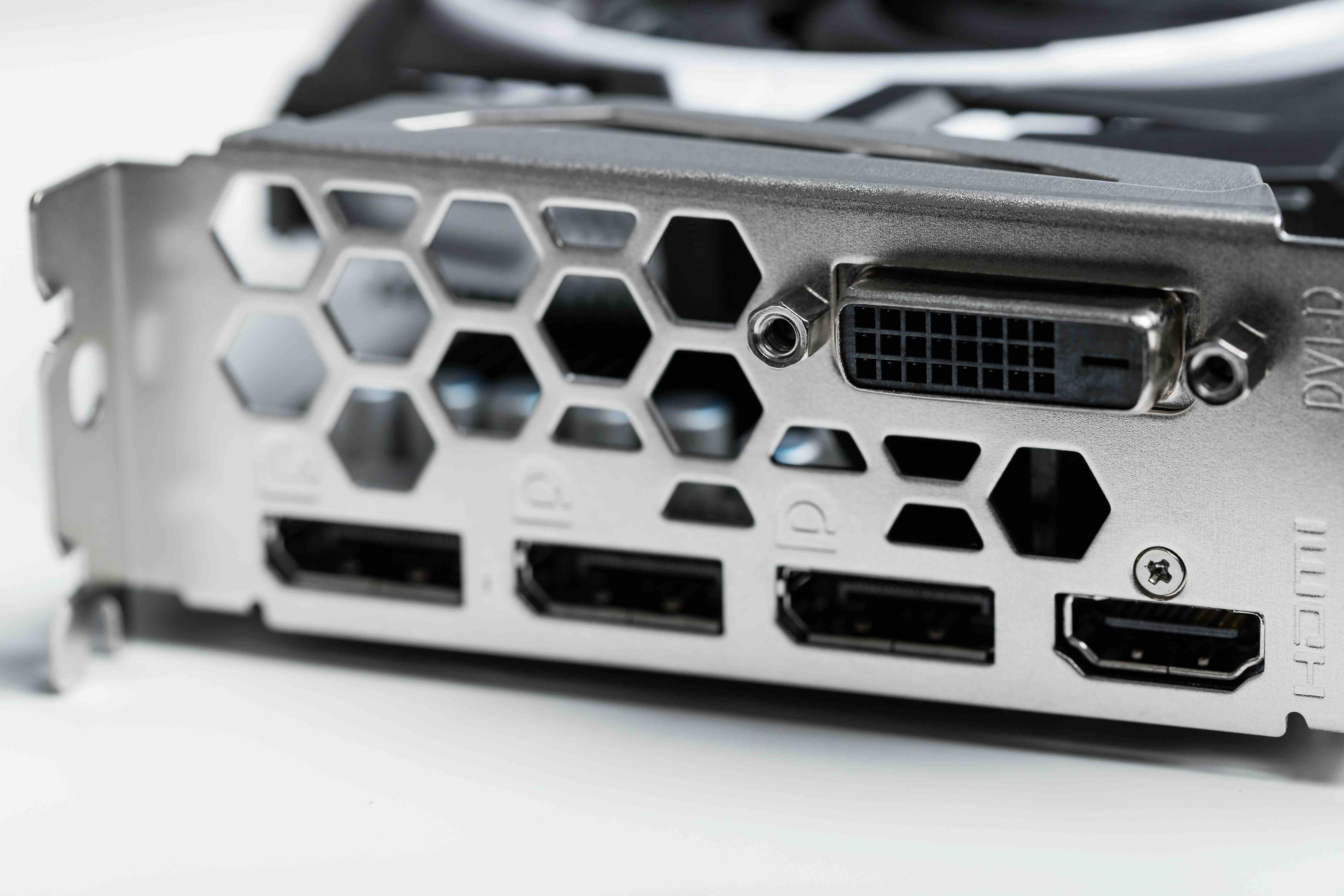
What Is a DVI Port and Why Does It Still Matter?
If you have ever looked at the back of an older monitor, graphics card, or desktop computer and noticed a wide, oddly shaped connector with a cluster of pins and a flat blade running through the middle, that is almost certainly a DVI port. DVI stands for Digital Visual Interface, and it was one of the most widely used display connection standards throughout the early 2000s and well into the 2010s. Even now, with HDMI and DisplayPort dominating the landscape, DVI has not fully disappeared. It still shows up on older workstations, budget monitors, projectors, and certain professional display setups. Understanding what a DVI port actually is, how it works, and when it makes sense to use one can save you from a lot of unnecessary confusion when trying to connect a display to a device.
A Quick History Behind the DVI Standard
DVI was introduced in 1999 by the Digital Display Working Group, which was a consortium of technology companies including Intel, Compaq, HP, and IBM. The goal was simple: replace the aging VGA standard with something capable of transmitting a cleaner, higher-quality digital signal to monitors. VGA was analog, and while it worked, it introduced signal degradation and image softness that digital displays did not need to deal with. DVI came in and offered a direct digital pathway between the graphics card and the monitor. For its time, it was a significant step forward. Adoption was fast across PC manufacturers and monitor brands, and for nearly a decade it was the go-to connection for anyone who wanted a sharp, stable image on a desktop display.
Understanding DVI Connector Types
This is where things get a little nuanced, and honestly it is probably the most confusing part of DVI for most people. There is not just one type of DVI connector. There are several, and they are not always interchangeable.
- DVI-A transmits an analog signal only and is essentially a bridge between digital DVI devices and older analog VGA monitors
- DVI-D carries a digital signal only and comes in both single-link and dual-link versions
- DVI-I is the integrated version that supports both analog and digital signals and is the most versatile of the three
- Single-link DVI-D supports resolutions up to 1920x1200 at 60Hz
- Dual-link DVI-D doubles the bandwidth and supports resolutions up to 2560x1600
The physical connectors look similar, which is a common source of frustration. A DVI-D cable will not work in a DVI-A port and vice versa, even though they might look close to identical at a glance. Dual-link connectors have additional pins in the center cluster that single-link versions lack. When you are shopping for a DVI cable or adapter, always confirm the exact type you need before purchasing.
How Does a DVI Port Actually Work?
At a technical level, DVI uses Transition Minimized Differential Signaling, or TMDS, to encode and transmit video data. Each channel in a DVI connection carries one color channel, red, green, or blue, and a fourth channel handles the clock signal that keeps everything synchronized. The signal travels from the graphics card through the cable to the display, where it is decoded and rendered as an image. Because the signal is digital from end to end in a DVI-D connection, there is no analog-to-digital conversion happening at the monitor. That means less noise, less signal loss, and a cleaner image overall compared to what VGA could deliver. DVI does not carry audio, which is one of its key limitations compared to HDMI, but for pure video transmission it was very well engineered for its era.
Key Advantages of Using a DVI Connection
DVI still holds some genuine advantages worth acknowledging, particularly depending on your setup and what you are working with.
- Delivers a clean, stable digital video signal with no analog conversion loss
- Supports high resolutions up to 2560x1600 via dual-link DVI
- Backward compatible with VGA through simple adapters when using DVI-I or DVI-A
- Widely supported on legacy hardware, making it useful for older workstations and monitors
- Low latency signal transmission that is suitable for gaming and graphics work on compatible hardware
- No DRM restrictions, unlike HDMI which enforces HDCP on certain content
That last point is actually meaningful for professionals and hobbyists who work with video capture setups or want more direct control over their display pipeline. DVI does not enforce High-bandwidth Digital Content Protection the way HDMI does, which makes it more flexible in certain production and monitoring environments.
Common Drawbacks and Limitations of DVI
No connection standard is perfect, and DVI has some real limitations that explain why it has been phased out on most modern hardware. The most obvious one is that it carries no audio. If you are connecting a monitor with built-in speakers, DVI requires a separate audio cable, which is inconvenient. DVI also does not support resolutions beyond 2560x1600 in any configuration, which means 4K is completely off the table. It was not designed with ultra-high-definition content in mind, and that limitation is just built into the spec. The physical connectors are also significantly larger and bulkier than HDMI or DisplayPort, and the screws required to secure the connection can be tedious. There is no support for Ethernet, ARC, or CEC features like you get with HDMI. And naturally, newer graphics cards and monitors are increasingly dropping DVI ports entirely, so long-term compatibility is a concern if you are building a system that needs to last.
DVI vs HDMI vs DisplayPort: Where Does DVI Fit?
If you are setting up a new system today, HDMI and DisplayPort are almost certainly the right choices. HDMI handles both audio and video in a single compact cable, supports 4K and even 8K resolutions depending on the version, and is universally supported across TVs, monitors, projectors, and computers. DisplayPort goes further with higher refresh rate support and is generally preferred for gaming monitors and professional display setups. DVI sits in a middle ground that mostly exists for legacy compatibility now. It is the right choice when you have older equipment that only supports DVI, when you need a simple video-only connection without dealing with HDCP restrictions, or when you are trying to extend the useful life of older monitors or workstations in a budget-conscious environment. Adapters between DVI and HDMI are widely available and usually affordable, making it easy to bridge the gap when needed.
Practical Tips for Working With DVI Ports
If you are dealing with a DVI connection, a few practical habits will make your life easier. Always identify your exact DVI type before buying cables or adapters. Check both ends of the connection, your source device and your display, to confirm they match. If you are running long cable distances, dual-link DVI is more forgiving than single-link for maintaining signal integrity. When connecting a DVI source to an HDMI display, a simple passive adapter works fine for the video signal, but remember you will need a separate audio connection. For anyone running a multi-monitor setup with mixed ports, DVI to HDMI and DVI to DisplayPort adapters are reliable and inexpensive. Just make sure you are using quality cables because connector fit, shielding, and pin construction all affect signal stability, especially over longer runs.
Why Monoprice Is the Right Source for Your DVI and Display Connectivity Needs
When it comes to display connectivity, whether you are working with DVI, HDMI, DisplayPort, or adapters bridging all three, having a reliable supplier matters more than most people realize. Cheap cables and poorly manufactured adapters cause signal dropouts, resolution errors, and flickering that can genuinely affect productivity and image quality. Monoprice has spent years building a reputation as a trusted source for high-performance cables and connectivity solutions that deliver consistent results without inflated pricing. Their DVI cables are built with proper shielding and precise connector tolerances, which means stable signal transmission whether you are running a single monitor workstation or a professional multi-display setup. For anyone who needs high-quality DVI cables and display connectivity solutions that perform reliably day after day, Monoprice offers exactly that kind of dependable, value-driven quality. It is straightforward, practical, and exactly what both individual users and IT procurement teams need from a connectivity supplier.
Frequently Asked Questions About DVI Ports
What does DVI stand for?
DVI stands for Digital Visual Interface. It is a video connection standard introduced in 1999 designed to transmit digital video signals between a computer and a display device such as a monitor or projector.
Is DVI still used today?
DVI is less common on new hardware but is still found on older monitors, workstations, and budget displays. It remains a functional option for legacy setups and is supported through adapters on many modern graphics cards.
What is the difference between DVI-D and DVI-I?
DVI-D carries a digital signal only. DVI-I carries both digital and analog signals, making it compatible with a broader range of displays including older VGA monitors when used with the appropriate adapter.
Can DVI carry audio?
No. DVI does not support audio transmission. It is a video-only interface. If you need audio, you will need a separate cable connected to your display or sound system.
What resolution does DVI support?
Single-link DVI supports up to 1920x1200 at 60Hz. Dual-link DVI supports up to 2560x1600 at 60Hz. DVI does not support 4K resolution in any configuration.
Can I convert DVI to HDMI?
Yes. A passive DVI to HDMI adapter or cable handles the video signal conversion effectively. However, since DVI does not carry audio, only the video portion will transfer through the adapter.
Is DVI better than VGA?
For digital displays, DVI-D is significantly better than VGA. DVI transmits a native digital signal that eliminates the analog conversion noise and image softness that VGA connections are prone to producing.
Why does my DVI cable have screws on it?
DVI connectors use threaded screws to physically secure the connection to the port. This prevents accidental disconnection and ensures consistent pin contact, which is important for maintaining a stable video signal.
Can a DVI port support a dual monitor setup?
Yes, if your graphics card has multiple outputs including a DVI port, you can use it as part of a dual monitor configuration. The DVI port handles one display while another port such as HDMI or DisplayPort handles the second.
Do I need a dual-link DVI cable for 1080p?
No. A standard single-link DVI-D cable is sufficient for 1920x1080 or 1920x1200 resolutions at 60Hz. Dual-link DVI is only necessary when running resolutions above 1920x1200.


