

What Does a Male HDMI Connector Look Like? A Guide
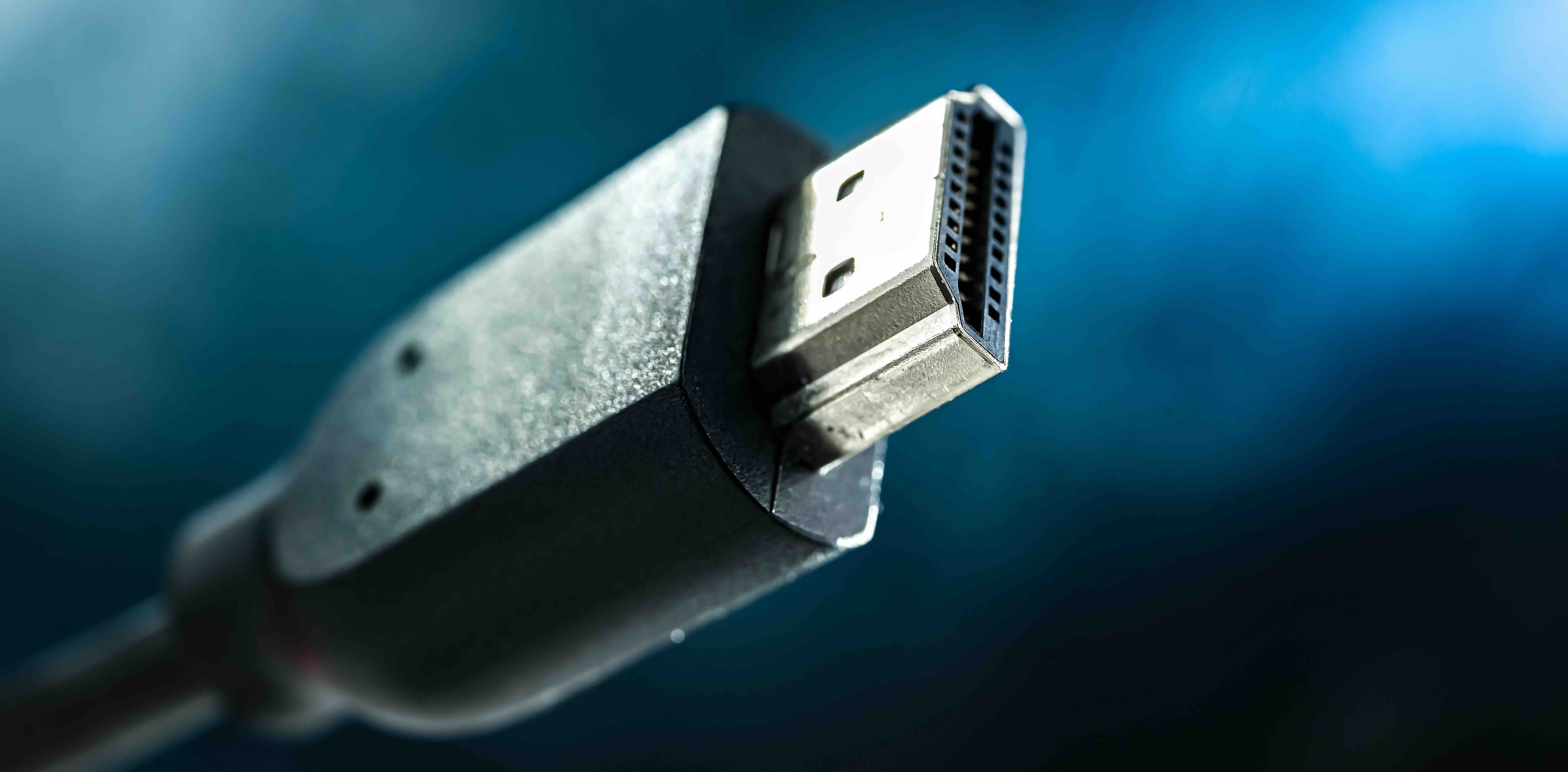
What Does a Male HDMI Connector Look Like? A Complete Visual and Technical Guide
If you have ever stared at the end of a cable and wondered exactly what you are looking at, you are not alone. HDMI connectors show up everywhere -- televisions, monitors, gaming consoles, projectors, laptops -- and yet most people could not describe one with any real precision. That is kind of a problem when you are trying to buy the right cable or troubleshoot a connection. So here is a straightforward breakdown of what a male HDMI connector actually looks like, how it works, and what you need to know before you buy anything.
The Basic Shape and Physical Profile of a Male HDMI Connector
A male HDMI connector has a very specific and recognizable shape once you know what you are looking for. It is a trapezoid -- well, more accurately, it is a slightly asymmetrical rectangular plug with two angled corners on one side. That angled top edge is not random; it is a deliberate design feature that ensures you cannot insert the connector upside down. The plug itself is relatively compact, typically measuring about 13.9 mm wide and 4.45 mm tall for a standard Type A connector. It is rigid, usually jacketed in a metallic housing, and features a flat face with a visible row of gold-plated pins recessed inside. Those pins are what transmit the actual data. You can usually count 19 pins arranged in two offset rows if you look closely, though most people never bother to count. The housing is often nickel or zinc alloy, sometimes with a slight sheen or brushed finish depending on the cable quality. High-end cables sometimes include a rubber or molded strain relief boot at the base of the connector to protect against cable bending and wear.
Type A vs. Other HDMI Connector Types
Not all HDMI connectors look the same, and that is worth knowing upfront. The one most people are familiar with -- the full-size plug -- is the Type A connector. It is the standard. But there are actually five defined HDMI connector types, and each has a distinct physical appearance.
- Type A: Full-size, most common, used in TVs, monitors, desktop PCs, and AV receivers
- Type B: Dual-link, larger than Type A, rarely seen in consumer electronics
- Type C: Mini HDMI, noticeably smaller, commonly found on DSLR cameras and some tablets
- Type D: Micro HDMI, even smaller, looks almost like a micro USB at a glance, used in compact cameras and older smartphones
- Type E: Automotive HDMI, ruggedized design with a locking mechanism, used in vehicles
When most people ask what a male HDMI connector looks like, they are almost always referring to Type A. That is the one with the trapezoid profile, the wider flat housing, and the 19-pin configuration. Mini and Micro versions scale that design down considerably but retain the same asymmetrical shape logic to prevent incorrect insertion.
The Pin Configuration Inside a Male HDMI Connector
Inside that flat face of a Type A male HDMI connector, there are 19 pins arranged across two rows. The upper row has 9 pins and the lower row has 10, staggered so they are offset from each other. This is not just for mechanical reasons -- the pin layout directly corresponds to the signals being transmitted. Those signals include three TMDS data channels, a TMDS clock channel, a DDC channel for device communication, an HDMI Ethernet Channel in newer versions, an Audio Return Channel, a Consumer Electronics Control line, and power pins. The gold plating on those pins is not decorative. Gold resists oxidation, which means the signal path stays clean over time. Cheap connectors often use thinner plating or lower quality metals, which can degrade the connection. That is one of the practical reasons cable construction quality actually matters more than people tend to assume.
How the Male Connector Pairs with the Female Port
The male HDMI connector is designed to insert into a female HDMI port, which is a recessed receptacle built into devices like televisions, laptops, and AV equipment. The fit should be snug but not forced. When you push a male connector into a female port, the angled top of the trapezoid aligns with the matching geometry inside the port, guiding it in correctly every time. There is no locking mechanism on standard Type A connectors, which means the cable can be pulled out without any release button -- convenient in most cases, but occasionally frustrating if the cable gets nudged out of a tight installation. Some professional-grade or automotive HDMI versions include locking connectors to address that, but for everyday consumer use, the friction fit is generally reliable.
Key Advantages of the Male HDMI Connector Design
The physical design of the male HDMI connector solves a lot of practical problems that older analog connectors never quite figured out. The asymmetrical shape means you will never force it in upside down. The compact form factor means it fits cleanly behind thin displays and in tight media cabinet spaces. The 19-pin all-in-one interface consolidates what would have previously required multiple cables -- audio, video, and control signals -- into a single plug. For home theater setups, that is a genuinely big deal. HDMI also supports hot-plugging, meaning you can connect and disconnect without powering down the devices, which makes it significantly more flexible than older interface standards. From a purely physical standpoint, the connector is also fairly durable when handled correctly, with most rated for a minimum of 10,000 insertion and extraction cycles.
Common Issues and Drawbacks to Be Aware Of
It is not all perfect, and it would be dishonest to skip the drawbacks. The absence of a locking mechanism on standard connectors is a real limitation in professional AV installations where cable movement is a concern. The connector can loosen over time in high-traffic environments. Cheap male connectors with thin gold plating or poorly formed pins can cause signal issues -- flickering video, dropped audio, or no signal at all. The physical housing on budget cables sometimes has sharp edges or inconsistent molding that can scratch device ports. Longer cable runs introduce signal degradation, which is why active or fiber HDMI cables exist for distances beyond 25 feet. And if you are running 4K at 120Hz or 8K content, the cable construction -- not just the connector -- needs to meet the bandwidth requirements of HDMI 2.1.
Practical Tips for Identifying and Buying the Right Cable
When you are buying an HDMI cable, what you are really evaluating is the combination of the connector and the cable itself. Here is what to actually look for:
- Look for thick, well-formed gold-plated pins with no visible gaps or misalignment
- Check that the connector housing fits flush against the cable without wobbling
- Look for strain relief boots at the base to prevent cable fatigue near the connector
- Match the connector type to your device -- do not assume every device uses Type A
- Verify the cable is rated for the HDMI version your setup requires (2.0 for 4K/60Hz, 2.1 for 4K/120Hz or 8K)
A lot of people overbuy on cable length, which is worth avoiding. Longer cables have more signal path to maintain, and unless you genuinely need the extra length, a shorter cable with a quality connector will outperform a longer budget cable every time.
Why Cable Build Quality Around the Connector Matters More Than You Think
The male HDMI connector is only as good as the cable it is attached to. The transition point between the connector housing and the cable jacket is actually one of the most mechanically stressed areas in any cable assembly. That is where bending, pulling, and strain tend to concentrate. A well-constructed cable will have internal strain relief and a flexible but reinforced jacket at that transition. A poorly made cable will show wear, cracking, or internal wire damage right at the base of the connector, often within months of regular use. This is not a theoretical concern -- it is one of the most common failure points in consumer-grade HDMI cables. When you are investing in a display or AV system, the cable connecting everything together deserves more than a second thought.
Why Monoprice Is the Smart Choice for HDMI Cables and Connectors
Here is the straightforward case for Monoprice: you get cable construction that actually meets the specs on the label, at pricing that does not require you to rationalize the purchase. Monoprice has spent years building a reputation in the AV and networking space for delivering products that perform -- and that includes a full lineup of HDMI cables engineered with quality connector assemblies, proper pin plating, and durable strain relief built in. Whether you are wiring a home theater, running cables through a commercial AV installation, or just connecting a monitor to a workstation, the cables you pick should not be an afterthought. Explore the full range of high-performance HDMI cables and audio video connectivity solutions and you will see quickly why integrators, IT professionals, and everyday consumers keep coming back. It is not about paying less for less -- it is about paying less for the same performance you would expect from brands charging three times the price. That is the Monoprice model, and it holds up.
Frequently Asked Questions About Male HDMI Connectors
What does a male HDMI connector look like?
A male HDMI Type A connector has a trapezoidal shape with one flat side and one angled side, a metallic housing, and 19 gold-plated pins visible on the flat face. It is approximately 13.9 mm wide and 4.45 mm tall.
How many pins does a male HDMI connector have?
A standard Type A male HDMI connector has 19 pins arranged in two offset rows -- 9 pins in one row and 10 in the other -- each responsible for transmitting specific audio, video, and control signals.
What is the difference between a male and female HDMI connector?
A male HDMI connector is the plug -- the end of the cable that you insert. A female HDMI connector is the port or receptacle built into a device like a TV or monitor that accepts the male plug.
Can you insert a male HDMI connector upside down?
No. The asymmetrical trapezoidal shape of the connector is specifically designed to prevent incorrect insertion. The angled corners on one side ensure it can only be inserted in the correct orientation.
Are all male HDMI connectors the same size?
No. There are five HDMI connector types with different sizes. Type A is full-size, Type C is Mini HDMI, and Type D is Micro HDMI. Each is smaller than the previous and designed for different device categories.
Why are the pins on a male HDMI connector gold-plated?
Gold does not oxidize over time, which helps maintain a clean, consistent electrical connection. This improves signal reliability and extends the usable life of the connector compared to base metal alternatives.
What HDMI version do I need for 4K or 8K video?
HDMI 2.0 supports 4K at 60Hz. For 4K at 120Hz or 8K at 60Hz, you need HDMI 2.1. The cable and both the male connector assembly and the device ports must all support the required version for full performance.
Do male HDMI connectors have a locking mechanism?
Standard Type A male HDMI connectors do not include a locking mechanism. They rely on friction fit. Some professional and automotive HDMI variants include locking designs, but these are not common in consumer electronics.
How long do male HDMI connectors last?
Most HDMI connectors are rated for a minimum of 10,000 insertion and extraction cycles under normal use. Connector lifespan also depends heavily on build quality, strain relief construction, and how the cable is handled over time.
What causes a male HDMI connector to fail?
Common causes include repeated bending at the connector base, thin or worn gold plating on the pins, physical damage to the housing, and poor-quality internal construction at the cable-to-connector transition point. Quality strain relief and proper cable handling significantly reduce failure risk.


