VGA Projector Cable: Reliable Signal, Every Presentation
What Is a VGA Projector Cable and Why Does It Still Matter?
So here is the thing about VGA -- a lot of people assume it is dead. And honestly, that assumption is understandable. HDMI and DisplayPort have taken over most modern setups, and newer laptops barely acknowledge analog connections exist. But then you walk into a conference room or a classroom, and there it is: a projector with a VGA port sitting right there, waiting. VGA, which stands for Video Graphics Array, was introduced by IBM back in 1987, and the connector standard has outlasted nearly every prediction about its demise. A projector cable VGA is exactly what it sounds like -- a cable that carries analog video signals from a source device, like a laptop or desktop, to a projector using the familiar 15-pin D-sub connector. Understanding what it is, how it works, and when to use it is genuinely useful knowledge, especially for IT managers, AV integrators, educators, and anyone maintaining a mixed-technology environment.
How a VGA Projector Cable Actually Works
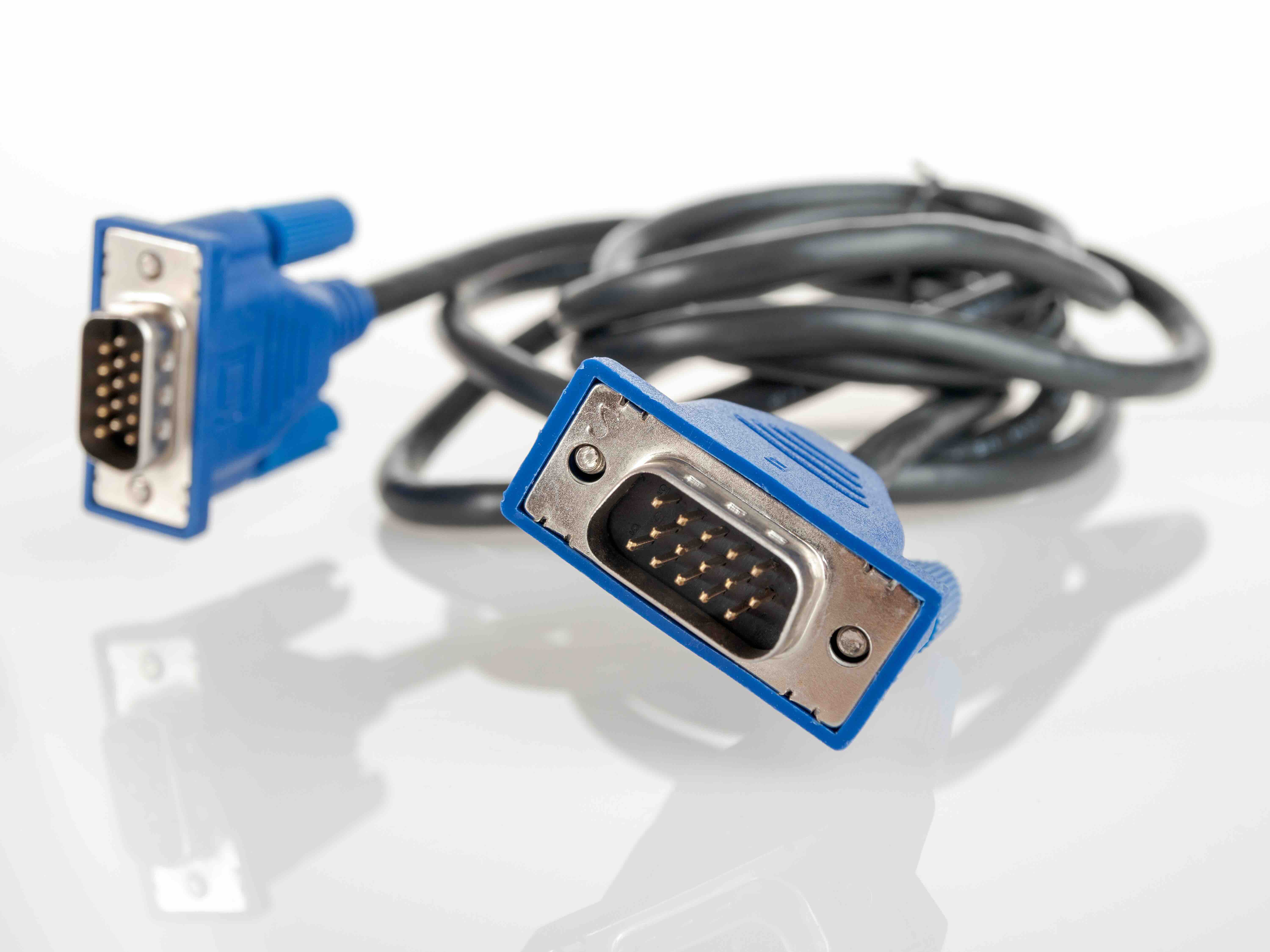
The VGA cable transmits analog video signals through a 15-pin connector arranged in three rows of five pins each. Unlike digital cables that send data as binary information, VGA sends continuous analog waveforms corresponding to red, green, and blue color channels, along with horizontal and vertical sync signals. The projector receives this signal and converts it into the image displayed on screen. This is a pretty straightforward process by modern standards, but it is worth understanding because analog signal transmission is sensitive to things digital connections handle automatically -- like cable length, interference, and connector quality. A low-quality or degraded VGA cable can produce ghosting, color bleeding, or a fuzzy image, which is why the cable itself matters more than people might expect. The maximum practical resolution for VGA is typically 1920x1080, though it is most commonly used at 1024x768 or 1280x1024 in real-world projector environments.
Key Features to Look for in a VGA Projector Cable
Not every VGA cable is the same, and the differences become obvious the moment you start comparing them side by side. There are several factors that genuinely affect performance and longevity in daily use environments.
- Ferrite cores on both ends to reduce electromagnetic interference
- Triple-shielded coaxial conductors for cleaner signal transmission
- Gold-plated or nickel-plated 15-pin connectors for corrosion resistance
- Molded strain relief to prevent cable damage near the connector
- Available lengths ranging from 3 feet to 50 feet or longer for flexible installations
- Thumbscrew-compatible housing to secure the connection to the port
For projector installations in boardrooms, lecture halls, or training spaces, these features are not just nice to have -- they are the difference between a reliable presentation and a frustrating troubleshooting session mid-meeting. Cable length is another underappreciated factor. The longer the cable run, the more signal degradation becomes a risk with analog VGA. Keeping cable runs under 25 feet is a reasonable rule of thumb for maintaining image clarity without additional signal boosting equipment.
Common Use Cases for VGA Projector Cables in Modern Environments
Here is where it gets practical. Despite all the newer alternatives, VGA projector cables are actively in use across a wide range of real-world environments. Educational institutions are probably the biggest holdout -- schools and universities that invested heavily in VGA-equipped projectors a decade ago are still running that infrastructure. Replacing all of it is expensive, and as long as it works, there is not a compelling operational reason to change. Corporate environments similarly retain projectors with VGA as the primary or secondary input, especially in older office buildings or facilities that have not undergone AV refreshes. Government facilities, healthcare training rooms, and small business conference setups round out the picture. Even in home theater contexts, older projectors with only VGA outputs remain in use for budget-conscious setups. Understanding the cable itself means understanding this entire installed base of equipment that is, frankly, not going anywhere soon.
Advantages of Using VGA Projector Cables
There are real, tangible reasons why VGA has persisted this long, and they are worth acknowledging directly. First, simplicity -- plug it in, and it works. There is no handshake protocol, no HDCP licensing negotiation, no driver installation. The analog nature of the connection means compatibility is essentially universal between any VGA source and any VGA display. Second, cost. VGA cables are significantly less expensive than their digital counterparts, which matters in large-scale deployments where you might need dozens of cables. Third, in environments where the content being displayed is basic presentation slides, spreadsheets, or video at moderate resolution, VGA delivers perfectly adequate image quality without any perceptible compromise. For these scenarios, spending more on a digital cable infrastructure does not improve the outcome. That is a value-driven reality worth respecting.
Drawbacks and Limitations You Should Know About
Being straightforward about the limitations is just as important as recognizing the strengths. VGA does not carry audio -- full stop. If your projector setup requires sound, you need a separate audio cable running parallel. VGA also tops out in terms of resolution and refresh rate capability, which becomes relevant in applications involving high-definition video, detailed graphics, or anything above 1080p. The analog signal is inherently more susceptible to interference than digital signals, which means cable quality and routing actually require attention in ways that HDMI or DisplayPort cables do not. Modern laptops and tablets frequently lack native VGA outputs entirely, requiring adapters -- and adapter quality introduces its own variables into signal integrity. For future-proofed installations or high-resolution environments, VGA is not the right answer. But for maintaining existing infrastructure efficiently and affordably, it remains a rational choice.
VGA vs. HDMI: Choosing the Right Cable for Your Projector Setup
This comparison comes up constantly, and the honest answer is that the right choice depends on what you actually need. HDMI carries both video and audio in a single digital cable, supports higher resolutions, and is inherently more resistant to signal degradation. If your projector has an HDMI port and your source device does too, HDMI is the better technical choice for most modern applications. However, if your projector only has a VGA input -- or your source device only has a VGA output -- then the comparison is academic. You use what the equipment supports. Adapter solutions exist for bridging the gap, such as HDMI-to-VGA or DisplayPort-to-VGA adapters, but each conversion step introduces potential quality loss and cost. In mixed environments, having both cable types on hand is simply practical. The projector cable VGA is not competing with HDMI so much as it is serving a different segment of the installed technology landscape.
Practical Tips for Getting the Best Performance from a VGA Projector Cable
Getting clean, reliable performance from a VGA cable setup does not require advanced technical knowledge -- it mostly requires attention to a few straightforward details. Use the shortest cable length that your installation allows. Secure the connectors using the thumbscrew hardware so there is no intermittent contact from a loose plug. Route cables away from power lines and other sources of electromagnetic interference. Inspect connector pins periodically for bending or corrosion, which can cause signal issues that look like display problems but are actually cable problems. When deploying multiple cables in a permanent installation, label both ends clearly -- this sounds minor but saves significant time during maintenance or troubleshooting. And always test the full signal path before a presentation or event rather than assuming everything is working correctly from the last use.
Why Monoprice Is the Right Source for Your VGA Projector Cable Needs
When it comes to sourcing reliable cables for projector installations, there is a real difference between a cable that simply fits in the port and one that consistently delivers clean signal over time. Monoprice has built a well-earned reputation for manufacturing cables that meet professional performance standards without the inflated price tags common to retail alternatives. Every Monoprice VGA cable is engineered with the shielding, connector quality, and build construction that AV integrators and IT professionals depend on across long-term deployments. Whether you are stocking cables for a school district, outfitting a corporate conference center, or simply replacing a worn cable in your home office projector setup, the value proposition is hard to argue with. For anyone managing technology procurement seriously, exploring the full range of VGA projector cables and professional AV connectivity solutions available through Monoprice is a logical and cost-effective step. The combination of consistent quality, practical pricing, and genuine product depth makes Monoprice a sourcing partner that earns trust through performance, not just marketing.
Frequently Asked Questions About VGA Projector Cables
What does VGA stand for and what is a VGA projector cable used for?
VGA stands for Video Graphics Array. A VGA projector cable is used to transmit analog video signals from a source device, such as a laptop or desktop computer, to a projector for display on a screen or wall surface.
Does a VGA cable carry audio as well as video?
No. VGA is a video-only connection standard. If your projector setup requires audio, you will need a separate audio cable, such as a 3.5mm stereo cable, running from the audio output of your source device to the projector or a connected speaker system.
What is the maximum resolution supported by a VGA projector cable?
VGA can technically support resolutions up to 1920x1080 at 60Hz, but in practice most projector applications use it at 1024x768 or 1280x1024. Image quality at higher resolutions can vary depending on cable quality and length.
How long can a VGA projector cable be before signal quality degrades?
For reliable image quality without additional signal boosting equipment, keeping VGA cable runs under 25 feet is a practical standard. Longer runs increase the risk of ghosting, color loss, or image blurring due to analog signal attenuation.
Can I use a VGA cable with a modern laptop that does not have a VGA port?
Yes, but you will need an adapter. Common options include USB-C to VGA, DisplayPort to VGA, or HDMI to VGA adapters. Keep in mind that each adapter introduces a conversion step that can affect signal quality if the adapter is low quality.
What should I look for when buying a VGA projector cable?
Look for cables with triple-shielded coaxial conductors, ferrite cores at each end, gold-plated or nickel-plated connectors, and molded strain relief at the connector housing. These features help maintain signal integrity and extend the lifespan of the cable in regular use.
Is VGA still a relevant connection standard for projectors?
Yes, particularly in educational institutions, government facilities, healthcare training environments, and older corporate AV setups. A large installed base of VGA-equipped projectors remains in active service, and the standard continues to serve those environments reliably.
What causes a blurry or ghosted image when using a VGA projector cable?
Common causes include a low-quality or damaged cable, a cable run that is too long for the resolution being used, loose connectors, electromagnetic interference from nearby power lines, or bent pins in the connector. Checking each of these factors systematically usually identifies the issue.
Is VGA better or worse than HDMI for projector use?
HDMI is technically superior -- it carries both audio and video digitally, supports higher resolutions, and resists signal degradation more effectively. However, if your projector or source device only supports VGA, HDMI is not an option without an adapter. For existing VGA infrastructure, a quality VGA cable is the appropriate and cost-effective solution.
How do I secure a VGA cable so it does not come loose during a presentation?
VGA connectors include thumbscrew hardware on both sides of the connector housing designed for exactly this purpose. Tightening the thumbscrews by hand after plugging in the cable locks it securely to the port and prevents accidental disconnection during use.