

VGA Cables: Types, Uses, and How to Choose the Right One
VGA Cables Explained: Types, Uses, and What You Need to Know Before You Buy
VGA cables have been around for decades, and honestly, they are still more relevant than people give them credit for. Whether you are setting up an older projector in a conference room, connecting a legacy desktop monitor, or just trying to make sense of the cable drawer you have had since 2009, understanding VGA cable types can save you real time and frustration. This guide breaks down what VGA actually is, how it works, the different connector and cable variations available, and when it makes sense to still use one in a modern setup.
What Is a VGA Cable and How Does It Work
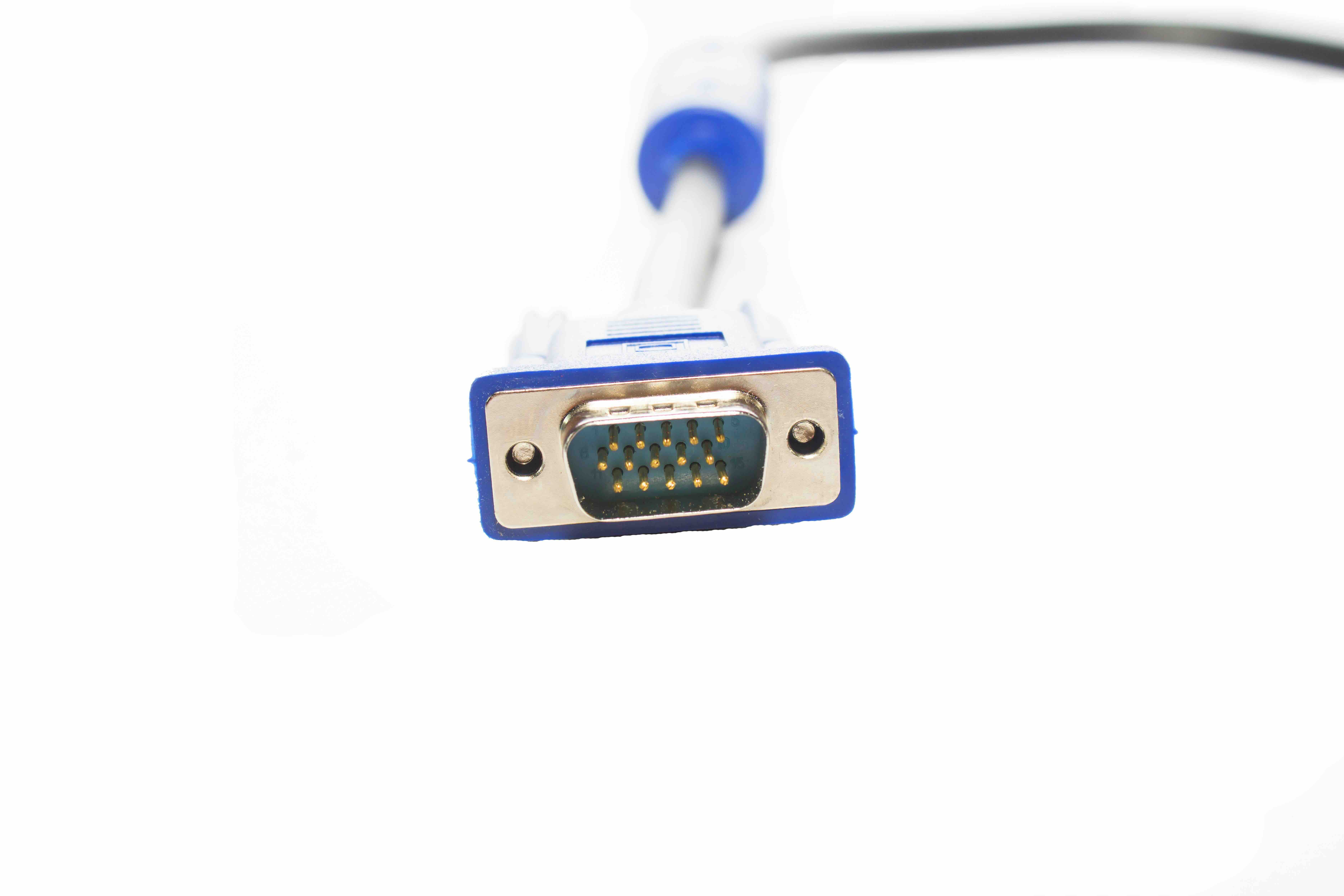
VGA stands for Video Graphics Array. It was introduced by IBM back in 1987 and became the default display standard for computers and monitors throughout the 1990s and most of the 2000s. The cable transmits analog video signals from a source device, like a computer or laptop, to a display like a monitor or projector. The standard VGA connector is a 15-pin D-sub connector, also called DE-15, arranged in three rows of five pins. The signal it carries is strictly analog, which means it does not support audio. That is a key distinction worth remembering early on. Unlike HDMI or DisplayPort, VGA is purely a video interface. It relies on separate audio cabling if sound is needed alongside the video output.
The Main Types of VGA Cables Available Today
Not all VGA cables are identical. There are several variations based on connector configuration, cable build quality, and intended use case. Knowing which type fits your setup is the practical first step before purchasing anything.
- Standard VGA to VGA Cable: This is the most common type. It has a male DE-15 connector on both ends and is used to connect a computer directly to a VGA-compatible monitor or projector. Lengths typically range from 3 feet to 50 feet, though signal quality degrades over longer runs without active amplification.
- VGA to HDMI Cable or Adapter: This type handles conversion between analog VGA output and digital HDMI input. It requires a chip inside the connector to handle the analog-to-digital conversion since the two signals are fundamentally different. These are especially useful for connecting older computers to newer displays.
- VGA to DVI Cable: DVI-A, the analog variant of DVI, is electrically compatible with VGA. A simple passive cable can handle this conversion without any active components. This is helpful when connecting legacy video cards to DVI monitors that still support analog input.
- VGA Extension Cables: These have a male connector on one end and a female connector on the other. They extend an existing VGA cable run and are commonly used in fixed installations where the source device is mounted at a distance from the display.
- Mini VGA Cables: Some older laptops and compact devices used a smaller Mini VGA port instead of the full-size connector. Mini VGA to standard VGA cables are available but increasingly niche. If you are working with older Apple iBooks or certain Toshiba laptops, this is the variant to look for.
Key Technical Specifications to Understand
When shopping for a VGA cable, the specs listed can feel overwhelming if you are not sure what they mean in practical terms. The resolution a VGA cable supports depends heavily on the quality of the cable itself and the length of the run. A standard VGA cable can support resolutions up to 1920x1080 at shorter distances, though original VGA spec topped out at 640x480. Many cables today are rated for SVGA, XGA, SXGA, or UXGA resolutions. Shielding is another important consideration. Cables with better shielding, typically indicated by ferrite cores or foil and braid shielding, reduce electromagnetic interference and deliver a cleaner signal, especially in environments with a lot of electronic equipment nearby.
Advantages of Using VGA Cables
There are genuine reasons VGA has not disappeared entirely. For environments running older equipment, VGA is cost-effective and widely compatible without requiring adapters or driver support. Installation is simple, the connectors are robust and lock with thumbscrews, and troubleshooting analog signals is generally more straightforward than debugging digital connection issues. For certain commercial AV environments, particularly those using older projectors in classrooms or boardrooms, VGA remains a practical, no-frills solution. The cables themselves are affordable, and the technology is well understood across most IT support teams.
Common Drawbacks and Limitations of VGA
The analog nature of VGA is both its defining characteristic and its biggest limitation in modern contexts. Because the signal is analog, it is susceptible to degradation over longer cable runs, interference from nearby power cables or electronics, and general noise that can result in a soft or blurry image. VGA carries no audio, which means any audio setup requires a completely separate cable path. It also caps out at 1080p in practical use, making it unsuitable for 4K displays or any high-refresh-rate gaming or video production environments. If the display or source device only has digital inputs or outputs, a passive VGA cable simply will not work without an active conversion device.
When Should You Still Use VGA
The honest answer is that VGA still earns its place in specific scenarios. Government and enterprise environments with older equipment refresh cycles may rely on VGA infrastructure for years to come. Educational institutions with projectors installed before 2015 frequently still run VGA as their primary connection. For basic office productivity tasks, connecting a secondary monitor, or setting up a display for a kiosk or digital signage application on legacy hardware, VGA does the job reliably. The key is matching the right cable type and quality to the specific use case rather than defaulting to VGA when a newer digital interface is readily available.
Tips for Getting the Best Performance from Your VGA Setup
A few practical steps can make a meaningful difference in VGA signal quality and reliability. Keep cable runs as short as possible when working at higher resolutions. Use cables with built-in ferrite cores at both ends to reduce interference. Secure connectors with the thumbscrews to ensure consistent pin contact. Avoid routing VGA cables parallel to power cables for extended distances. If running longer than 25 feet, consider an active VGA signal booster or extender rather than relying on a passive cable alone. Choosing a well-built cable from the start reduces the likelihood of image noise, color fringing, or resolution limitations.
VGA vs. Modern Alternatives: A Quick Comparison
It is worth taking a moment to understand where VGA stands relative to current display interfaces. HDMI delivers digital video and audio over a single cable and supports resolutions well beyond what VGA is capable of. DisplayPort offers even higher bandwidth and is the preferred choice for high-refresh-rate monitors. USB-C with DisplayPort Alt Mode is increasingly common on modern laptops. That said, none of these are automatically better if the connected devices do not support them natively. Compatibility drives the right choice every time. VGA is not a premium option in 2024, but it is not obsolete either. It is a legacy standard that still functions reliably in the right context.
Why Monoprice Is the Right Source for Your VGA Cable Needs
When it comes to sourcing display cables that actually perform as described without inflated pricing, Monoprice has built a well-earned reputation across both consumer and professional markets. Whether you need a straightforward VGA to VGA cable for a conference room projector or a more specialized VGA to HDMI adapter for bridging legacy and modern equipment, the selection is deep and the quality is consistent. Monoprice engineers its cables to meet real-world installation demands, including proper shielding, durable connectors, and accurate resolution support specifications. For IT managers, AV integrators, and everyday users alike, choosing high-quality VGA cables and display connectivity solutions from Monoprice means getting dependable performance without overpaying for brand markup. The value proposition is straightforward: well-built cables, transparent specs, and pricing that makes stocking up for multi-display or multi-room installations genuinely practical.
Frequently Asked Questions About VGA Cables
What does VGA stand for and what is it used for?
VGA stands for Video Graphics Array. It is an analog video interface used to connect computers, laptops, and other source devices to monitors, projectors, and displays. It transmits only video, not audio.
Can a VGA cable support 1080p resolution?
Yes, many VGA cables support 1080p resolution, though performance depends on cable quality and length. Shorter, well-shielded cables deliver cleaner signals at higher resolutions.
Does VGA carry audio?
No. VGA is a video-only interface. A separate audio cable is required if sound needs to accompany the video output.
What is the difference between VGA and HDMI?
VGA transmits an analog video signal only, while HDMI transmits digital video and audio over a single cable. HDMI supports significantly higher resolutions and is the preferred standard for modern displays.
Can I connect a VGA device to an HDMI monitor?
Yes, but you need an active VGA to HDMI adapter or cable with a built-in conversion chip. A passive cable will not work because the signal types are fundamentally different.
How long can a VGA cable be before signal quality degrades?
Signal quality can degrade noticeably on runs beyond 25 feet. For longer distances, an active VGA signal booster or extender is recommended to maintain image clarity.
What are ferrite cores on a VGA cable and why do they matter?
Ferrite cores are cylindrical components found near the connectors on shielded cables. They suppress electromagnetic interference and help maintain cleaner signal transmission, especially in environments with dense electronic equipment.
Is VGA still supported on modern computers?
Many newer laptops and desktop computers have removed VGA ports entirely in favor of HDMI, DisplayPort, and USB-C. However, adapters and docking stations can restore VGA compatibility when needed.
What is a Mini VGA cable used for?
Mini VGA was used on certain older laptops, particularly some Apple and Toshiba models, as a compact alternative to the full-size VGA port. A Mini VGA to standard VGA cable is required to connect these devices to standard VGA displays.
Is it worth buying a VGA cable in 2024?
It depends on your equipment. If you are working with legacy monitors, projectors, or computers that only support VGA output or input, then yes, a quality VGA cable is a practical and cost-effective investment. For new setups, a digital interface like HDMI or DisplayPort is the better long-term choice.


