

USB Type-C Splitter Cable: Expand Your Ports Easily
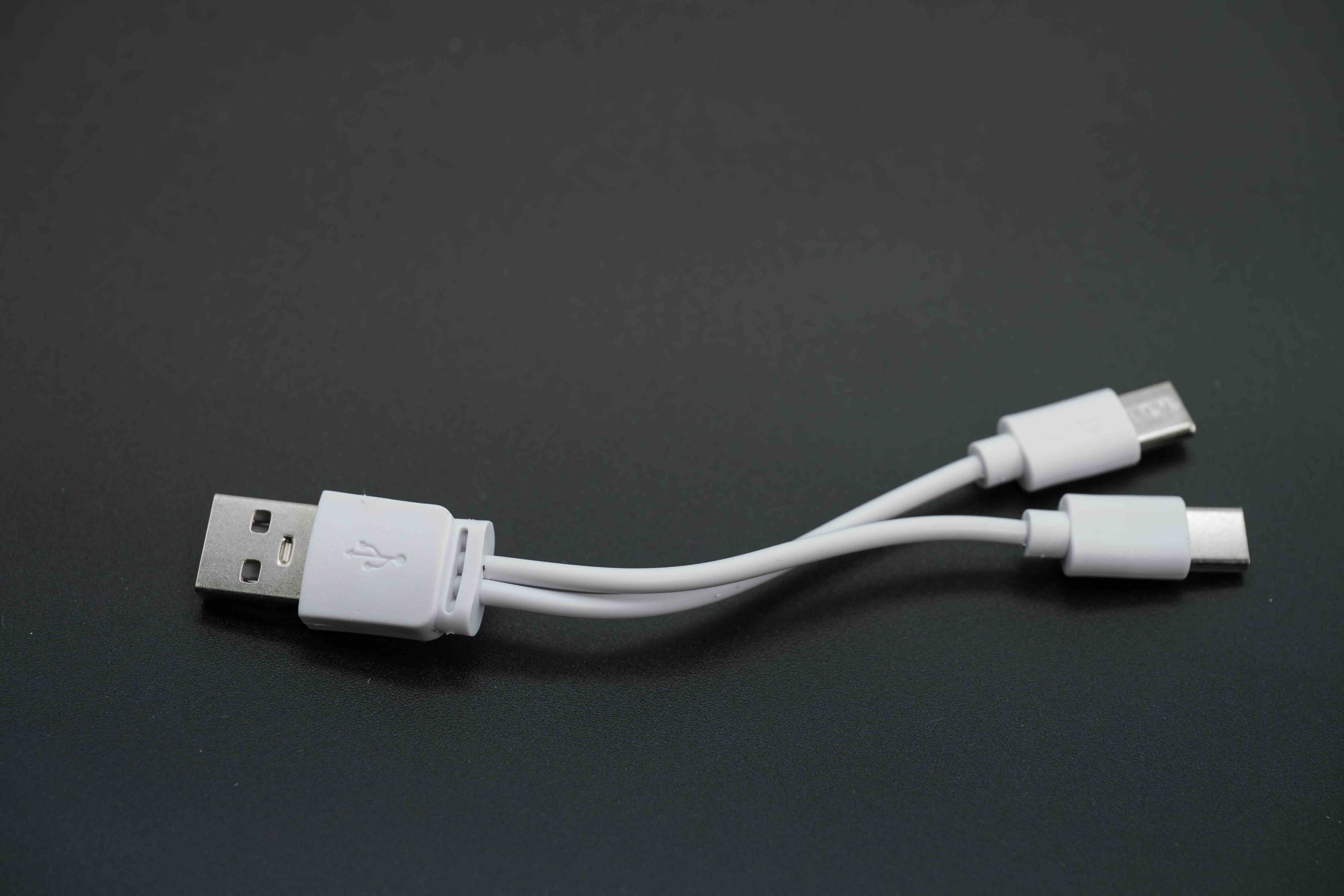
What Is a USB Type-C Splitter Cable and Why Does It Matter?
So you have one USB-C port on your laptop and about three things that need to connect to it at the same time. Sound familiar? That is exactly the problem a USB Type-C splitter cable is designed to solve. At its most basic, a USB-C splitter takes that single port and expands it into multiple connection points, letting you run more devices simultaneously without constantly swapping cables. It sounds simple, and honestly, the concept is simple. But there is a little more going on under the hood that is worth understanding before you buy one. Whether you are managing a cluttered desk setup, trying to stay productive on the road, or speccing out a shared workspace, knowing how these cables actually work will save you a lot of frustration later.
How a USB Type-C Splitter Cable Actually Works
Here is the thing that surprises a lot of people. A USB-C splitter is not magic. It does not create new bandwidth out of nowhere. What it does is route the available data transfer capacity of your single USB-C port across multiple outputs. The way this gets divided depends on the splitter design and what the connected devices are actually requesting. Some splitters operate purely as passive devices, meaning they do not have their own power source and just physically branch the signal. Others are active designs, which handle the load more intelligently and tend to perform better under heavier use. The USB-C standard itself is versatile. Depending on the host port and cable spec, you might be moving data, video, audio, and power delivery all through the same connector. A quality splitter is built to manage that complexity without dropping the ball on any of those functions.
USB-C Splitter vs. USB-C Hub: Knowing the Difference
This is where a lot of buyers get tripped up, and it is worth clearing up right away. A splitter and a hub are related but not identical. A splitter, in the strictest sense, takes one connection and divides it into two or more of the same type. Think of it as a Y-cable arrangement. A hub, on the other hand, is a more sophisticated device that often includes multiple different port types, like USB-A, HDMI, SD card readers, and Ethernet, all stemming from a single USB-C connection. If you just need to connect two USB-C devices where before you could only connect one, a splitter gets the job done with less bulk and usually at a lower cost. If you are building out a full workstation from a single port, a hub is probably the smarter move. Both have their place, and honestly, knowing which one fits your use case is half the battle.
Key Advantages of Using a USB Type-C Splitter Cable
The appeal is not complicated. These cables solve a real, everyday problem with minimal friction. Here is what most users find genuinely useful about them:
- Expand a single USB-C port into two or more usable connections without buying new hardware
- Lightweight and compact enough to carry in a laptop bag or pocket
- Affordable compared to full docking stations or powered hubs
- Useful for charging while simultaneously transferring data, depending on the model
- Eliminates the constant cycle of plugging and unplugging devices at your desk
- Compatible with a wide range of USB-C enabled laptops, tablets, and smartphones
That last point is worth emphasizing. Because USB-C has become the dominant standard across so many device categories, a good splitter has a broad range of compatibility right out of the box. That kind of versatility at a modest price point is genuinely useful, especially if you are managing multiple devices across a day.
Common Drawbacks Worth Knowing Before You Buy
No product is without its trade-offs, and USB-C splitter cables are no exception. Bandwidth is the big one. Your host port has a fixed ceiling, and splitting that connection means every device downstream shares from the same pool. If you are running two high-speed storage drives and a 4K display simultaneously, something is going to feel the squeeze. Passive splitters in particular can struggle under that kind of load. There is also the power delivery question. Not every splitter supports pass-through charging, and even when one does, the wattage available gets divided between ports, which can mean slower charging for your laptop or connected devices. Compatibility can also vary. While USB-C is standardized at the connector level, the features supported by a given port depend on the host device, the cable rating, and the splitter itself. Always check the spec sheet before assuming a splitter will handle everything your setup demands.
What to Look for When Choosing a USB-C Splitter Cable
Shopping for one of these does not need to be overwhelming. The key is matching the splitter to your actual use case rather than buying the cheapest option available and hoping for the best. A few things to keep in mind:
- Check whether the splitter supports USB 3.1 or USB 3.2 for faster data transfer speeds
- Confirm pass-through charging support if you need to keep your device powered while using the splitter
- Look for active designs if you plan on connecting multiple high-bandwidth devices at the same time
- Verify compatibility with your specific host device, particularly for Thunderbolt or USB4 ports
- Consider total cable length, since longer cables can affect signal integrity
- Look for shielded cable construction to reduce interference in busy environments
It is also worth paying attention to build quality. Reinforced connectors and braided or heavy-duty jacket materials make a real difference in durability, especially if this cable is going to live in a bag and get used daily. Quality construction is not just about longevity. It is about consistent performance over time.
Real-World Use Cases for USB-C Splitter Cables
The people who get the most out of these cables tend to fall into a few predictable categories. Mobile professionals who carry ultrabooks with limited port configurations rely on them constantly. A single USB-C port on a modern thin-and-light laptop is not much to work with when you need to connect a drive, push data to a display, and keep your battery topped off all at once. Educators and presenters face a similar challenge. Hybrid workers setting up shared desk environments also lean on splitters as a cost-effective alternative to full docking solutions. On the lighter end of the spectrum, everyday users just want to charge their phone and connect a USB-C accessory at the same time without a complicated setup. That is a completely valid use case, and for that, a straightforward passive splitter gets the job done cleanly.
Tips for Getting the Most Out of Your USB-C Splitter
Once you have the right cable, a few practical habits will help you get reliable performance out of it. Do not overload the splitter with more devices than it is rated for. Check the power delivery specs before connecting anything that draws significant wattage. If you notice slowdowns during data transfer, consider whether another device on the splitter is competing for bandwidth and disconnect it temporarily. Keep the connector contacts clean, especially if the cable lives in a bag or gets used in dusty environments. And if you are using the splitter with a Thunderbolt 3 or Thunderbolt 4 port, confirm that the cable itself is rated to handle that interface. Using an underpowered cable on a high-bandwidth port is a common cause of unexpected performance issues that can be avoided entirely with a quick spec check.
Why Monoprice Is the Right Source for Your USB-C Connectivity Needs
When it comes to connectivity hardware, the brand behind the cable matters just as much as the cable itself. Monoprice has spent years building a reputation as a trusted source for high-performance cables, adapters, and accessories at prices that do not require a second thought at checkout. The product lineup is built around real user feedback and engineered to perform reliably in both home and professional environments. If you are ready to expand your setup without overspending, exploring USB Type-C splitter cables and connectivity solutions from Monoprice is a straightforward way to get exactly what you need at a price that makes sense. The quality is there. The value is obvious. And the range of options means you are not settling for a one-size-fits-all answer when your setup deserves a precise fit.
Frequently Asked Questions About USB Type-C Splitter Cables
What is a USB Type-C splitter cable used for?
A USB Type-C splitter cable allows you to connect multiple devices to a single USB-C port on your laptop, tablet, or other host device, effectively multiplying your available connections without adding new hardware ports.
Is a USB-C splitter the same as a USB-C hub?
Not exactly. A splitter typically divides one connection into two or more of the same type, while a hub offers multiple different port types such as USB-A, HDMI, and Ethernet from a single USB-C source. Hubs are more versatile but also bulkier and more expensive.
Will a USB-C splitter reduce my data transfer speed?
Yes, it can. The total bandwidth of your USB-C port is shared across all connected devices. The more devices you connect simultaneously, the more that available bandwidth gets divided among them, which can reduce transfer speeds.
Can I charge my laptop and transfer data at the same time using a USB-C splitter?
Only if the splitter supports power delivery pass-through. Check the product specifications before purchasing to confirm this capability is included and review the wattage supported to ensure it meets your charging requirements.
Are USB-C splitter cables compatible with all devices?
Most USB-C splitters work with any device that has a standard USB-C port. However, advanced features like video output or Thunderbolt support depend on both the host device capabilities and the cable rating, so always verify compatibility before use.
What is the difference between an active and passive USB-C splitter?
A passive splitter has no onboard power or signal management and simply branches the connection. An active splitter uses its own power or circuitry to manage the signal more effectively, which generally means better performance when multiple high-demand devices are connected.
Does a USB-C splitter work with Thunderbolt ports?
A standard USB-C splitter may work in a basic capacity with a Thunderbolt port, but it will not unlock Thunderbolt-specific features or speeds unless the cable and splitter are explicitly rated and certified for Thunderbolt use.
How do I know if a USB-C splitter supports video output?
Look for splitters that specifically list DisplayPort Alternate Mode or video output support in their specifications. Not all USB-C splitters carry video signals, so this needs to be confirmed before assuming display connectivity is available.
Can a USB-C splitter damage my device?
A low-quality or incompatible splitter could potentially cause issues if it delivers incorrect voltage or does not properly manage power delivery. Using a well-built splitter from a reputable manufacturer that meets USB-IF standards significantly reduces any risk.
What should I look for in a high-quality USB-C splitter cable?
Focus on USB 3.1 or higher data support, power delivery pass-through with adequate wattage, shielded cable construction, reinforced connectors, and verified compatibility with your specific host device or interface type.


