

USB Type-C Explained: Cables, Power, and What to Buy
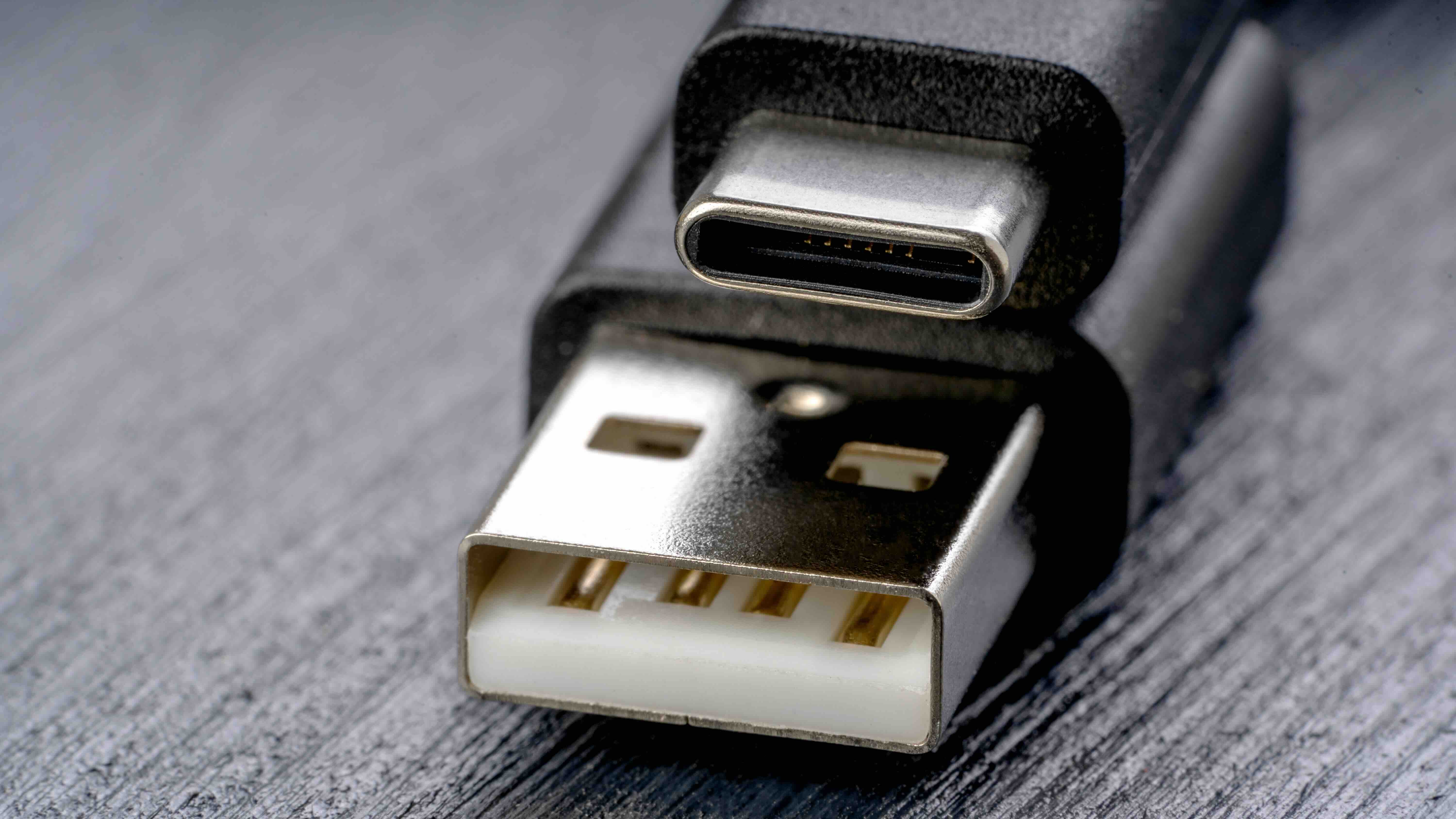
What Is USB Type-C? A Plain-Language Guide to the Connector Everyone Is Talking About
If you have bought a laptop, smartphone, or tablet in the last few years, you have almost certainly run into a USB Type-C port. It is that small, oval-shaped connector that looks the same on both ends -- and yes, that is actually one of its biggest selling points. But USB-C is more than just a reversible plug. It is a technology standard that has quietly reshaped how we charge devices, transfer data, and send video signals across cables. Whether you are a IT administrator standardizing a fleet of workstations or someone who just wants to stop fumbling with cables in the dark, understanding USB-C is genuinely worth your time.
A Quick History: How USB-C Came to Dominate
USB has been around since the mid-1990s, and for most of that era, it was a mess of incompatible shapes -- Type-A, Type-B, Mini-USB, Micro-USB. Each format had a job, but none of them played nicely together, and almost all of them had a frustrating orientation problem. You had a fifty-fifty shot of plugging them in correctly, and somehow you still got it wrong. The USB Implementers Forum introduced the USB Type-C specification in 2014, and it was designed from the ground up to fix all of that. By the early 2020s, it became the dominant connector across consumer electronics, professional AV gear, and enterprise infrastructure -- and regulators in multiple regions have since mandated it as a common charging standard for portable devices.
How USB Type-C Actually Works
At its core, USB-C is a physical connector standard. The port itself is 8.4mm by 2.6mm and features 24 pins arranged symmetrically, which is exactly why it is reversible. But the connector is really just the outer shell. What matters more is the protocol running through it. USB-C cables and ports can carry several different protocols simultaneously -- USB 3.2, USB4, Thunderbolt 4, DisplayPort Alternate Mode, and USB Power Delivery, among others. Think of the port as a pipeline and the protocol as the type of content flowing through it. The same physical connector can push 100 watts of power to charge a laptop, transmit a 4K video signal to an external monitor, and transfer a large file at high speed -- sometimes all at once, depending on the cable and host device specifications.
Key Advantages of USB Type-C
There are several concrete reasons why USB-C has become the industry standard, and they go well beyond the reversible design. Here is what makes it genuinely useful in real-world environments.
- Reversible connector design eliminates orientation errors
- Supports high-speed data transfer up to 40Gbps with USB4 and Thunderbolt 4
- Power Delivery specification supports up to 240W for charging laptops and large displays
- Single cable can carry data, video, and power simultaneously
- Compact form factor suits thin and light devices without sacrificing capability
- Broadly supported across operating systems, manufacturers, and device categories
- Enables single-cable docking station setups that simplify desk configurations significantly
Common Drawbacks and Things to Watch Out For
USB-C is genuinely impressive technology, but there are a few friction points worth knowing before you buy a cable or build out an infrastructure around it. The biggest source of confusion is that not all USB-C cables are created equal. A cable that physically fits into a USB-C port might only support USB 2.0 speeds and basic 5-watt charging -- even though it looks identical to a cable that supports 40Gbps and 100-watt power delivery. This creates real problems in professional environments where people grab whatever cable is nearby. Additionally, Thunderbolt 4, while using the same USB-C connector, requires certified cables and compatible host hardware. Mixing up cables leads to degraded performance and frustrated end users. Always check the cable rating, not just the connector shape.
USB-C vs. Thunderbolt 4: Understanding the Difference
This is a question that comes up constantly, and honestly it trips up a lot of people who should know better. USB-C is the physical connector standard. Thunderbolt 4 is a protocol developed by Intel that runs through a USB-C connector. Thunderbolt 4 guarantees a minimum of 40Gbps bandwidth, support for two 4K displays or one 8K display, and at least 15 watts of power to connected devices. Not every USB-C port supports Thunderbolt 4 -- not by a long stretch. To use Thunderbolt 4, both the port on your device and the cable itself need to support it. Look for the lightning bolt icon near the port or explicit Thunderbolt 4 certification labeling on the cable packaging. For enterprise deployments and professional AV setups, this distinction matters enormously.
USB Power Delivery: Charging Smarter Across All Your Devices
USB Power Delivery, or USB PD, is the charging specification built into the USB-C ecosystem, and it is one of the most practical advancements in consumer electronics infrastructure. Rather than a fixed voltage and current, USB PD negotiates dynamically between the charger and the device to deliver the right amount of power -- anywhere from 5 watts for a pair of earbuds up to 240 watts for a high-performance laptop under the extended power range revision. This means a single USB-C charger can potentially handle your phone, tablet, laptop, and portable monitor. For IT managers provisioning hardware across a distributed workforce, or for anyone tired of carrying four different charging bricks when they travel, USB PD is a meaningful practical improvement. Just verify that the charger and cable are both rated for the wattage your device requires.
Practical Tips for Getting the Most Out of USB Type-C
Understanding the technology is useful, but applying it correctly in day-to-day use is where the real value shows up. A few habits and purchasing decisions make a significant difference in reliability and performance outcomes.
- Always buy cables with clearly labeled specifications -- look for USB 3.2 Gen 2, USB4, or Thunderbolt 4 ratings printed on the packaging
- Use USB-C hubs and docks that explicitly list the protocols they support rather than generic unbranded hardware
- For video output, confirm the host device supports DisplayPort Alt Mode or Thunderbolt before purchasing a USB-C to HDMI cable or adapter
- Match charger wattage to device requirements -- underpowered chargers cause slow charging and can stress battery management systems over time
- For fixed installations in conference rooms or workstations, use higher-quality certified cables to prevent intermittent connectivity issues
- Keep cable lengths reasonable -- longer USB-C cables may require active signal boosting to maintain performance at higher speeds
Who Benefits Most from USB Type-C Technology
USB-C adoption cuts across nearly every user category in the technology space. Content creators benefit from fast data transfer when moving large video files from cameras to editing workstations. IT professionals deploying docking stations for hybrid work environments rely on the single-cable connection model to simplify desk setups and reduce cable clutter. AV integrators use USB-C with DisplayPort Alt Mode to route video signals cleanly through managed infrastructure. Students and mobile professionals appreciate the universal charging compatibility that lets them pare down to a single power adapter. Even home theater enthusiasts benefit when connecting media devices or gaming hardware that uses USB-C for display output. The standard is broad enough that virtually any technology user stands to gain something from understanding it properly.
Why Monoprice Is the Right Source for USB Type-C Cables and Accessories
When it comes to USB-C infrastructure -- whether you are outfitting a single desk or deploying across an entire enterprise -- the quality of your cables and accessories directly affects system reliability, charging performance, and data integrity. Monoprice has built a reputation as a trusted source for high-performance connectivity solutions at pricing that does not require a painful budget conversation. Every cable in the Monoprice lineup is built to clearly stated specifications, so you always know what protocol and power rating you are working with before it ships. That kind of transparency removes the guesswork that leads to degraded setups and equipment mismatches. If you are ready to build a reliable, cost-effective USB-C infrastructure for your home, office, or installation project, explore the full selection of USB Type-C cables, docks, and charging accessories from Monoprice and get the performance your devices actually deserve without overpaying for it.
Frequently Asked Questions About USB Type-C
What makes USB Type-C different from older USB connectors?
USB Type-C is a smaller, reversible connector that supports higher data speeds, greater power delivery, and video output through a single port, unlike older USB-A or Micro-USB connectors which were limited in these capabilities.
Can I use any USB-C cable with any USB-C device?
Physically, yes -- but not all USB-C cables support the same speeds or power levels. Always check the cable's rated specification to confirm it matches the requirements of your device and use case.
What is USB Power Delivery and how much power can it provide?
USB Power Delivery is a charging specification within the USB-C standard that allows dynamic negotiation of voltage and current. It supports up to 240 watts under the extended power range revision, making it suitable for laptops and larger displays.
Is Thunderbolt 4 the same as USB-C?
No. Thunderbolt 4 uses the USB-C physical connector but is a separate, higher-performance protocol developed by Intel. It requires certified cables and compatible host devices to deliver its full 40Gbps bandwidth and multi-display capabilities.
How do I know if my USB-C port supports video output?
Check your device's specifications for DisplayPort Alternate Mode or Thunderbolt support. Not all USB-C ports support video output -- some are limited to data transfer and charging only.
What cable do I need for 4K or 8K video over USB-C?
You need a cable that explicitly supports DisplayPort Alt Mode or Thunderbolt 4, along with a host device that supports those protocols. Thunderbolt 4 cables can support up to 8K video to a single display.
Why is my USB-C device charging slowly even with a high-wattage charger?
The cable connecting your charger to your device may not be rated for high wattage. USB PD requires both the charger and the cable to support the required power level for full-speed charging to occur.
Can a USB-C cable transmit data and charge a device at the same time?
Yes, provided the cable and host device support simultaneous power and data delivery, which is one of the key advantages of the USB-C standard over previous connector formats.
Are longer USB-C cables slower than shorter ones?
Passive USB-C cables can experience signal degradation at longer lengths, especially at higher speeds. For runs beyond one meter at USB4 or Thunderbolt 4 speeds, active cables with built-in signal amplification are recommended.
Do all smartphones use USB-C now?
Most Android smartphones have adopted USB-C, and major manufacturers including Apple have transitioned iPhone and iPad lineups to USB-C. Regulatory requirements in multiple markets are also accelerating this standardization across all portable devices.


