

USB Micro B vs A: Connector Guide for Modern Electronics
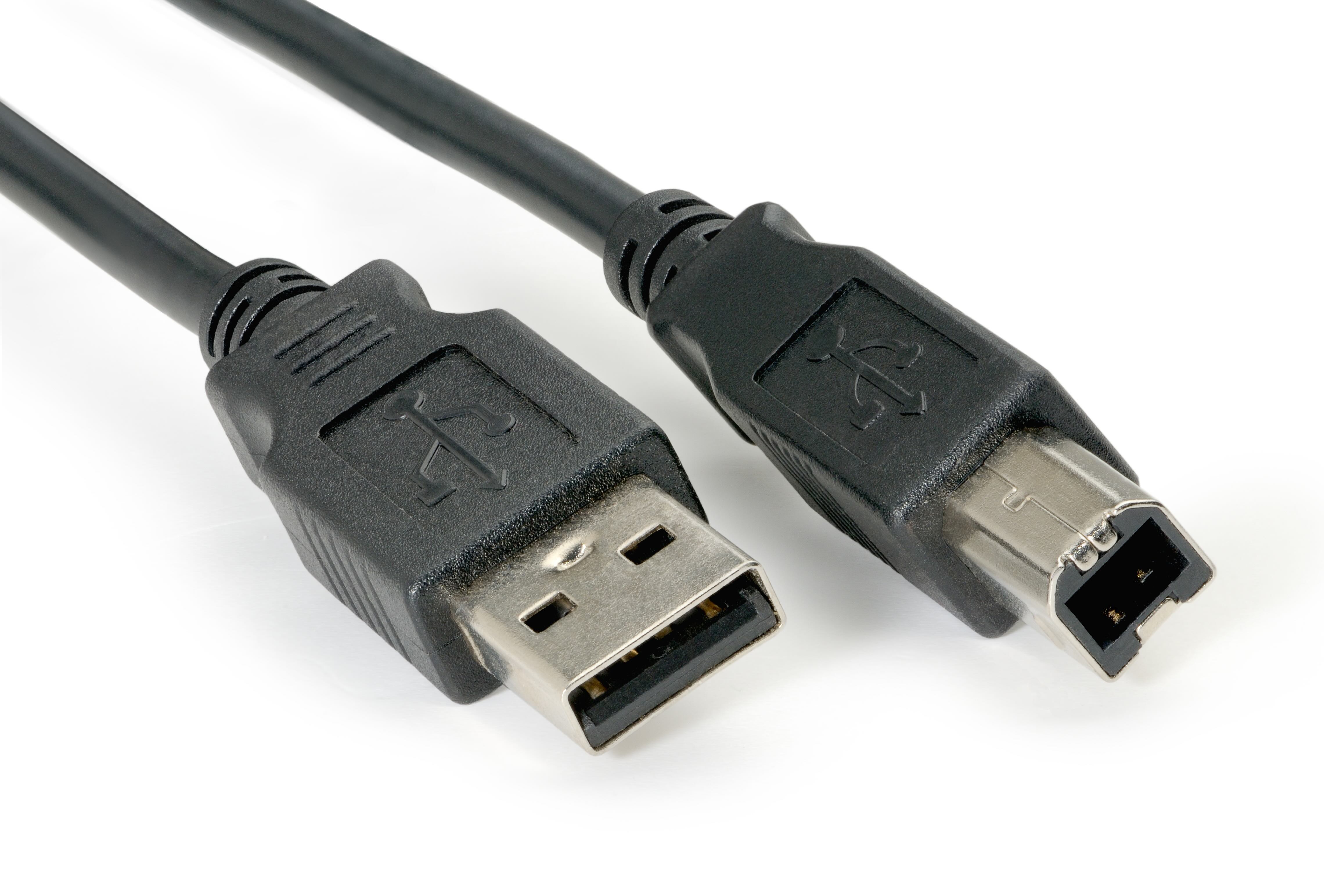
USB Micro B vs A: What You Actually Need to Know Before Buying
So you have a cable sitting in front of you and you are not totally sure which end does what, or maybe you are trying to figure out why your device keeps rejecting a perfectly fine-looking connector. It happens constantly. USB connectors are one of those things that seem simple until you are standing in a store aisle or scrolling through product listings, and suddenly there are like five different shapes that all look vaguely similar. The Micro B and USB A formats specifically cause a lot of confusion, and that confusion costs people time and money. Let us break this down properly, from what each connector actually is to how you pick the right one for your use case, because getting this right matters more than most people think.
A Quick History of USB Connectors and Why There Are So Many
USB, which stands for Universal Serial Bus, was introduced in the mid-1990s as an effort to standardize the way peripheral devices connected to computers. Before USB, you had serial ports, parallel ports, and all manner of proprietary connectors that made interoperability basically a nightmare. USB was supposed to fix that. And it did, mostly, but then technology kept evolving and devices kept getting smaller and the connector formats had to evolve too. That is essentially how we ended up with USB A, USB B, Mini USB, Micro USB in both A and B variants, and eventually USB C. Each generation solved a specific problem for a specific device category, which explains why there are so many shapes even within the USB family. USB Micro B and USB A exist in that middle period of USB evolution, and they serve very different functions that are worth understanding clearly.
What Is USB Type A and How Does It Work
USB Type A is probably the connector you have used the most without even thinking about it. It is the wide, flat, rectangular plug that goes into your laptop, desktop, wall charger, or power bank. The USB A connector is specifically designed as a host-side connector, meaning it lives on the device that is providing power or initiating the data transfer. Your computer has USB A ports. Your wall adapter has a USB A port. That is intentional by design. USB A delivers power and data downstream to whatever peripheral or device is plugged into it. It supports USB 2.0 and USB 3.0 specifications depending on the port version, with USB 3.0 A ports typically identifiable by their blue-colored inserts. The form factor has remained remarkably consistent across decades, which is both a strength and a limitation. It works everywhere, but it is too large for compact modern devices.
What Is USB Micro B and Where Is It Used
USB Micro B is the small, slightly trapezoidal connector that became essentially the universal standard for smartphones, tablets, cameras, portable hard drives, and a wide range of consumer electronics through the 2010s. If you owned an Android phone before 2017 or so, you were almost certainly using USB Micro B to charge it. The connector is noticeably smaller than its Mini USB predecessor and features a distinct shape where one edge is flat and the opposite edge is angled slightly, forming that trapezoid profile. This makes it directional, meaning you have to insert it the correct way, which is a point of frustration for a lot of users. USB Micro B supports both USB 2.0 and USB 3.0 data transfer, with the 3.0 version featuring a wider connector body to accommodate additional pins for faster transfer speeds. It is rated for approximately ten thousand insertion cycles, which is a reasonable durability benchmark for a device-side connector.
Key Differences Between USB Micro B and USB A
Understanding the differences between these two connector types goes beyond just physical shape. There are functional distinctions that affect how and where each is used. Here is a direct breakdown of the major differences:
- Physical size: USB A is larger and rectangular while USB Micro B is compact and trapezoidal
- Role in the connection: USB A is host-side and USB Micro B is device-side
- Orientation: USB A can sometimes be inserted either way depending on the port design, Micro B is strictly directional
- Data speed: Both support USB 2.0 and 3.0, but USB 3.0 Micro B requires a wider connector format
- Device type: USB A is found on computers and chargers while Micro B is found on phones, cameras, and drives
- Current support: USB A ports typically provide up to 900 milliamps at 5 volts in USB 3.0 configurations
Common Use Cases for Each Connector Type
The practical applications for these two connector formats are fairly well defined by now, even as the industry shifts toward USB C. USB A still dominates on the host side of the equation. Laptops, desktop towers, monitors with built-in hubs, docking stations, and wall chargers all rely on USB A ports to deliver connectivity to downstream devices. On the other side, USB Micro B continues to see active use in a surprising number of product categories. Budget Android devices, many portable Bluetooth speakers, older fitness trackers, e-readers, dash cameras, and a wide range of industrial and embedded electronics still ship with Micro B ports. For professionals working in field production, data collection, or electronics manufacturing, Micro B compatibility is still a genuine requirement, not a relic.
Drawbacks to Be Aware Of With Both Connectors
Neither of these connector formats is perfect, and being upfront about that matters. USB A is physically bulky relative to modern device expectations, and because it is not reversible in most implementations, plugging it in incorrectly and bending the pins is a real failure mode. USB Micro B has its own well-documented weaknesses, particularly around the solder points on the device side. The connector can become loose over time with repeated use, and the directional insertion requirement is a persistent annoyance. Neither format supports the higher power delivery specifications that USB C enables, which becomes relevant when charging larger devices or trying to push data transfer rates beyond what USB 3.0 provides. That said, for the devices and applications where they are still used, both connectors remain reliable and cost-effective choices.
Compatibility Considerations When Buying Cables or Adapters
One thing that trips people up when shopping for USB cables is assuming all cables with the same connectors perform identically. They do not. A USB A to Micro B cable rated for charging only will not reliably handle data transfer at full speed. Cable quality, conductor gauge, and shielding all affect real-world performance. When you need a cable that reliably handles both power and data, verifying the specification on the cable itself is important, not just the connector shape. Adapters between USB A and Micro B are also widely available for situations where you need to convert between formats, but again, adapter quality varies and a poor adapter can introduce signal integrity issues, especially in data-critical applications like external drive connections. Always source cables and adapters from manufacturers who publish actual specifications.
Is It Time to Upgrade to USB C or Should You Stick With Micro B
This is the practical question most people are really asking. The honest answer is that it depends on your device ecosystem. If you are managing a mixed fleet of devices where some are USB C and some are still Micro B, maintaining both cable types is simply a reality. USB C offers clear advantages in terms of reversibility, higher power delivery, and faster maximum data transfer rates, and it is the direction the industry has committed to long-term. But USB Micro B is not going away overnight. There are hundreds of millions of Micro B devices still in active use globally, and for applications like budget electronics, industrial equipment, and older consumer devices, Micro B cables and accessories will remain relevant for years. The smart move is to assess your actual device inventory rather than chase format standardization for its own sake.
Why Monoprice Is the Right Source for USB Cables and Connectors
When you are sourcing USB cables across multiple connector types for a home office, a production environment, or a mixed enterprise setup, the supplier you choose affects both your costs and your outcomes. Monoprice has built a trusted reputation among IT professionals, AV integrators, and everyday consumers by delivering well-specified, rigorously constructed cables at pricing that makes sense at any quantity. Every product comes with transparent specifications so you know exactly what you are getting before it ships. Whether you need USB A to Micro B cables in bulk for a field deployment or a single high-quality cable for a home workstation, you will find exactly what you need when you shop USB Micro B and USB Type A cables at Monoprice. The combination of product quality, honest pricing, and practical selection makes Monoprice the logical choice for anyone who wants to get USB connectivity right without overspending to do it.
Frequently Asked Questions About USB Micro B vs A
What is the main difference between USB Micro B and USB Type A?
USB Type A is a host-side connector found on computers, chargers, and power banks, while USB Micro B is a device-side connector found on smartphones, cameras, and portable drives. They are physically distinct and serve different roles in a USB connection.
Can I use a USB A to Micro B cable for both charging and data transfer?
Yes, but only if the cable is rated for data transfer. Some cables are designed for charging only and lack the internal wiring needed for reliable data transfer. Always check the cable specifications before purchasing.
Is USB Micro B the same as Micro USB?
Micro USB refers to the broader connector family, which includes both Micro A and Micro B variants. In common usage, when people say Micro USB they almost always mean Micro B, which is the version used on most consumer devices.
What devices still use USB Micro B?
Many budget Android smartphones, portable Bluetooth speakers, older e-readers, dash cameras, fitness trackers, external hard drives, and a wide range of industrial and embedded electronics still use USB Micro B connectors.
How do I tell a USB 3.0 Micro B cable apart from a USB 2.0 Micro B cable?
USB 3.0 Micro B cables have a noticeably wider connector than their USB 2.0 counterparts because they include additional pins for faster data transfer. The USB 3.0 version looks like the standard Micro B with an extra section attached to one side.
Can a USB A port charge a Micro B device?
Yes. A USB A port can provide power to a Micro B device through an appropriate cable. The charging speed depends on the power output of the USB A port, which varies between USB 2.0, USB 3.0, and fast-charge capable ports.
Are USB Micro B cables being discontinued?
Not discontinued, but the industry is transitioning toward USB C as the dominant standard. USB Micro B cables remain in active production and wide distribution because hundreds of millions of Micro B devices are still in everyday use worldwide.
Can I use an adapter to connect a USB A cable to a Micro B port?
An adapter between USB A and Micro B is not a standard configuration because they serve the same side of the connection in different device contexts. Adapters between Micro B and USB C are more common and practical for transitioning between device generations.
What should I look for when buying a USB A to Micro B cable?
Look for cables that specify support for both power and data transfer, list the USB version they support, include information on conductor gauge and shielding, and come from a manufacturer that publishes actual performance specifications rather than just listing connector types.
Does cable length affect USB Micro B performance?
Yes. USB 2.0 has a maximum recommended cable length of approximately five meters, while USB 3.0 is typically recommended at three meters or less without active signal boosting. Longer cables can introduce signal degradation that affects both data integrity and charging efficiency.


