USB Micro B SuperSpeed Cables: Fast, Reliable Transfers
USB Micro B SuperSpeed: What It Is and Why It Still Matters
If you have spent any time working with external hard drives, industrial equipment, or certain professional-grade peripherals from the past decade, there is a good chance you have crossed paths with a USB Micro B SuperSpeed connector without knowing exactly what you were looking at. It is one of those connectors that does not get a lot of press -- overshadowed by the rise of USB-C -- but it absolutely earned its place in the industry. Understanding what it is, how it works, and where it fits today can save you from compatibility headaches and help you make smarter buying decisions.
A Quick Look at the USB Standard and Where Micro B SuperSpeed Fits In
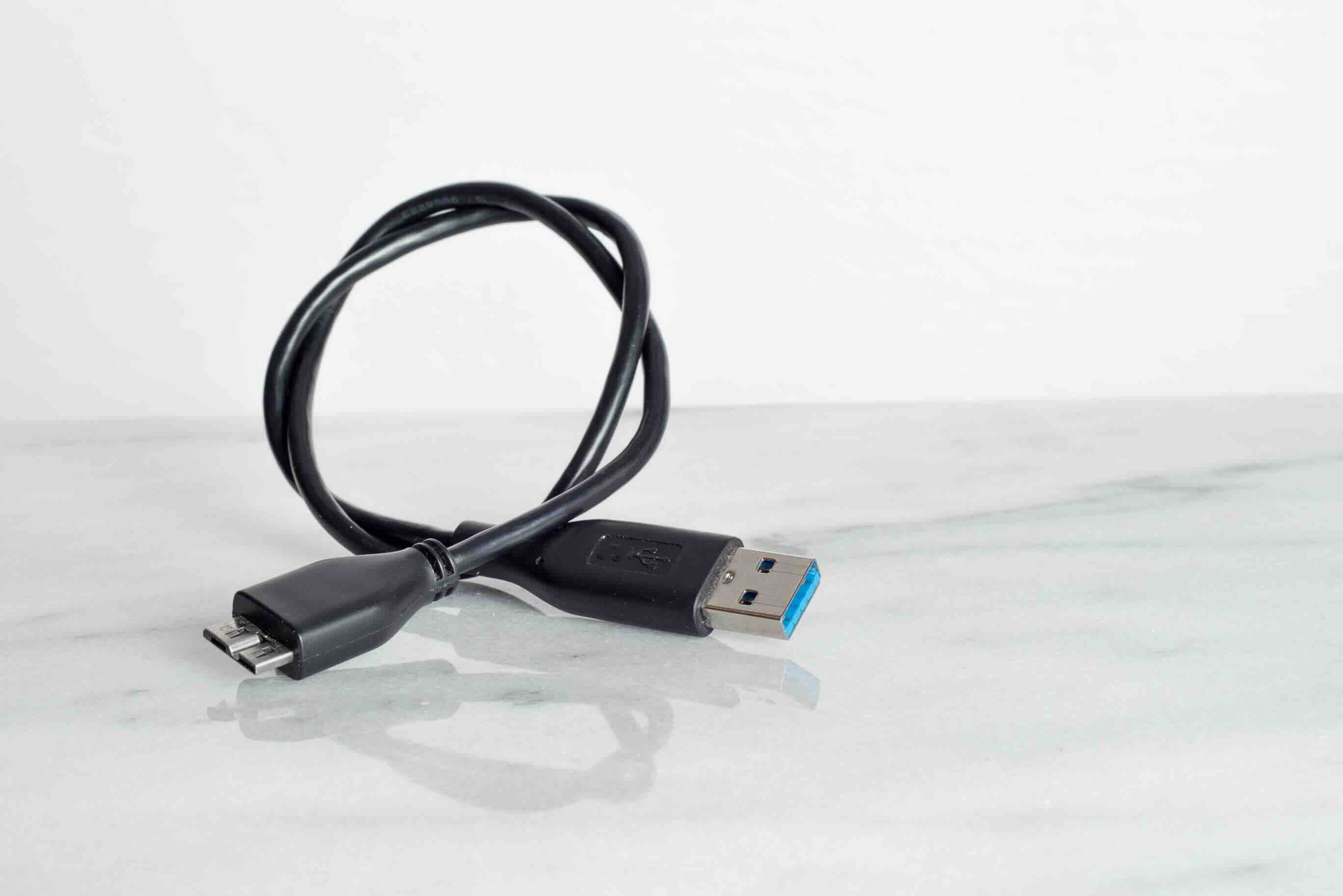
USB has gone through several generations since its introduction in the mid-1990s. Each iteration brought faster data transfer rates, updated connector designs, and improved power delivery. USB 3.0 was the standard that introduced SuperSpeed technology, pushing data transfer rates up to 5 Gbps -- a dramatic leap from USB 2.0's 480 Mbps ceiling. The USB Micro B SuperSpeed connector was developed to bring that USB 3.0 performance to smaller, more compact devices without requiring a full-size Type-A or Type-B port. It is technically specified under USB 3.0 and sometimes referenced as USB 3.1 Gen 1, depending on the branding used by a manufacturer. The connector itself looks like a standard Micro-B plug with an additional section fused alongside it -- a wider, slightly awkward footprint that many users notice right away.
How USB Micro B SuperSpeed Actually Works
The physical design of the USB Micro B SuperSpeed connector combines the legacy USB 2.0 Micro-B layout with an extended section housing the additional data pins required for SuperSpeed communication. This is why the plug looks asymmetrical and wider than a standard Micro-B. Inside the cable and connector, there are separate data pathways for USB 2.0 signals and the SuperSpeed 3.0 signals, which is how backward compatibility is maintained. When you plug a USB Micro B SuperSpeed cable into a USB 2.0 port, the connection falls back to 2.0 speeds. When connected to a USB 3.0-compatible host, the additional pathways activate and deliver the full 5 Gbps throughput. The cable is not doing anything magical -- it is just routing signals through the appropriate pins depending on what the host supports.
Where You Will Actually Encounter This Connector
USB Micro B SuperSpeed ports are most commonly found on external hard drives and SSDs from manufacturers like Seagate, Western Digital, and Toshiba -- especially models released between roughly 2012 and 2019. You will also see them on certain USB 3.0 hubs, digital cameras, and professional measurement or diagnostic equipment. Some industrial and commercial peripherals still use this connector format because legacy compatibility and proven durability matter more in those environments than adopting the newest connector standard. If you manage older AV equipment, lab hardware, or enterprise storage solutions, you have likely dealt with this port. Knowing what cable to reach for is part of working efficiently.
Key Advantages of the USB Micro B SuperSpeed Connector
There are real, practical reasons this connector format was widely adopted and continued to appear on devices for years after its introduction. Understanding those reasons helps explain why it is not something you can completely ignore, even now.
- SuperSpeed data transfer rates up to 5 Gbps for fast file transfers and backups
- Backward compatibility with USB 2.0 ports and devices
- Compact form factor suited for portable hard drives and mobile peripherals
- Widely standardized across external storage from major manufacturers
- Lower cost to implement compared to newer connector standards at the time of adoption
- Durable enough for frequent connection and disconnection cycles in professional environments
Common Drawbacks Worth Knowing
No connector standard is perfect, and USB Micro B SuperSpeed has some genuine limitations that are worth understanding before you stock up on cables or plan an infrastructure around it. The most obvious complaint is the physical design -- that wider, offset plug shape is awkward and the mechanical connection does not feel particularly robust compared to something like USB-C with its snug, reversible fit. The port on the device side is also known to wear out faster than some users expect, particularly on external drives that get plugged in and unplugged frequently. Beyond physical concerns, SuperSpeed Micro-B tops out at 5 Gbps, which is capable for most storage use cases but not adequate if you are moving extremely large files regularly or need the bandwidth headroom that USB 3.2 Gen 2 or USB4 can provide. And of course, the industry has largely moved toward USB-C as the universal standard, which means finding cables and accessories is becoming incrementally harder over time.
USB Micro B SuperSpeed vs. USB-C: Understanding the Shift
It is fair to ask why USB-C has replaced Micro B SuperSpeed as the go-to option for portable devices. USB-C supports far higher data transfer rates, better power delivery up to 240W with the right specification, a reversible connector that eliminates the frustration of wrong-side insertion, and a single port capable of handling data, power, and video simultaneously. USB Micro B SuperSpeed simply cannot match that feature set. However, replacing infrastructure built around older external drives or equipment is not always practical or cost-effective -- especially in business environments where equipment replacement cycles are measured in years, not months. Knowing the difference helps you plan appropriately rather than forcing a premature upgrade.
Practical Tips for Working With USB Micro B SuperSpeed Cables and Devices
If you are managing devices or peripherals that use this connector, a few straightforward practices can extend the life of your hardware and prevent data transfer issues.
- Always use cables specifically rated for USB 3.0 SuperSpeed -- 2.0 cables will work but limit performance significantly
- Check that the host port on your computer or hub is also USB 3.0 to get full 5 Gbps speeds
- Avoid forcing the connector -- the wider Micro B SuperSpeed plug is directional and not reversible
- Keep spare cables on hand since availability may decrease as USB-C continues to dominate
- Inspect the port on external drives periodically for wear, especially on frequently used devices
- Use quality cables to reduce signal interference and ensure reliable data integrity over time
Is USB Micro B SuperSpeed Still Relevant Today
Yes -- conditionally. If your devices use it, it is absolutely still relevant. Millions of external hard drives in active use around the world rely on this connector format, and those drives are not going anywhere until they fail or get replaced. For IT managers, AV integrators, and individuals managing legacy equipment, understanding and sourcing quality USB Micro B SuperSpeed cables is a real operational need. The connector is not cutting-edge, but it remains functional and capable for the workloads it was designed to handle. Dismissing it outright just because USB-C exists is the kind of impractical thinking that leads to unnecessary equipment replacement costs.
Why Monoprice Is the Right Source for Your USB Micro B SuperSpeed Needs
When you need reliable cables and connectivity solutions for existing hardware, quality and value both matter. Monoprice has built a reputation as a dependable source for exactly this kind of practical, high-performance connectivity gear -- without the inflated pricing you find at retail chains or branded accessory companies. Whether you are managing a storage array of legacy external drives or just need a replacement cable for a device you rely on daily, sourcing your cables from a trusted supplier makes a real difference in performance and longevity. Explore the full range of USB 3.0 SuperSpeed cables and high-performance connectivity accessories available at Monoprice to find exactly what your setup requires. The combination of quality manufacturing, thorough specifications, and fair pricing makes Monoprice a practical choice for both individual users and procurement teams managing larger deployments.
Frequently Asked Questions About USB Micro B SuperSpeed
What is USB Micro B SuperSpeed?
USB Micro B SuperSpeed is a connector format used in USB 3.0 devices. It combines the original Micro-B design with an extended section containing additional pins needed for SuperSpeed data transfer rates up to 5 Gbps.
Is USB Micro B SuperSpeed the same as USB 3.0?
Yes. USB Micro B SuperSpeed is the Micro-B form factor connector associated with USB 3.0 and sometimes labeled USB 3.1 Gen 1. The SuperSpeed designation indicates the 5 Gbps data transfer capability introduced with USB 3.0.
Can I use a USB 2.0 Micro-B cable with a USB 3.0 SuperSpeed port?
You can connect a USB 2.0 Micro-B cable to a USB 3.0 SuperSpeed port, but the data transfer speed will be limited to USB 2.0 rates. You will not get the SuperSpeed performance without a cable specifically rated for USB 3.0.
What devices commonly use USB Micro B SuperSpeed?
External hard drives and SSDs from brands like Seagate, Western Digital, and Toshiba are the most common. USB 3.0 hubs, certain digital cameras, and some professional or industrial peripherals also use this connector.
Is USB Micro B SuperSpeed backward compatible with USB 2.0?
Yes. The connector design preserves the USB 2.0 Micro-B pin layout, so devices with USB Micro B SuperSpeed ports can connect to USB 2.0 hosts and cables at reduced speeds.
Why does my USB Micro B SuperSpeed cable look wider than a regular Micro-B cable?
The wider appearance comes from the additional connector section housing the SuperSpeed data pins. The plug is essentially a Micro-B connector with an extended housing fused alongside it to accommodate the extra pin contacts required for USB 3.0 operation.
How fast is USB Micro B SuperSpeed?
USB Micro B SuperSpeed supports data transfer rates up to 5 Gbps under the USB 3.0 specification. This is significantly faster than USB 2.0, which maxes out at 480 Mbps.
Will USB Micro B SuperSpeed work with USB-C ports?
Not directly. You would need an appropriate adapter to connect a USB Micro B SuperSpeed device to a USB-C port. The adapter must support USB 3.0 data speeds to preserve performance, not just handle the physical connection.
Is it worth replacing USB Micro B SuperSpeed devices with USB-C alternatives?
It depends on your needs. If your current devices are functioning well and 5 Gbps transfer speeds meet your requirements, replacement is not necessary. If you need faster speeds, better power delivery, or universal compatibility, upgrading to USB-C devices is a worthwhile consideration.
Are USB Micro B SuperSpeed cables still available to buy?
Yes, they remain available from quality connectivity suppliers. While USB-C has become the dominant standard for new devices, USB Micro B SuperSpeed cables continue to be sold to support the large installed base of external drives and legacy peripherals still in active use.