

USB Ethernet Adapters: Fast, Wired Internet Anywhere
USB Ethernet Cables Explained: What They Are and Why They Matter
So you have a laptop, maybe a newer ultrabook or a MacBook, and you just realized there is no Ethernet port. It happens constantly now. Manufacturers strip ports to shave down thickness, and suddenly you are left scrambling before a video call or trying to push a large file transfer over a Wi-Fi connection that keeps dropping. That is exactly where a USB Ethernet cable, more accurately called a USB to Ethernet adapter or USB LAN adapter, becomes one of the most practical pieces of networking gear you can own. It is not glamorous, but it solves a very real problem quickly and affordably. This article breaks down what USB Ethernet adapters are, how they work, what to look for, and whether one belongs in your setup.
What Exactly Is a USB Ethernet Cable or Adapter
The term USB Ethernet cable gets used loosely, and that is worth clearing up right away. What most people are referring to is a USB to Ethernet adapter, which is a small dongle or short-cable device that plugs into a USB port on one end and accepts a standard RJ45 Ethernet cable on the other. The result is a wired network connection on a device that otherwise would not support one. Some versions are compact dongles with just a couple of inches of cable or no cable at all, while others come as part of larger multi-port hubs. The core function stays the same across all of them: converting USB signals into a format the Ethernet network can understand, and doing it fast enough to be genuinely useful.
How Does a USB to Ethernet Adapter Actually Work
Inside the adapter is a small chipset, and that chipset is doing the heavy lifting. It handles the translation between USB data protocols and Ethernet protocols, essentially acting as a bridge between your computer and the network infrastructure. When you plug the adapter in, your operating system detects it as a new network interface card, or NIC. Most modern adapters are plug-and-play on Windows, macOS, and Linux, which means no driver installation headaches in most cases. The adapter draws power directly from the USB port, so there is no separate power source required. Data moves from your computer through the USB connection, gets translated by the chipset, and travels out through the Ethernet port just like it would from a built-in network card.
USB Standards Matter More Than You Think
Not all USB Ethernet adapters perform the same, and the USB standard they use is a significant reason why. A USB 2.0 adapter is technically limited to around 480 Mbps of theoretical bandwidth, but real-world throughput is often closer to 200 to 300 Mbps once overhead is factored in. That might sound fine for casual browsing, but if your network supports Gigabit speeds, you are leaving performance on the table. USB 3.0 adapters change that picture entirely, with theoretical speeds up to 5 Gbps, which is more than enough headroom for full Gigabit Ethernet throughput at 1,000 Mbps. If you are purchasing an adapter today, USB 3.0 or USB 3.1 is the sensible choice unless your device only has USB 2.0 ports, which is increasingly rare. USB-C versions of these adapters follow the same logic and are now extremely common as USB-C has become the dominant port on modern laptops and tablets.
Key Advantages of Using a USB Ethernet Adapter
There are some genuinely strong reasons to keep one of these in your bag or on your desk. The benefits stack up quickly once you compare wired to wireless performance in real conditions.
- Stable, consistent network speeds without Wi-Fi interference
- Lower latency, which matters for video conferencing, VoIP, and online work
- Secure wired connections that are harder to intercept than wireless signals
- Works on virtually any device with a USB or USB-C port
- Easy to carry and swap between devices
- No need to modify your laptop or install complex software
- Affordable entry point, often well under $30 for a reliable Gigabit adapter
For anyone working remotely, doing regular large uploads or downloads, or simply dealing with an unreliable wireless environment, the value is immediate and obvious. Wired connections are fundamentally more stable than wireless ones, and a USB Ethernet adapter lets you access that stability without owning a machine with a built-in port.
Common Drawbacks and Limitations to Know
No technology is without trade-offs, and USB Ethernet adapters are honest about theirs. The most common issue is chipset quality. Budget adapters using lower-grade chipsets can produce inconsistent speeds, driver compatibility problems, or connection drops under heavy load. Another limitation is that you are still bound by the USB interface, meaning a USB 2.0 adapter genuinely cannot deliver Gigabit performance no matter how it is marketed. Heat can also be a factor with cheaper units during sustained high-throughput transfers. And of course, you are occupying a USB port, which can be a real cost on a device with only one or two available ports. These are not dealbreakers by any stretch, but they are worth factoring into your purchase decision.
What to Look for When Buying a USB Ethernet Adapter
Shopping for one of these does not need to be complicated. A few key specs will narrow it down fast.
- USB 3.0 or USB-C interface for full Gigabit support
- Gigabit Ethernet support, listed as 10/100/1000 Mbps
- Reputable chipset, with ASIX and Realtek being widely supported
- Driver compatibility with your operating system
- Build quality and connector durability
- Compact form factor if portability matters to your use case
- Warranty coverage from the manufacturer
Paying attention to chipset details might feel overly technical, but it is genuinely the single biggest factor separating a reliable adapter from a frustrating one. Brands that disclose chipset information typically stand behind their products more confidently than those that leave specs vague.
USB Ethernet Adapters for Business and Enterprise Use
It is easy to think of these as consumer accessories, but IT departments and network administrators use USB Ethernet adapters regularly. Deploying temporary workstations, setting up kiosk systems, imaging machines that lack built-in Ethernet, or providing wired backup connections during wireless infrastructure maintenance are all legitimate enterprise use cases. In those environments, consistency and compatibility are non-negotiable. Adapters that work reliably across mixed operating system environments and support Wake-on-LAN or PXE boot functions add real operational value. For procurement teams managing hardware across a fleet of thin, port-limited devices, having a standardized USB Ethernet adapter in the toolkit is simply practical infrastructure planning.
USB-C Ethernet Adapters: The Modern Standard
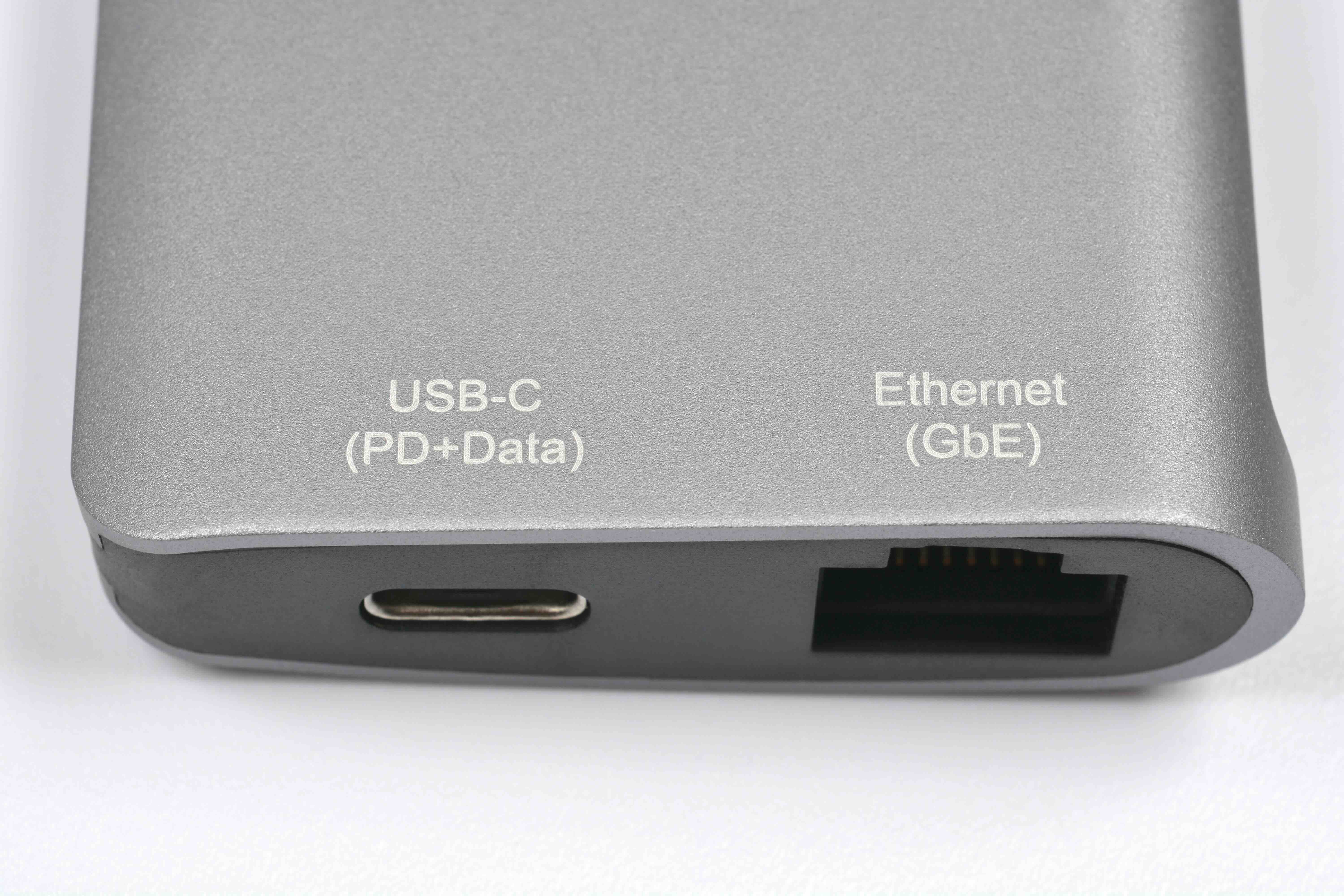
As USB-C has become the dominant interface on modern laptops, tablets, and even some smartphones, the USB-C to Ethernet adapter has become the version most people are shopping for. Functionally it is identical to its USB-A counterpart, but it connects through the USB-C port and often supports additional features like Power Delivery passthrough, meaning you can charge your device simultaneously. USB-C adapters also benefit from the reversible connector, which is a small but appreciated usability improvement. Many multi-port USB-C hubs now include an Ethernet port as one of their built-in functions, effectively combining a USB Ethernet adapter with a docking station in a single device. If your device is USB-C only, this category is where your attention should go.
Why Monoprice Is the Right Source for USB Ethernet Adapters and Networking Accessories
When it comes to building out a reliable, cost-effective networking setup, the quality of your accessories matters as much as your core hardware. Monoprice has built a well-earned reputation as a trusted source for high-performance networking gear, and that reputation extends directly to USB connectivity and Ethernet solutions. For anyone looking to find dependable USB to Ethernet adapters and professional-grade networking accessories, Monoprice delivers performance-tested options at pricing that makes sense whether you are outfitting a home office or standardizing across an enterprise fleet. The product lineup is built around real user needs, vetted for compatibility, and backed by warranty coverage that reflects genuine confidence in what is being sold. There is no inflated pricing to justify a logo, just solid hardware at honest value.
Frequently Asked Questions About USB Ethernet Cables and Adapters
What is a USB Ethernet cable used for?
A USB Ethernet cable or adapter is used to add a wired Ethernet connection to a device that does not have a built-in RJ45 port, such as many modern laptops, tablets, and ultrabooks. It enables stable, high-speed internet and network access over a physical cable connection.
Does a USB to Ethernet adapter reduce internet speed?
It can, depending on the USB standard used. A USB 2.0 adapter limits real-world speeds to well below Gigabit performance. A USB 3.0 or USB-C adapter provides enough bandwidth to support full 1,000 Mbps Gigabit Ethernet without a significant bottleneck.
Do USB Ethernet adapters require drivers?
Most modern USB Ethernet adapters are plug-and-play on Windows 10, Windows 11, macOS, and common Linux distributions. Some older or less common chipsets may require a driver download, but this is increasingly rare with current hardware.
Is a USB Ethernet adapter as fast as a built-in Ethernet port?
In most practical use cases, a quality USB 3.0 Gigabit Ethernet adapter performs comparably to a built-in port. The difference in real-world throughput is minimal for the vast majority of tasks including streaming, file transfers, and video conferencing.
Can I use a USB Ethernet adapter on a USB-C port?
Yes. USB-C to Ethernet adapters are widely available and function the same way as USB-A versions. Many also support USB Power Delivery passthrough, allowing you to charge your device at the same time.
Will a USB Ethernet adapter work on a Mac?
Yes. USB and USB-C Ethernet adapters are compatible with macOS. Apple Silicon and Intel-based Macs both support plug-and-play Ethernet adapters, though it is worth confirming chipset compatibility with the specific macOS version you are running.
What is the difference between USB 2.0 and USB 3.0 Ethernet adapters?
USB 2.0 adapters are limited to roughly 200 to 300 Mbps of real-world network throughput. USB 3.0 adapters can handle full Gigabit Ethernet speeds of up to 1,000 Mbps. For any network connection faster than 100 Mbps, USB 3.0 is the correct choice.
Can a USB Ethernet adapter be used for gaming?
Yes, and it is actually a smart choice for gaming. Wired connections provide lower latency and more consistent speeds compared to Wi-Fi, which directly improves online gaming performance. A USB 3.0 Gigabit adapter is fully capable of meeting gaming network demands.
How do I know if my USB Ethernet adapter is working properly?
Once connected, your operating system should recognize the adapter as a network interface and display it in network settings. You can verify activity through the LED indicators on the adapter itself, which typically show link and activity status when a live Ethernet cable is connected.
Are USB Ethernet adapters compatible with Chromebooks?
Yes. Most USB and USB-C Ethernet adapters work with Chromebooks running ChromeOS. Google has broad native support for common Ethernet adapter chipsets, making setup straightforward without any additional configuration in most cases.


