

USB-A Power Cords: What They Are and Why They Matter
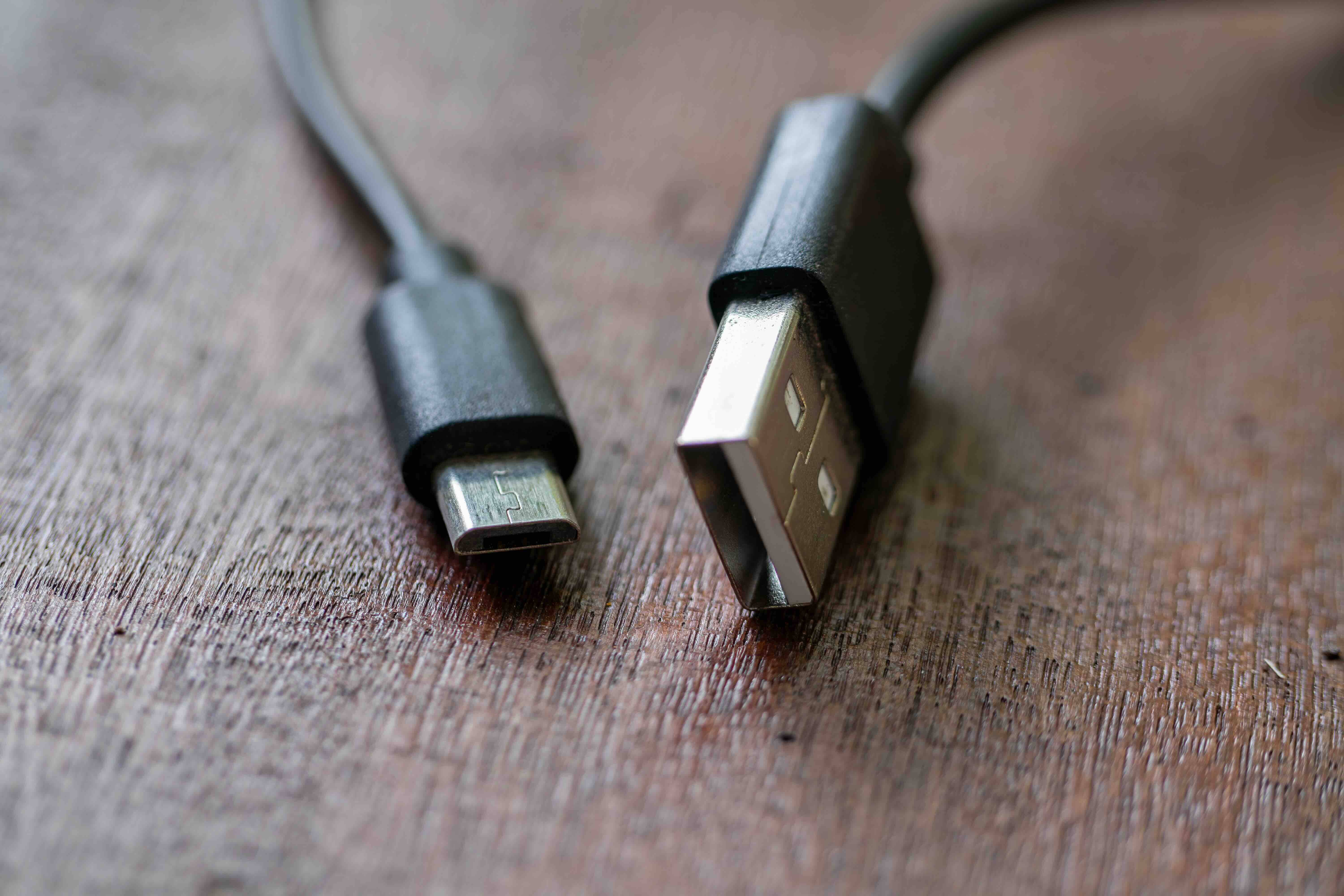
What Is a USB-A Power Cord and Why Does It Still Matter?
If you have ever charged a phone, powered a small fan on your desk, or plugged in a Bluetooth speaker, there is a pretty good chance you have already used a USB-A power cord without thinking much about it. USB-A is that flat, rectangular connector that has been everywhere for the past two decades. It is one of the most recognized connector types in consumer electronics, and despite the growing presence of USB-C, USB-A is still deeply embedded in how people power and charge their devices every single day. Understanding what a USB-A power cord actually does, how it works, and where it fits into your current setup can save you a lot of frustration when buying new gear or troubleshooting what you already own.
A Quick History of the USB-A Connector
USB, which stands for Universal Serial Bus, was introduced in the mid-1990s as an effort to standardize how peripherals connected to computers. Before USB, you had serial ports, parallel ports, and a whole collection of proprietary connectors that made compatibility a constant headache. USB-A specifically became the host-side connector, meaning it is the port you find on computers, wall adapters, and power banks. It is the upstream end of the cable. Since its introduction, USB-A has gone through several generations, including USB 1.1, USB 2.0, USB 3.0, USB 3.1, and USB 3.2, each increasing data transfer speeds while largely keeping that same familiar rectangular form factor. Even as USB-C becomes the new standard, USB-A remains relevant because so many devices, hubs, chargers, and accessories still rely on it.
How a USB-A Power Cord Actually Works
A USB-A power cord is designed to carry both power and, in many cases, data between a host device and a connected peripheral. The connector itself has four pins inside: two for power delivery and two for data transfer. When you are using the cable purely for charging, the power pins are doing all the work, delivering voltage and current from a power source to the device being charged. A standard USB-A port typically outputs 5 volts, with the current varying depending on the charging standard in use. Basic USB-A ports deliver around 0.5 amps, while dedicated charging ports can push 1 amp, 2 amps, or more. If a cable or charger supports a fast charging protocol like Qualcomm Quick Charge, it can negotiate higher power delivery through the data pins. The cable itself needs to be built well enough to handle the current without excessive resistance, which is why cable quality genuinely matters.
Common Types of USB-A Power Cables You Will Encounter
Not all USB-A cables are built for the same job. Here is a breakdown of the most common types you will run into:
- USB-A to USB-B: commonly used with printers, scanners, and older external hard drives
- USB-A to Micro-USB: a staple for Android phones, older Bluetooth accessories, and gaming controllers
- USB-A to Mini-USB: found in older cameras, GPS units, and early media players
- USB-A to USB-C: increasingly common as newer devices adopt USB-C while chargers still use USB-A ports
- USB-A to Lightning: used with Apple devices across several product generations
- USB-A Extension Cables: male-to-female cables that extend the reach of an existing USB-A port
Each of these cable types serves a distinct purpose, and knowing which one you need before you buy saves time and eliminates the frustration of incompatible connections. The USB-A end is always the same, but the device-side connector varies significantly depending on the product era and manufacturer choices.
Key Advantages of Using USB-A Power Cords
There is a reason USB-A has stayed in the conversation for so long. The format is remarkably practical. Backward compatibility is probably the biggest benefit. A USB-A cable that works with a USB 2.0 port will still plug into a USB 3.0 port without issue. That kind of flexibility has real value when you are managing a mixed environment of older and newer devices. USB-A chargers and wall adapters are also widely available and generally affordable, which matters when you need to outfit a workspace, a hospitality environment, or a classroom. The connector itself is durable and has been extensively tested across billions of devices. For low-power applications like charging wireless earbuds, desk lamps, small fans, or LED strips, USB-A delivers reliable, stable power without any complexity. If your application does not require the higher wattage of USB-C Power Delivery, USB-A gets the job done cleanly.
Common Drawbacks and Limitations to Know
Being honest here is important. USB-A does have real limitations that are worth understanding before making purchasing decisions. The connector is not reversible, which means you will flip it the wrong way at least once before getting it right, every single time. Power delivery through USB-A is capped compared to what USB-C can handle, making it less suitable for charging laptops or high-demand devices quickly. Data transfer speeds, even with USB 3.2, lag behind what Thunderbolt and USB-C configurations can achieve for demanding workloads. There is also the durability concern with lower-quality cables, specifically thin gauge wiring and weak strain relief that can degrade over time. The technology itself is aging, and device manufacturers are actively phasing out USB-A ports in newer laptop and phone designs. None of this means USB-A is obsolete today, but it does mean that understanding its ceiling helps you plan smarter purchases for the long term.
How to Choose the Right USB-A Cable for Your Needs
Cable quality has a direct impact on performance and longevity. When evaluating USB-A power cords, there are several practical factors to weigh:
- Current rating: look for cables rated for the amperage your device actually needs
- Wire gauge: lower AWG numbers mean thicker wires and better power handling
- Shielding: braided or foil shielding reduces interference and improves durability
- Connector quality: robust strain relief and solid contacts extend cable lifespan
- Certification: certified cables meet verified performance and safety standards
- Length: longer cables can introduce resistance, so match length to actual need
For everyday charging tasks, a quality USB-A cable rated at 2.4 amps is usually sufficient. If you are running a more demanding setup or need data transfer alongside power, pay closer attention to the cable's rated speed and gauge. Spending a little more on a well-made cable upfront typically saves money in the long run because cheap cables fail faster and sometimes cause charging inconsistencies.
USB-A vs. USB-C: Understanding When Each Makes Sense
This comparison comes up constantly, and it is worth addressing directly. USB-C is the future. It is reversible, supports higher power delivery, handles faster data speeds, and is being adopted across virtually every new product category. But USB-A is the present for a huge portion of installed devices. If you have a drawer full of USB-A chargers, a computer with USB-A ports, and devices that still use Micro-USB or Lightning connectors, switching entirely to USB-C overnight is neither practical nor necessary. A USB-A to USB-C cable is one of the most useful cables you can own right now because it bridges both worlds. The smart approach is to maintain a practical inventory of USB-A cables for your current devices while gradually incorporating USB-C into your setup as you upgrade hardware. There is no hard deadline for retiring USB-A from your life.
Why Monoprice Is the Right Source for USB-A Power Cords
Here is where it comes together. If you are looking for reliable, well-built USB-A power cords without paying inflated prices for brand recognition, Monoprice is the practical answer. Monoprice has built its reputation on delivering high-performance cables and accessories that meet real-world demands without the unnecessary markup. Whether you need a basic USB-A to Micro-USB cable for a quick charge setup or a higher-gauge cable for a demanding peripheral, the product lineup covers the range with quality that holds up. The cables are constructed with attention to conductor quality, connector integrity, and strain relief, which means you are not replacing them every few months. For anyone managing multiple devices, setting up a workstation, or simply trying to keep things charged and running reliably, finding high-quality USB-A power cords and charging cables through Monoprice is a straightforward decision that aligns performance with value.
Frequently Asked Questions About USB-A Power Cords
What does USB-A stand for?
USB-A stands for Universal Serial Bus Type A. It refers to the flat, rectangular connector that serves as the host or upstream end of a USB connection, typically found on computers, wall chargers, and power banks.
Can I use a USB-A cable for fast charging?
Yes, depending on the cable and charger. USB-A cables can support fast charging protocols like Qualcomm Quick Charge if both the charger and connected device support the same protocol. The cable must also be rated to carry the required current.
Is USB-A slower than USB-C for data transfer?
In most practical comparisons, USB-C supports faster data transfer speeds, especially with USB 3.2 Gen 2 or Thunderbolt configurations. USB-A 3.0 and 3.2 are still capable for many tasks, but USB-C has a higher ceiling.
Why does my USB-A cable charge slowly?
Slow charging is usually caused by a cable with thin wire gauge, a charger with low amperage output, or a port that limits power delivery. Using a quality cable and a charger rated for your device's requirements will improve charging speed.
Can I plug a USB-A cable into a USB-C port?
Not directly. USB-A and USB-C connectors are physically incompatible. You would need a USB-A to USB-C cable or an adapter to connect a USB-A device to a USB-C port.
Are all USB-A cables the same?
No. USB-A cables vary significantly in wire gauge, current rating, shielding, data transfer speed rating, and build quality. A cable designed for USB 2.0 data transfer will not perform the same as one rated for USB 3.0 speeds.
How long can a USB-A cable be before it loses performance?
For USB 2.0, cable lengths up to 5 meters are generally reliable. For USB 3.0 and higher, performance can degrade beyond 3 meters without active signal boosting. For power-only applications, shorter cables with lower resistance are preferable.
Is USB-A going to become obsolete?
USB-A is being phased out in newer devices, but it remains widely used and supported across billions of existing products. It will not disappear overnight, and USB-A cables and chargers will remain relevant for years to come in mixed-device environments.
What is the maximum power output of a USB-A port?
Standard USB-A ports output 5 volts at 0.5 amps for basic USB 2.0 ports. Dedicated charging ports can deliver up to 2.4 amps at 5 volts. With Quick Charge support, voltage can vary higher, but USB-A is still limited compared to USB-C Power Delivery.
What should I look for in a quality USB-A power cord?
Look for a cable with a lower AWG wire gauge for better current handling, sturdy strain relief at both connectors, proper shielding, and a current rating that matches your device requirements. Certified cables from reputable brands offer the most consistent and safe performance.


