Serial Printer Cables: RS-232 Connectivity That Works
What Is a Serial Printer Cable and Why Does It Still Matter?
Some technologies quietly outlast the hype cycles. Serial printer cables are a good example of that. Most people working in modern offices assume everything runs on USB or wireless at this point, and for a lot of setups that is absolutely true. But serial communication -- specifically RS-232 -- has not gone anywhere, not entirely. Industrial environments, point-of-sale systems, legacy printers, and certain specialized hardware still rely on serial connections to function. If you have ever tried to get an older printer running and hit a wall, there is a reasonable chance a serial cable is sitting somewhere in that equation. Understanding what this cable actually does, and whether it fits your situation, saves time and frustration.
Serial Communication Explained: The Foundation Behind the Cable
To understand the serial printer cable, you have to understand serial communication itself. Unlike parallel communication, which sends multiple bits of data simultaneously across multiple wires, serial communication transmits data one bit at a time over a single channel. That might sound slower in theory, but serial protocols are simpler, more reliable over longer distances, and far less susceptible to signal interference. The RS-232 standard, which governs most serial printer connections, was formally introduced in the 1960s and has been refined over decades. It defines voltage levels, signal timing, connector types, and data transfer logic. The DB9 and DB25 connectors you see on serial cables come directly out of that specification. Serial data travels through the cable in a defined sequence, and the receiving device reassembles those bits into usable information. It is a slower handshake than modern USB, but for many applications, speed is not the primary concern -- reliability and compatibility are.
What Does a Serial Printer Cable Actually Look Like?
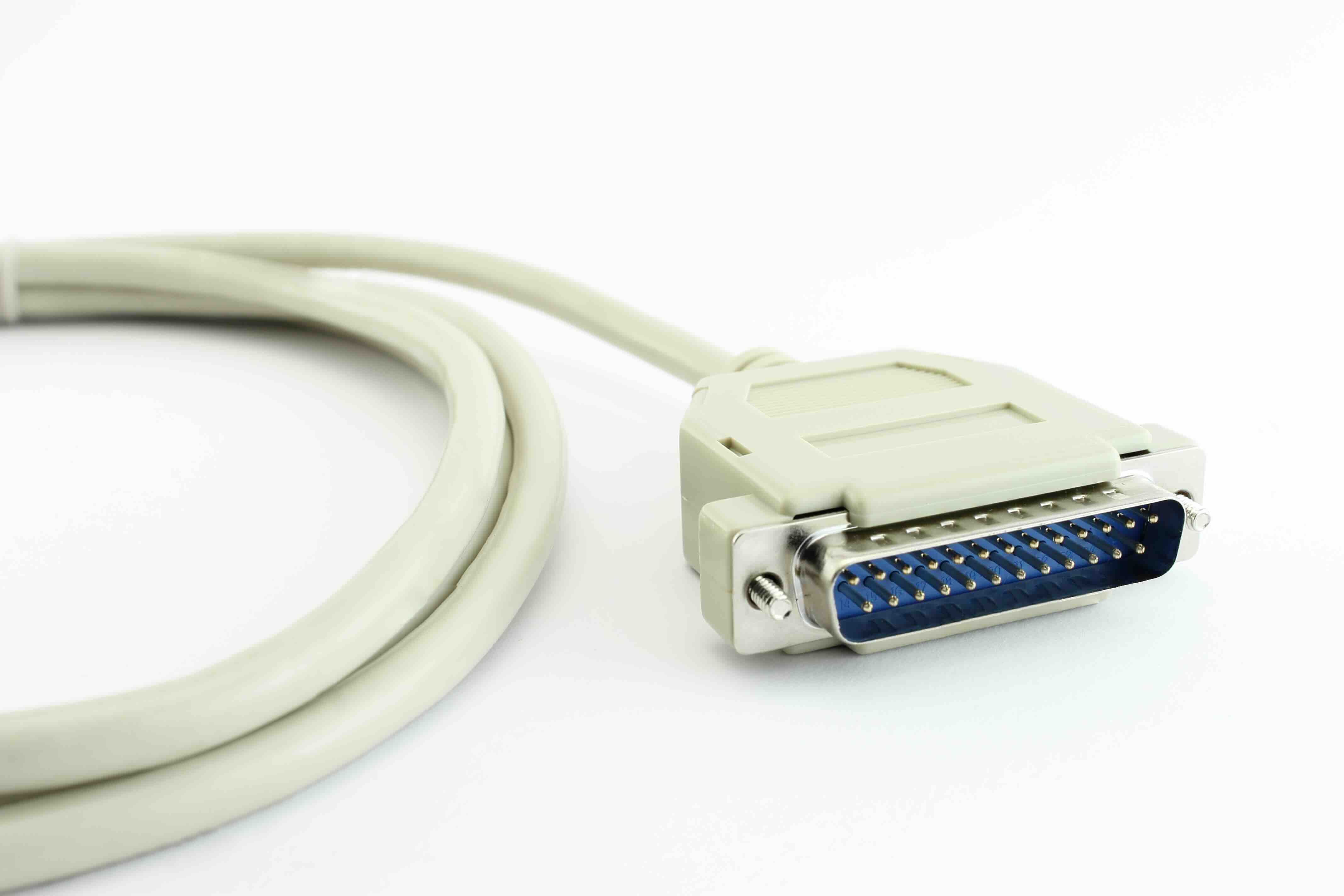
Serial printer cables typically use D-sub connectors, most commonly DB9 or DB25 configurations. The DB9 connector has nine pins arranged in two rows, while the DB25 has twenty-five. Both use a trapezoidal metal housing that locks into place on the device port. On most setups, one end connects to the computer or controller, and the other connects to the printer. The cable itself carries multiple conductors inside the shielding, each mapped to a specific RS-232 signal line such as transmit data, receive data, request to send, and clear to send. Some serial printer cables are wired as straight-through connections, meaning pin assignments match directly from one end to the other. Others are null modem cables, which cross certain signal lines to allow two devices to communicate as if an intermediary modem were present. Knowing which type you need matters, because using the wrong one will result in no communication at all.
Key Advantages of Using a Serial Printer Cable
There are real reasons serial connections persist in certain industries, and it is worth being specific about them.
- Stable, deterministic communication with minimal protocol overhead
- Long cable runs without signal degradation, often up to 50 feet or more with proper shielding
- Wide compatibility with legacy printers, industrial controllers, and embedded systems
- Resistance to electromagnetic interference compared to some other interface types
- Simple hardware implementation with low system resource requirements
- Broad support in point-of-sale terminals, medical devices, and manufacturing equipment
For businesses running environments where older printers are integrated into larger operational systems, replacing those printers is often not practical. The cost and disruption of upgrading the entire infrastructure outweigh the inconvenience of maintaining serial connections. In those contexts, a quality serial printer cable is not a stopgap -- it is the right tool for the job.
Drawbacks and Limitations Worth Knowing
Being honest about the limitations here is just as important as recognizing the strengths. Serial printer cables are not a universal solution, and in many modern setups, they introduce friction rather than resolve it.
- Lower data transfer speeds compared to USB 2.0 or USB 3.0 connections
- Most modern computers no longer include native RS-232 serial ports
- Driver and adapter compatibility can be inconsistent depending on the operating system
- Cable length still has practical limits, typically requiring signal boosters beyond 50 feet
- Configuration settings like baud rate and parity must match on both ends or communication fails
- Limited plug-and-play support means manual configuration is often required
The absence of native serial ports on modern PCs is probably the most common friction point. USB-to-serial adapters address this gap, but they add a layer of complexity and can introduce driver-related issues, particularly across different versions of Windows or in Linux environments. Anyone deploying serial printer connections at scale needs a reliable adapter solution alongside the cable itself.
Common Use Cases for Serial Printer Cables Today
Walk into a retail store, a hospital intake desk, or a warehouse shipping station, and there is a meaningful chance a serial printer is involved in that workflow somewhere. Receipt printers in older point-of-sale systems, label printers in logistics environments, and ticket printers in service industries frequently use RS-232 serial interfaces. Industrial control systems often communicate with printers that log operational data or print barcodes for parts tracking. Even some network equipment uses serial connections for console access and local printing functions. These applications are not going away quickly. The installed base is large, the hardware is often reliable, and the operational cost of swapping to a completely different interface type can be significant. Serial printer cables are a practical solution in every one of these contexts.
How to Choose the Right Serial Printer Cable
Selecting the correct serial printer cable requires attention to a few specific details that are easy to overlook. Start with the connector type on both your printer and your host device -- confirm whether you need DB9 or DB25 on each end. Determine whether a straight-through or null modem wiring configuration is required by checking the printer documentation or the technical specifications for your controller. Cable length matters too; measure the actual run distance and build in some slack rather than cutting it too close. Shielding quality affects signal integrity, especially in environments with motors, fluorescent lighting, or other electrical noise sources. And if your host system lacks a native serial port, factor in the USB-to-serial adapter and verify driver support for your operating system before purchasing. Getting all of these details right upfront prevents the kind of troubleshooting that eats hours out of a deployment schedule.
Serial Printer Cables Versus USB and Network Printer Connections
The comparison between serial, USB, and networked printing connections comes up often, and the answer is genuinely context-dependent. USB is faster, simpler to configure, and natively supported on virtually every modern computer. Networked printing offers centralized management and supports multi-user access across an organization. For new installations where legacy compatibility is not a factor, USB or network-based printing almost always makes more practical sense. But serial connections win on simplicity and determinism in environments where the hardware is already in place and changing the interface type would require replacing functional equipment. There is no single winner here -- the right answer depends on the operational environment, the existing infrastructure, and the total cost of making a change. Serial printer cables fill a specific, well-defined role, and they fill it well when used appropriately.
Why Monoprice Is a Smart Source for Serial Printer Cables and Legacy Connectivity Solutions
When you are sourcing connectivity hardware for a deployment that depends on precision and reliability, the quality of the cable itself is not something to leave to chance. Monoprice has built a reputation for delivering high-performance cables and connectivity products at prices that make sense for both individual users and large-scale procurement teams. The product lineup covers the full range of serial connectivity needs, from standard DB9 serial cables to USB-to-serial adapters and null modem configurations. Whether you are maintaining a legacy print environment or building out a new industrial control setup that requires serial communication, serial printer cables and RS-232 connectivity solutions from Monoprice offer a cost-effective path to reliable performance without overpaying for the brand name on the box. That value-first approach is not just a positioning statement -- it reflects a real commitment to making professional-grade hardware accessible to everyone from solo integrators to enterprise procurement teams.
Frequently Asked Questions About Serial Printer Cables
What is a serial printer cable used for?
A serial printer cable connects a printer to a computer or controller using an RS-232 serial interface, transmitting data one bit at a time. It is commonly used in point-of-sale systems, industrial equipment, and legacy printing environments where USB or network connections are not supported or practical.
What is the difference between a DB9 and DB25 serial connector?
A DB9 connector has nine pins and is the most common serial connector found on modern serial devices and adapters. A DB25 connector has twenty-five pins and was more prevalent in older equipment. Both follow the RS-232 standard but are physically incompatible without an adapter.
What is the difference between a straight-through and null modem serial cable?
A straight-through serial cable passes each signal pin directly through to the same pin on the opposite end. A null modem cable crosses specific signal lines to allow two DTE devices, such as a computer and a printer, to communicate directly without a modem in between. Using the wrong type will prevent communication.
How long can a serial printer cable be before signal quality degrades?
RS-232 serial cables can typically run up to 50 feet at standard baud rates without significant signal loss. Longer runs are possible at lower baud rates or with signal boosters, but for most printer applications, keeping the cable run within 50 feet is the recommended practice.
Do modern computers support serial printer cables?
Most modern computers do not include native RS-232 serial ports. However, USB-to-serial adapters allow users to add serial connectivity to any system with an available USB port. Driver compatibility with the operating system should be verified before selecting an adapter.
What baud rate should I use for a serial printer connection?
The baud rate must match on both the host device and the printer. Common rates for serial printers include 9600, 19200, and 38400 baud. Check the printer documentation and the software or controller configuration to confirm the correct setting before establishing a connection.
Can I use a serial printer cable with a modern receipt printer?
Some modern receipt printers include a serial interface alongside USB or Ethernet options. If your printer has an RS-232 port and your system supports serial communication through a native port or adapter, a serial printer cable is a fully functional connection method even on current hardware.
What causes a serial printer connection to fail?
Common causes include mismatched baud rate or parity settings, using the wrong cable type such as straight-through when null modem is required, driver issues with USB-to-serial adapters, damaged connectors, or incorrect COM port assignment in the operating system or software configuration.
Is a serial printer cable the same as a parallel printer cable?
No. A serial printer cable transmits data one bit at a time over a single channel using the RS-232 standard. A parallel printer cable transmits multiple bits simultaneously across multiple wires using the IEEE 1284 standard. They are electrically and physically different and not interchangeable.
Are serial printer cables still being manufactured?
Yes. Serial printer cables remain in active production because demand from industrial, medical, retail, and legacy computing environments continues. Reputable connectivity suppliers like Monoprice carry a range of serial cable configurations to support both new deployments and replacement needs in existing infrastructure.