

S-Video Port Guide: What It Is and Why It Matters
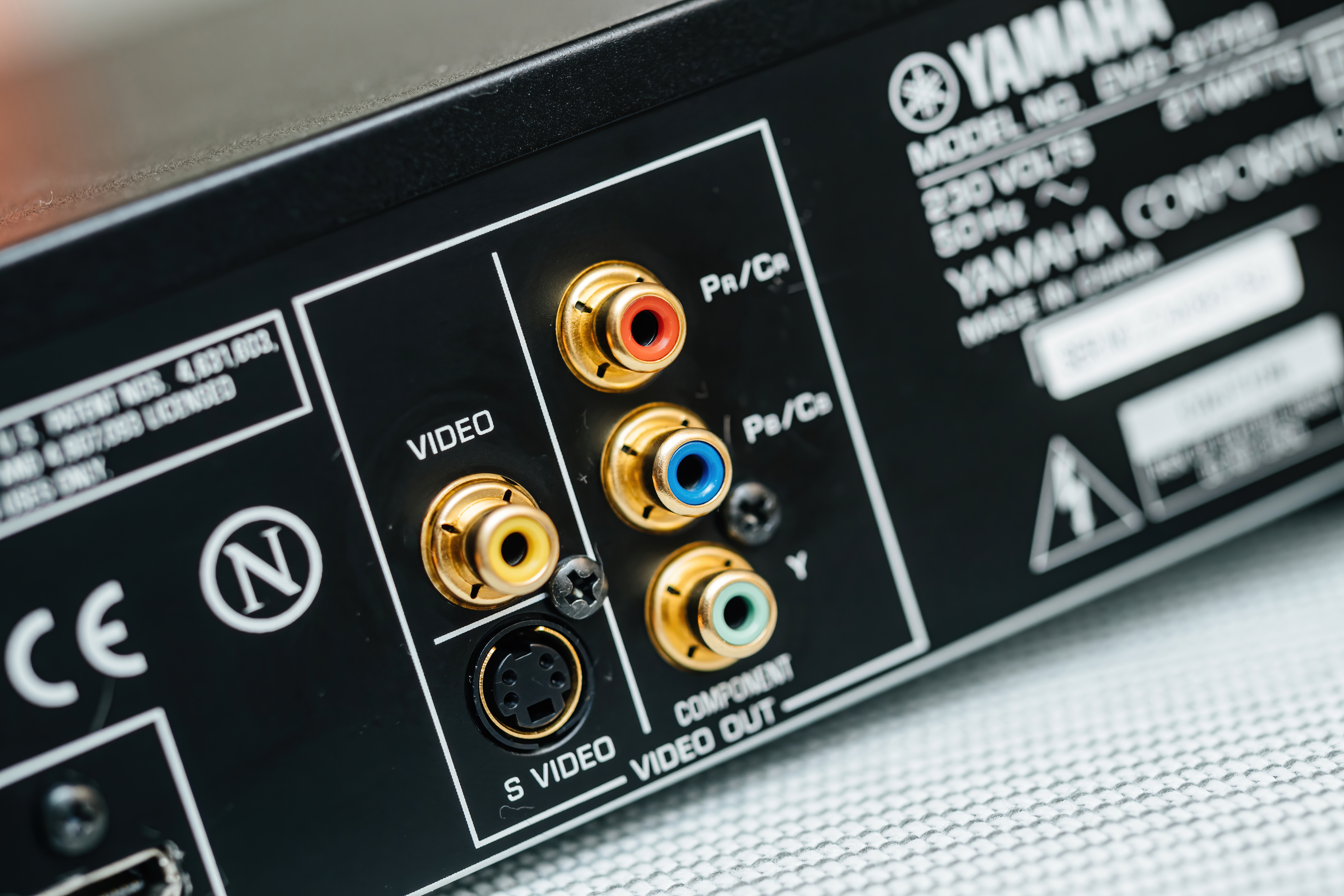
What Is an S-Video Port and Why Does It Still Matter?
S-Video, short for Separate Video, is an analog video interface that transmits picture data by dividing it into two separate signal components: luminance, which handles brightness and detail, and chrominance, which carries color information. That separation is kind of the whole point. By keeping those two channels apart, S-Video avoids the color bleed and muddiness that plagued older composite video connections, where everything was crammed into a single wire. The result is a noticeably cleaner image, especially on standard-definition content. If you have ever gone back and forth between composite and S-Video on an older CRT television, the difference is real and immediate. S-Video was a practical, meaningful step forward in consumer video quality during its time, and understanding it helps you make smarter decisions when dealing with legacy equipment, retro gaming setups, or older AV infrastructure.
A Brief History of S-Video Technology
S-Video was developed by JVC in the 1980s as part of the S-VHS format and quickly became a widely adopted standard across consumer electronics. Through the late 1980s and into the 2000s, it showed up on VCRs, DVD players, camcorders, game consoles, projectors, and televisions of all kinds. The Nintendo 64, PlayStation 2, and original Xbox all supported S-Video output, which made it a staple connection type in living rooms and media rooms for well over a decade. Broadcast and production environments used it too, though higher-end facilities often stepped up to component video or SDI. S-Video occupied a comfortable middle ground between entry-level composite and more demanding professional formats. It held that space for a long time before HDMI and digital connections made it largely obsolete in new equipment, though the installed base remains enormous.
How the S-Video Port Actually Works
The S-Video connector itself is a small, round DIN-style plug. Most consumer S-Video connectors are 4-pin, though 7-pin variants exist with additional functionality. The four pins carry two ground references and the two signal channels, Y for luminance and C for chrominance. When video content is processed for S-Video output, the encoding stage keeps those two elements separated through the transmission path rather than combining them like composite does or encoding them with full RGB separation like component video. The receiving device, a television, monitor, or capture card, then decodes those two channels into a displayable image. The process is entirely analog and does not carry audio, which means you always need separate audio cables alongside S-Video. That is worth knowing before you start pulling cables and wondering why there is no sound. The port itself is somewhat fragile due to its pin arrangement, so handling it carefully matters.
Key Advantages of Using S-Video Connections
There are genuine, practical reasons S-Video stayed relevant for so long, and some of those reasons still apply today depending on your setup.
- Superior image clarity compared to composite video
- No luma-chroma crosstalk, which eliminates the dot crawl artifact common with composite
- Broad compatibility across late-20th century consumer and prosumer equipment
- Well-supported by analog capture cards for digitizing legacy content
- Ideal for retro gaming with consoles that support it natively
- Widely available cables and adapters at reasonable cost
- Good color accuracy for standard-definition content within its resolution limitations
For anyone digitizing home video footage from VHS-C tapes, Hi8 recordings, or older camcorder formats, S-Video is almost always the recommended output connection over composite when available. The improvement in digitized image quality is consistent and measurable. Retro gaming enthusiasts building period-accurate setups on CRT displays also tend to prioritize S-Video output because it represents the best image quality many of those consoles were actually designed to deliver.
Common Drawbacks and Limitations to Know
S-Video is not without real limitations, and knowing them upfront saves frustration. First and most obviously, it is a standard-definition format. S-Video maxes out at 480i in North American NTSC environments or 576i in PAL regions. There is no path to HD content over S-Video, so it is not something you connect to a modern 4K display expecting good results. Second, S-Video carries no audio whatsoever, requiring you to manage audio routing separately. Third, the 4-pin connector is physically delicate and can be damaged by misaligned insertion or strain on the cable. Fourth, modern televisions, monitors, and graphics cards rarely include S-Video ports anymore, meaning you often need an adapter or a dedicated capture device to interface with legacy S-Video sources. Fifth, not all S-Video to HDMI converters on the market are created equal, and poor-quality converters can introduce latency, color shifting, or upscaling artifacts that degrade the original signal rather than preserve it.
S-Video vs. Composite vs. Component: Which Should You Use?
This is one of the more common questions people have when working with older AV equipment, and the short answer is: use the best connection your equipment supports. Composite video combines all video information into a single channel and delivers the lowest image quality of the three. S-Video separates luminance from chrominance and delivers a noticeably better result. Component video goes further by splitting the signal into three channels, Y, Pb, and Pr, and supports higher resolutions including progressive scan and, in some cases, HD formats. If your source and display both support component, use it. If component is not available but S-Video is, choose S-Video over composite without hesitation. The hierarchy is straightforward: component beats S-Video, S-Video beats composite. That logic applies whether you are connecting a DVD player, a retro game console, or a camcorder to a capture card.
Practical Tips for Getting the Best Performance from S-Video
Working with S-Video effectively comes down to a few consistent practices. Use cables with quality shielding to reduce interference, especially in environments with other electronics nearby. Keep cable runs as short as reasonably possible since analog signals degrade over distance. When digitizing footage, use a capture device that accepts S-Video directly rather than converting to composite first, because that intermediate step introduces the exact color blending you are trying to avoid. Inspect connectors before use, because bent pins in the S-Video connector will corrupt the signal or prevent connection entirely. If you are using a converter to output S-Video to a modern display, look for devices with dedicated upscaling chips rather than passive adapters that simply remap pins without any signal processing. Store S-Video cables coiled loosely to avoid connector stress over time.
Is S-Video Still Relevant in Modern AV and Retro Setups?
It depends entirely on what you are doing. For anyone running a modern home theater with current-generation equipment, S-Video has no place in the signal chain. HDMI, DisplayPort, and even component video offer dramatically better performance for HD and 4K content. But for retro gaming communities, analog video enthusiasts, archivists digitizing legacy footage, and AV professionals maintaining older equipment, S-Video remains actively useful. The format represents a well-engineered analog solution that performed its intended job reliably for decades, and the sheer volume of equipment still out there means the knowledge and cabling infrastructure around S-Video stays practical. Understanding it is not just nostalgia; it is genuinely applicable expertise for anyone working across legacy and modern AV environments simultaneously.
Why Monoprice Is the Right Partner for Your S-Video and Legacy AV Needs
When you are sourcing cables, adapters, and connectivity solutions for legacy AV formats like S-Video, quality and value are both non-negotiable. Cheap cables with poor shielding will degrade an already limited analog signal, and overpriced boutique options offer no real performance advantage. That is where Monoprice delivers. With a comprehensive catalog of AV cables, signal converters, and connectivity accessories built to perform at every price point, Monoprice is a trusted resource for integrators, enthusiasts, and everyday users alike. Whether you are building a retro gaming station, digitizing old home video, or maintaining a mixed-signal AV environment, you will find the right tools without overspending. Explore the full range of solutions available from Monoprice, your source for high-quality S-Video cables and AV connectivity accessories, and see exactly how far your budget can take you without compromising on performance. The combination of transparent specs, real value, and genuine product depth makes Monoprice a straightforward choice for anyone who takes their AV setup seriously.
Frequently Asked Questions About S-Video Ports
What does an S-Video port look like?
An S-Video port is a small, round connector with either 4 or 7 pins arranged in a circular pattern, typically housed in a black plastic housing. It resembles a PS/2 keyboard or mouse connector but is specifically designed for video signal transmission.
Does S-Video carry audio?
No. S-Video transmits video signal only. Audio must be carried through separate cables, typically RCA analog audio connections running alongside the S-Video cable.
What resolution does S-Video support?
S-Video supports standard-definition resolutions only. In NTSC regions that is 480i, and in PAL regions it is 576i. It does not support HD, 720p, 1080i, or any higher format.
Can I connect an S-Video device to a modern HDMI television?
Yes, but you need an active S-Video to HDMI converter. Passive adapters will not work because the conversion requires actual signal processing and upscaling to translate the analog SD signal into a digital HDMI output.
Is S-Video better than composite video?
Yes, consistently. S-Video separates the luminance and chrominance channels, which eliminates color bleed and dot crawl artifacts that are common with composite video. The resulting image is sharper and more accurate.
Which game consoles support S-Video output?
Several classic consoles support S-Video natively, including the Super Nintendo, Nintendo 64, PlayStation 2, and original Xbox. Support varies by region, and some consoles require specific cables to enable S-Video output.
How long can an S-Video cable run be before signal degrades?
For reliable signal quality, S-Video cable runs are generally recommended at 15 feet or under. Longer runs are possible with well-shielded cables, but signal degradation becomes more noticeable beyond that range without amplification.
Can S-Video be used for video capture and digitizing?
Yes, and it is often the preferred method over composite when digitizing legacy footage from VHS, Hi8, or similar formats. Using a capture card with a direct S-Video input preserves more image detail and color accuracy than composite input.
Why does my S-Video image look black and white?
A black and white image over S-Video usually indicates a problem with the chrominance channel, either a damaged pin, a faulty cable, or a format mismatch such as connecting a PAL source to an NTSC display or capture device.
Are S-Video cables still being manufactured?
Yes. S-Video cables and adapters are still produced and readily available through electronics and AV accessory suppliers. Demand from the retro gaming, archiving, and legacy AV communities keeps the supply chain active.


