

RCA Plug Color Code: What Each Color Means
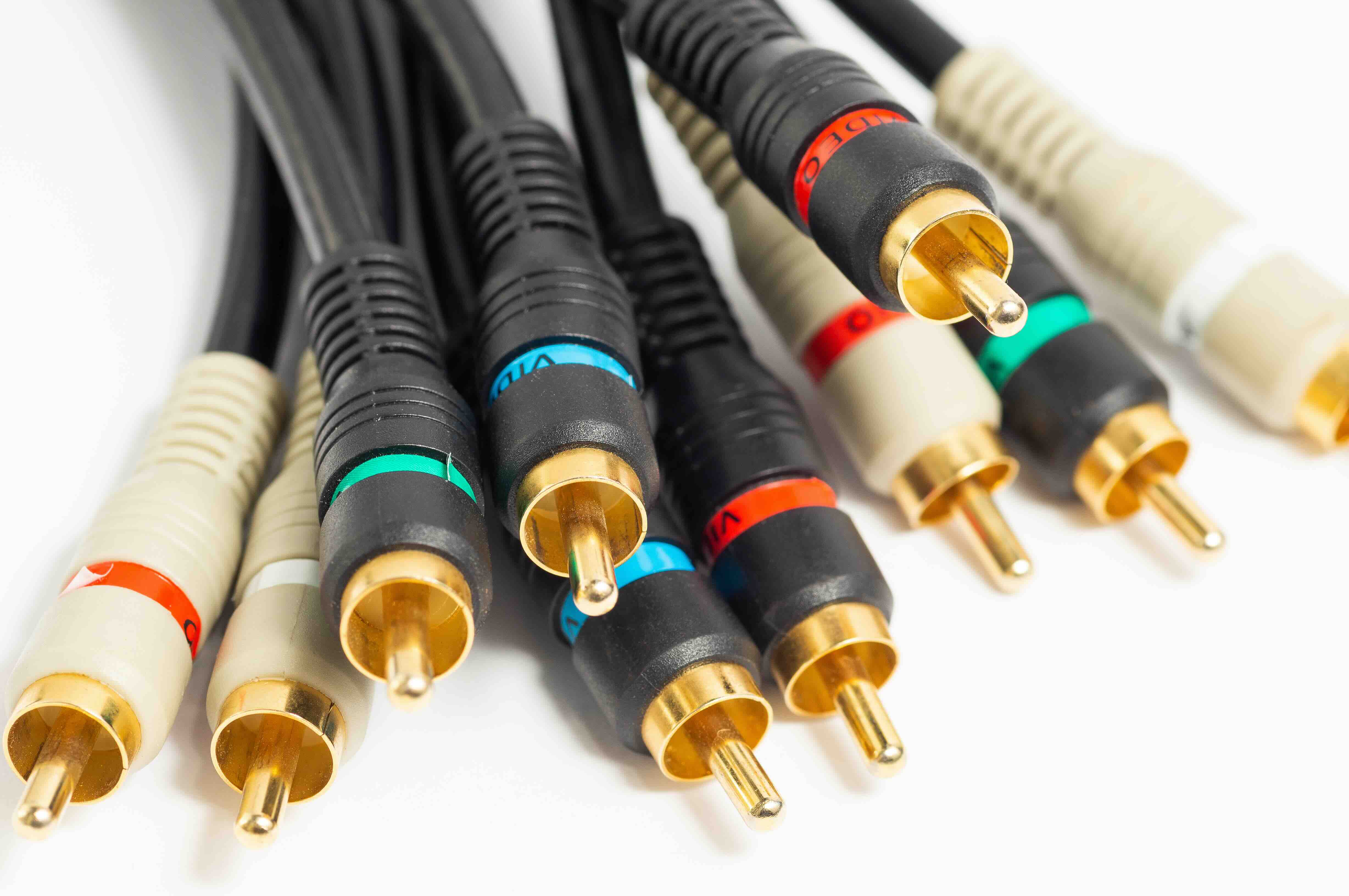
What Is the RCA Plug Color Code and Why Does It Still Matter?
If you have ever set up a home theater system, connected a gaming console to an older television, or wired up a stereo receiver, you have almost certainly dealt with RCA connectors. Those round, color-coded plugs have been a staple of consumer electronics since the 1940s, and even with HDMI and optical audio dominating modern setups, RCA connections remain widely relevant in professional AV installations, legacy equipment integration, and budget-friendly audio and video routing. Understanding the RCA plug color code is one of those foundational technology concepts that makes everything else easier to figure out. Once you know what each color means, you stop guessing and start connecting with confidence.
A Brief Background on RCA Connectors
RCA connectors were originally developed by the Radio Corporation of America -- hence the name -- for use in early phonograph and radio equipment. The design is straightforward: a central pin carries the signal, a surrounding outer sleeve handles the ground, and the whole assembly snaps or slides into a matching female jack. Over decades, the connector became the standard interface for consumer audio and video devices. Televisions, DVD players, VCRs, camcorders, gaming systems, and stereo receivers all relied on these plugs to pass analog signals between components. The color coding system emerged as a practical solution to a real problem -- when you have multiple cables doing different jobs, visual identification eliminates costly and frustrating miswiring.
The Standard RCA Color Code Explained
The color coding for RCA cables follows a convention that the consumer electronics industry has treated as a near-universal standard for decades. Here is how the three most common colors break down and what each one carries.
- Yellow handles composite video. This is the analog video signal that carries picture information from one device to another. It is not high definition by modern standards, but it is functional for standard definition sources.
- White carries the left audio channel in a stereo configuration. When you are listening to music or watching content in stereo, the white plug is responsible for delivering audio to the left speaker or left channel input.
- Red carries the right audio channel. Paired with white, the red and white combination covers full stereo audio. In mono audio setups, only one of these is typically used.
So in the most basic three-cable RCA bundle -- the classic composite AV cable -- you have yellow for video, white for left audio, and red for right audio. That combination has not changed meaningfully in decades, which is part of why it remains so intuitive once learned.
Component Video and the Extended Color System
Beyond the standard three-cable composite setup, component video introduced an expanded color scheme that pushed analog video quality significantly higher. Component video splits the picture signal into three separate channels to reduce interference and improve resolution, making it the preferred analog video format for HDTVs before HDMI became dominant. The three component video connectors follow a specific color assignment as well.
- Green carries the Y signal, which contains luminance -- essentially the brightness and detail information of the image.
- Blue carries the Pb or Cb signal, which represents the difference between blue and the luminance channel.
- Red carries the Pr or Cr signal, representing the difference between red and the luminance channel.
Here is where it can get a little confusing. Component video cables also use red, and when paired with white for audio, you end up with two red plugs in the same setup -- one for the right audio channel and one for the video Pr signal. Labeling your cables and always matching by the labeled input on your device is the reliable fix for that. Component video can support resolutions up to 1080i or even 1080p depending on the equipment, which is a meaningful jump from composite.
Digital Audio and the Orange or Black RCA Connector
There is another color that does not get enough attention in basic guides: orange. An orange RCA connector typically designates a digital coaxial audio connection. This is different from analog stereo audio -- digital coaxial carries a bitstream signal compatible with Dolby Digital, DTS, and other surround formats. It requires a 75-ohm cable rather than a standard audio cable, and not all RCA cables are built to that specification. Black RCA connectors are sometimes used as well, often representing a subwoofer output on home theater receivers. In many AV systems, a dedicated subwoofer cable runs from a receiver's LFE (Low Frequency Effects) output to an active subwoofer, and that cable is typically terminated with a single black or sometimes red RCA plug depending on the manufacturer.
Common Mistakes When Working with RCA Color Codes
Knowing the color code is one thing. Applying it correctly in a real installation is where a lot of people run into trouble. A few errors come up repeatedly, and they are worth flagging because they can cause real signal quality problems or outright failures.
- Mixing composite video cables with component video connections is one of the most frequent errors. The connectors are physically identical, but composite cables are not rated for the impedance requirements of component video, which can degrade picture quality noticeably.
- Assuming all red plugs serve the same purpose is another mistake. As noted, red appears in stereo audio as the right channel and in component video as the Pr signal. Context matters enormously here.
- Using low-quality or poorly shielded cables for digital coaxial audio often causes dropouts or handshake failures between devices, even though the physical connection looks fine.
- Swapping left and right audio channels, which results in reversed stereo imaging. It sounds subtle but becomes obvious on any stereo content with distinct left-right panning.
Practical Tips for Managing RCA Cables in Real Installations
Anyone who has worked inside an equipment rack or behind a media console knows how quickly RCA cables become a tangled, unlabeled mess. A few practical habits make a real difference. Always label both ends of a cable run before routing it. Use cable ties or hook-and-loop straps to keep bundles organized and separated by signal type. Keep analog audio cables away from power cables to minimize induced hum and interference. When purchasing RCA cables, pay attention to the cable construction -- oxygen-free copper conductors and quality shielding are not just marketing language; they measurably impact signal integrity over longer runs. For component video specifically, matched-impedance cables designed specifically for video use are worth the investment.
When RCA Still Makes Sense in Modern Setups
It is fair to ask whether any of this matters in a world dominated by HDMI, DisplayPort, and USB-C. The honest answer is yes, in several contexts. Legacy AV equipment integration is a genuine professional need -- plenty of commercial installations and institutional environments run hardware that predates HDMI by decades, and decommissioning that equipment is not always practical. Home recording studios often rely on analog signal chains that use RCA connections extensively. Turntables, tape decks, older DACs, and analog mixing equipment all connect via RCA. In live sound and broadcast environments, component video over RCA is still encountered in camera feeds and production switchers. Knowing the color code and understanding the signal types is not an obsolete skill. It is a working knowledge that fills real gaps.
Why Monoprice Is the Right Source for RCA Cables and AV Connectivity
When it comes to sourcing reliable RCA cables, composite video cables, component video cables, and digital coaxial audio cables, the quality and value of the cable itself directly affects system performance. Monoprice has built a reputation precisely in this space -- delivering cables and connectivity solutions that perform at a professional level without the inflated pricing that often accompanies brand-name alternatives. Whether you are wiring a home theater, integrating legacy equipment into a modern rack, or outfitting a commercial installation on a budget, you will find that high-quality RCA cables and analog AV connectivity solutions from Monoprice deliver the shielding, conductivity, and build quality that real installations demand. From basic composite AV bundles to precision component video cables and digital coaxial audio runs, the catalog covers the full range of what integrators and home users actually need -- at pricing that makes restocking or scaling up a straightforward decision rather than a budget conversation.
Frequently Asked Questions About RCA Plug Color Codes
What does the yellow RCA plug carry?
The yellow RCA plug carries the composite video signal, which transmits standard definition picture information between devices such as DVD players, VCRs, and televisions.
What is the difference between composite video and component video RCA connections?
Composite video uses a single yellow RCA cable to carry the entire video signal in one channel, while component video splits the signal into three separate cables -- green, blue, and red -- to deliver higher image quality and support resolutions up to 1080i or 1080p.
Why are there two red RCA plugs in some setups?
In setups that use both component video and stereo audio, one red plug carries the Pr component video signal and another red plug carries the right stereo audio channel. Always check device labeling to confirm which input or output each connection corresponds to.
What does an orange RCA connector mean?
An orange RCA connector typically designates a digital coaxial audio connection, used to transmit digital audio bitstreams such as Dolby Digital or DTS between components like receivers and disc players.
Can I use a standard RCA cable for component video?
Technically the connectors are compatible, but standard audio RCA cables are not optimized for the 75-ohm impedance that component video requires. Using properly rated video cables for component connections will produce better picture quality and fewer signal issues.
What color is typically used for a subwoofer output connection?
A single black RCA connector is commonly used for subwoofer or LFE output connections on home theater receivers, though some manufacturers use other colors including red. Always confirm by checking the device's output labeling.
Are RCA connections still relevant with modern HDMI-equipped devices?
Yes. RCA connections remain relevant for integrating legacy equipment, analog audio sources like turntables and tape decks, older monitors and displays, and in professional AV and broadcast environments where analog signal chains are still actively used.
Does cable quality affect RCA signal performance?
Cable quality has a direct impact on signal integrity, particularly over longer runs. Cables with oxygen-free copper conductors, proper shielding, and correct impedance ratings will consistently outperform lower-quality alternatives in terms of noise rejection and signal clarity.
What is the correct way to connect a stereo audio RCA cable?
Connect the white plug to the left audio channel input and the red plug to the right audio channel input on both the source device and the receiving device. Reversing these connections will result in inverted stereo imaging.
Is there a universal RCA color standard across all manufacturers?
The yellow, white, and red composite AV color standard is widely followed across consumer electronics, but it is not a formally mandated specification. Some manufacturers use variations, particularly for specialized outputs, so checking device documentation is always a reliable practice.


