Port HDMI Splitter: One Source, Multiple Displays
What Is a Port HDMI Splitter and Why Does It Matter?
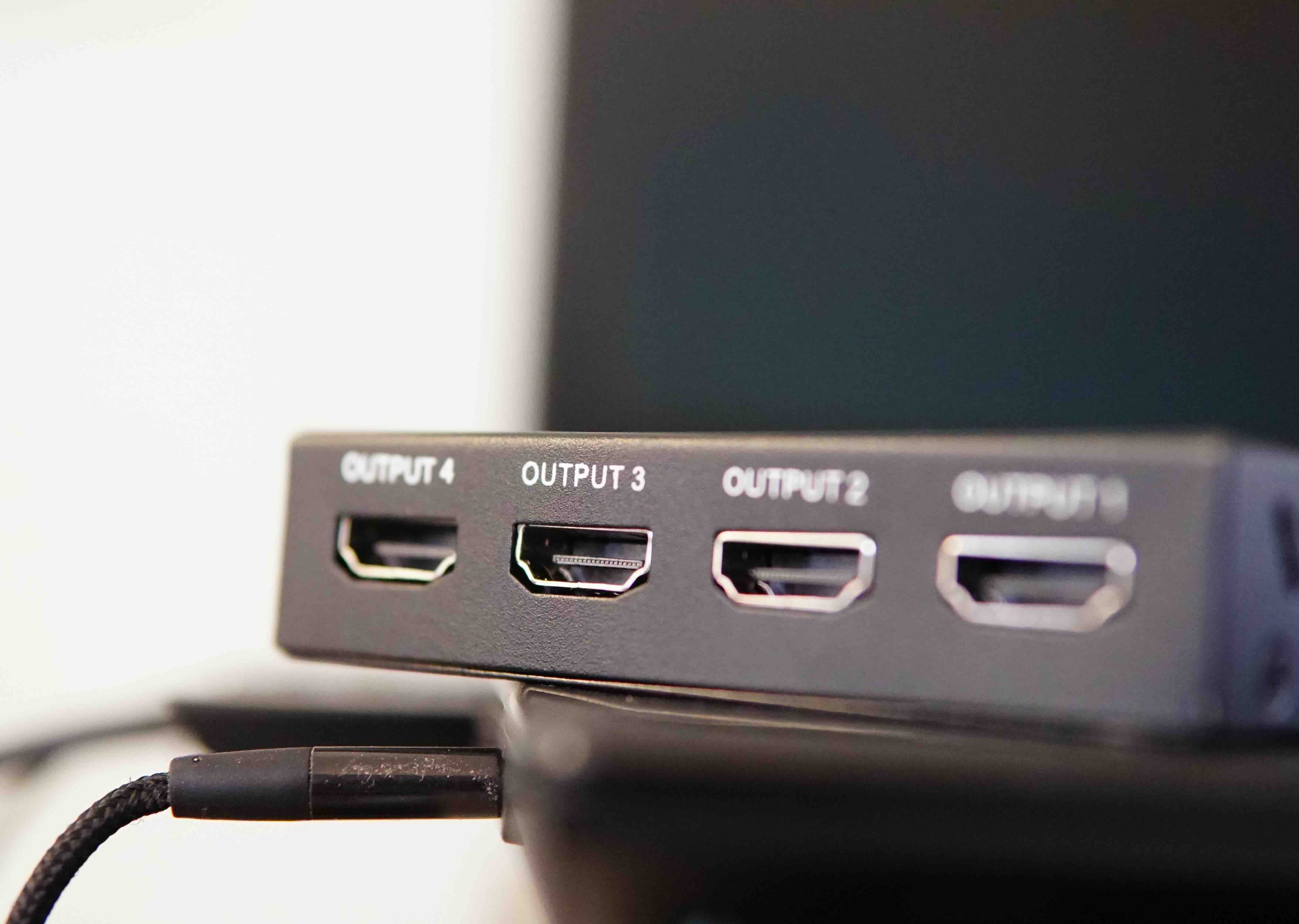
So you have one HDMI source, maybe a laptop or a streaming box, and you need to send that signal to two, four, or even eight displays at once. That is exactly what a port HDMI splitter is designed to do. It takes a single HDMI input and distributes that signal simultaneously to multiple HDMI outputs. No switching, no toggling, just the same image and audio pushing out to every connected screen at the same time. This comes up constantly in conference rooms, digital signage setups, classrooms, retail environments, and home theater configurations. It is a straightforward solution to a very real problem, and once you understand how it works, the purchasing decision becomes a lot easier to navigate.
How a Port HDMI Splitter Actually Works
At its core, a port HDMI splitter receives a single HDMI signal from a source device and amplifies or replicates that signal across multiple output ports. Most active splitters include an internal signal booster, which is important because splitting a signal without amplification would degrade picture quality fast, especially over longer cable runs. The splitter essentially clones the digital signal and pushes it through each output simultaneously. Passive splitters exist but are generally only viable for very short distances and basic use cases. For anything serious, you want an active splitter with built-in amplification. Some higher-end models also support HDCP compliance, 4K resolution passthrough, HDR, and high refresh rates, which matters if you are working with modern display hardware or high-performance AV setups.
Active vs. Passive HDMI Splitters: What Is the Difference?
This is one of the first decisions you will face when shopping for a port HDMI splitter. Active splitters require external power, usually via a USB cable or AC adapter, and use that power to regenerate and boost the signal before sending it to each output port. Passive splitters do not require power and rely entirely on the source signal strength. In practice, passive options are fine for two-screen setups with very short cable runs, but they introduce signal loss and inconsistency at scale. Active models are the clear choice for multi-display commercial or professional applications. If you are running four or more screens, or if any display is more than a few feet away from the splitter, go active without hesitation. The performance difference is not subtle.
Key Benefits of Using a Port HDMI Splitter
There are some genuinely compelling reasons to add one of these to your setup. Here is what stands out most in day-to-day use:
- Simultaneous multi-display output from a single source device
- No need to reconfigure or switch inputs between screens
- Consistent signal quality across all connected displays when using an active model
- Ideal for presentations, digital signage, surveillance monitoring, and event setups
- Reduces cable clutter compared to running multiple source devices
- Cost-effective alternative to purchasing additional playback hardware
That last point deserves some emphasis. Running a second laptop or media player to feed a second screen is expensive and inefficient. A quality HDMI splitter handles that job for a fraction of the cost, and it does it cleanly.
Common Limitations and Drawbacks to Know
No technology is perfect, and HDMI splitters have some real constraints worth understanding before you buy. First, all connected displays typically need to support the same resolution and refresh rate. Most splitters will default to the lowest common denominator among connected screens, which means if one monitor maxes out at 1080p and another supports 4K, you may end up with 1080p across the board. Second, HDCP handshake issues can occasionally cause screens to go blank or flicker, particularly when mixing different display brands. Third, cable length matters more than people expect. Even with an active splitter, pushing signal through low-quality or overly long HDMI cables can introduce instability. Quality cables and quality splitters go together. You cannot cut corners on one and expect the other to compensate.
How to Choose the Right Port HDMI Splitter for Your Setup
The right splitter depends entirely on your use case. Start by counting the number of displays you need to feed simultaneously, then verify the resolution requirements for each screen. From there, check whether your source content is HDCP-protected, because if it is, your splitter needs to be HDCP 2.2 compliant for 4K content or HDCP 1.4 for 1080p. Consider the environment too. A home theater setup has different demands than a trade show booth or a hospital waiting room with six displays running the same informational loop. For high-traffic commercial environments, look for splitters rated for continuous operation and backed by solid warranties. Do not overlook port count either. A 1x2 splitter handles two outputs, a 1x4 handles four, and so on up to 1x8 or beyond for larger installations.
Resolution and Bandwidth: The Specs That Actually Matter
When you are comparing splitter specs, pay close attention to supported resolution, refresh rate, and total bandwidth. An HDMI 2.0 splitter supports up to 4K at 60Hz with a bandwidth of 18 Gbps, which covers most modern consumer and professional use cases. HDMI 2.1 pushes that to 48 Gbps and adds support for 8K at 60Hz and 4K at 120Hz, which is increasingly relevant as higher refresh rate displays become standard. HDR10 and Dolby Vision passthrough are also worth checking if color accuracy and contrast performance matter in your deployment. For most corporate AV and digital signage applications, HDMI 2.0 is more than sufficient. For gaming-focused setups or future-proofed installations, HDMI 2.1 compatibility gives you more headroom without having to replace hardware a year from now.
Practical Tips Before You Install Your HDMI Splitter
A few things that will save you a lot of troubleshooting time. First, always use the same cable specification on both ends. If your splitter supports HDMI 2.0, run certified High Speed HDMI cables to every display. Mixing cable grades introduces signal inconsistency that is hard to diagnose. Second, power the splitter before connecting your source or displays. This gives the device time to initialize properly and reduces HDCP handshake failures. Third, if you are experiencing blank screens on one output but not others, try swapping cable positions between ports. Sometimes one output port is more sensitive than others. Fourth, keep firmware in mind for smart splitters. Some higher-end models support firmware updates that resolve compatibility issues with newer displays. Checking for updates after initial installation is a habit worth building.
Why Monoprice Is the Right Source for Your HDMI Splitter Needs
When it comes to sourcing reliable, high-performance AV hardware without overspending, Monoprice has built a well-earned reputation among integrators, IT professionals, and everyday consumers alike. The product line covers 1x2 through 1x8 configurations, with options supporting 4K resolution, HDCP 2.2 compliance, and active signal amplification at price points that make sense for both single installations and larger bulk orders. Every splitter in the lineup is engineered for real-world performance, not just spec sheet numbers. If you are managing a multi-screen retail display, running an AV setup for a corporate conference room, or building out a home theater, you will find the right fit without the premium markup that other brands charge for comparable performance. Whether you are an AV integrator sourcing gear for a client deployment or a home user trying to extend a single cable to two TVs, you can explore the full range of professional HDMI splitters and AV distribution solutions that deliver dependable signal quality at a price point that actually respects your budget. That combination of value, performance, and support is what keeps professionals coming back.
Frequently Asked Questions About Port HDMI Splitters
What is a port HDMI splitter used for?
A port HDMI splitter takes one HDMI signal from a source device and sends it simultaneously to multiple display outputs. It is commonly used in conference rooms, classrooms, retail signage, and home theater setups where the same content needs to appear on more than one screen at the same time.
Can a port HDMI splitter support 4K resolution?
Yes, many active HDMI splitters support 4K resolution at 30Hz or 60Hz depending on the model. Look for splitters that specify HDMI 2.0 or HDMI 2.1 compliance and confirm the bandwidth supports your target resolution and refresh rate before purchasing.
Do all displays need to be the same resolution when using an HDMI splitter?
Not necessarily, but most HDMI splitters will default to the resolution supported by the lowest-capability display in the chain. For best results, use displays with matching resolution and refresh rate specifications to avoid downscaling across all connected screens.
What is the difference between an HDMI splitter and an HDMI switch?
An HDMI splitter takes one input and sends it to multiple outputs simultaneously. An HDMI switch takes multiple inputs and routes one at a time to a single output. They solve opposite problems and are not interchangeable.
Do I need a powered HDMI splitter?
For most real-world applications, yes. Active splitters use external power to amplify and regenerate the signal before distributing it, which preserves quality across all output ports. Passive splitters are only reliable for very short cable runs with two displays at standard resolutions.
Why is one of my screens blank when using an HDMI splitter?
This is usually caused by an HDCP handshake failure between the splitter and one of the displays. Try swapping cable positions, ensuring the splitter is HDCP-compliant, and powering the splitter before connecting your source device. Using the same cable specification on all ports also helps.
How many displays can a single HDMI splitter support?
Common configurations include 1x2, 1x4, and 1x8, meaning one input feeding two, four, or eight displays. Some commercial-grade solutions support even higher port counts. The right number depends on your setup requirements and the signal bandwidth your source device can deliver.
Does using an HDMI splitter reduce picture or audio quality?
A quality active HDMI splitter should not noticeably degrade video or audio quality. Signal degradation is more commonly caused by passive splitters, low-grade cables, or cable lengths that exceed the rated distance for the HDMI specification being used.
Is an HDMI splitter compatible with streaming devices like Roku or Apple TV?
Generally yes, but HDCP compliance is important here. Streaming content is often HDCP-protected, which means your splitter must support the appropriate HDCP version to pass that content to connected displays without triggering a content protection error or blank screen.
Can I use an HDMI splitter for gaming across multiple monitors?
You can, but there are limitations. Most splitters mirror the same image to all displays rather than extending it. For gaming across multiple monitors with different content on each screen, you would need a graphics card with multiple outputs rather than a splitter.