

Patch Panel Wiring, Grounding, and Setup Guide
What Is a Patch Panel and Why Does It Matter in Network Infrastructure
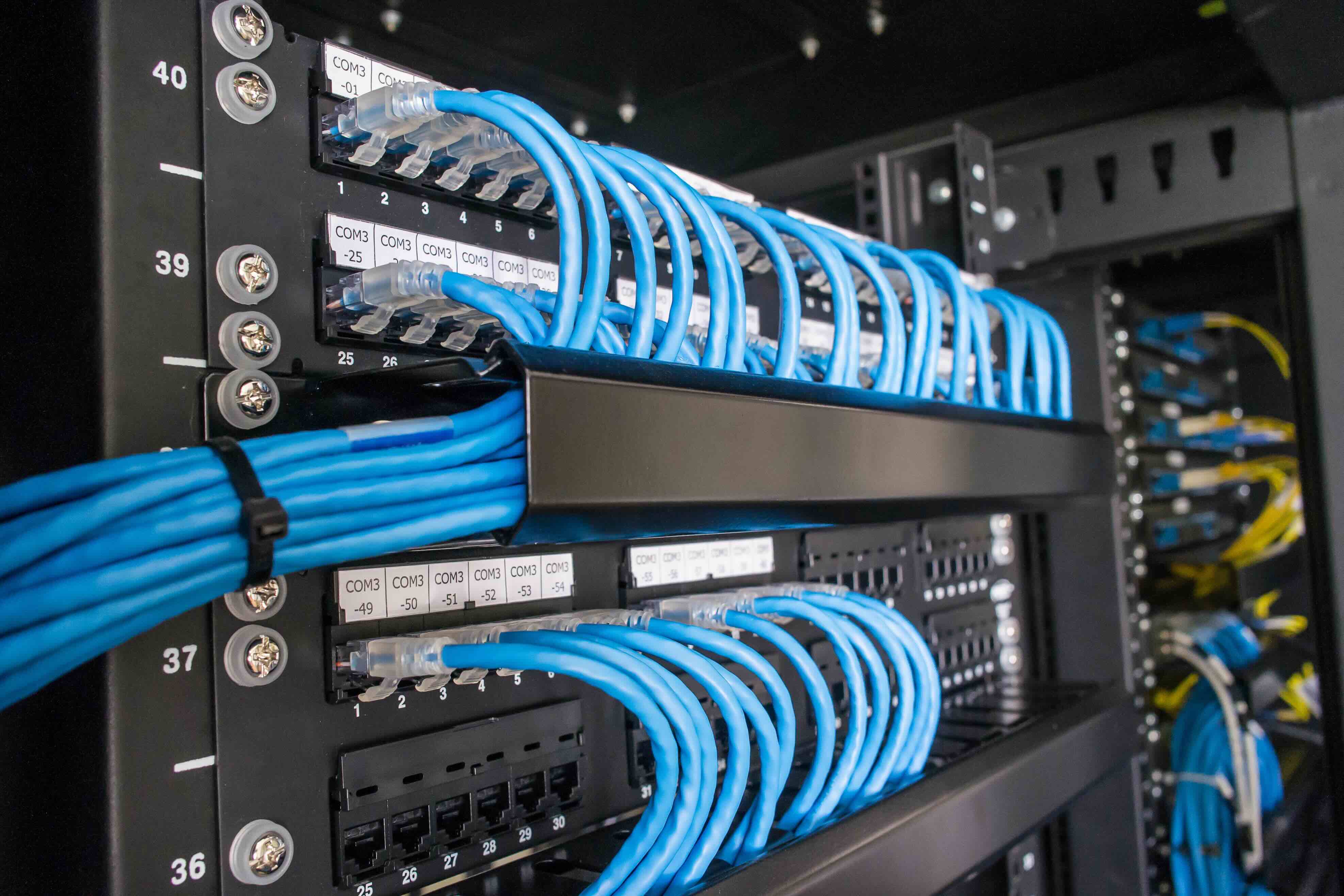
If you have ever walked into a server room or network closet and wondered what that flat panel with rows of ports actually does -- yeah, that is a patch panel. It is one of those components that does not always get the attention it deserves, but honestly, it is doing a lot of heavy lifting behind the scenes. A patch panel is a passive networking device that acts as a central hub for incoming and outgoing data cables in a structured cabling system. It organizes and terminates cable runs from workstations, offices, or other endpoints so that a network administrator can manage connections cleanly and efficiently. Think of it like a switchboard -- instead of having cables running directly into switches or routers in a tangled mess, everything routes through the patch panel first. Clean, labeled, and manageable. That matters more than people realize until something goes wrong.
How Patch Panels Work in a Structured Cabling System
Here is the basic flow. Ethernet or other data cables run from end-user locations -- desks, conference rooms, access points -- back to the network closet or data center. Those cables terminate on the back of the patch panel, typically punched down into 110-style connectors using a punch-down tool. On the front of the panel, you get ports -- usually RJ45 jacks for Ethernet setups -- that accept short patch cables. Those patch cables then connect the panel ports to the appropriate switch or router port. That short cable between the panel and the switch is what gives it the name "patch" panel. The magic here is flexibility. Need to move a workstation to a different VLAN? Swap the patch cable on the panel. No rewiring. No running new cable through walls. It is genuinely efficient once the system is set up right, and it is the foundation of nearly every professional network installation worth taking seriously.
Types of Patch Panels You Should Know About
Not all patch panels are built the same, and choosing the right type for your environment actually matters for long-term performance and scalability. The most common types include the following.
- Cat5e patch panels -- suitable for networks running up to 1 Gbps, still found in older installations
- Cat6 patch panels -- support up to 10 Gbps over short distances, a solid standard for most commercial environments today
- Cat6A patch panels -- designed for full 10 Gbps over longer distances with better alien crosstalk performance
- Fiber patch panels -- used in high-bandwidth backbone connections or where long-distance signal integrity is critical
- Shielded panels (STP/FTP) -- built for environments with heavy electromagnetic interference, such as industrial settings or data centers near power equipment
- Keystone patch panels -- modular design that accepts individual keystone jacks, offering flexibility for mixed-media environments
For most modern office deployments or small-to-mid-size data centers, a Cat6 or Cat6A patch panel hits the right balance between performance, cost, and forward compatibility. Going below that in a new installation is a decision you might regret in two or three years when bandwidth demands shift.
How to Wire a Patch Panel Correctly
Wiring a patch panel is a straightforward process but it absolutely requires attention to detail. The most common wiring standard used in North America is T568B, though T568A is also acceptable -- the critical rule is consistency throughout the entire installation. You cannot mix standards on the same run. Each cable gets stripped back, the pairs are untwisted just enough to seat into the punch-down block slots, and a punch-down tool is used to seat and trim the conductors. Pair color coding follows the standard precisely: white-orange, orange, white-green, blue, white-blue, green, white-brown, brown. Keep untwisted lengths as short as possible -- excessive untwisting increases crosstalk and can degrade signal quality, especially at higher frequencies. After punching down, label every port clearly and document the run. That documentation step? People skip it constantly and regret it when troubleshooting at 10pm during a network outage.
Grounding a Patch Panel: Why It Is Not Optional
Grounding is where a lot of installations cut corners, and it is genuinely a problem. A properly grounded patch panel protects equipment and personnel from electrical surges, static discharge, and electromagnetic interference. For shielded patch panels, the panel chassis should be bonded to the rack ground, which in turn connects to the building's ground infrastructure according to TIA-607 standards. Unshielded installations still benefit from rack grounding to protect connected switch equipment. The grounding conductor is typically connected to the rack rail using a star washer and a dedicated ground lug or grounding bar within the rack. In data centers, a Telecommunications Bonding Backbone connects all racks to a common grounding system. Skipping this step does not cause immediate visible problems -- which is exactly why it gets ignored. But during a surge event or in an environment with heavy electrical noise, the absence of proper grounding can damage equipment, corrupt data transmissions, or create safety hazards. It is not a maybe. Ground the rack. Ground the panel.
Key Advantages of Using a Patch Panel
The case for using a patch panel in any serious network installation is strong. Here is what makes it worth every bit of the setup effort.
- Centralized cable management reduces clutter and simplifies troubleshooting
- Moves, adds, and changes happen at the patch panel without disturbing permanent cable runs
- Labeled and organized ports reduce human error during maintenance
- Protects expensive switches from repeated plug-unplug cycles that wear out ports over time
- Scales easily as network infrastructure grows
- Supports structured cabling compliance with industry standards like TIA-568 and ISO 11801
For IT managers, integrators, and anyone responsible for maintaining a network over time, these advantages translate directly into reduced downtime and lower operational costs. That is not a minor benefit -- that is the entire value proposition of doing structured cabling the right way.
Common Mistakes and Drawbacks to Watch For
Even experienced installers run into trouble with patch panels when attention lapses. Mislabeled or unlabeled ports create confusion that compounds over time, especially as staff turns over. Exceeding the maximum cable bend radius during installation degrades performance. Using mismatched categories -- say, a Cat6A cable terminated into a Cat5e panel -- limits the entire run to the lower spec. Cheap panels with poorly manufactured jacks introduce impedance mismatches that cause intermittent connectivity problems that are genuinely maddening to diagnose. High-density panels in under-ventilated racks can also contribute to heat buildup, which is worth factoring into rack planning. The initial investment in quality components and proper installation pays back many times over in reliability. Trying to save twenty dollars on a patch panel for a production network environment is a decision that tends to look worse with time.
Best Practices for Long-Term Patch Panel Management
Once the panel is wired and running, ongoing management is what keeps a network operating at its best. Use color-coded patch cables to visually distinguish VLANs, departments, or circuit types. Maintain a living document or network management software that maps every port to its physical and logical endpoint. Schedule periodic inspections to check for loose connections, damaged cables, or ports showing wear. Keep a small inventory of spare patch cables and spare keystone jacks on hand -- these are small costs that prevent big delays. In high-availability environments, consider using locking patch cables to prevent accidental disconnection. A patch panel that was installed correctly and is actively managed becomes one of the most reliable elements in your entire network infrastructure. The discipline of maintenance is what separates a well-run network from one that generates constant support tickets.
Why Monoprice Is the Right Partner for Your Patch Panel and Structured Cabling Needs
When it comes to building out a structured cabling system that actually performs over the long haul, the components you choose matter more than most people account for upfront. Monoprice has built a reputation as a trusted source for networking professionals and IT integrators who need reliable, high-performance infrastructure products without paying a steep price tag for brand name overhead. From Cat6 and Cat6A patch panels to shielded options for demanding environments, the product line is built to meet real-world installation requirements. Whether you are wiring a small office or deploying infrastructure across an enterprise environment, finding professional-grade patch panels and structured cabling solutions for network installations through Monoprice means accessing quality components that hold up to daily use, comply with industry standards, and arrive ready to install. That combination of performance, compliance, and value is exactly what IT professionals and integrators are looking for when they are trying to build something that works reliably and does not require revisiting six months later.
Frequently Asked Questions About Patch Panels and Grounding
What is the primary purpose of a patch panel in a network?
A patch panel serves as a centralized termination point for cable runs in a structured cabling system, allowing network administrators to manage, organize, and reconfigure connections between end-user locations and network switches without disturbing permanent cable infrastructure.
Do I need to ground a patch panel?
Yes. Grounding a patch panel, particularly shielded models, is essential for protecting against electrical surges, static discharge, and electromagnetic interference. The panel chassis should be bonded to the rack ground following TIA-607 standards.
What is the difference between T568A and T568B wiring standards?
Both are valid wiring standards for Ethernet terminations. T568B is more commonly used in commercial installations in North America. The critical rule is to use the same standard consistently throughout an entire installation -- mixing the two on the same cable run creates a crossover cable, not a straight-through connection.
Can I use a Cat5e patch panel with Cat6 cables?
You can physically terminate Cat6 cable into a Cat5e panel, but the performance of that run will be limited to Cat5e specifications. For full Cat6 performance, all components including the patch panel, jacks, and patch cables must be rated to Cat6 or higher.
How many ports do I need on a patch panel?
This depends on the number of active cable runs and anticipated growth. A common approach is to plan for 20 to 25 percent more ports than currently needed to accommodate future expansion without requiring an immediate panel replacement.
What tool is needed to terminate cables on a patch panel?
A 110-style punch-down tool is the standard tool used to seat and trim conductors into the patch panel's IDC connectors. Using a proper punch-down tool ensures secure terminations and cleaner cuts compared to manual methods.
What is a keystone patch panel and when should I use it?
A keystone patch panel uses modular slots that accept individual keystone jacks rather than having fixed built-in ports. This design offers flexibility for mixed-media environments where you may need a combination of Ethernet, fiber, or other connector types in the same panel.
How do I label a patch panel effectively?
Use a consistent labeling convention that ties each panel port to a specific physical location or endpoint, such as a room number and jack identifier. Document this mapping in a network diagram or asset management system and keep it updated whenever changes are made.
What causes intermittent connectivity issues on a patch panel?
Common causes include loose or improperly punched terminations, worn patch cable connectors, mismatched cable categories, excessive untwisting during termination, and low-quality jacks with poor contact reliability. Systematic port-by-port testing with a cable certifier helps isolate the source.
Is a patch panel necessary for small office networks?
While a patch panel is technically optional for very small installations, it is considered best practice even for small offices because it significantly simplifies cable management, protects switch ports from wear, and makes future moves or changes far easier to execute without disrupting the entire network.


