

Optical Input Cable: What It Is and Why It Matters
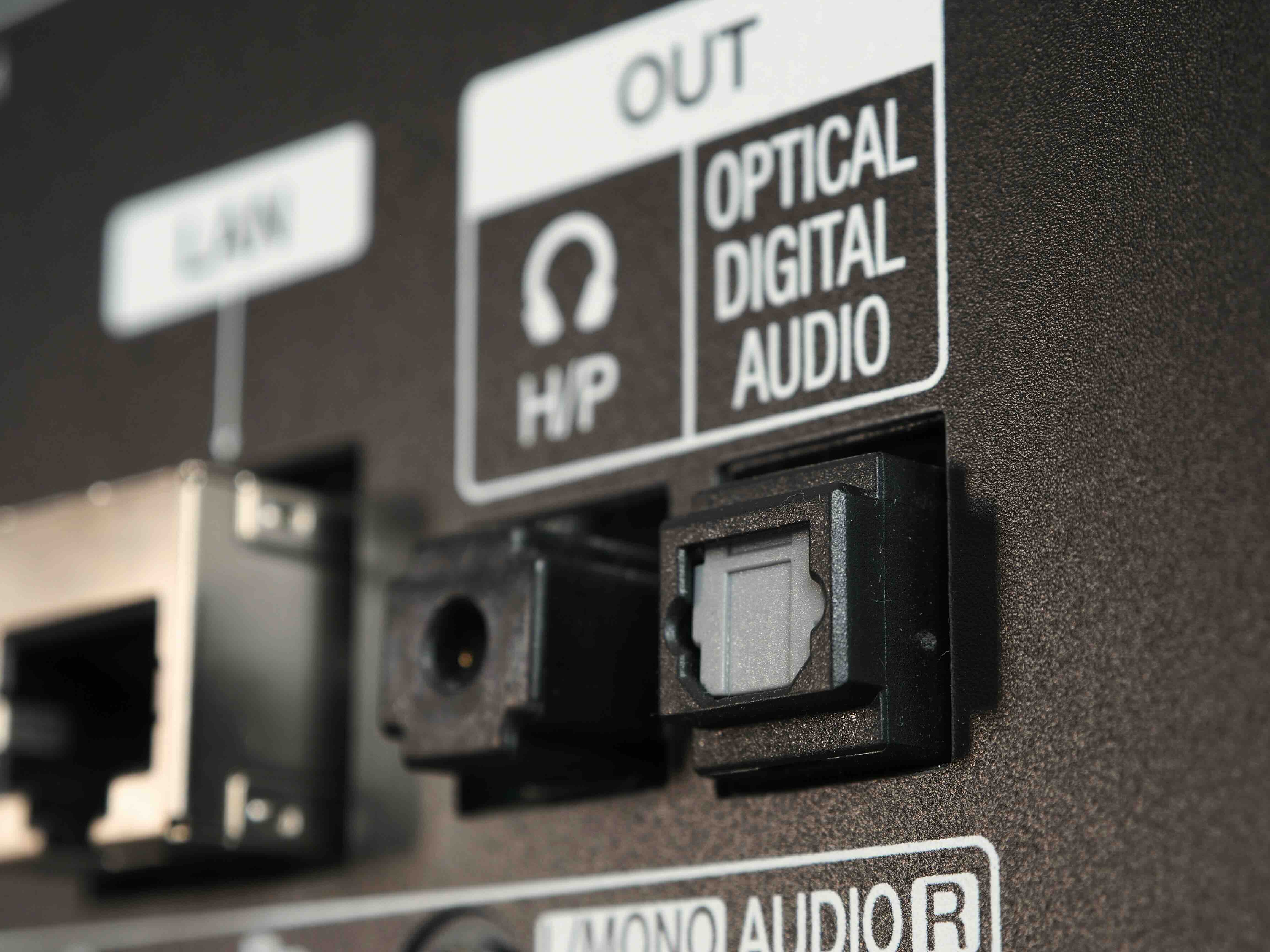
What Is an Optical Input Cable and Why Does It Matter for Your Audio Setup
If you have ever set up a home theater system, a soundbar, or a high-end audio receiver, there is a good chance you have come across the term optical input cable. Sometimes labeled as TOSLINK, optical digital audio, or simply digital optical, this cable type has been a reliable part of consumer audio infrastructure for decades. And yet, a surprising number of people still connect their devices with older analog cables without realizing what they are missing. So let us break this down in a way that actually makes sense, from what the cable physically is, to how it works, to when you should or maybe should not reach for one.
What Is an Optical Input Cable
An optical input cable, most commonly referred to as a TOSLINK cable, is a fiber optic cable designed to transmit digital audio signals using pulses of light rather than electrical current. The name TOSLINK actually comes from Toshiba Link, since Toshiba developed the standard back in the early 1980s for use with their CD players. The connector on each end is typically a square-shaped plug with a distinctive red glow when the cable is active and transmitting signal. That glow is literally light passing through the fiber optic strand inside the cable, which is kind of fascinating when you think about it. The cable itself contains a thin plastic or glass fiber core that guides light from one end to the other with minimal interference, and that is the key to why optical cables have such a strong following in the audio world.
How Does an Optical Audio Cable Actually Work
Here is where things get genuinely interesting. Unlike HDMI or coaxial cables, which carry electrical signals, optical cables convert audio data into light pulses. Your source device, whether that is a TV, gaming console, Blu-ray player, or computer sound card, converts the digital audio signal into a sequence of light flashes. Those flashes travel through the fiber optic strand at incredible speed and are received and decoded at the other end by your amplifier, soundbar, or DAC. Because the signal is transmitted as light, there is a natural galvanic isolation between the two connected devices. In practical terms, that means ground loops and electrical interference from power lines or other electronics simply cannot travel through the cable, which is a significant technical advantage in environments with a lot of equipment running simultaneously.
Key Advantages of Using an Optical Digital Audio Cable
There are several reasons why optical cables remain relevant and in many cases preferable depending on the application. Here is a straightforward look at the core benefits:
- Immune to electromagnetic interference and radio frequency noise
- Galvanic isolation eliminates ground loop hum
- Simple plug-and-play compatibility with a wide range of consumer devices
- Supports PCM stereo, Dolby Digital 5.1, and DTS surround sound formats
- Durable connection with a secure locking mechanism on most connectors
- No signal degradation from power fluctuations or nearby electronics
For home theater users, the interference immunity is arguably the most practical benefit. Rack-mounted AV systems with multiple power supplies, amplifiers, and digital components running in close proximity can be a nightmare for electrical noise, and optical connections essentially sidestep that problem entirely. The result is a cleaner, quieter audio signal path from source to speaker.
Common Drawbacks You Should Know Before You Buy
Optical cables are genuinely useful, but they are not without limitations, and knowing those limitations upfront saves a lot of frustration. The most significant drawback is bandwidth. Standard TOSLINK cables top out at around 125 Mbps, which means they cannot carry high-resolution audio formats like Dolby TrueHD, DTS-HD Master Audio, or Dolby Atmos in their full, uncompressed form. If you are running a modern AV receiver with a Blu-ray player and you want the full lossless audio experience, HDMI with Audio Return Channel is the better route. Optical cables also have a relatively strict distance limitation, generally performing best under about 10 meters, and they can be fragile if bent too sharply since the fiber core can crack or distort. Physical damage does not always show up visually, which can make troubleshooting a bit tricky. Despite these limitations, for everyday surround sound, stereo audio, and general home theater use, optical cables remain a solid and dependable option.
Optical vs. HDMI vs. Coaxial Digital Audio
This comparison comes up constantly, and for good reason. Each connection type has its place, and the right answer depends entirely on your setup and what your devices support. HDMI carries both audio and video in a single cable and supports the highest-bandwidth audio formats available today, making it the go-to choice for modern home theater builds. Coaxial digital audio, which uses an RCA-style connector but transmits a digital signal, actually has slightly higher bandwidth than optical and performs similarly in most real-world setups, though it lacks optical's galvanic isolation. Optical sits in a practical middle ground, widely supported, interference-resistant, and capable of handling the most common surround sound formats without any complicated configuration. For connecting a TV to a soundbar, a gaming console to an external DAC, or a CD transport to a stereo amplifier, optical remains one of the most reliable and hassle-free choices available.
Practical Tips for Getting the Most Out of Your Optical Cable
Using an optical cable correctly makes a real difference in longevity and performance. A few things worth keeping in mind when setting up or purchasing one:
- Always remove the protective dust caps before connecting, since leaving them in is a surprisingly common mistake
- Avoid bending the cable at sharp angles, keep curves gentle and gradual
- Keep the connection ports clean and free of dust using a dry lens cloth or air blower
- Do not exceed the rated cable length for your specific cable quality
- Ensure both devices are set to output PCM or Bitstream audio in the device settings
- Replace cables that show physical kinks or damage, even if they appear to still work
One thing that often goes overlooked is the audio output setting on the source device. Many TVs and gaming consoles default to PCM stereo output even when connected via optical, so it is worth going into the audio settings and selecting Bitstream or Dolby Digital output to get proper surround sound through your receiver or soundbar.
Who Should Use an Optical Input Cable
Honestly, optical cables are a smart choice for a broader range of users than most people expect. If you are connecting a soundbar to a television that lacks HDMI ARC support, optical is almost certainly your best available digital audio option. Gamers who want to route audio from an older console or PC to a dedicated DAC or headphone amplifier will find optical connections clean and reliable. Home recording setups that use external audio interfaces often include optical ports for connecting digital mixers or outboard gear. Even in commercial and light professional settings, optical connections show up regularly in conference room AV systems and installed audio applications where interference rejection is a practical concern rather than a theoretical one.
Why Monoprice Is the Right Source for Your Optical Audio Cable Needs
When it comes to sourcing reliable optical digital audio cables without spending more than you need to, Monoprice has consistently delivered on both quality and value for over two decades. The cables are constructed with attention to signal integrity, proper fiber core quality, and connector durability, which matters more than most buyers realize when they are comparing options on a product listing. Monoprice has built a strong reputation among AV integrators, IT professionals, and home theater enthusiasts precisely because the products perform as described and the pricing does not punish you for wanting something that actually works. Whether you need a single TOSLINK cable for a soundbar setup or a bulk order for a commercial installation, you can find a full range of high-quality optical audio cable solutions at Monoprice that are backed by solid product support and accessible pricing that makes sense for both individual buyers and procurement teams.
Frequently Asked Questions About Optical Input Cables
What is the difference between a TOSLINK cable and an optical audio cable?
They are the same thing. TOSLINK is the standard name for the optical digital audio cable format, originally developed by Toshiba. The terms optical cable, digital optical cable, and TOSLINK all refer to the same connector type and signal transmission method.
Can an optical cable carry surround sound audio?
Yes, optical cables support Dolby Digital 5.1 and DTS 5.1 surround sound formats in their compressed form. However, they cannot carry lossless formats like Dolby TrueHD or DTS-HD Master Audio due to bandwidth limitations.
Is optical audio better than HDMI for audio quality?
For basic surround sound, the practical audio quality difference is minimal. HDMI supports higher-bandwidth lossless audio formats and is generally preferred in modern home theater setups. Optical remains competitive for standard surround sound and stereo audio applications.
How long can an optical audio cable be before signal quality degrades?
Most optical cables perform reliably up to around 10 meters. Beyond that length, signal integrity can begin to degrade depending on cable quality. For longer runs, higher-grade cables with glass fiber cores rather than plastic tend to perform better.
Why is there a red light coming from my optical cable?
That red light is the actual light signal being transmitted through the fiber optic core. It is completely normal and indicates the cable and port are functioning. A brighter, steady glow typically means the connection is active and transmitting audio data.
Do optical cables affect sound quality based on brand or price?
Within a reasonable quality range, optical cables transmit a digital signal that is either received correctly or not. However, cable construction quality does matter for durability, connector fit, and signal integrity over longer cable lengths or in demanding environments.
Why does my soundbar only play stereo through the optical connection?
This is almost always a device setting issue. Check the audio output settings on your TV or source device and change the output format from PCM to Bitstream or Dolby Digital. Once adjusted, the soundbar should receive and decode the surround sound signal properly.
Can I use an optical cable for a gaming console to a DAC?
Yes, many gaming consoles include an optical output port specifically for connecting to external DACs, headphone amplifiers, or AV receivers. This is a common and effective setup for gamers seeking improved audio quality over the built-in headphone jack.
What happens if I bend an optical cable too sharply?
Sharp bends can crack or distort the fiber optic strand inside the cable, which disrupts light transmission and can result in audio dropouts, distortion, or complete signal loss. The damage is not always visible externally, so handle optical cables carefully and route them with gentle curves.
Are optical cables compatible with all TVs and soundbars?
Most modern TVs and soundbars include at least one optical digital audio port, making compatibility very broad across consumer electronics. However, it is always worth checking the device specifications before purchasing a cable to confirm that an optical port is present and accessible on both connected devices.


