Mini USB to USB Pinout Guide for Legacy Device Connections
What Is a Mini USB to USB Connection and Why Does It Still Matter
If you have ever dug through a drawer full of old cables and pulled out something smaller than a standard USB but chunkier than a Micro USB, you were probably holding a Mini USB cable. These connectors were everywhere in the mid-2000s through the early 2010s, powering cameras, external hard drives, GPS units, and all kinds of consumer electronics. And honestly, they are still relevant today. A lot of legacy devices sitting in offices, production environments, and even home setups still rely on Mini USB ports for data transfer and power. Understanding the Mini USB to USB pinout is not just a throwback topic -- it is genuinely practical information for anyone trying to connect older hardware to modern systems without running into wiring surprises or compatibility failures.
The Physical Design of Mini USB Connectors Explained
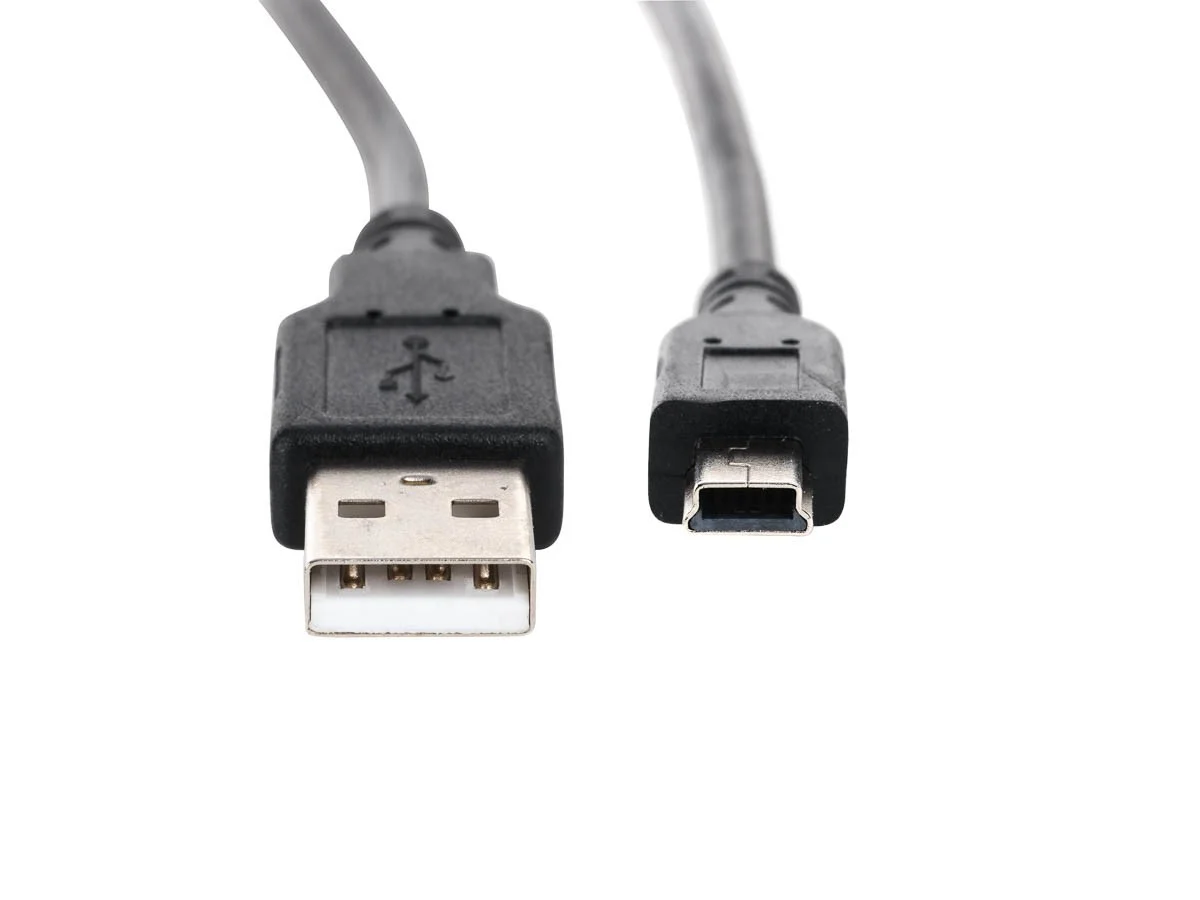
Mini USB connectors come in a few different forms, but the most common are Mini-A and Mini-B. The Mini-B is by far the more widely used of the two -- it is the one you would recognize from older digital cameras and MP3 players. The connector itself is trapezoidal in cross-section, which is different from the more rectangular Type-A connector you plug into a computer. That asymmetrical shape was actually intentional. It helps prevent incorrect insertion, which matters more than people realize when you are in the middle of a workflow and not looking closely. The Mini USB plug is noticeably thicker than Micro USB, which some users argue makes it more durable under repeated connect-disconnect cycles. And for industrial and field use, that durability argument actually has some merit.
Mini USB to USB Pinout Breakdown Pin by Pin
Here is where things get technical but in a clear and useful way. The standard Mini USB connector uses five pins, compared to four in a standard USB Type-A connector. This fifth pin, labeled ID, is what distinguishes Mini USB from earlier full-size USB designs and sets the stage for On-The-Go functionality. Here is the complete Mini USB to USB pinout in plain terms:
Pin 1 -- VBUS -- Carries +5V power from the host device Pin 2 -- D- -- Negative differential data line Pin 3 -- D+ -- Positive differential data line Pin 4 -- ID -- Used for OTG detection; grounded on Mini-A, floating on Mini-B Pin 5 -- GND -- Ground return path for power and signal
The standard Type-A USB connector on the host side maps to the same VBUS, D-, D+, and GND lines but does not include the ID pin. When you build or verify a Mini USB to USB cable, you are essentially bridging those four functional lines between the two connectors. The ID pin on the Mini-B end is typically left unconnected unless you are specifically working with an OTG setup.
How the Mini USB to USB Data Transfer Process Actually Works
Once the physical connection is made correctly, the communication process follows standard USB protocol. The host device -- typically a computer -- applies voltage to the VBUS line to signal power availability. The D+ and D- lines then negotiate the connection speed. Mini USB supports USB 2.0, which means you are working with a maximum theoretical throughput of 480 Mbps, though real-world speeds typically land somewhere lower depending on the device firmware and cable quality. For transferring photos from an older camera or syncing data from a GPS receiver, that speed is more than adequate. It is not going to saturate a modern system, but it handles the job reliably when the cable and pinout are correct.
Common Wiring Mistakes That Cause Connection Failures
Most Mini USB to USB connection problems trace back to a handful of avoidable errors. The most frequent issue is swapping the D+ and D- lines, which prevents any data communication from happening even if power delivery looks fine. Another common mistake involves grounding errors -- incomplete ground connections cause signal instability and intermittent disconnects. Shielding is also worth thinking about. Cheap, unshielded cables introduce noise on the data lines, which can manifest as slow transfer speeds or dropped connections. And then there is the physical connector itself -- Mini USB connectors with worn retention clips tend to lose contact mid-transfer, which can corrupt data on storage devices. Paying attention to these details upfront saves a lot of troubleshooting time later.
Key Advantages of Understanding the Mini USB Pinout for Legacy Devices
Knowing exactly how a Mini USB to USB cable is wired gives you real control over your hardware environment. If you manage a fleet of older devices in a business setting -- cameras, barcode scanners, measurement instruments -- you can verify cable integrity, source replacements accurately, and troubleshoot failures without guesswork. It also opens the door to custom cable fabrication for specialized setups where off-the-shelf lengths do not work. In AV and media production environments, knowing the pinout also helps when adapting older field equipment to modern capture workflows.
Drawbacks and Limitations of Mini USB in Modern Environments
Mini USB is not without its frustrations in a contemporary tech setup. The format is officially deprecated under USB standards in favor of Micro USB and USB-C, which means active development and new product integration are essentially nonexistent for Mini USB. Sourcing high-quality Mini USB cables has become less straightforward as retail focus shifts almost entirely toward Type-C solutions. The connector also does not support USB 3.0 or faster protocols, so if your workflow demands high-speed data transfer, Mini USB will be a bottleneck. For legacy-to-modern bridging, it works. For anything involving 4K media files or large dataset transfers on a regular basis, the format shows its age quickly.
Practical Tips for Working With Mini USB Cables and Connections
A few things worth keeping in mind when working with Mini USB in real-world environments:
Always verify cable pinout with a continuity tester before trusting a cable with important data Avoid cables longer than 5 meters without active signal boosting -- USB 2.0 has a defined cable length limit Check the retention mechanism on the Mini-B end before inserting into sensitive devices Use shielded cables in environments with significant electromagnetic interference Label cables clearly in multi-device setups to avoid using the wrong cable type accidentally Store spare Mini USB cables in a sealed bag -- oxidation on the pins can cause contact issues over time
Where to Find Reliable Mini USB to USB Cables Worth Using
When it comes to sourcing cables that actually perform -- consistent pinout, proper shielding, solid connector construction -- the brand matters more than a lot of buyers realize. Cheap cables from unknown sources often cut corners on shielding and conductor quality, which shows up as data errors and unreliable connections over time. For anyone managing legacy hardware in a professional or business context, investing in quality cables is simply the more cost-effective choice when you factor in the time wasted troubleshooting bad connections. That is where choosing a supplier with a verified track record makes a clear difference. When you are maintaining older equipment or building out a connectivity solution for mixed-device environments, sourcing your Mini USB to USB cables and legacy device connectivity solutions from Monoprice means you are working with a brand that takes cable construction seriously -- proper shielding, accurate pinouts, and durable connector housings that hold up over time. Monoprice has built its reputation precisely by delivering that kind of reliability at pricing that makes sense for both individual buyers and procurement teams managing device inventories at scale.
Frequently Asked Questions About Mini USB to USB Pinout and Connections
What are the five pins in a Mini USB connector?
The five pins are VBUS for power, D- and D+ for differential data signals, ID for On-The-Go device detection, and GND for ground. Standard data cables use all pins except the ID pin, which is typically left floating on Mini-B connectors.
Is Mini USB the same as Micro USB?
No. Mini USB and Micro USB are physically different connectors with different sizes and form factors. Mini USB is larger and was used primarily in earlier devices, while Micro USB became the standard in smartphones and portable electronics through the 2010s.
Can I use a Mini USB cable for charging only?
Yes. If the device supports it, a Mini USB cable can deliver power through the VBUS and GND lines without requiring the data lines to be active. Many older cameras and portable devices accept charge through Mini USB regardless of data connection status.
What is the maximum data transfer speed over Mini USB?
Mini USB supports USB 2.0, which has a maximum theoretical throughput of 480 Mbps. Real-world speeds are typically lower depending on device hardware, cable quality, and host system performance.
Why does my Mini USB device disconnect randomly during data transfer?
Random disconnects are usually caused by a worn connector with poor pin contact, a cable with insufficient shielding causing signal noise, or exceeding the recommended 5-meter cable length limit for USB 2.0. Replacing the cable with a quality shielded option typically resolves the issue.
What does the ID pin in Mini USB do?
The ID pin is used for USB On-The-Go functionality. On a Mini-A connector it is grounded, signaling that the device is acting as a host. On a Mini-B connector the ID pin is left floating, indicating the device operates in peripheral mode.
Are Mini USB cables still manufactured and sold?
Yes, Mini USB cables are still produced and available from various cable manufacturers and electronics retailers. While they are no longer included with new consumer devices, they remain accessible for maintaining and operating legacy hardware.
Can I make a custom Mini USB to USB cable using the pinout?
Yes. With the correct pinout information -- VBUS, D-, D+, GND mapped between the Mini-B and Type-A ends -- you can fabricate a custom cable. For best results, use shielded wire and verify continuity on each conductor before use.
Does Mini USB support USB On-The-Go?
Yes. Mini USB was one of the original connector types to support USB OTG through the ID pin. This allows compatible devices to switch between host and peripheral roles depending on what is connected.
What devices commonly use Mini USB ports?
Older digital cameras, MP3 players, GPS receivers, external hard drives, gaming controllers, and various handheld measurement devices commonly used Mini USB ports. Many of these devices remain in service in professional and industrial environments today.