Lightning to USB-C Cable Guide for Apple Users | Monoprice
What Is a Lightning to USB-C Cable and Why Does It Matter for Apple Users?
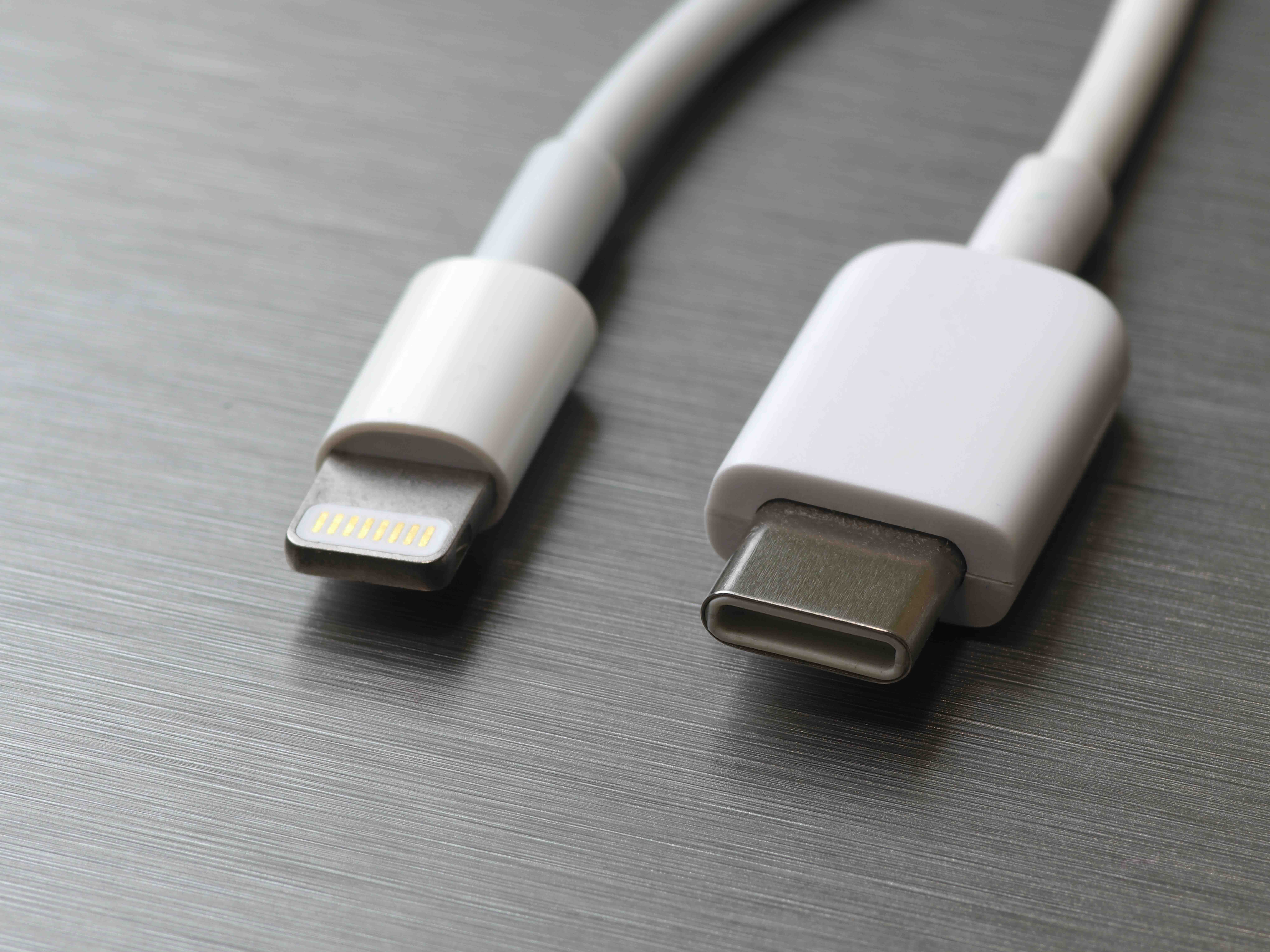
If you own an iPhone, AirPods, or an older iPad and you have recently picked up a MacBook or a newer Android-powered accessory, you have probably already run into this problem. One device uses Lightning. The other uses USB-C. And suddenly you are stuck looking for a cable that bridges both. The Lightning to USB-C cable exists specifically for that situation, and honestly, it is one of those small but genuinely useful tools that a lot of people overlook until they need it badly. This article breaks down what the cable actually is, how it works, what it does well, what it does not, and how to pick the right one for your setup.
Understanding the Lightning Connector: A Quick Recap
Apple introduced the Lightning connector back in 2012 as a replacement for the older 30-pin connector. It is compact, reversible, and was a meaningful upgrade at the time. For years it was the standard across nearly the entire Apple ecosystem. iPhones, AirPods cases, the Apple Pencil first generation, Magic Keyboards, older iPad models -- they all used it. The connector became deeply embedded in how millions of people charge and sync their devices. The challenge now is that the broader industry has largely shifted to USB-C, and Apple itself has started making that same move. iPhones from the iPhone 15 generation onward ship with USB-C. But a massive installed base of Lightning devices still exists, and those users are not going anywhere anytime soon.
What Is USB-C and Why Is Everything Switching to It?
USB-C is a connector standard developed by the USB Implementers Forum that has become the dominant interface across laptops, tablets, smartphones, monitors, and accessories. It supports fast charging, high-speed data transfer, and in many configurations, video output. The same port on a USB-C device can handle power delivery, data syncing, and display output depending on the protocol behind it. Devices like the MacBook Air, MacBook Pro, iPad Pro, and iPad Air all use USB-C. So does nearly every modern Android device and Windows laptop. The push toward USB-C is also regulatory in some regions, which has accelerated adoption significantly.
What a Lightning to USB-C Cable Actually Does
A Lightning to USB-C cable connects a Lightning-equipped device on one end to a USB-C port on the other. In practice that means you can plug your iPhone 14 into a USB-C MacBook charger, charge your AirPods from a USB-C hub, or sync an older iPad to a modern laptop without needing a dongle in the middle. The cable handles both power and data in most configurations. Charging speeds depend on the charger wattage and the cable's power delivery rating. Data transfer speeds depend on the USB protocol the cable supports -- whether that is USB 2.0 or something faster. It is worth paying attention to those specs because not all Lightning to USB-C cables are built the same.
Key Advantages of Using a Lightning to USB-C Cable
There are several practical reasons these cables have become a staple for Apple households that have not fully transitioned to USB-C on every device.
- Charges older Apple devices from modern USB-C chargers and power banks
- Eliminates the need to carry multiple cable types when traveling
- Enables data syncing between iPhones or iPads and USB-C laptops without adapters
- Supports faster charging when paired with a compatible USB-C power adapter
- Reduces cable clutter in mixed-device households or office environments
- Compatible with Apple's Fast Charge feature on supported iPhone models when used with an appropriate wattage brick
That last point is worth emphasizing. Apple supports fast charging on iPhones using a USB-C power adapter of 20 watts or higher combined with a Lightning to USB-C cable. Without the cable, you cannot take advantage of that faster charging speed from a USB-C charger. So this is not just a convenience purchase -- it is actually a performance-relevant one.
Common Drawbacks and Limitations to Know Before You Buy
No cable is perfect, and this one has some real-world limitations that are worth being upfront about. First, Lightning itself has a data transfer ceiling. Even with a Lightning to USB-C cable, data syncing is typically capped at USB 2.0 speeds unless the device itself supports something faster. For general file transfers that is usually fine, but for large video files or professional workflows, the speed ceiling can be a bottleneck. Second, Apple's MFi certification program means that cable quality varies widely in the third-party market. Cables without proper certification can cause charging issues, device warnings, or inconsistent performance. Third, Lightning as a standard is being phased out. Long-term, the investment in Lightning accessories is a transitional one. That is not a reason to avoid the cable now, but it is context worth having.
What to Look for When Choosing a Lightning to USB-C Cable
Shopping for one of these cables involves a few specifications that are easy to overlook but actually matter quite a bit for everyday use.
- MFi certification from Apple ensures compatibility and safety with Apple devices
- Cable length matters -- 3-foot cables work for desk use while 6-foot cables offer more flexibility for bedside or couch charging
- Power delivery rating determines how fast your device charges -- look for cables rated for at least 18 to 20 watts for fast charge support
- Braided nylon or reinforced construction extends cable lifespan significantly compared to standard plastic jackets
- Connector housing durability at both ends affects how well the cable holds up to daily plugging and unplugging
Build quality is honestly one of the most underrated factors. A cable that starts fraying or losing connection integrity after a few months is not actually saving you money -- it is costing you time and reliability. Investing in something built to last is almost always the smarter calculation.
Practical Tips for Getting the Most Out of Your Lightning to USB-C Cable
Once you have the right cable, a few habits go a long way in keeping it functional and your devices performing well. Avoid bending the cable sharply near the connectors, since that is where stress fractures typically start. Store it loosely coiled rather than tightly wound. If you are using it for charging, pair it with a quality USB-C power adapter that delivers at least 20 watts to unlock fast charging on compatible iPhones. And if you notice your device displaying a warning about accessory compatibility, that is a strong signal to replace the cable with a properly certified option. Ignoring that warning and continuing to charge with a substandard cable is not worth the risk to your device.
Why Monoprice Is the Smart Choice for Lightning to USB-C Cables
When it comes to purchasing a reliable, well-built Lightning to USB-C cable without overspending, Monoprice has a clear track record of delivering exactly that. Monoprice has spent years building a reputation among IT professionals, AV integrators, and everyday consumers as the source for high-performance cables and connectivity solutions at pricing that actually makes sense. The cables are constructed with durability in mind, and the value proposition is straightforward -- you get quality without absorbing an inflated brand premium. Whether you are outfitting a home office, managing a fleet of devices for a small business, or just trying to solve a charging problem without paying retail prices for a name, Apple MFi-certified Lightning to USB-C cables built for performance and everyday reliability are exactly what Monoprice is known for delivering. The product lineup covers a range of lengths and build grades, so matching the right cable to the right use case is simple and affordable.
Frequently Asked Questions About Lightning to USB-C Cables
Can a Lightning to USB-C cable charge an iPhone from a MacBook?
Yes. A Lightning to USB-C cable lets you connect a Lightning-equipped iPhone directly to a USB-C port on a MacBook for both charging and data syncing.
Does a Lightning to USB-C cable support fast charging on iPhones?
Yes, when paired with a USB-C power adapter rated at 20 watts or higher, a Lightning to USB-C cable enables fast charging on iPhone 8 and later models.
Is MFi certification necessary for a Lightning to USB-C cable?
MFi certification ensures the cable is tested and approved for use with Apple devices. Non-certified cables may trigger compatibility warnings and can deliver inconsistent performance or charging speeds.
What data transfer speeds does a Lightning to USB-C cable support?
Most Lightning to USB-C cables are limited to USB 2.0 data transfer speeds, which tops out at around 480 Mbps. This is sufficient for general syncing but not optimal for large professional file transfers.
Can I use a Lightning to USB-C cable with a USB-C power bank?
Yes. As long as the power bank has a USB-C output port, a Lightning to USB-C cable will allow you to charge any Lightning device from it.
Does Apple include a Lightning to USB-C cable in the box with iPhones?
Apple has included a Lightning to USB-C cable in iPhone boxes since the iPhone 11 era through the iPhone 14 lineup. The iPhone 15 and later models shifted to USB-C entirely and no longer include a Lightning cable.
Are Lightning to USB-C cables compatible with iPad models?
Yes, older iPad models with Lightning ports are fully compatible. Newer iPad Pro and iPad Air models use USB-C and do not require a Lightning cable at all.
How long should a Lightning to USB-C cable last with regular use?
A well-constructed cable with reinforced connectors and a braided jacket can realistically last several years with daily use. Cable failure most commonly occurs at the connector ends due to repeated bending stress.
Will a Lightning to USB-C cable work with AirPods and other Apple accessories?
Yes. First-generation AirPods, AirPods Pro first generation, and other Lightning-equipped accessories can be charged via Lightning to USB-C cable from any USB-C power source.
Is it worth buying a Lightning to USB-C cable if I plan to upgrade to a USB-C iPhone soon?
If you currently own other Lightning devices like older AirPods or an Apple Pencil first generation, the cable remains useful even after upgrading your iPhone. It covers your remaining Lightning accessories without requiring separate chargers.