

How to Wire a Cat5e Jack: Step-by-Step Guide
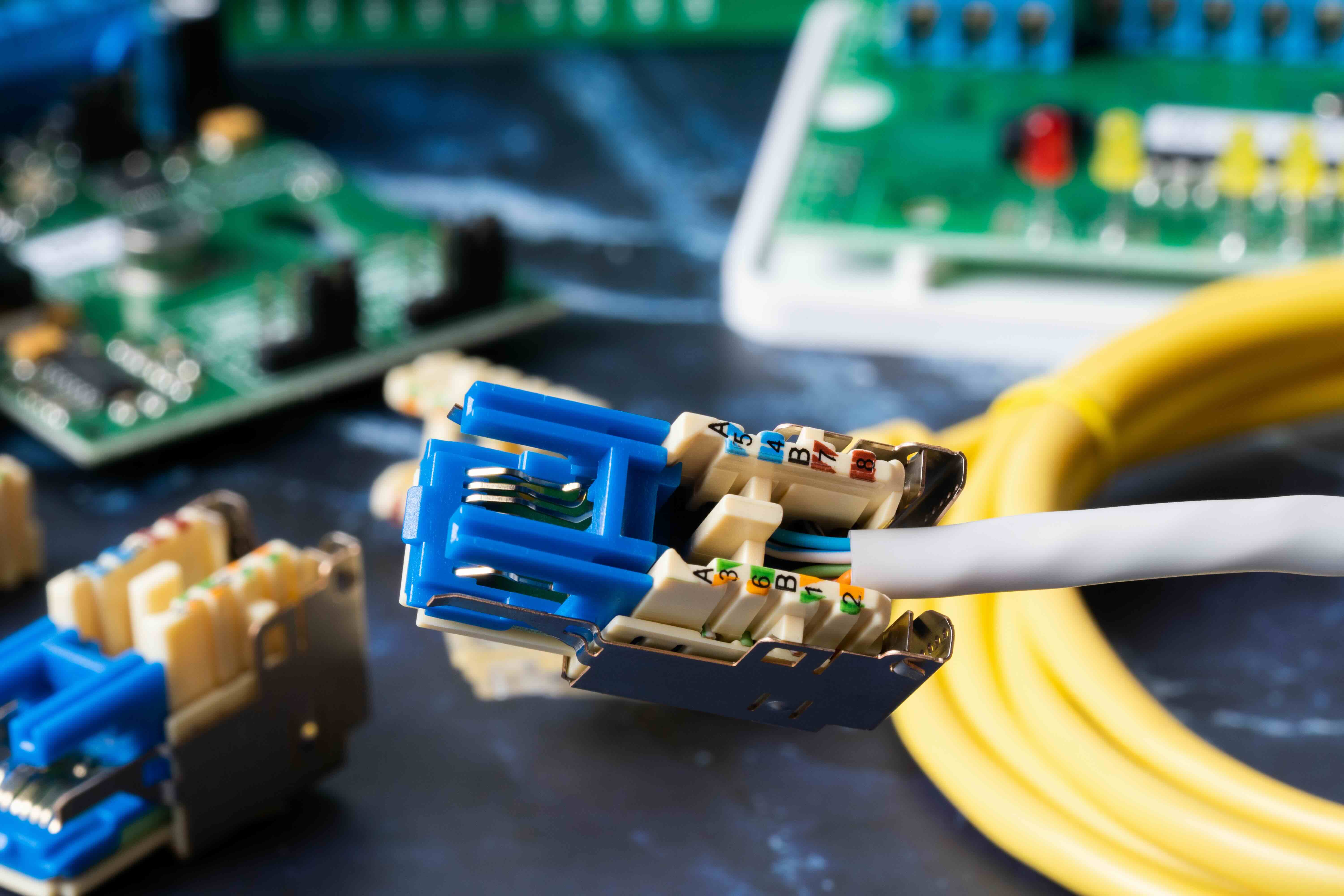
How to Wire a Cat5e Jack: A Complete Guide for Clean, Reliable Network Connections
If you have ever stared at a keystone jack with eight tiny wires fanned out in front of you and thought, okay, now what -- you are not alone. Wiring a Cat5e jack is one of those things that looks complicated until someone actually walks you through it. Then it clicks. And once it does, you realize this is a skill that saves serious time and money on any network installation, whether you are setting up a home office, running cable through a new build, or expanding infrastructure at a small business. So let us get into it -- what Cat5e actually is, how jacks work, and how to do this right the first time.
What Is Cat5e and Why Does It Still Matter?
Cat5e stands for Category 5 Enhanced. It is a twisted pair copper cable standard that supports up to 1 Gbps speeds at 100 MHz bandwidth over runs of up to 100 meters. The enhanced designation separates it from original Cat5 by reducing crosstalk -- which is interference between adjacent wire pairs. That matters a lot in real installations where signal integrity can degrade fast. Cat5e is not the newest standard out there -- Cat6 and Cat6A have pushed performance further -- but Cat5e remains one of the most widely deployed networking cables in the world. It handles standard Gigabit Ethernet without breaking a sweat, it is broadly compatible with existing infrastructure, and it costs less than higher-category alternatives. For most everyday networking environments, Cat5e gets the job done reliably and affordably.
Understanding the Cat5e Jack and How It Works
A Cat5e keystone jack is a small termination point that connects the exposed ends of a Cat5e cable to a standardized RJ45 interface. The jack has eight contact terminals -- matching the eight conductors inside Cat5e cable -- arranged in two rows. Those terminals use either punch-down connections or, in some designs, tool-free insulation displacement contacts. When a network cable is seated and punched down correctly, each wire makes a reliable electrical connection that carries data with minimal signal loss. The jack then snaps into a keystone wall plate or patch panel, creating a clean, permanent network port wherever you need one. That is the whole concept. The quality of the termination -- how cleanly you seat each wire -- directly affects network performance and connection stability.
T568A vs T568B: Which Wiring Standard Should You Use?
This is the question that trips people up most often. There are two accepted wiring configurations for Cat5e jacks: T568A and T568B. Both are recognized by TIA/EIA standards and both work. The difference is the arrangement of the orange and green wire pairs. T568B is more common in commercial and residential installations across North America. T568A is required for government work and is standard in some countries. The rule that actually matters is this: pick one and be consistent throughout the entire installation. Mixing standards between the jack and the patch panel -- or between two ends of the same run -- creates a crossover condition rather than a straight-through connection, and that breaks the link. Most installers default to T568B unless there is a specific reason to use T568A.
Tools and Materials You Need Before You Start
Getting set up correctly before wiring saves a lot of frustration. Here is what you will need on hand:
- A Cat5e keystone jack rated for your installation environment
- A punch-down tool with both 110-style and Krone blade options
- A cable stripper or utility knife
- A cable tester to verify connections after termination
- Patch panel or wall plate to mount the finished jack
- The Cat5e cable run you are terminating
Do not skip the cable tester. It is the difference between walking away confident and spending two hours troubleshooting a link that refuses to come up. A basic wiremap tester costs very little and confirms that every pin is connected, in order, without shorts or opens. Worth every cent.
Step-by-Step: How to Wire a Cat5e Keystone Jack
Strip back approximately one inch of the cable's outer jacket using a cable stripper. Be careful not to nick the insulation on the inner conductors -- that creates problems you will not find until the cable fails under load. Untwist each wire pair just enough to seat them into the jack terminals, no more. Excessive untwisting increases crosstalk and degrades performance. Refer to the color-coded diagram printed directly on the jack body -- most quality jacks have both T568A and T568B layouts labeled. Seat each wire into its corresponding terminal slot and use the punch-down tool to drive the conductor down into the IDC contact and trim the excess wire cleanly. Work through all eight wires. Snap the strain relief clip over the cable jacket, then mount the jack into your wall plate or patch panel. That is the full sequence. Clean technique here is what separates a professional-quality termination from one that causes intermittent issues.
Common Mistakes to Avoid When Terminating Cat5e Jacks
A few mistakes show up consistently in Cat5e terminations, and they are worth knowing before you start rather than after you have already wired a panel.
- Untwisting wire pairs too far back from the jack -- always keep untwisted length under half an inch
- Stripping too aggressively and nicking conductor insulation
- Mixing T568A and T568B wiring standards in the same installation
- Using the wrong blade setting on the punch-down tool and failing to cut the excess wire
- Skipping the cable test after termination and assuming the connection is good
- Seating wires in the wrong terminal positions by misreading the color code diagram
These are fixable mistakes -- but they are much easier to avoid than to diagnose after the fact. Take an extra sixty seconds at each jack and check your work visually before punching down. That discipline pays off across an entire installation.
Key Advantages and Limitations of Cat5e
Cat5e handles Gigabit Ethernet reliably, which covers the bandwidth needs of most residential and small business environments without issue. It is cost-effective compared to higher category cable, which makes it practical at scale. Termination is straightforward, the tools are affordable, and the ecosystem of compatible jacks, patch panels, and faceplates is mature and widely available. The limitations come into play when higher performance is needed. Cat5e is not rated for 10 Gigabit Ethernet at standard distances, and in high-interference environments or long cable runs, crosstalk management becomes more critical. For future-proofing, especially in new construction, Cat6 or Cat6A may be worth the additional investment. But in an existing infrastructure where Cat5e is already installed and Gigabit throughput is the target, the cable performs exactly as needed.
When to Upgrade Beyond Cat5e
There are specific scenarios where the practical choice is to move past Cat5e. Dense office environments running high-bandwidth applications, facilities planning for 10GbE backbone connections, and new construction projects where the cable will be embedded in walls for fifteen-plus years are all cases where Cat6A justifies the cost. Cat5e terminations are also more sensitive to installation quality than Cat6 in some configurations, so if the installation environment is demanding or the installer is less experienced, a more forgiving cable category may reduce risk. That said, millions of working networks run on Cat5e and will continue to do so for years. The decision comes down to what the infrastructure is expected to support and for how long.
Why Monoprice Is the Right Source for Your Cat5e Wiring Needs
When it comes to sourcing the hardware for a Cat5e installation -- jacks, patch panels, cable, tools -- quality and consistency matter as much as price. Monoprice has built a well-earned reputation as a trusted source for networking infrastructure components that perform at the level professionals expect without the inflated pricing that comes from legacy brand names. The keystone jacks, wall plates, and patch panels available through Monoprice are built to TIA/EIA standards, which means they terminate correctly and hold up under real-world use. If you are planning a structured cabling project, looking to expand an existing network, or just need reliable components for a home office build, you will find what you need from Monoprice Cat5e networking jacks, patch panels, and structured cabling solutions. The product range covers everything from individual keystone jacks to full installation kits, and the pricing reflects Monoprice's core commitment to delivering high performance at fair cost. That combination of quality and value is exactly what makes Monoprice a practical choice for both first-time installers and experienced integrators who spec out infrastructure for a living.
Frequently Asked Questions About Wiring Cat5e Jacks
What is the difference between Cat5 and Cat5e?
Cat5e is an enhanced version of Cat5 that reduces crosstalk between wire pairs and supports Gigabit Ethernet speeds up to 1 Gbps. Original Cat5 was rated for up to 100 Mbps under Fast Ethernet and is largely obsolete in modern installations.
Do I need a special tool to wire a Cat5e jack?
A punch-down tool is required for standard 110-type keystone jacks. Some jacks are designed for tool-free termination using a cap that seats the wires without a punch-down tool, but a dedicated tool produces more consistent and reliable results.
Should I use T568A or T568B wiring for my Cat5e jack?
T568B is the most common standard in North American commercial and residential installations. T568A is required for some government work. Either standard works correctly as long as it is used consistently throughout the entire installation.
How far can Cat5e cable run without signal loss?
The maximum recommended run length for Cat5e is 100 meters, or approximately 328 feet. Beyond that distance, signal attenuation can degrade performance and cause connection issues.
Can I use Cat5e for PoE devices like IP cameras or access points?
Yes. Cat5e supports Power over Ethernet and is compatible with PoE and PoE+ standards. For higher power applications like PoE++ or four-pair power delivery, Cat6 or higher is recommended for better thermal performance.
What happens if I mix T568A and T568B in the same cable run?
Mixing standards between the two ends of a cable run creates a crossover cable rather than a straight-through cable. This prevents standard network devices from communicating correctly over that connection.
How do I test a Cat5e jack after termination?
Use a basic wiremap cable tester. Connect one end to the jack and the other to a known good patch cable or the remote unit of the tester. The tester confirms that all eight conductors are connected, in the correct order, with no shorts, opens, or reversed pairs.
Is Cat5e good enough for Gigabit internet connections?
Yes. Cat5e is rated for Gigabit Ethernet at distances up to 100 meters, which covers the speeds delivered by most residential and small business internet service providers operating at 1 Gbps or below.
What causes crosstalk in Cat5e installations?
Crosstalk is caused by electromagnetic interference between adjacent wire pairs. It increases when wire pairs are untwisted too far during termination, when cables are bent sharply, or when cable runs are routed too close to electrical interference sources.
Can Cat5e jacks be used in outdoor installations?
Standard Cat5e keystone jacks are designed for indoor use. Outdoor installations require weatherproof-rated enclosures, outdoor-rated cable with UV-resistant jackets, and sealed connection points to prevent moisture intrusion and corrosion.


