

How to Make Cat 6 Cables: Tools, Steps & Tips
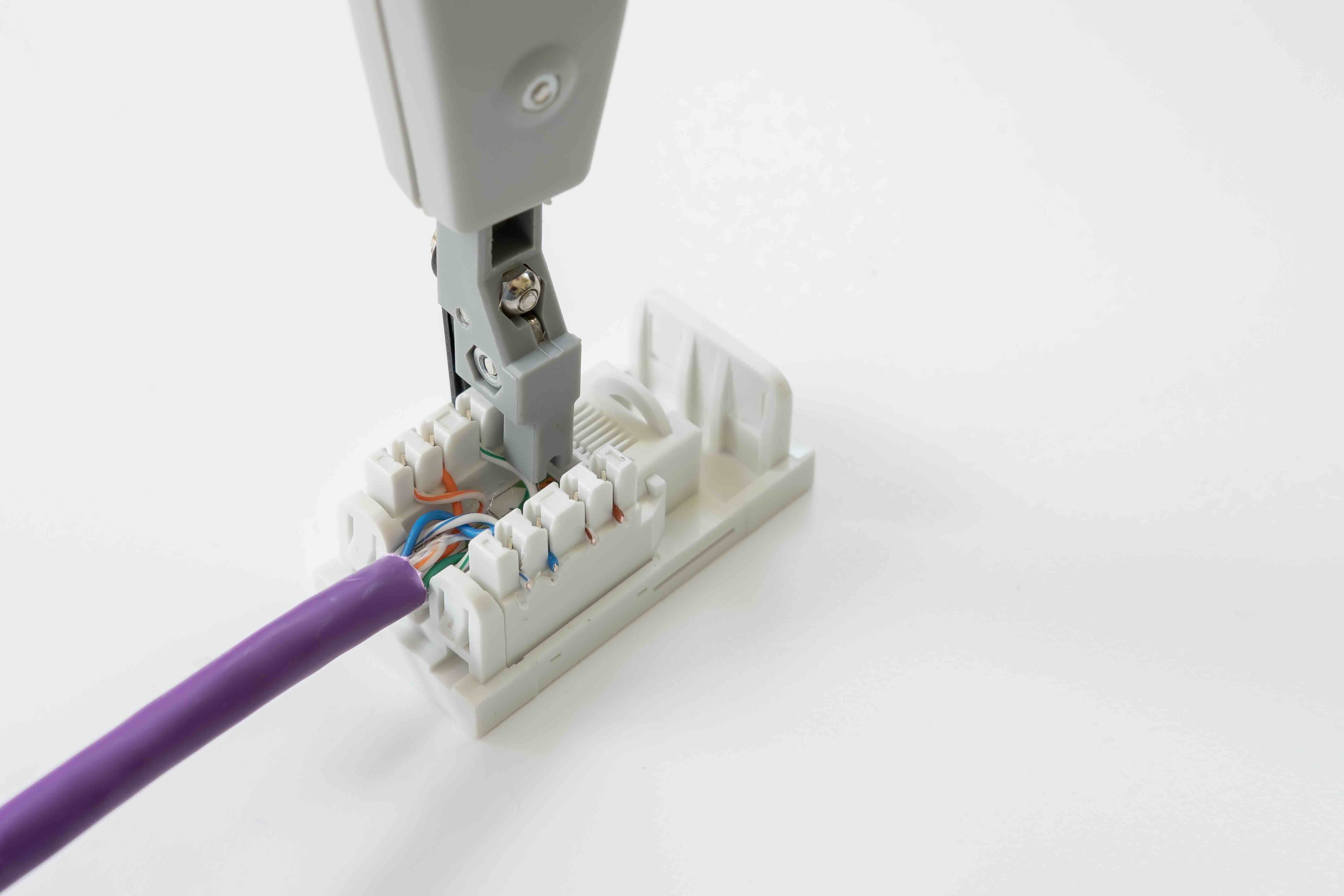
How to Make Cat 6 Cables: A Complete Guide to Building Your Own Network Connections
There is something genuinely satisfying about terminating your own Cat 6 cables. Whether you are setting up a home office, running structured cabling through a commercial space, or just trying to save money on pre-made patch cords, knowing how to build Cat 6 cables is a skill that pays off quickly. It is not complicated once you understand the steps, but there is a right way and a wrong way to do it. Get it right, and you have a clean, high-performance connection. Get it wrong, and you will spend time troubleshooting link errors and signal issues that should never have happened. This guide covers everything from what you actually need to what not to do along the way.
What Is Cat 6 Cable and Why Does It Matter
Cat 6, short for Category 6, is a standardized twisted-pair cable designed for Ethernet networking. It supports data transmission speeds up to 10 Gbps over distances up to 55 meters and 1 Gbps reliably up to 100 meters. Compared to Cat 5e, it offers tighter twist ratios, a spline separator in many designs that reduces crosstalk between pairs, and better overall signal integrity under real-world conditions. For most home and small business installations today, Cat 6 is the practical baseline. It is affordable, widely available, and built for the bandwidth demands that modern networks actually place on infrastructure. If you are going through the effort of running cable, Cat 6 is the version worth running.
Tools and Materials You Need Before You Start
You can not terminate Cat 6 properly without the right tools. Trying to cut corners here is one of the most common reasons DIY cables fail or underperform. Before you start, make sure you have these on hand:
- Cat 6 bulk cable (solid or stranded depending on your application)
- RJ45 Cat 6 pass-through or standard keystone connectors
- A quality crimping tool rated for Cat 6
- A cable stripper or sharp scissors for removing the outer jacket
- A cable tester to verify continuity and wiring order after termination
- Wire cutters for clean, flush cuts on individual conductors
- Flush cutters if using pass-through connectors
One thing worth noting -- not all RJ45 connectors are the same. Standard connectors work fine but require very precise conductor seating. Pass-through connectors allow the wires to push through the front before crimping, which makes alignment significantly easier and reduces termination errors, especially for people who do not do this every day. The cable tester is not optional. Every cable you make should be tested before it goes into service.
Understanding the T568A and T568B Wiring Standards
Before you touch a single wire, you need to understand wiring standards. There are two: T568A and T568B. Both are acceptable. The critical thing is consistency. Most installations in the United States use T568B, and it is what you will find on the majority of commercial patch panels and wall plates already in the field. T568A is also valid and is preferred in some federal government installations. For a straight-through cable, both ends use the same standard. For a crossover cable, you use T568A on one end and T568B on the other -- though crossover cables are rarely needed in modern networks since most devices auto-detect. Pick T568B for most jobs, and stick with it throughout the entire installation.
Step-by-Step: How to Terminate a Cat 6 Cable
This is where the actual work happens. Take your time on each step and the result will be a cable that performs exactly as it should.
- Strip approximately one inch of the outer jacket using your cable stripper, being careful not to nick the individual conductors inside
- Remove the internal spline separator if present and trim it flush with the conductors
- Untwist each of the four wire pairs only as much as necessary to arrange them in the correct wiring order
- Arrange the eight conductors in the correct T568B sequence: orange-white, orange, green-white, blue, blue-white, green, brown-white, brown
- Hold them flat and trim them to approximately half an inch so they fit cleanly into the connector
- Insert the conductors firmly into the RJ45 connector, ensuring each wire reaches the front of the connector cavity
- Place the connector into your crimping tool and apply a firm, complete crimp
- If using pass-through connectors, let the conductors push out the front, crimp, then trim the excess flush
After both ends are terminated, plug the cable into your tester and run a continuity check. All eight pins should show correct mapping with no opens or shorts. If the tester shows an issue with a specific pair, re-terminate that end and test again.
Common Mistakes That Cause Cable Failures
Even experienced installers make termination errors from time to time. The most frequent problems come from untwisting too much wire before inserting it into the connector. The TIA-568 standard limits untwisting to no more than half an inch for Cat 6, because excessive untwisting reduces the crosstalk rejection that the cable is engineered to provide. Other common issues include not seating conductors fully into the connector before crimping, using Cat 5e connectors on Cat 6 cable (they are not the same diameter), and making crimps that are incomplete or off-center. Any of these can cause a cable that passes a basic continuity test but still delivers degraded performance under load. A more advanced cable tester that checks for crosstalk and attenuation will catch issues that a simple continuity tester will miss.
Solid vs. Stranded Cat 6 Cable: Knowing Which to Use
This distinction matters more than people often realize. Solid Cat 6 cable uses a single solid copper conductor in each of its eight wires. It is designed for permanent in-wall or in-conduit runs where the cable stays fixed and does not flex. It offers lower resistance over longer distances and is the correct choice for structured cabling installations. Stranded Cat 6 cable uses multiple thin copper strands twisted together per conductor, making it more flexible and resistant to the fatigue that comes from repeated bending. Stranded cable is what patch cords are made from -- the cables that connect your computer to a wall port or your router to a switch. Using stranded cable for long permanent runs, or solid cable as a frequently moved patch cord, shortens cable life and can compromise performance. Match the cable type to the application.
Testing and Validating Your Cat 6 Cables
A cable is only as good as your ability to confirm it works correctly. Basic cable testers verify continuity and correct pin mapping, which is enough for most home and small office installations. For professional or commercial deployments, a certification tester like a Fluke DSX or similar device validates that the cable actually meets Cat 6 performance specifications including insertion loss, return loss, and near-end crosstalk. This matters when you are working on a project where the cabling infrastructure will carry mission-critical traffic or when a client requires certified documentation. Even at the hobbyist level, a mid-range cable tester is a worthwhile investment. It eliminates guesswork and saves significant troubleshooting time when a network connection behaves unpredictably.
Why Monoprice Is the Right Source for Cat 6 Cable and Termination Supplies
When you are sourcing materials for a Cat 6 installation, quality and value are not mutually exclusive. Monoprice has built a well-earned reputation as a trusted supplier for networking professionals, IT departments, and savvy DIYers who want performance without overpaying for it. From bulk Cat 6 cable to RJ45 connectors, crimping tools, and cable testers, everything you need is available in one place at pricing that makes large-scale installations genuinely cost-effective. If you are ready to build clean, reliable network infrastructure, shop professional-grade Cat 6 cables and networking supplies at Monoprice and see the full range of termination tools and bulk cable options designed for real-world performance at every scale.
Frequently Asked Questions About Making Cat 6 Cables
What is the difference between Cat 6 and Cat 5e cable?
Cat 6 supports higher data transmission speeds, offers better crosstalk reduction due to tighter twist ratios and an internal spline separator, and is the preferred standard for new installations that need to handle 10 Gbps over shorter distances. Cat 5e maxes out at 1 Gbps and has less stringent performance specifications overall.
Can I use Cat 5e connectors on Cat 6 cable?
No. Cat 6 cable has a larger outer diameter than Cat 5e, and the internal conductor gauge can differ. Using Cat 5e connectors on Cat 6 cable often results in an incomplete crimp and unreliable termination. Always use connectors rated specifically for Cat 6.
What wiring standard should I use, T568A or T568B?
For most residential and commercial installations in the United States, T568B is the standard. The most important rule is consistency -- both ends of a straight-through cable must use the same wiring standard. Mixing standards on the same cable will result in a non-functional connection.
How much of the outer jacket should I strip when terminating Cat 6?
Strip approximately one inch of the outer jacket. From there, untwist only as much of each pair as needed to arrange the conductors correctly -- no more than half an inch of untwisting per pair. Excessive untwisting degrades crosstalk performance.
Do I need a cable tester after making a Cat 6 cable?
Yes. Every terminated cable should be tested before it is put into service. A basic continuity tester confirms correct pin mapping and identifies opens or shorts. For professional installations, a certification-level tester validates that the cable meets full Cat 6 electrical performance specifications.
What is the maximum length for a Cat 6 cable run?
Cat 6 supports 1 Gbps over runs up to 100 meters. For 10 Gbps performance, the effective distance drops to approximately 55 meters. Permanent horizontal runs should not exceed these limits when accounting for patch cables at each end.
When should I use solid vs. stranded Cat 6 cable?
Use solid Cat 6 for permanent in-wall or in-conduit structured cabling runs. Use stranded Cat 6 for patch cords and any cable that will be frequently moved or flexed. Using the wrong type for the application reduces cable lifespan and can affect performance.
What is a pass-through RJ45 connector and should I use one?
A pass-through connector allows conductors to extend through the front of the connector before crimping, which makes it easier to verify correct wire order and seat conductors fully. This reduces termination errors and is especially helpful for those who do not terminate cables regularly.
Can I make a crossover cable using Cat 6?
Yes. A crossover cable uses T568A on one end and T568B on the other. However, most modern network devices support auto-MDI/MDIX, which automatically detects and adjusts for cable type. Crossover cables are rarely needed in current networking environments.
Is it cost-effective to make my own Cat 6 cables versus buying pre-made ones?
For short patch cables in small quantities, pre-made cables are often the faster and more economical choice. For longer custom-length runs, bulk infrastructure deployments, or situations requiring specific cable lengths, making your own cables using bulk Cat 6 and quality connectors delivers meaningful cost savings and a cleaner installation.


