

HDMI vs DVI: Which Connection Is Better for You
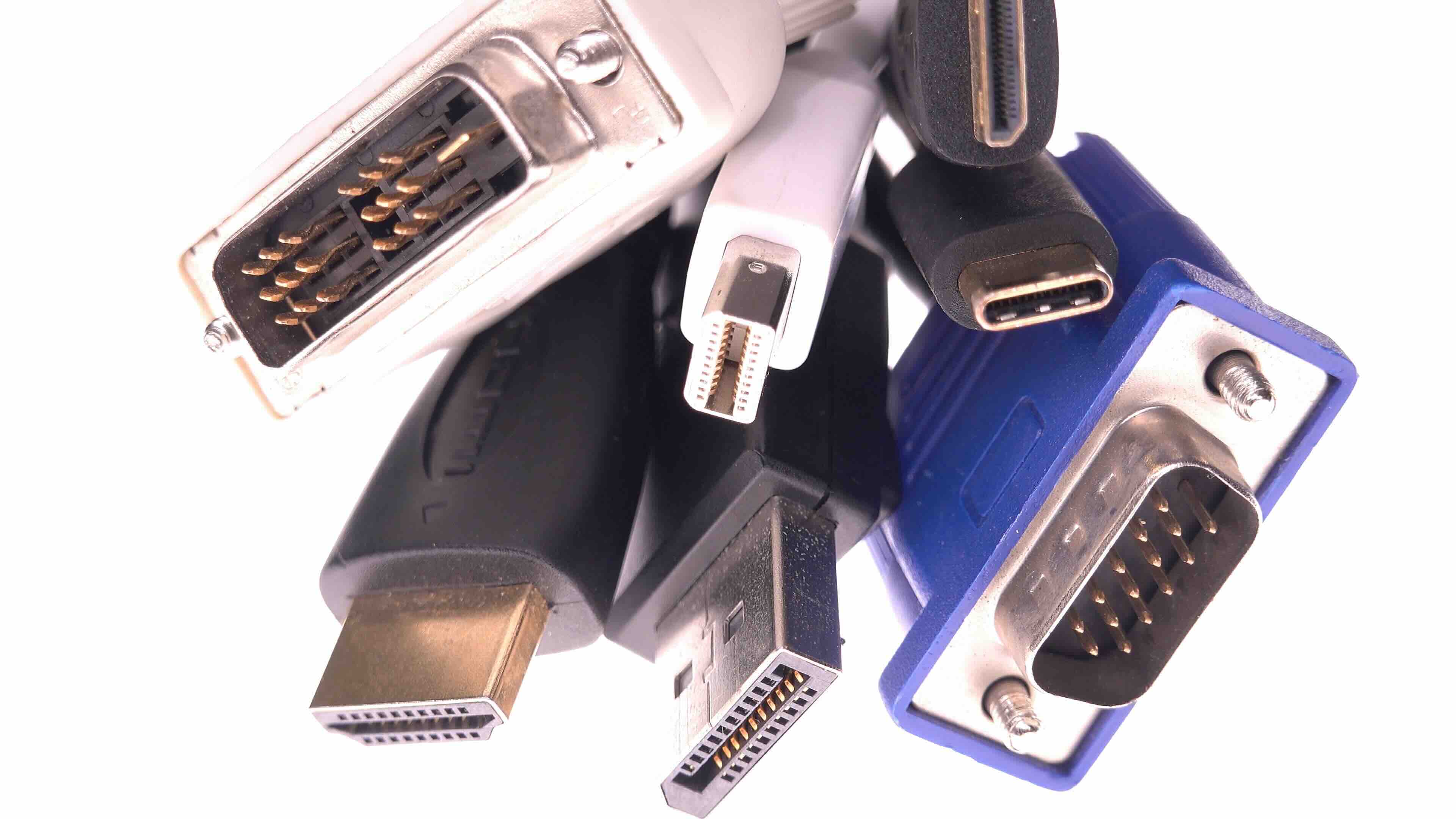
HDMI vs DVI: Which Connection Is Actually Better for Your Setup
So here is the thing -- this question comes up constantly, and honestly it is one of those topics where the answer kind of depends on what you are actually doing. HDMI and DVI have been coexisting in the display world for years now, and yet a lot of people still are not entirely sure what makes them different or why it matters. Both carry video signals. Both are widely used. But they are not the same, and picking the wrong one for your situation can lead to real headaches. Let us break this down clearly and practically.
What Is HDMI and How Does It Work
HDMI stands for High-Definition Multimedia Interface. It was introduced in 2002 and was designed from the ground up to carry both audio and video over a single cable. That is the key part -- a single cable. The standard has evolved quite a bit over the years, moving from HDMI 1.0 through to HDMI 2.1, each iteration adding support for higher resolutions, faster refresh rates, and additional features like HDR, Ethernet data, and ARC, which stands for Audio Return Channel. Modern HDMI 2.1 cables support up to 10K resolution in theory, though practical use cases tend to center around 4K at 120Hz and 8K at 60Hz. HDMI is found on televisions, monitors, projectors, gaming consoles, laptops, AV receivers, and just about everything else in a modern home or professional AV environment.
What Is DVI and How Does It Work
DVI stands for Digital Visual Interface. It was developed around 1999, and its primary design goal was to replace the older VGA standard with a digital-first connection. DVI carries video only -- no audio, no Ethernet, none of the extra functionality that HDMI eventually brought to the table. There are a few variants of DVI worth knowing. DVI-D carries only digital signals, DVI-A carries only analog signals, and DVI-I carries both. Dual-link DVI pushed bandwidth further, supporting resolutions up to 2560 x 1600 at 60Hz. DVI became a staple for computer monitors and PC graphics cards throughout the 2000s, and it is still present on some legacy hardware and professional workstation equipment today, though it has largely been phased out in newer consumer products.
Key Differences Between HDMI and DVI
This is where things start to get more useful. Understanding the actual differences helps you make a smarter decision for your specific situation rather than just going with what is familiar. Here is a direct comparison of the most important distinctions:
- Audio support: HDMI carries both audio and video in a single cable, while DVI carries video only and requires a separate audio connection.
- Maximum resolution: HDMI 2.1 supports up to 10K resolution in specification, while dual-link DVI caps out at 2560 x 1600.
- Refresh rate support: HDMI 2.1 supports 4K at 120Hz and 8K at 60Hz, while DVI maxes out at 144Hz only at 1080p using dual-link configurations.
- HDR support: HDMI supports HDR content transmission, DVI does not.
- Cable size and connector: DVI connectors are physically larger and bulkier compared to the more compact HDMI connector.
- Device compatibility: HDMI is found on the vast majority of modern televisions, monitors, and consumer electronics, while DVI is largely limited to older PC hardware and specific professional displays.
Where HDMI Clearly Has the Advantage
For home theater setups, gaming configurations, and most modern display applications, HDMI is the stronger choice -- and it is not particularly close anymore. The ability to carry audio and video over a single cable simplifies cable management significantly. If you are connecting a gaming console, a streaming device, a Blu-ray player, or a soundbar, HDMI handles everything without needing additional cables running alongside it. HDMI also supports HDCP, which is the content protection protocol required to play back DRM-protected content like 4K Blu-ray or streaming video in full resolution. Without HDMI, that content simply will not display at the resolution it was meant to. Add in HDR support and the consistently updated HDMI specification, and the picture becomes very clear for consumer applications.
Where DVI Still Holds Its Ground
DVI is not irrelevant, though. It still has a legitimate place in certain environments. Some older professional monitors and workstations were built around DVI, and those connections are still perfectly functional. For users running legacy display hardware, or integrating into older infrastructure that has not been updated, DVI remains a reliable and stable connection standard. There is also something worth noting for competitive PC gamers: dual-link DVI can support 144Hz at 1080p, which was historically a selling point before DisplayPort and newer HDMI versions made that less of a distinguishing factor. If you are working with hardware that only has DVI outputs and inputs, forcing an upgrade just to change the connection standard may not always be the most cost-effective move.
Compatibility and Adapters: What You Need to Know
One practical consideration that does not get enough attention is compatibility through adapters. HDMI and DVI are actually signal-compatible in their digital video transmission, which means passive adapters can often convert between them without signal loss -- as long as you stay within the resolution and refresh rate limits of DVI. This is useful for mixed environments where one end of the connection is a DVI output and the other is an HDMI input, or vice versa. Keep in mind that audio will not pass through a DVI connection even with an adapter, and HDCP compliance can sometimes be interrupted depending on the adapter quality. Using a well-manufactured adapter from a reliable source matters here, because signal integrity at higher resolutions is not something you want to leave to chance.
HDMI vs DVI for Gaming, Monitors, and Professional Use
Context shifts the recommendation pretty significantly. For gaming on a modern console or a PC with a current-generation GPU, HDMI is almost always the practical choice, particularly for 4K or HDR-enabled displays. For professional design work or video editing on a legacy workstation monitor, DVI may still be in play depending on what the hardware supports. For standard office and productivity use with a 1080p or 1440p monitor, either connection will serve well, though HDMI offers more flexibility for future hardware changes. The real edge case where DVI held a specific advantage -- high refresh rate 1080p gaming -- has effectively been addressed by HDMI 2.0 and newer, which removed that last remaining performance gap.
Should You Upgrade From DVI to HDMI
If your display and source hardware both support HDMI and you are currently using DVI, making the switch is generally a worthwhile move. You gain audio integration, HDR capability, and better long-term compatibility with modern devices. If your monitor only has a DVI input and your GPU only has HDMI outputs, a quality passive adapter will work in most cases for video-only tasks. However, if you are also running audio through that connection or working with protected content, you will need to rethink the signal path. Upgrading displays or cables is not always necessary immediately, but having a roadmap toward HDMI makes sense for anyone who regularly updates their hardware or works in demanding AV environments.
Why Monoprice Is the Smart Choice for HDMI and DVI Cables and Adapters
When it comes to sourcing the right cables and adapters for your display setup, quality and value both matter -- and that is exactly where Monoprice delivers. Whether you need a high-speed HDMI 2.1 cable capable of handling 8K content, a dual-link DVI cable for a professional workstation monitor, or a passive HDMI-to-DVI adapter for a mixed-input environment, Monoprice has the right solution without charging a premium for basic connectivity. For anyone building out a home theater, upgrading a gaming setup, or managing display infrastructure in a commercial or educational environment, choosing high-performance HDMI and DVI cables from Monoprice means you are getting certified, thoroughly tested products designed to maintain signal integrity at every resolution level. The catalog spans everything from everyday HDMI cables to professional-grade AV solutions, all backed by Monoprice's commitment to delivering performance that matches or exceeds far more expensive alternatives. It is a straightforward decision for anyone who wants reliable connections without overcomplicating the budget.
Frequently Asked Questions About HDMI vs DVI
Is HDMI better than DVI for everyday monitor use?
For most everyday monitor use, HDMI is the more versatile option because it carries both audio and video in one cable and supports modern resolutions and HDR. DVI handles video reliably but lacks audio support and tops out at lower resolution limits compared to HDMI 2.0 and above.
Can I use a DVI to HDMI adapter without losing quality?
In most cases, a passive DVI to HDMI adapter will not degrade video quality as long as the resolution stays within DVI's supported limits. Audio will not pass through the DVI side of the connection, so a separate audio solution is needed if sound is required.
Does DVI support 4K resolution?
Standard DVI does not support 4K resolution. Dual-link DVI maxes out at 2560 x 1600 at 60Hz, which falls short of the 3840 x 2160 resolution that defines 4K. HDMI 1.4 and above is required for 4K output.
Does HDMI carry audio automatically?
Yes, HDMI is designed to carry both audio and video signals through a single cable. This includes multi-channel audio formats like Dolby TrueHD and DTS-HD Master Audio, which are commonly used in home theater systems.
Which is better for gaming, HDMI or DVI?
For modern gaming, HDMI is the better choice, particularly for 4K, HDR, or high refresh rate gaming above 1080p. HDMI 2.0 supports 4K at 60Hz and 1080p at 240Hz, while HDMI 2.1 extends that to 4K at 120Hz. Dual-link DVI could handle 1080p at 144Hz but offers no path to higher resolutions at comparable refresh rates.
Is DVI still used in professional environments?
Yes, DVI is still present in some professional workstation environments, particularly where legacy monitors or specialized display hardware is involved. However, most new professional displays have shifted to HDMI or DisplayPort as primary connection standards.
Can HDMI and DVI display the same image quality?
For resolutions within DVI's supported range, the digital video quality between HDMI and DVI is essentially identical. Both use digital signal transmission, so there is no inherent quality difference for standard desktop or productivity use at 1080p or 1440p.
Does HDMI support HDR and DVI does not?
Correct. HDR, or High Dynamic Range, requires HDMI to function. HDR metadata is transmitted through HDMI and is not supported by the DVI standard. If HDR content or HDR-enabled monitors are part of your setup, HDMI is required.
What cable should I use to connect a PC to a TV?
For connecting a PC to a television, HDMI is almost always the right choice. It carries both video and audio, supports the resolutions televisions use including 4K and 8K, and is compatible with content protection standards required for streaming and disc playback.
How do I know if my monitor supports HDMI or DVI?
Check the back or underside of your monitor for available input ports. HDMI ports are smaller and trapezoidal in shape, while DVI connectors are wider with a visible pin layout. Many monitors include both input types, giving you flexibility in how you connect your source device.


