HDMI to DisplayPort Conversion: Adapters That Work
Converting HDMI to DisplayPort: What You Need to Know Before You Buy
So you have an HDMI source and a DisplayPort monitor, or maybe it is the other way around, and you are sitting there wondering why this is not as simple as grabbing a cable off the shelf. Here is the thing: HDMI and DisplayPort are not just different shapes. They operate on fundamentally different signaling protocols, which means converting between them requires active processing, not passive adaption. That distinction matters more than most people realize when they are shopping for a solution.
Understanding the Core Difference Between HDMI and DisplayPort
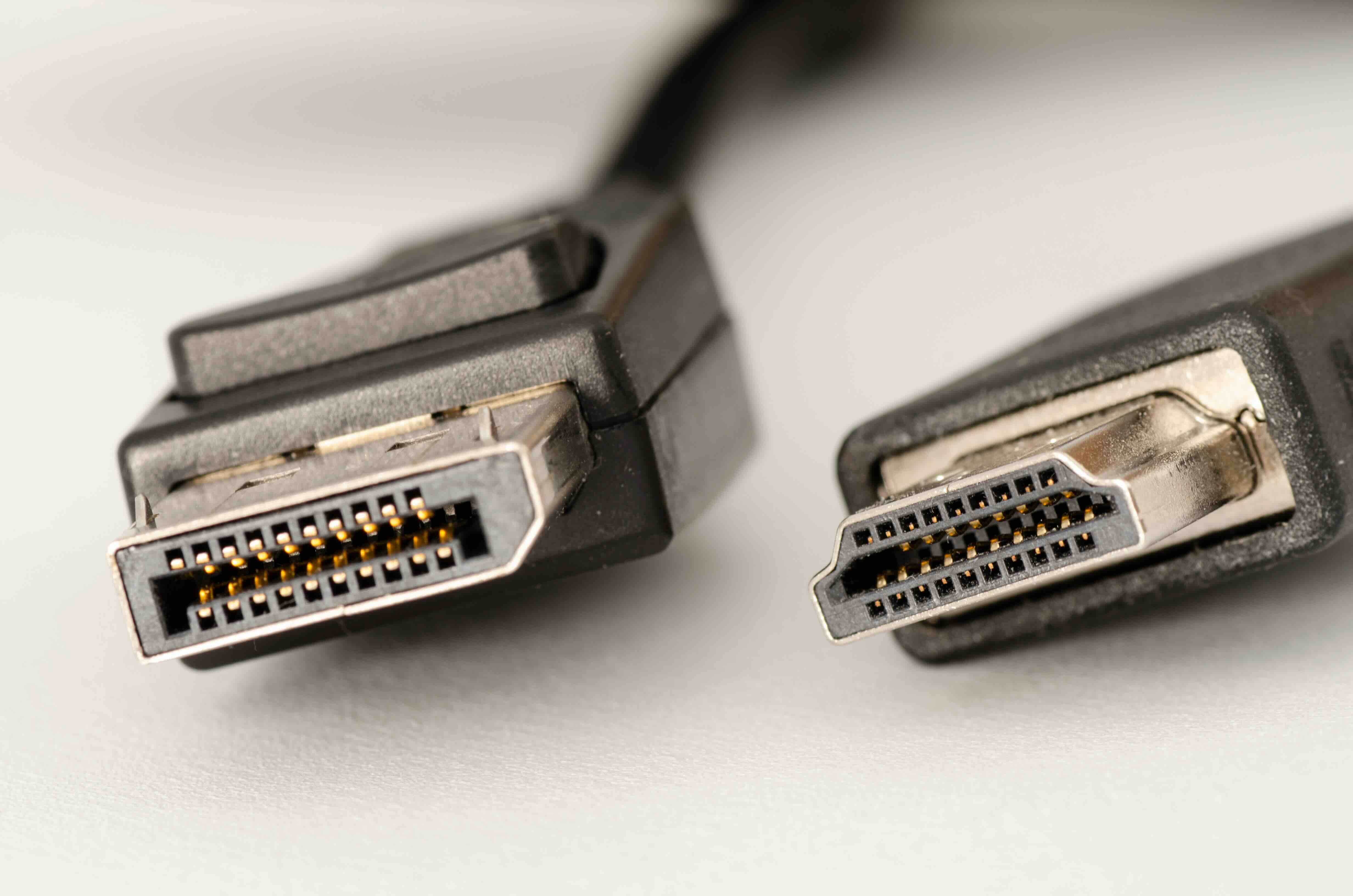
HDMI, which stands for High-Definition Multimedia Interface, was built primarily for consumer electronics. Televisions, projectors, streaming devices, game consoles -- that is where HDMI lives. DisplayPort, developed by VESA, was designed with PC and professional display use in mind. Both carry audio and video signals, but they do it differently at a technical level. HDMI uses a TMDS signal architecture while DisplayPort relies on a packet-based transmission system similar to how PCIe data moves. Because of these underlying differences, you cannot simply rewire one connector to the other. You need active conversion circuitry to translate the signal properly.
Active vs. Passive Adapters: Why This Distinction Is Critical
This is where a lot of people get tripped up. You will see both active and passive adapters listed online, sometimes at wildly different price points, and the temptation to go cheap is real. But passive adapters only work in very specific scenarios, typically when the source device supports a dual-mode output, sometimes called DisplayPort++, which can natively output an HDMI-compatible signal without conversion. Passive adapters in this context just remap the pins. Active adapters, however, contain an integrated chip that actually processes and converts the signal from one format to the other. For a true HDMI-to-DisplayPort conversion, an active adapter is almost always required. Buying a passive one when you need an active one results in a blank screen and a frustrating afternoon.
HDMI to DisplayPort vs. DisplayPort to HDMI: Direction Matters
This is a detail that catches people off guard. Conversion adapters are directional. An adapter designed to go from DisplayPort to HDMI will not work in reverse. The signal processing inside the adapter is built for one direction of flow, so plugging it in backwards simply does not function. When shopping for a converter or adapter, always confirm the directionality. Check whether you need HDMI input to DisplayPort output, or DisplayPort input to HDMI output. Both configurations exist, but they are separate products with separate internal components.
Resolution and Refresh Rate Support: Know What You Are Getting
Not all adapters handle high-resolution signals equally, and that is worth spending a moment on. Budget adapters sometimes cap out at 1080p or 1440p, which may be fine for everyday office work but problematic if you are running a 4K display or pushing a 144Hz refresh rate for gaming or professional video work. Before purchasing, verify that the adapter explicitly supports your target resolution and refresh rate combination. Look for specifications that mention 4K at 60Hz, or if you are in a more demanding workflow, check for HDR passthrough support as well. These specs should be clearly stated in product documentation, not buried in fine print.
Common Use Cases for HDMI to DisplayPort Conversion
Understanding when and why you would need this conversion helps clarify which solution fits your setup. Here are the most common real-world scenarios where HDMI to DisplayPort adapters or converters come into play:
- Connecting a laptop with only HDMI output to a newer DisplayPort-only monitor
- Linking a gaming console like a PlayStation or Xbox to a PC gaming monitor that lacks an HDMI port
- Using legacy AV equipment in a modern workstation environment
- Extending a multi-monitor setup where one display only accepts DisplayPort input
- Connecting set-top boxes or media players to professional-grade displays in commercial AV installs
Each of these situations calls for an active adapter with properly matched specifications. The use case informs the spec requirements, so always start there before comparing products.
Potential Drawbacks to Keep in Mind
HDMI to DisplayPort conversion works well when you use quality hardware, but it is not without limitations. Active adapters add a small layer of latency, though in most display use cases this is imperceptible. Audio passthrough can be inconsistent across lower-quality adapters, with some stripping multichannel audio entirely. Variable refresh rate technologies like AMD FreeSync or NVIDIA G-Sync may not function correctly or at all through a converted signal, which is a real consideration for gamers. Additionally, HDCP copy protection signals can sometimes get disrupted during conversion, causing issues with streaming services that enforce strict DRM. These are not dealbreakers, but they are things you want to evaluate against your specific needs before purchasing.
Tips for Choosing the Right HDMI to DisplayPort Adapter
When evaluating options, a few practical criteria separate reliable products from ones you will return within a week:
- Confirm it is an active adapter with a dedicated conversion chip
- Verify maximum resolution and refresh rate support matches your display
- Check for USB power requirements, as many active adapters draw bus power from a USB port
- Look for products that explicitly list audio passthrough support if sound matters to your setup
- Read user reviews that mention the specific source and display combination you are working with
- Avoid unbranded adapters with vague or missing technical specifications
Sticking to these criteria significantly reduces the chance of compatibility headaches. It is also worth noting that standalone HDMI to DisplayPort converter boxes, as opposed to simple cable adapters, tend to offer more stable performance in demanding or commercial environments.
HDMI vs. DisplayPort: Which Is Better for Your Setup Going Forward?
This is a reasonable question to ask alongside the conversion discussion. For monitor-to-PC connections where you control both ends of the signal chain, DisplayPort generally offers advantages: higher bandwidth headroom, support for daisy-chaining multiple displays, and better compatibility with adaptive sync technologies. HDMI holds the edge in consumer electronics ecosystems, particularly for TVs, AV receivers, and consoles. If you are building or upgrading a workstation setup, moving toward DisplayPort-native hardware on both ends eliminates the conversion step entirely. But for mixed environments where you have no control over one end of the connection, a quality active adapter remains a perfectly workable solution.
Why Monoprice Is the Right Source for Your HDMI to DisplayPort Conversion Needs
When it comes to display connectivity, the cable or adapter you choose matters as much as any other component in the chain. Monoprice has built a trusted reputation among IT professionals, AV integrators, and everyday users by delivering high-performance connectivity solutions at pricing that makes sense for both individual buyers and enterprise procurement teams. For anyone navigating the process of converting HDMI signals to DisplayPort, Monoprice offers a range of active adapters and converter solutions engineered to handle real-world demands, including 4K resolution support, stable audio passthrough, and construction quality that holds up in commercial installations. If you are ready to shop for reliable display adapters and cables backed by clear specifications and fair pricing, explore the full selection of HDMI to DisplayPort adapters and display connectivity solutions at Monoprice and find the right fit for your setup without overpaying for a brand name that does not add value to the signal coming through the wire.
Frequently Asked Questions About Converting HDMI to DisplayPort
Can I use a passive adapter to convert HDMI to DisplayPort?
In most cases, no. HDMI to DisplayPort conversion requires an active adapter with a built-in conversion chip because the two standards use incompatible signaling protocols. Passive adapters only work in very specific scenarios involving dual-mode DisplayPort++ outputs, and they do not work for HDMI source to DisplayPort display conversions.
Does an HDMI to DisplayPort adapter support 4K resolution?
It depends on the specific adapter. Many quality active adapters support 4K at 60Hz, but budget options may cap at 1080p or 1440p. Always check the product specifications before purchasing and confirm the adapter explicitly supports your required resolution and refresh rate.
Will an HDMI to DisplayPort adapter carry audio?
Many active adapters do support audio passthrough, but not all of them. Check the product description carefully for audio support before buying, especially if you are relying on the display's built-in speakers or passing audio through to an AV receiver.
Is the conversion from HDMI to DisplayPort the same as DisplayPort to HDMI?
No. These are directional conversions. An adapter built for DisplayPort to HDMI will not work in reverse. You need the correct adapter for your specific signal direction, so confirm whether your source is HDMI or DisplayPort before purchasing.
Do HDMI to DisplayPort adapters work with gaming monitors?
They can, but with limitations. Adaptive sync features like G-Sync or FreeSync may not function properly through a converted signal. For competitive gaming setups where variable refresh rate is important, a native DisplayPort or HDMI connection without conversion is strongly recommended.
Why does my HDMI to DisplayPort adapter result in a blank screen?
This is most commonly caused by using a passive adapter when an active one is required, using the adapter in the wrong direction, or a mismatch between the adapter's supported resolution and what the display is requesting. Verify adapter type, direction, and resolution compatibility as a first troubleshooting step.
Do HDMI to DisplayPort adapters need external power?
Many active HDMI to DisplayPort adapters draw power through a USB connection to operate the internal conversion chip. Check whether the adapter you are considering requires USB bus power and ensure your setup has an available USB port nearby.
Can I connect a game console to a DisplayPort monitor using an HDMI to DisplayPort adapter?
Yes, this is one of the most common use cases for HDMI to DisplayPort adapters. Consoles output HDMI signals, and many PC gaming monitors accept only DisplayPort input. An active HDMI to DisplayPort adapter handles this conversion, though resolution and refresh rate support should be confirmed against your console's output capabilities.
Will HDCP-protected content play through an HDMI to DisplayPort adapter?
Not reliably. HDCP handshakes can be disrupted during signal conversion, which may cause streaming services or Blu-ray playback to fail or display an error. For HDCP-protected content, a native connection without conversion is the more dependable solution.
How do I know if my adapter is truly active and not passive?
Active adapters typically mention a built-in conversion chip or signal processor in their specifications, and many require USB power to function. If an adapter makes no mention of active conversion, draws no power, and is priced extremely low, it is likely passive and may not work for HDMI to DisplayPort conversion.