FireWire Cables Explained: Legacy High-Speed Data Solutions
What Is a FireWire Cable and Why Does It Still Matter?
FireWire cables -- you might not hear about them every day anymore, but they still come up enough that it's worth really understanding what they are and what they do. FireWire, also known by its technical designation IEEE 1394, is a high-speed serial data transfer interface that was developed in the late 1980s and commercialized by Apple in the early 1990s. At the time, it was genuinely impressive technology. It gave professionals a fast, reliable way to move large amounts of data between devices -- camcorders, external hard drives, audio interfaces, and more -- without the bottlenecks that plagued older connection types. Even now, in production environments and legacy media workflows, FireWire holds its ground as a dependable solution for specific use cases.
How FireWire Cables Actually Work
So here is the part that tends to trip people up. FireWire operates as a serial bus interface, meaning it transfers data bits one at a time in a sequential stream rather than in parallel. That might sound slower, but the engineering behind it allows for remarkably fast throughput with low latency. The standard supports peer-to-peer device communication, which means two FireWire devices can communicate directly with each other without routing data through a host computer. That was a big deal for video production workflows where timing and real-time data transfer mattered enormously. FireWire also supports isochronous data transfer, which basically guarantees a consistent data delivery rate -- crucial when you are streaming video or audio and cannot afford dropped frames or timing errors.
FireWire Versions and Speed Tiers Explained
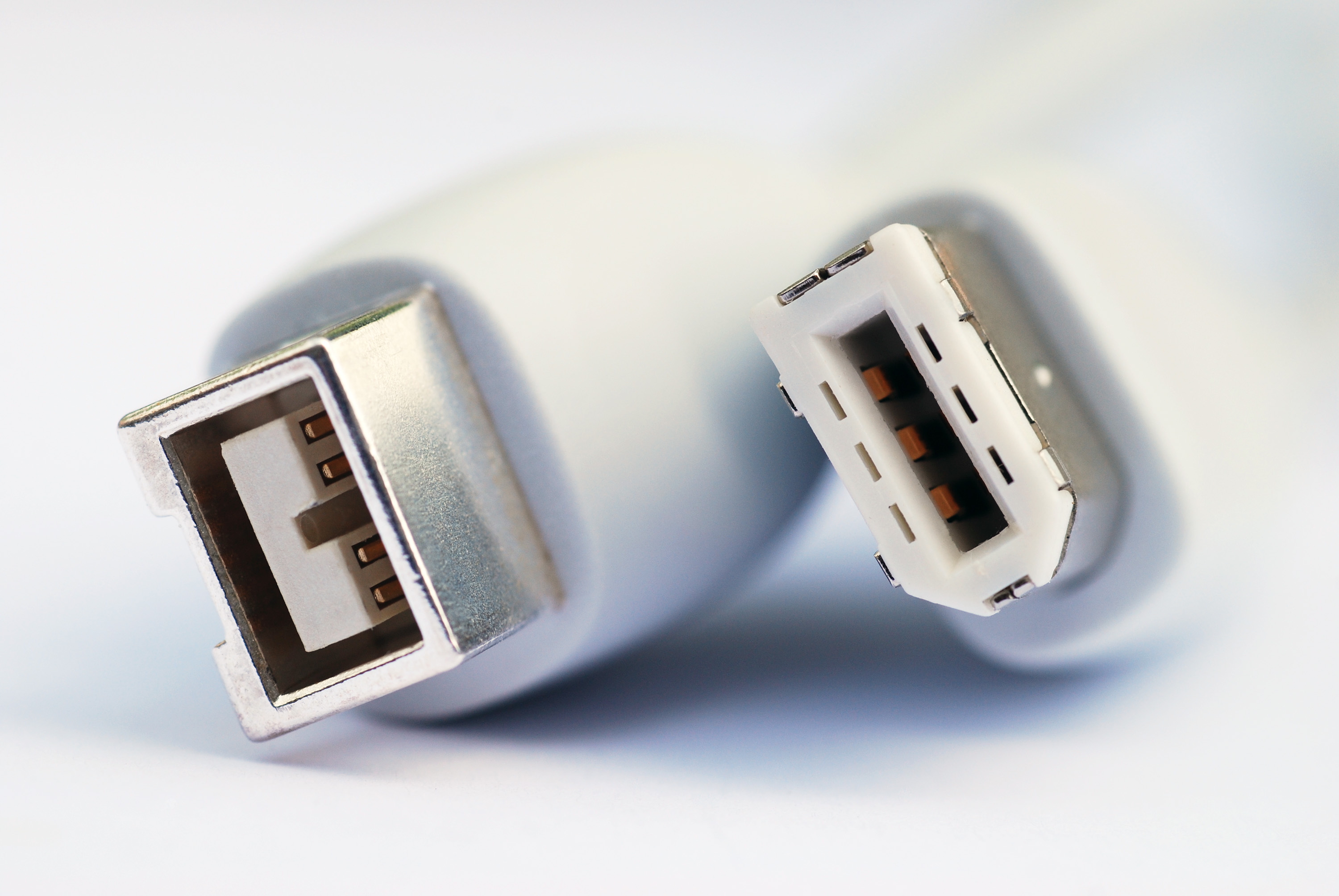
Not all FireWire cables are the same, and the version you are using matters a lot for performance. The three main iterations are FireWire 400, FireWire 800, and the less common FireWire S3200. FireWire 400, or IEEE 1394a, tops out at 400 Mbps and uses a 4-pin or 6-pin connector. FireWire 800, or IEEE 1394b, doubles that to 800 Mbps and introduced the 9-pin connector. FireWire S3200 pushed speeds up to 3.2 Gbps but never saw widespread adoption before USB and Thunderbolt overtook the market. Knowing which version your device supports is the first step to making sure you are getting the performance the interface was designed to deliver.
Common FireWire Connector Types at a Glance
FireWire connectors come in several physical formats, and matching the right connector to your device is not always obvious. Here is a breakdown of what you will likely encounter when working with FireWire equipment.
4-pin FireWire 400 connector -- common on camcorders and portable devices, no power delivery 6-pin FireWire 400 connector -- found on desktop computers and hubs, includes power delivery 9-pin FireWire 800 connector -- used in IEEE 1394b devices, enables higher bandwidth 4-pin to 6-pin cables -- bridge portable and desktop FireWire 400 devices 6-pin to 9-pin cables -- allow FireWire 400 devices to connect to FireWire 800 ports 9-pin to 9-pin cables -- full FireWire 800 to FireWire 800 connections for maximum speedGetting the right cable type is not just about physical fit -- it directly affects whether you are getting the transfer speeds your workflow demands. Always verify connector types on both ends before purchasing.
Key Advantages of FireWire Cables
There are real reasons why professionals in video production, music recording, and digital archiving still reach for FireWire connections. The isochronous transfer capability already mentioned is a cornerstone advantage -- it makes FireWire ideal for real-time audio and video capture where data consistency is non-negotiable. FireWire also supports daisy-chaining, meaning you can connect multiple devices in sequence off a single port without needing a hub. That kind of flexibility is genuinely useful in a production environment where desk real estate and port availability are limited. Additionally, FireWire can deliver power to connected devices through the cable itself on 6-pin and 9-pin connections, reducing the cable clutter that comes with requiring separate power adapters for every peripheral.
Drawbacks and Limitations to Know Before You Buy
FireWire is not without its complications, and going in with clear expectations matters. The most obvious issue is that modern computers have largely dropped FireWire ports in favor of USB-C and Thunderbolt. That means you will likely need a PCIe expansion card or an adapter to use FireWire devices with current hardware. The technology also never achieved the universal adoption that USB did, which made it feel like a niche solution even during its peak years. Cost was another barrier -- FireWire equipment has historically carried a premium price point compared to USB alternatives. And while FireWire 800 is genuinely fast by legacy standards, it does not compete with modern USB 3.2 or Thunderbolt 4 speeds. Understanding these limitations helps you make a practical decision about whether FireWire fits your specific workflow.
Where FireWire Is Still Used Today
Legacy does not mean obsolete, at least not in every context. FireWire still sees active use in several professional and semi-professional environments. Digital video archivists working with footage captured on MiniDV or HDV camcorders depend on FireWire connections to digitize and preserve that content -- there is often no practical alternative. Professional audio interfaces from earlier production eras frequently use FireWire, and many studios have not replaced that gear because it still performs exactly as needed. Industrial and scientific equipment with FireWire interfaces also continues to operate in research and manufacturing settings. If your workflow involves any of this legacy equipment, FireWire cables are not a relic -- they are a requirement.
Tips for Getting the Most Out of FireWire Connections
If you are working with FireWire equipment, a few practical considerations will help you avoid frustrating performance issues. Always use quality cables that are properly shielded -- signal degradation over poorly constructed cables is a real problem, especially over longer runs. Keep cable lengths reasonable; FireWire 400 supports runs up to 4.5 meters per segment, and FireWire 800 can extend further with the right cabling. If you are daisy-chaining devices, place the most bandwidth-demanding device closest to the host. Make sure your host adapter or expansion card has the correct chipset for your operating system -- driver compatibility has historically been an issue with certain FireWire cards on Windows systems. And when possible, avoid mixing FireWire 400 and 800 devices on the same chain, as throughput will drop to the lowest common denominator.
Why Monoprice Is the Right Source for Your FireWire Cable Needs
When you need reliable connectivity for legacy workflows, cutting corners on cable quality is not a trade-off worth making. Monoprice has built a reputation for delivering performance-grade cables and connectivity solutions at pricing that does not punish professionals for needing the right tool. Whether you are sourcing FireWire 400 to 400 cables for a digitization project or tracking down a 6-pin to 9-pin adapter to connect older audio gear to a current workstation, Monoprice carries the inventory and the expertise to back it up. The product lineup is built for real-world use -- properly shielded, correctly specced, and ready to perform in demanding environments. If you are putting together a reliable legacy media workflow or maintaining production equipment that depends on trusted data transfer, explore the full range of high-speed data transfer cables and connectivity solutions at Monoprice FireWire cables and legacy connectivity solutions and find exactly what your setup requires without overpaying for it.
Frequently Asked Questions About FireWire Cables
What is a FireWire cable used for?
FireWire cables are used to transfer data at high speeds between devices such as camcorders, external hard drives, audio interfaces, and computers. They are especially common in video production and professional audio workflows that rely on consistent, real-time data transfer.
Is FireWire faster than USB?
FireWire 800 outperforms USB 2.0 in sustained transfer speeds and real-world performance, particularly for streaming audio and video. However, modern USB 3.2 and USB4 standards significantly exceed FireWire speeds, so the comparison depends on which generation of each technology you are referencing.
Can I use a FireWire cable with a modern computer?
Most modern computers do not include built-in FireWire ports. To use FireWire devices, you will typically need a PCIe FireWire expansion card for desktop computers or a Thunderbolt-to-FireWire adapter for laptops that support Thunderbolt.
What is the difference between FireWire 400 and FireWire 800?
FireWire 400 transfers data at up to 400 Mbps and uses 4-pin or 6-pin connectors. FireWire 800 doubles that throughput to 800 Mbps and uses a 9-pin connector. FireWire 800 is backward compatible with FireWire 400 devices using the appropriate adapter cable.
Can FireWire cables deliver power to connected devices?
Yes, 6-pin and 9-pin FireWire connectors include power delivery capability, allowing compatible devices to draw power directly through the cable. The 4-pin connector does not carry power and is typically found on portable devices like camcorders.
How long can a FireWire cable be?
FireWire 400 supports cable lengths up to 4.5 meters per segment. When daisy-chaining multiple devices, the total cable length across the chain should not exceed approximately 72 meters. FireWire 800 can support longer individual cable runs with properly rated cable.
What devices commonly use FireWire connections?
FireWire is commonly found on MiniDV and HDV camcorders, professional audio interfaces, early external hard drives, digital mixers, and industrial or scientific equipment. It was also widely used in early professional video editing workstations.
Is FireWire still being manufactured?
FireWire cables and adapters are still manufactured and available, though the market is significantly smaller than during the technology's peak. Professionals working with legacy equipment continue to source FireWire cables for digitization, archiving, and ongoing production work.
Can I daisy-chain multiple FireWire devices together?
Yes, FireWire natively supports daisy-chaining up to 63 devices from a single port. Each device in the chain passes data along to the next, eliminating the need for a hub. For best performance, connect the most data-intensive device closest to the host computer.
Are FireWire and IEEE 1394 the same thing?
Yes, FireWire is Apple's branded name for the IEEE 1394 interface standard. Sony also marketed the same technology under the name i.LINK. All three names refer to the same underlying serial bus interface technology.