

DVI Single Link vs Dual Link: What You Need to Know
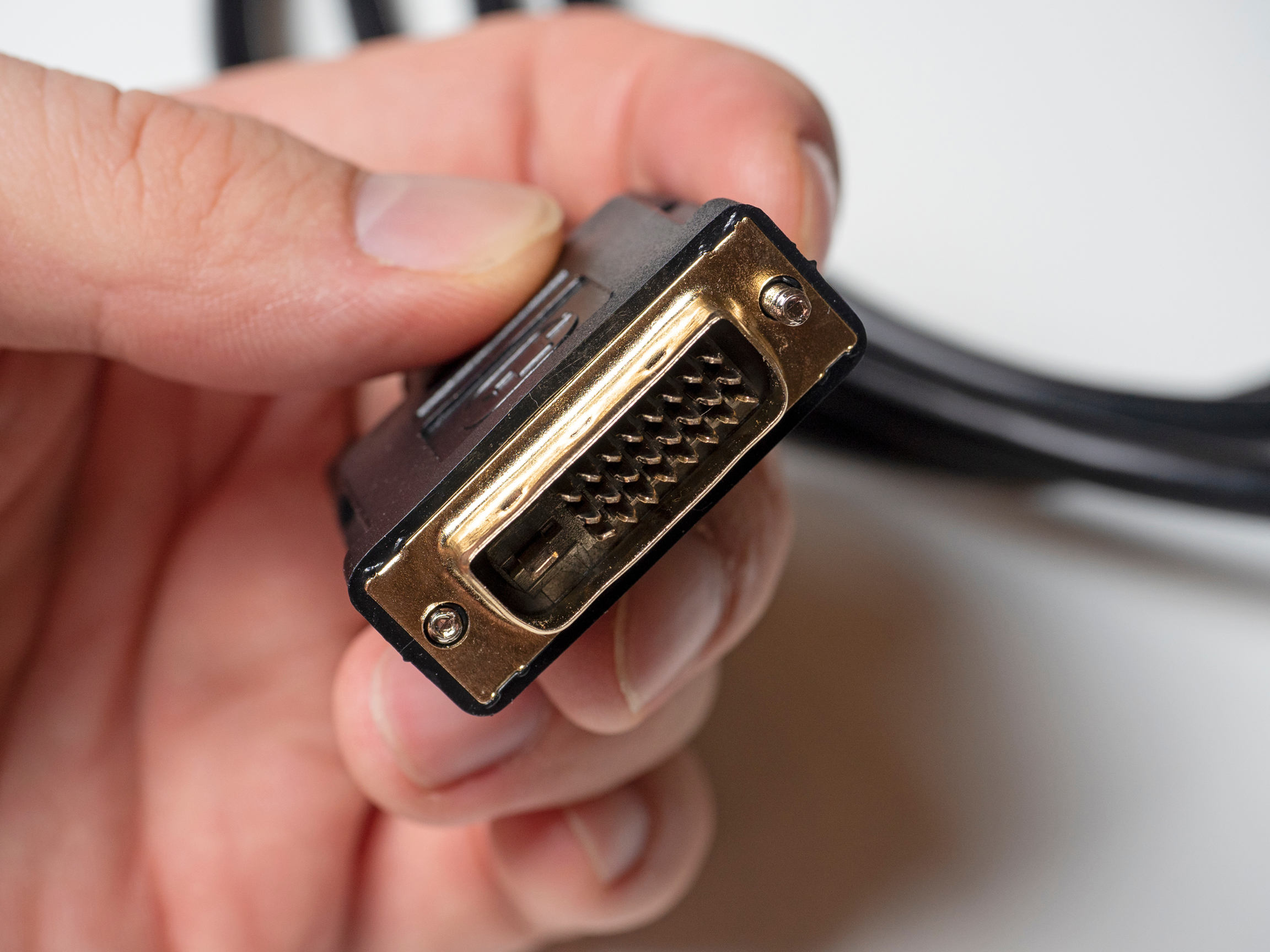
DVI Single Link vs Dual Link: What You Actually Need to Know
If you have ever stood in front of a monitor setup trying to figure out why your display looks slightly off, or why you cannot push a higher resolution no matter what you do, there is a decent chance the answer lives somewhere inside your DVI cable. Specifically, in whether you are running single link or dual link. It sounds like a minor technical distinction, but it genuinely matters depending on what you are trying to do. So let's get into it, because this one trips people up more than it should.
What Is DVI and Why Does It Still Matter
DVI, short for Digital Visual Interface, is a video connection standard that launched back in 1999. Yes, it has been around for a while. And yes, newer standards like DisplayPort and HDMI have taken over a lot of ground. But DVI is still present in a surprising number of workstations, older monitors, graphics cards, and professional display setups. It bridges the gap between old analog VGA technology and the fully digital world we live in now. There are a few variants of DVI, including DVI-A for analog only, DVI-D for digital only, and DVI-I which supports both. The single versus dual link distinction applies specifically to DVI-D and DVI-I connectors, and it determines the bandwidth that signal can actually carry.
How DVI Single Link Works
A single link DVI connection uses one set of transmitters to carry the video signal. That gives you a maximum bandwidth of around 165 MHz, which translates to a maximum resolution of 1920x1200 at 60Hz. For a lot of standard desktop use cases, that is completely sufficient. If you are running a 1080p monitor or even a 1920x1200 display at normal refresh rates, single link DVI does the job without any issues. The connector itself has 18 pins plus a ground pin, and while it physically looks similar to its dual link counterpart, the internal wiring and capability are not the same. Worth noting: you cannot simply swap in a different cable and gain dual link capability if your hardware only supports single link output. The limitation is in the hardware, not just the cable.
How DVI Dual Link Works
Dual link DVI adds a second set of transmitters alongside the first, effectively doubling the available bandwidth to around 330 MHz. That opens the door to resolutions up to 2560x1600 at 60Hz. If you are running a high-resolution monitor for creative work, data visualization, or a specialized professional display, dual link is where you need to be. The connector has 24 pins plus a ground pin, which is how you can physically tell them apart before you even look at specs. The additional pins carry that second channel of data. Both the cable and the source output need to support dual link for it to work. One single link component in the chain breaks the whole thing.
Key Differences Between Single Link and Dual Link DVI
The gap between these two formats really comes down to a few concrete factors that directly impact your setup. Here is a straightforward breakdown of where they differ:
Maximum bandwidth: Single link tops out at 165 MHz, dual link reaches 330 MHz
Maximum resolution: Single link handles up to 1920x1200 at 60Hz, dual link supports up to 2560x1600 at 60Hz
Pin count: Single link uses 18 plus 1 ground pin, dual link uses 24 plus 1 ground pin
Use case fit: Single link works for standard HD and WUXGA displays, dual link is necessary for higher resolution professional monitors
Hardware dependency: Both source and display must support dual link for the higher bandwidth to function
That last point is important and worth repeating. Even if you buy a dual link cable, your resolution ceiling is determined by your graphics card output and your monitor's input capabilities. The cable is a conduit, not a solution on its own.
Common Use Cases for Each Format
Single link DVI is perfectly suited for most general computing environments. Office workstations, standard gaming monitors at 1080p, home setups running a single display at non-extreme resolutions, these are all solid single link territory. If your workflow does not involve pushing above 1920x1200, you probably do not need to think about this further. Dual link DVI enters the conversation when you are working with high-resolution production monitors, older professional-grade displays that predate DisplayPort availability, or any setup where you need to hit 2560x1600 without switching to a different interface entirely. Graphic designers, video editors working on legacy equipment, and certain CAD environments have historically leaned on dual link DVI for exactly this reason.
Limitations and Drawbacks to Know
Neither format is without its constraints. Single link is limited in resolution ceiling, which becomes a real problem if you upgrade your monitor but not your cable or card. Dual link solves the bandwidth problem but does not add audio support, which is one area where HDMI and DisplayPort have a clear edge. DVI as a whole does not carry audio. It is a video-only interface. Additionally, DVI does not support the adaptive sync technologies or high refresh rates above 60Hz that modern gaming monitors now expect. So while dual link gives you more resolution headroom, it does not future-proof you in every direction. There is also the physical size of the DVI connector itself, which is noticeably bulkier than modern alternatives and can create cable management challenges in tight rack or desk environments.
How to Identify Which Type You Have
The fastest way to tell is to count the pins on the connector or look at the port on your graphics card or monitor. If you see a full grid of 24 pins arranged in three rows of eight, plus the flat ground blade, that is dual link. If you see 18 pins in three rows of six plus the ground blade, that is single link. Some connectors are dual link ports but used with a single link cable, which means only 18 of those 24 pin slots will be populated. Also worth checking your graphics card specifications directly. Manufacturers list whether the DVI output is single or dual link in the product documentation, and that spec tells you the actual maximum output capability regardless of what cable you connect.
Should You Upgrade From Single Link to Dual Link
If your current resolution needs are met by single link, there is no urgent reason to change anything. But if you are running a high-resolution monitor that feels like it is not delivering its full performance, or if you see artifacts, flickering, or a hard resolution cap that does not match the display specs, checking your DVI link type is a smart first diagnostic step. Upgrading the cable alone will not help if the hardware source is single link only. In that scenario, the better long-term move might actually be transitioning to a DisplayPort or HDMI connection if your hardware supports it, especially if you are also chasing higher refresh rates or audio over the same cable. DVI dual link is a solid solution within its defined range, but knowing its ceiling helps you decide whether it is the right tool going forward.
Why Monoprice Is the Right Source for Your DVI Cable Needs
When you are speccing out a display connection for a workstation, a professional monitor setup, or a legacy AV installation, the cable quality and compatibility matter more than most people expect. Monoprice has built a trusted reputation for delivering reliable, well-constructed cables across every major video interface, including DVI. Whether you need a single link solution for a standard HD display or a dual link cable to unlock the full resolution of a high-end monitor, you will find options built to perform without the inflated price tags that come from buying name-brand cables at retail markups. Finding the right DVI single link and dual link cables for professional display setups is straightforward with Monoprice, where specifications are clearly listed, quality is consistent, and the value is built into every product on the shelf. If you are building, upgrading, or troubleshooting a display configuration and need cables that actually match the specs on the box, Monoprice is a reliable starting point that professionals and everyday users come back to again and again.
Frequently Asked Questions About DVI Single Link vs Dual Link
What is the main difference between DVI single link and dual link?
Single link DVI uses one transmitter set and supports resolutions up to 1920x1200 at 60Hz. Dual link uses two transmitter sets and doubles the bandwidth, supporting resolutions up to 2560x1600 at 60Hz.
Can I use a dual link DVI cable in a single link port?
Yes, a dual link cable will physically fit in a single link port, but the connection will only operate at single link bandwidth. The extra pins simply will not be used.
Does DVI carry audio signal?
No. DVI is a video-only interface and does not transmit audio. If you need audio over the same cable, HDMI or DisplayPort are better suited for that requirement.
How do I know if my graphics card supports dual link DVI?
Check the product specifications for your graphics card, either in the documentation or on the manufacturer's website. It will explicitly state whether the DVI output is single link or dual link.
Can DVI dual link support 4K resolution?
No. Dual link DVI maxes out at 2560x1600 at 60Hz. It does not support 4K UHD resolution. For 4K output, DisplayPort or HDMI are the appropriate interfaces.
Is DVI still worth using in a modern setup?
It depends on your hardware. If your monitor and graphics card both use DVI and you are operating within its resolution and refresh rate limits, it works reliably. For newer setups targeting high refresh rates or 4K resolution, modern interfaces are a better choice.
What does a dual link DVI connector look like compared to single link?
A dual link DVI connector has 24 pins arranged in three rows of eight, plus a flat ground blade. A single link connector has 18 pins in three rows of six plus the ground blade. Counting the pins is the fastest visual check.
Do I need a special dual link DVI cable for high-resolution monitors?
Yes. If your monitor and graphics card both support dual link DVI and you need to run resolutions above 1920x1200, you specifically need a dual link rated cable. A single link cable will cap your resolution regardless of what your hardware supports.
Can a DVI to HDMI adapter carry dual link bandwidth?
No. Standard DVI to HDMI adapters are limited to single link DVI bandwidth equivalents. HDMI handles its own bandwidth management independently, so the dual link advantage does not transfer through a passive adapter.
What refresh rates does dual link DVI support?
Dual link DVI supports up to 60Hz at its maximum resolution of 2560x1600. It does not support the high refresh rates of 120Hz or 144Hz that are common in modern gaming monitors, which is a key limitation compared to DisplayPort.


