

DVI-D Cables and Adapters for Clear, Reliable Display Signals
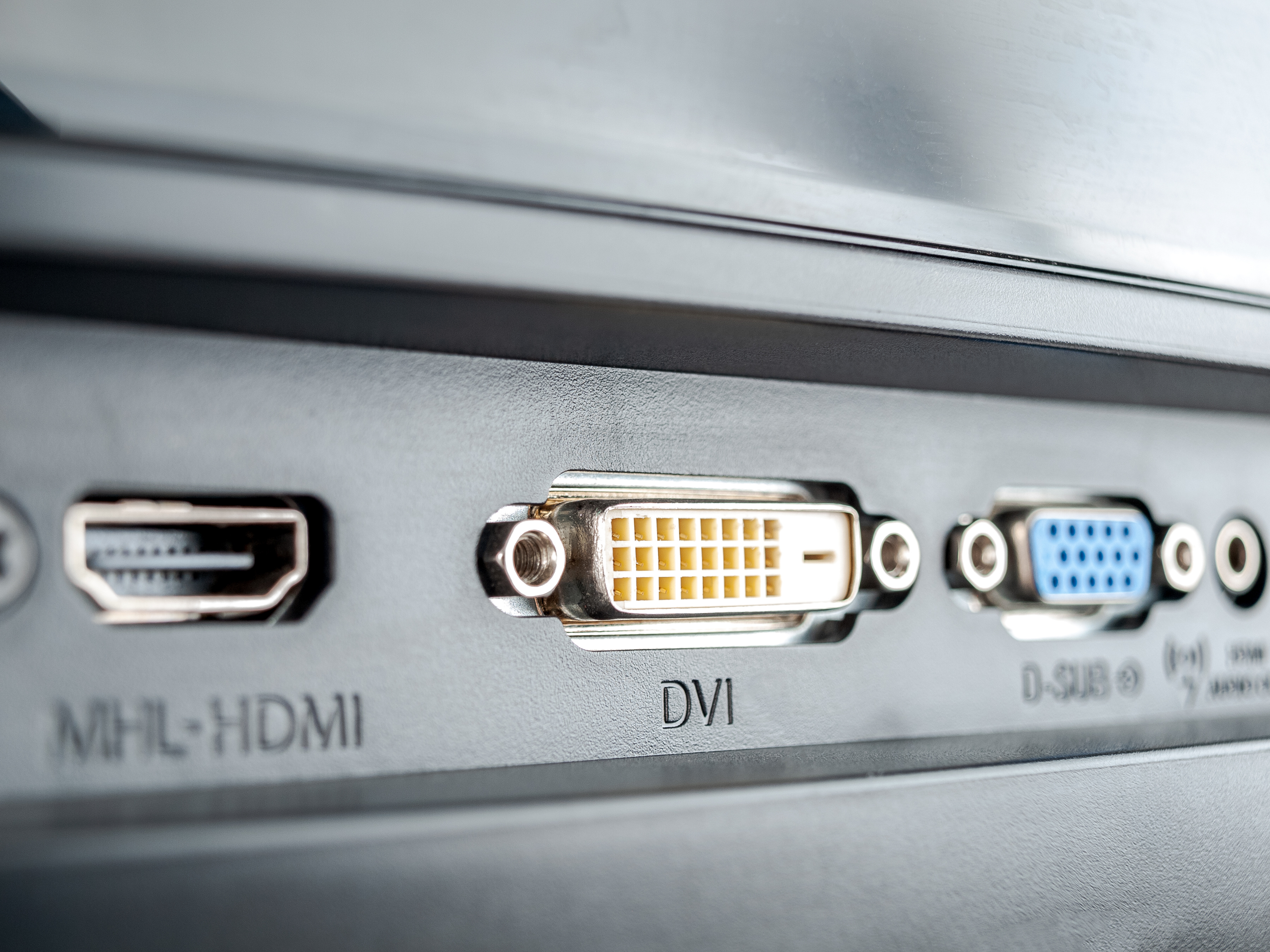
What Is DVI-D and Why Does It Still Matter for Digital Video?
So, DVI-D. It's one of those connector types that doesn't get a lot of attention anymore, but it absolutely should not be ignored -- especially if you're running a setup that depends on clean, reliable digital signal delivery without the overhead of newer standards. DVI-D stands for Digital Visual Interface -- Digital Only. And that second part is key. Unlike its cousin DVI-I, which handles both analog and digital signals, DVI-D strips it down to purely digital transmission. That means what you're getting is an uncompressed, direct digital signal between your source device and your display. No conversion, no signal degradation from analog-to-digital translation. Just clean output. Whether you're running a workstation monitor, a secondary display, or a projector in a conference room, DVI-D cables and adapters remain a practical, cost-effective solution that delivers exactly what it promises.
How DVI-D Technology Actually Works
Here's the thing about DVI-D that makes it worth understanding -- it uses a transmission protocol called TMDS, which stands for Transition Minimized Differential Signaling. That's a mouthful, but the function is simple. TMDS encodes video data and transmits it across three data channels, each dedicated to a color component -- red, green, and blue -- plus a fourth channel for clock synchronization. The result is a high-fidelity signal that arrives at your display with minimal noise or interference. Now, there's also a distinction worth knowing: Single-Link DVI-D supports resolutions up to 1920x1200 at 60Hz, which covers the vast majority of everyday display needs. Dual-Link DVI-D essentially doubles the bandwidth by adding more pins and more data channels, pushing support up to 2560x1600 at 60Hz. So if you're running a high-resolution monitor for design work or data-intensive applications, Dual-Link is the configuration you're looking for. It's straightforward technology that's been proven across years of real-world deployment.
Single-Link vs. Dual-Link DVI-D: Which One Do You Need?
This is probably the most common question people run into when buying DVI-D cables, and honestly it's easy to answer once you know your display specs. Single-Link DVI-D handles standard HD and even wide HD resolutions -- think 1080p and 1200p displays. For office monitors, general-use screens, and older hardware setups, Single-Link is more than adequate. Dual-Link DVI-D is designed for higher resolution demands. If your monitor pushes past 1920x1200 or you're working with high-density panels that require greater bandwidth, go Dual-Link. A quick note that sometimes gets overlooked: both your cable and your hardware need to support Dual-Link for the increased bandwidth to actually function. So check your GPU output and your monitor's input spec before purchasing. Getting mismatched cable and hardware is a frustrating and avoidable mistake. Single-Link DVI-D is the more common format and widely compatible -- start there unless your specs demand otherwise.
Key Advantages of Using DVI-D Cables and Adapters
DVI-D brings some genuinely solid advantages to the table, particularly for users who prioritize signal integrity and hardware compatibility over chasing the newest standard. Here's what stands out:
Pure digital signal transmission with no analog interference or conversion loss Wide compatibility with monitors, projectors, and graphics cards from the mid-2000s onward Locking connector design that secures the cable physically to the port, reducing accidental disconnects No need for active electronics in most standard cable runs Cost-effective solution for extending the life of capable legacy hardware Reliable performance for resolutions up to 2560x1600 with Dual-Link configurations Low latency signal delivery ideal for productivity-focused and professional display environmentsThat physical locking mechanism is something that deserves a second mention. In environments where cables get bumped -- think AV racks, broadcast setups, or busy workspaces -- a connector that screws in and stays put is worth a lot. It's a small detail that saves real headaches.
Common Drawbacks Worth Knowing Before You Buy
Look, DVI-D is a dependable standard, but it's not without its limitations. Being upfront about them helps you make the right call for your specific setup. DVI-D does not carry audio -- full stop. If you need audio-over-cable functionality, HDMI or DisplayPort are the appropriate choices. DVI-D also maxes out at 2560x1600 even in Dual-Link configurations, so it's not going to support 4K resolution displays. Cable length is another consideration. DVI-D signal quality can degrade over longer runs, with manufacturers typically recommending stays under 15 feet for reliable performance without signal boosting. And while DVI-D adapters exist for HDMI and DisplayPort conversions, those conversions are signal-direction sensitive -- passive adapters only work in specific orientations, and active adapters are sometimes required depending on source and destination hardware. None of these are dealbreakers for the right use case, but they're absolutely worth mapping out before your purchase decision.
DVI-D Adapters: Expanding Compatibility Without Replacing Hardware
One of the most practical applications of DVI-D technology today isn't the cables themselves -- it's the adapters. DVI-D to HDMI adapters, for example, allow you to connect a DVI-D output source to a modern HDMI-input display. That's useful when you're extending the value of an older workstation GPU or integrating newer displays into an existing DVI-D infrastructure without a full hardware refresh. DVI-D to DisplayPort adapters serve a similar purpose in the other direction. These conversions are clean when matched correctly, and for video-only applications -- which covers most office and productivity environments -- they perform exactly as expected. Adapters are essentially the bridge between generations of display technology, and when they're built well, that bridge is invisible. The signal arrives at the display clean and the user never knows or cares what standard was running under the hood.
Practical Tips for Getting the Best Performance from DVI-D Cables
A few things make a real difference in day-to-day DVI-D performance, and they're all pretty simple to apply. First, match your cable spec to your hardware. Single-Link cables physically look similar to Dual-Link cables but have fewer pins -- and using a Single-Link cable on a Dual-Link setup will cap your resolution. Check the pin count before you commit. Second, keep cable runs short wherever possible. For most desktop setups this is easy, but in rack environments, plan your cable routing deliberately. Third, inspect connectors before installation. Bent pins in a DVI-D connector are a common cause of signal failure and image artifacts, and they're usually caused by misaligned plugging rather than cable defects. Seat the connector straight and tighten the locking screws to finger-tight -- that's all it takes. Fourth, for longer cable runs, look at signal boosters or active cable solutions rated for the distance. These are available and affordable, and they solve the attenuation problem cleanly.
Who Should Still Be Using DVI-D in Their Setup?
DVI-D is not a format you need to retire in a rush. There are real, current, and legitimate use cases where it remains the right tool. If you're running a workstation or gaming rig with an older GPU that outputs DVI-D natively -- and your monitor supports it -- there is no practical reason to add adapters just to use HDMI. DVI-D in that context is the cleanest and most direct path. Office environments with existing DVI-D monitor infrastructure benefit from maintaining that standard rather than migrating unnecessarily. Educational institutions, broadcast facilities, and industrial control environments often have DVI-D built into their hardware at scale, and those setups don't need to change just because HDMI exists. And frankly, for anyone building out a secondary display setup on a budget, DVI-D hardware and cables remain some of the most cost-effective options available. Reliable, proven, and still delivering exactly what you need.
Why Monoprice Is the Smart Choice for DVI-D Cables and Adapters
When it comes to sourcing DVI-D cables and adapters, the brand behind the product matters more than most people realize. Cable construction quality, connector shielding, pin integrity, and jacket durability all determine whether you're getting a product that performs for years or one that fails inside six months. Monoprice has built a reputation in the AV and technology industry for delivering exactly the level of quality that professionals and everyday users both need -- without the inflated pricing that often comes with premium branding. The DVI-D cables and adapters available through Monoprice DVI-D cables and digital display adapters are engineered for consistent signal integrity, built with quality materials, and offered at price points that make sense for both single-unit buyers and bulk procurement. Whether you're speccing out a workstation, maintaining a conference room AV setup, or sourcing gear for a larger installation, Monoprice delivers the performance and reliability that the job actually requires. That combination of value, quality, and trusted product depth is why AV integrators, IT managers, and home users keep coming back. It's not about flashy packaging -- it's about solutions that work, every time you need them to.
Frequently Asked Questions About DVI-D Cables and Adapters
What does DVI-D mean and how is it different from DVI-I?
DVI-D is a purely digital video interface, meaning it transmits only digital signals. DVI-I supports both digital and analog signals. If your hardware uses DVI-D, you cannot use analog-only adapters, and DVI-I cables are not always compatible with DVI-D-only ports depending on connector pin configuration.
Does DVI-D carry audio?
No. DVI-D does not transmit audio signals. It is a video-only interface. If you need audio alongside your video connection, HDMI or DisplayPort are the appropriate cable standards to use.
What is the maximum resolution supported by DVI-D?
Single-Link DVI-D supports up to 1920x1200 at 60Hz. Dual-Link DVI-D extends that to 2560x1600 at 60Hz. DVI-D does not support 4K resolutions.
Can I connect a DVI-D cable to an HDMI port?
Yes, with the correct adapter. A DVI-D to HDMI adapter allows you to connect a DVI-D output to an HDMI input display. However, since DVI-D does not carry audio, only the video signal transfers through this connection.
How long can a DVI-D cable run before signal quality degrades?
Signal quality in a DVI-D cable can begin to degrade beyond approximately 15 feet. For longer runs, active signal boosters or amplified DVI-D cables rated for extended distances are recommended to maintain image quality.
Is a Dual-Link DVI-D cable backward compatible with Single-Link ports?
Yes. A Dual-Link DVI-D cable will work in a Single-Link configuration. However, the bandwidth will be limited to Single-Link performance. You will only see the benefit of Dual-Link when both the source device and display support that specification.
What causes image artifacts or flickering with a DVI-D connection?
Common causes include bent or damaged connector pins, a loose cable connection, a cable run that exceeds recommended length, or a cable that does not match the Dual-Link requirements of your hardware. Inspect connectors carefully and ensure the cable is fully seated and the locking screws are secure.
Can I use a passive DVI-D to DisplayPort adapter?
Passive DVI-D to DisplayPort adapters work in specific signal-direction scenarios. In many cases, an active adapter is required, particularly when converting from a DisplayPort source to a DVI-D display. Always verify the adapter type against your specific hardware configuration before purchasing.
Are DVI-D cables still relevant in modern setups?
Yes, in the right context. DVI-D remains a practical and reliable choice for setups involving monitors with native DVI-D inputs, older GPUs, and environments where video-only transmission is sufficient. It delivers clean digital signal performance and is often the most cost-effective option for existing DVI-D infrastructure.
What should I look for when buying a DVI-D cable?
Key factors include Single-Link versus Dual-Link configuration matched to your hardware, overall cable length relative to your setup, build quality including shielding and connector construction, and whether the cable is designed for the resolution you need to support. Sourcing from a reputable manufacturer ensures consistent signal performance and connector durability.


