

DVI Connector Explained: Legacy Value in Digital Display Tech
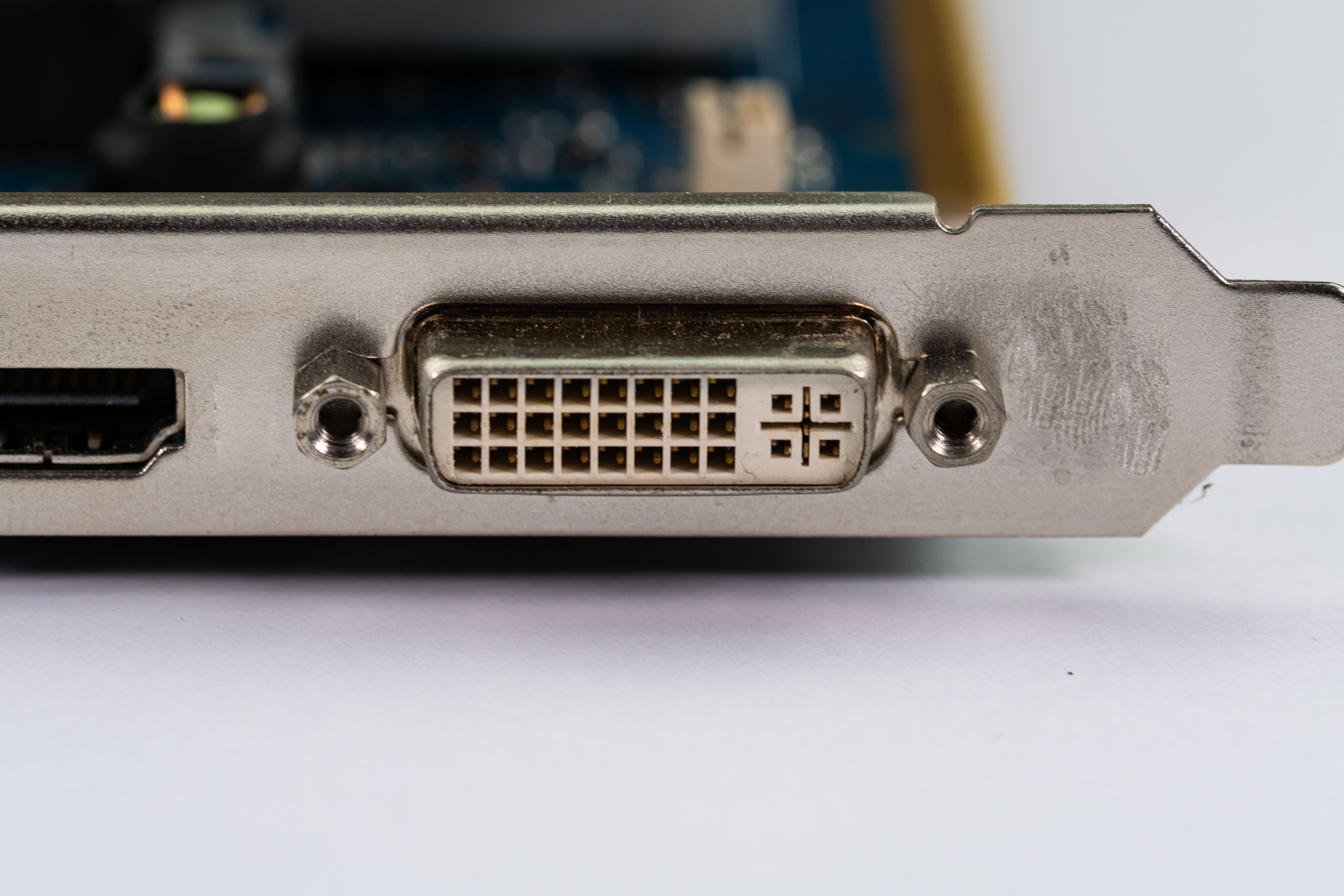
What Is a DVI Connector and Why Does It Still Matter?
DVI stands for Digital Visual Interface, and honestly, if you work around legacy display setups or older workstation hardware, you already know this connector shows up more often than people expect. Introduced in 1999 by the Digital Display Working Group, DVI was designed to replace the aging VGA standard and deliver cleaner, sharper digital video signals. It became the go-to interface for monitors, projectors, and graphics cards throughout the early 2000s and well into the 2010s. Fast forward to today and DVI is technically a legacy format, but calling it obsolete would miss the point entirely. There is still a massive installed base of hardware that relies on it, and for cost-conscious professionals managing older infrastructure, DVI connectors remain a dependable, no-nonsense option worth understanding inside and out.
The Different Types of DVI Connectors Explained
This is where a lot of people get tripped up, and it is worth slowing down here because the DVI family is not a single standard. There are actually several variants, and choosing the wrong cable or connector type is a common mistake that wastes time and budget. The main types you will encounter are DVI-A, DVI-D, and DVI-I. DVI-A carries analog signals only, which makes it compatible with older VGA displays when used with the right adapter. DVI-D is purely digital, and it comes in two configurations: single link and dual link. Single link DVI-D supports resolutions up to 1920x1200 at 60Hz, while dual link DVI-D pushes that up to 2560x1600. DVI-I is the versatile option, supporting both analog and digital signals, which makes it the most flexible choice if you are managing a mixed display environment. Knowing which variant you are working with before you buy cables or adapters is not optional, it is essential.
How DVI Transmits Video Signals
DVI uses a signaling protocol called Transition Minimized Differential Signaling, or TMDS, to transmit video data. Without getting too deep into the engineering, TMDS works by reducing the number of transitions in the data signal, which cuts down on electromagnetic interference and allows for cleaner transmission over longer cable runs. A single link DVI connection uses one set of TMDS channels, while dual link doubles that capacity, effectively doubling the available bandwidth. The signal travels from the graphics output through the cable to the display, where it is decoded and rendered. No compression, no encoding overhead the way you might see with some modern interfaces. That simplicity is actually one of DVI's quiet strengths. The signal path is straightforward, which contributes to reliable, consistent performance in environments where signal integrity matters more than cutting-edge features.
Key Advantages of Using DVI Connections
There is a reason DVI held the market for as long as it did. The advantages are real and practical, especially in specific deployment scenarios. Here is what makes DVI still worth considering:
- Plug-and-play compatibility with a wide range of legacy monitors and projectors
- No audio signal complexity to manage, which simplifies certain professional AV setups
- Dual link DVI-D supports high-resolution displays up to 2560x1600, more than enough for many professional workflows
- Widely supported by older graphics cards without the need for active adapters
- Cost-effective cabling and connectors make it budget-friendly for large legacy installations
- Signal quality is clean and consistent thanks to TMDS encoding
For IT professionals maintaining older workstations, digital signage operators working with existing hardware, or AV integrators managing legacy conference room setups, these advantages are not trivial. They represent real cost savings and operational stability.
Common Drawbacks and Limitations to Know
To be fair, and this matters for making smart purchasing decisions, DVI does have real limitations that you need to account for before committing to a setup. The most significant one is the lack of audio support. Unlike HDMI or DisplayPort, DVI carries video only, which means you will need a separate audio solution in any setup that requires sound output. DVI also does not natively support HDCP 2.2, the content protection standard required for 4K protected content, which rules it out for modern streaming or Blu-ray playback in many configurations. Cable length is another practical concern since signal degradation can start occurring beyond 15 to 20 feet without signal boosters. And of course, newer displays and graphics cards are increasingly dropping DVI ports entirely, which means adapter dependency is becoming more common and adds a layer of complexity to planning.
DVI vs. HDMI vs. DisplayPort: Knowing When to Use Each
The honest answer is that DVI does not compete with HDMI or DisplayPort for modern setups, and it was never supposed to. The smarter question is knowing when DVI is the right tool versus when you should be upgrading the interface entirely. HDMI is the standard choice when audio and video need to travel over a single cable, particularly in home entertainment or modern conference room environments. DisplayPort is the better option for high-refresh-rate gaming monitors and multi-monitor daisy-chain configurations. DVI, on the other hand, earns its place in environments where the display hardware is older, the budget is constrained, and there is no requirement for audio over the display connection. Think CAD workstations running older graphics cards, secondary monitors on legacy office machines, or industrial display terminals that simply do not need modern feature sets. Understanding this matrix saves time and prevents unnecessary hardware spend.
Practical Tips for Getting the Most Out of DVI Connections
If you are working with DVI in a professional or DIY context, a few straightforward practices will help you get the most reliable performance out of your setup. Always verify the connector type before purchasing cables or adapters, since mixing DVI-A, DVI-D, and DVI-I incorrectly is a frustratingly common mistake. For longer cable runs, opt for quality shielded cables to minimize signal degradation and interference pickup. If you need to exceed 20 feet, a signal repeater or amplifier is worth the investment. When using DVI-to-HDMI or DVI-to-DisplayPort adapters, confirm whether you need an active or passive adapter based on your source and display hardware. Passive adapters work when both sides share compatible signaling, but active adapters are necessary in certain conversion scenarios. Also, make sure your cable is rated for the resolution and refresh rate you are targeting, because not all DVI cables are built to the same specification.
Who Still Uses DVI and Why It Remains Relevant
The users still relying on DVI are not behind the times, they are practical. Enterprise IT departments managing fleets of older desktop workstations often have no immediate budget justification to replace functional monitors and graphics cards. Educational institutions, government facilities, and industrial operations frequently maintain hardware on long refresh cycles where DVI is still the active display interface. Digital signage installations built in the mid-2000s and designed to run for decades often use DVI as their core video connection. And then there is the DIY and home lab community, where older hardware gets repurposed for secondary machines, retro gaming setups, or low-cost server monitoring displays. In all these contexts, DVI is not a compromise, it is a practical and cost-effective solution that still delivers dependable digital video performance without unnecessary complexity.
Why Monoprice Is the Smart Choice for DVI Cables and Display Connectivity
When you are sourcing DVI cables, adapters, or any display connectivity solution for a legacy or mixed-hardware environment, quality and value are both non-negotiable. That is exactly where Monoprice delivers. As a trusted name in professional AV and IT connectivity, Monoprice carries a well-curated selection of DVI cables across all major variants, from single link to dual link, DVI-D to DVI-I, in lengths and configurations built to handle real-world installations. The build quality is consistent, the pricing is competitive, and you are not paying inflated margins for brand recognition that does not translate into better signal integrity. Whether you are an integrator managing a legacy conference room refresh, a school district standardizing on cost-effective display cables, or a DIYer putting together a budget workstation, you can find reliable, high-performance DVI cables and digital display connectivity solutions at Monoprice without second-guessing the quality. Monoprice is the kind of supplier that works the way you do: straightforward, value-focused, and serious about performance where it counts.
Frequently Asked Questions About DVI Connectors
What does DVI stand for and what is it used for?
DVI stands for Digital Visual Interface. It is a video connector standard used to transmit digital and in some cases analog video signals between a source device such as a computer or graphics card and a display such as a monitor or projector.
What is the difference between DVI-D and DVI-I?
DVI-D carries only digital signals, while DVI-I supports both digital and analog signals. DVI-I is more versatile in mixed display environments, while DVI-D is typically found on purely digital display setups.
Can DVI carry audio signals?
No. DVI does not carry audio. It is a video-only interface. If your setup requires audio output through a display connection, you will need a separate audio cable or should consider switching to an HDMI or DisplayPort interface.
What resolution does DVI support?
Single link DVI supports up to 1920x1200 at 60Hz. Dual link DVI doubles the bandwidth and supports resolutions up to 2560x1600, making it suitable for high-resolution professional monitors.
Is DVI better than VGA?
Yes, in most scenarios. DVI transmits a digital signal which results in a sharper, cleaner image compared to VGA's analog signal, which is more susceptible to interference and image degradation, particularly at higher resolutions.
Can I use a DVI to HDMI adapter?
Yes, DVI-D and DVI-I connectors are electrically compatible with HDMI for video signals, so passive adapters typically work in most cases. However, audio will not pass through the adapter since DVI does not carry audio data.
How long can a DVI cable run before signal quality degrades?
Generally, DVI cable runs up to 15 to 20 feet perform reliably without signal loss. Beyond that distance, you may experience image degradation and should consider using a signal repeater or an active amplified cable to maintain quality.
Is DVI still supported by modern graphics cards?
Support for DVI has been declining on newer graphics cards, particularly in the last several years. Many modern GPUs have dropped DVI ports entirely in favor of HDMI and DisplayPort. Adapters can bridge the gap in many situations, though active adapters may be needed depending on the configuration.
What is dual link DVI and when do I need it?
Dual link DVI uses two sets of TMDS channels to double the available bandwidth. You need dual link DVI when connecting to displays with resolutions higher than 1920x1200, such as a 30-inch monitor running at 2560x1600.
Is it worth upgrading from DVI to HDMI or DisplayPort?
If your display and source hardware already support DVI and meet your resolution and workflow requirements, there is no immediate need to upgrade. However, if you need audio over video, higher refresh rates, or support for modern content protection standards, upgrading to HDMI or DisplayPort is the practical move.


