

D-Sub vs VGA: Key Differences and What You Need
D-Sub vs VGA: What Is the Difference and Which One Do You Actually Need?
So here is the thing -- this question comes up more than you would expect, even among people who have been in IT or AV for years. D-Sub and VGA get used interchangeably in conversation, on product pages, in spec sheets, and even in installation guides. But they are not the same thing, and understanding the distinction actually matters when you are sourcing cables, planning a display setup, or troubleshooting a connection that is not working the way it should. This article breaks it down in plain terms so you can move forward with clarity and confidence.
What Is a D-Sub Connector?
D-Sub is short for D-subminiature, which is a family of electrical connectors that were developed by Cannon in the 1950s. The name comes from the distinctive D-shaped metal shell that surrounds the pin arrangement and acts as a mechanical guide during connection. That shell is not just aesthetic -- it ensures the connector can only be inserted in one orientation, which matters a lot in professional and high-density cabling environments. D-Sub connectors come in several sizes, typically defined by the number of pins they carry. Common variants include DE-9, DA-15, DB-25, DC-37, and DD-50. Each of those letters corresponds to a different pin count and physical size. What this means in practice is that D-Sub is a broad connector category used across a wide range of applications, from serial communications to joystick ports to legacy industrial equipment and yes, video interfaces.
What Is VGA and How Does It Relate to D-Sub?
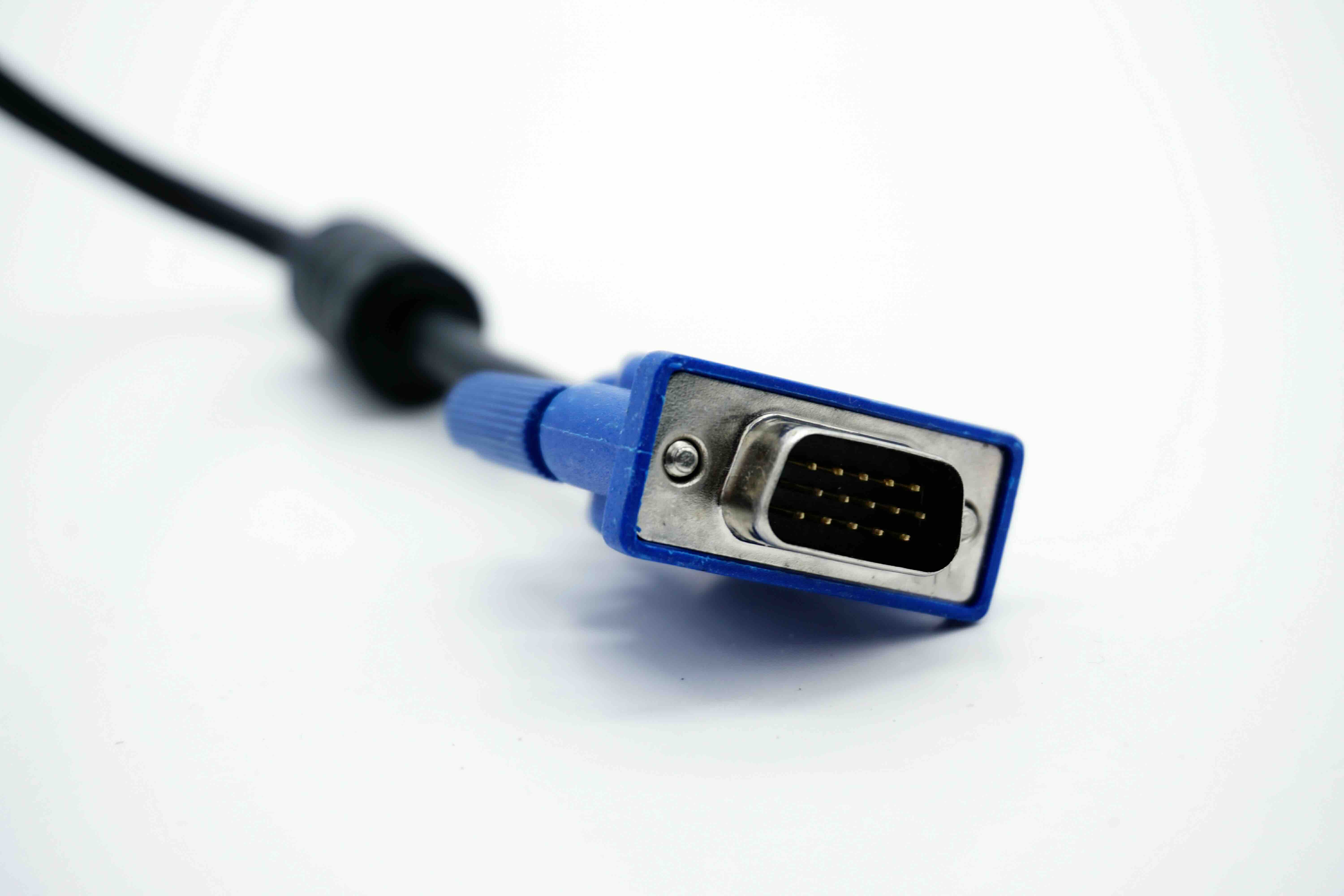
VGA stands for Video Graphics Array, and it refers to a video display standard introduced by IBM in 1987 with the PS/2 line of personal computers. The VGA connector specifically is a 15-pin connector arranged in three rows of five pins each. In connector family terms, this falls under the DE-15 or HD-15 designation within the D-Sub family. So technically, a VGA connector is a type of D-Sub connector -- but not all D-Sub connectors are VGA connectors. That distinction is where most of the confusion originates. When someone refers to a D-Sub cable in a display context, they almost always mean VGA. But if you are working in a broader electronics or industrial context, D-Sub could refer to something completely unrelated to video output.
How the VGA Signal Actually Works
VGA transmits analog video signals across its 15 pins. The signal carries red, green, and blue color channels separately, along with horizontal and vertical sync signals and some additional lines used for display identification and communication. Because it is analog, VGA signal quality is sensitive to cable length, cable quality, and electromagnetic interference. You will notice this if you have ever used a low-quality or excessively long VGA cable and seen a soft, blurry, or color-shifted image compared to a shorter or better-shielded run. The maximum practical resolution for VGA is typically around 1920x1080, though it can theoretically push higher. In real-world deployment, image quality at that resolution depends heavily on the quality of the cable and the output circuitry of the device. It is not the ideal connector for high-resolution modern displays, but it still sees widespread use in legacy systems, projectors, industrial monitors, and budget display setups.
Key Advantages of VGA and D-Sub Connections
Despite being an older standard, VGA and D-Sub connections still offer genuine practical value in the right situations. Understanding when to use them is the smart move, not dismissing them outright.
- Broad compatibility with legacy hardware going back decades
- Supported by a massive installed base of monitors, projectors, and display devices
- Widely available adapters and cables at low cost
- Does not require active electronics or powered adapters in most use cases
- Reliable physical connection with screw-lock retention for secure installations
- Sufficient for standard definition and 1080p applications where analog is acceptable
- Ideal for industrial, signage, and long-life equipment environments
Common Drawbacks You Should Know About
VGA and D-Sub video connections have real limitations that are worth understanding before you commit to a setup built around them. The analog signal is susceptible to degradation over distance and interference, which can compromise image clarity especially at higher resolutions. There is no audio channel in VGA, so you will always need a separate audio solution alongside it. VGA does not support HDCP, which means it cannot carry copy-protected digital content in its native form. Modern graphics cards and displays are dropping VGA support entirely, so sourcing compatible hardware is becoming more of a challenge over time. And if you are running a 4K or high refresh rate display, VGA simply cannot deliver the bandwidth required. It is a standard built for a different era of display technology.
D-Sub vs VGA in Real-World AV and IT Scenarios
In practice, the D-Sub versus VGA question usually surfaces in a few specific scenarios. You might be setting up a conference room with an older projector that only has a VGA input and you need to connect it to a modern laptop that has moved on to HDMI or USB-C. That requires an active or passive adapter depending on the source. You might be managing a network operations center with legacy monitoring equipment that still runs on analog video outputs. In that context, VGA and D-Sub cabling remains the right tool for the job. Or you might be in procurement, sourcing cables for a mixed environment where some displays are modern and some are five to ten years old. Knowing the connector terminology correctly helps you spec the right part without ordering the wrong thing or relying on a vendor who might conflate the terms.
When to Use VGA and When to Upgrade to Digital
Use VGA when you are working with hardware that only supports analog video output or input, when budget is a primary constraint, or when the display application does not demand high resolution or color accuracy. It is entirely appropriate for secondary monitors, industrial displays, legacy projection systems, and point-of-sale or signage applications where the content is straightforward and the resolution requirements are modest. Consider upgrading to HDMI, DisplayPort, or USB-C when you need 1080p at high refresh rates, 4K, HDR, audio over the same cable, or HDCP compliance for protected content. Digital connections offer significantly better signal integrity, support far greater bandwidth, and are the standard for any modern display environment. For mixed environments, quality adapters and signal converters bridge the gap effectively when managed correctly.
Practical Tips for Working with D-Sub and VGA Cables
A few things worth keeping in mind when you are actually working with these connectors in the field or in an office environment.
- Always use cables with proper shielding to reduce interference, especially on runs over six feet
- Use the screw retention hardware when available -- it prevents accidental disconnection in professional environments
- For runs over 25 feet, consider a VGA signal booster or extender to maintain image quality
- Match cable gauge and quality to the resolution you are running -- not all VGA cables are built the same
- When adapting from digital to VGA, use an active adapter, not a passive one, especially from HDMI or DisplayPort sources
- Label your D-Sub cables in mixed environments where different connector sizes may be in use
- Test the connection at both ends before finalizing a rack or desk installation to catch pin damage early
Why Monoprice Is the Right Source for Your D-Sub and VGA Cable Needs
When you need reliable, properly-built cabling for legacy and modern display environments alike, sourcing from a trusted supplier makes a measurable difference. Monoprice has built a strong reputation in both the B2B and consumer markets for delivering high-performance connectivity products at pricing that respects your budget. Whether you are speccing out a conference room, managing an IT refresh across multiple floors, or sourcing display cables for an industrial application, Monoprice carries the selection and quality to get it done right. Every cable is built to perform, not just to fit, and that distinction shows up in image quality, connection stability, and long-term reliability. If you are ready to find the right D-Sub or VGA cable for your specific setup, explore the full range of professional-grade VGA and D-Sub display cables at Monoprice and get exactly what your installation requires without overpaying for it. The value is there, the quality is there, and the inventory depth means you are not hunting across multiple vendors to complete a single order.
Frequently Asked Questions About D-Sub vs VGA
Is D-Sub the same as VGA?
Not exactly. VGA is a specific type of D-Sub connector. VGA uses a 15-pin D-Sub connector in an HD-15 or DE-15 configuration. D-Sub is the broader connector family that includes many pin configurations used in different applications beyond video.
Can I use a D-Sub cable for VGA?
Only if the D-Sub cable uses the correct 15-pin HD-15 configuration. A 9-pin or 25-pin D-Sub cable will not work for VGA because the pin count and arrangement are different. Always verify the pin configuration before purchasing.
What resolution does VGA support?
VGA can technically support resolutions up to 2048x1536 or higher in certain implementations, but real-world quality at those resolutions is limited. For most practical deployments, VGA performs reliably at 1024x768 and 1920x1080, with quality depending on cable length and construction.
Does VGA carry audio?
No. VGA is a video-only connection and carries no audio signal. You will need a separate audio cable or connection when using VGA as your display interface.
Why do modern laptops not have VGA ports anymore?
Manufacturers have moved to digital video standards like HDMI, DisplayPort, and USB-C because they offer higher bandwidth, better image quality, audio support, and support for modern display features like HDR and high refresh rates. VGA's analog signal cannot meet those requirements.
Can I connect HDMI to VGA without an adapter?
No. HDMI outputs a digital signal and VGA accepts an analog signal. You need an active adapter that converts the signal between the two formats. A passive cable will not work and could potentially damage ports if forced.
How long can a VGA cable run before signal quality degrades?
A well-shielded VGA cable can maintain acceptable image quality up to about 25 feet. Beyond that, signal degradation becomes noticeable, especially at higher resolutions. VGA signal boosters or extenders are recommended for longer runs.
What does the locking screw on a VGA connector do?
The screw retention system on VGA connectors secures the cable to the port so it cannot be accidentally pulled out. This is especially useful in professional environments like broadcast, control rooms, or any installation where cable integrity is critical.
Is VGA still relevant in 2024 and beyond?
VGA remains relevant in specific contexts, particularly with legacy industrial equipment, older projectors, long-life display systems, and cost-sensitive environments where replacing hardware is not immediately practical. For new installations, digital connections are the better choice.
What is the difference between DB-15 and HD-15 in VGA connectors?
Both terms are used to describe the VGA connector, but they reflect different naming conventions. DB-15 technically refers to a standard-density 15-pin D-Sub shell, while HD-15 refers to the high-density version actually used for VGA. The HD-15 is the correct designation for VGA connectors, though DB-15 is commonly used as shorthand in everyday usage.


