

Component Video vs RCA: Differences and Which You Need
Component Video vs RCA: What Is the Difference and Which One Do You Actually Need?
If you have ever stared at the back of a TV, receiver, or DVD player and wondered what all those colored jacks actually do, you are not alone. Component video and RCA connectors look almost identical at first glance, and that creates a lot of confusion, especially when you are trying to hook up older equipment or build out a home theater setup on a budget. The short answer is that they are related but not the same thing, and using the wrong one can mean poor picture quality, no picture at all, or audio that just refuses to show up. This guide breaks it all down clearly, from what each connection type actually is, to how they work, and when one makes more sense than the other.
What Are RCA Connectors and How Do They Work?
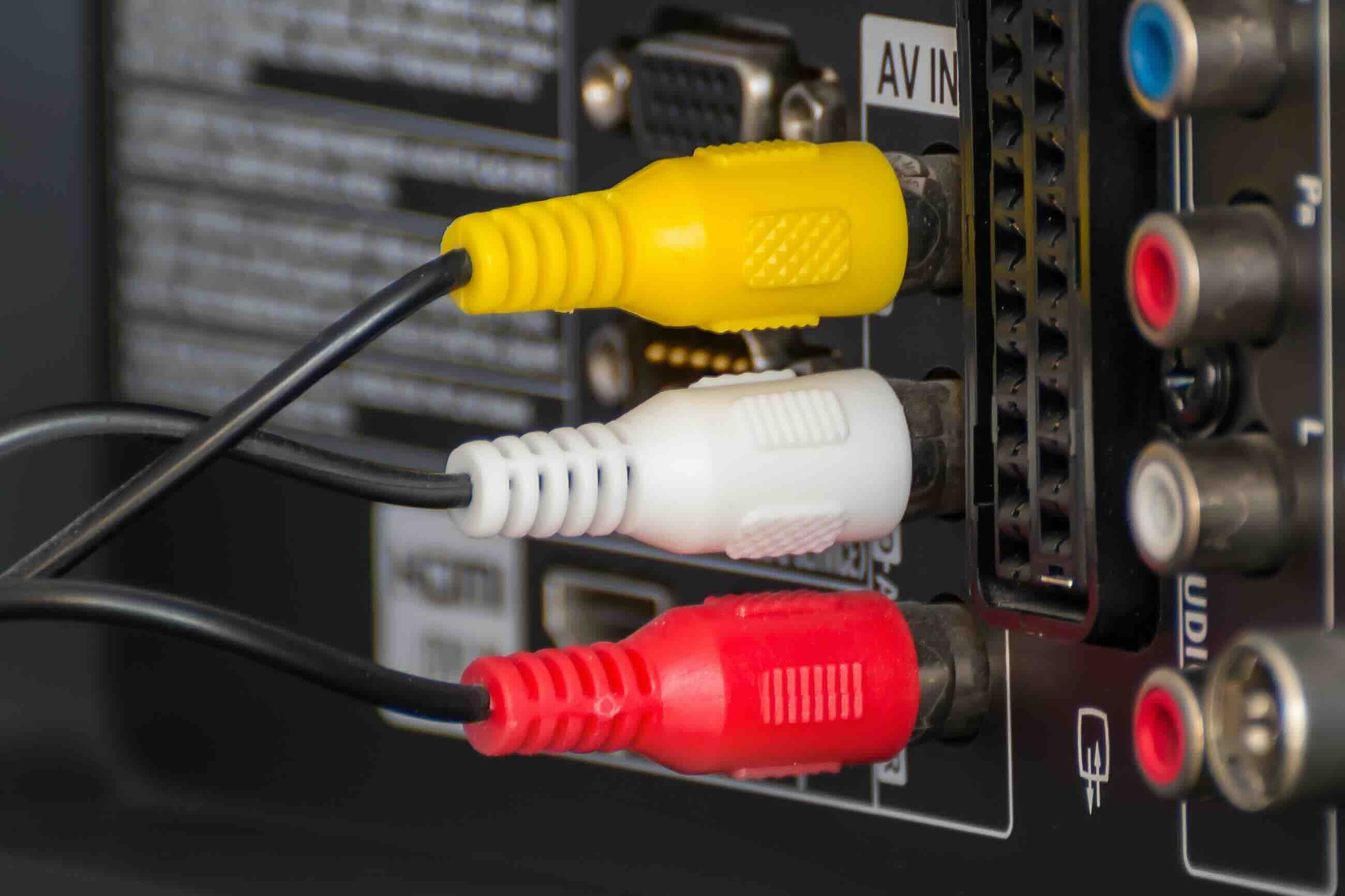
RCA connectors are one of the oldest and most recognizable connection formats in consumer electronics. Developed by RCA in the 1940s, they became the standard way to send analog audio and video signals between devices for decades. The connectors are circular, push-in jacks with a center pin and an outer ring, and they are typically color-coded for easy identification. The most common configuration is a three-cable bundle where yellow carries composite video, white carries left-channel audio, and red carries right-channel audio. Composite video, which is what that yellow cable transmits, bundles all video information into a single signal. That includes color, brightness, and sync data all mixed together. While this works, it means the receiving device has to decode and separate all of that information back out, which introduces signal degradation and limits the maximum resolution and sharpness you can achieve. For standard definition content it gets the job done, but that is basically the ceiling.
What Is Component Video and How Is It Different?
Component video uses the same physical RCA-style connectors, which is the main reason people get confused. The plugs look identical. The difference is what those cables are actually doing. Component video splits the video signal into three separate channels instead of bundling everything together. Those three cables are labeled Y, Pb, and Pr. Y carries the luminance signal, which is essentially brightness and sync information. Pb carries the difference between blue and luminance. Pr carries the difference between red and luminance. Green is mathematically derived from the other three, so you do not need a fourth cable for it. Because the signal is separated this way, there is far less interference and signal degradation. Component video supports much higher resolutions than composite, including 480i, 480p, 720p, and even 1080i in many cases. That was a massive deal during the DVD era and the early years of HD television before HDMI took over.
Component Video vs RCA Composite: A Direct Comparison
Here is where it helps to lay out the practical differences side by side. Both formats use RCA-style connectors, but they serve very different purposes and deliver very different results.
- Video quality with composite RCA tops out at 480i standard definition
- Component video supports up to 1080i high definition in most consumer applications
- Composite video bundles all video data into one yellow cable
- Component video splits the signal across three cables for cleaner, sharper output
- Composite is simpler to connect with just three cables for audio and video combined
- Component requires five cables total, three for video and two for audio
- Composite is found on nearly every piece of older consumer AV equipment
- Component was more common on DVD players, early Blu-ray decks, and HD game consoles
- Neither format carries audio on its own without the red and white RCA audio cables
The takeaway here is straightforward. If image quality matters at all, component video is the better path. If you are just trying to get a basic signal from point A to point B with older gear, composite RCA still works fine.
When Should You Use Composite RCA Connections?
Composite RCA is not obsolete for every use case. There are situations where it remains the practical, sensible choice. Connecting a retro game console like a Super Nintendo or Sega Genesis, hooking up an old VHS player, or running a security camera feed to a monitor are all scenarios where composite video is completely adequate. The devices themselves were designed for that signal level, and you are not going to get better results by trying to force them into a connection they were not built for. Composite is also useful when you need a long cable run and do not have other options, since it is widely available, inexpensive, and easy to source. The point is not to avoid composite entirely. It is to understand when you are settling and when you are making the right call for the situation.
When Component Video Is the Right Call
Component video earned its place during the transition from standard definition to high definition content. If you are working with a DVD player, an original Xbox, PlayStation 2 or 3, Wii, or any device that outputs progressive scan or HD signals, component video is going to give you a noticeably sharper, cleaner image than composite. Some older projectors and CRT televisions only accept component video for their HD-capable inputs, which makes this connection type still relevant today for enthusiasts maintaining legacy home theater systems. Upscalers and video processors that convert analog signals to HDMI also tend to produce better results when fed a component video source rather than composite, simply because they have more to work with from the start.
Common Mistakes to Avoid When Using These Connections
A few mistakes come up repeatedly when people work with these cable types. Plugging component video cables into composite inputs is probably the most common one. The connectors fit physically, but the signal is wrong and you will get a distorted or tinted image. Always check that your source device and your display or receiver are both using the same standard, composite to composite or component to component. Another issue is cable quality. Cheap, poorly shielded cables introduce interference, especially at longer lengths. This shows up as noise in the image or buzzing in the audio. Investing in quality cables with proper shielding makes a real difference, particularly for component video where you are dealing with three separate signal paths that all need to stay clean. Also, remember that component video carries no audio. You always need those red and white RCA audio cables running alongside it.
The Role These Connections Play in Modern AV Setups
HDMI has largely replaced both composite RCA and component video in new equipment, and for good reason. A single HDMI cable carries high-definition video and audio together, supports much higher resolutions, and introduces less signal degradation than any analog connection. That said, analog connections have not disappeared entirely. Legacy equipment, retro gaming setups, educational environments, broadcast facilities, and certain commercial AV installations still rely on RCA composite and component video every day. Understanding these formats means you can troubleshoot and configure equipment confidently, connect older devices to modern displays using the right adapters or converters, and make smart purchasing decisions rather than buying cables or adapters that will not work for your setup.
Practical Tips for Getting the Best Results From Both Formats
Regardless of which connection type you are using, a few practical habits will help you get the best possible result. Always match the cable quality to the cable length. Shorter runs can tolerate less shielding, but anything over six feet benefits significantly from higher quality construction. Keep component video cables bundled together and away from power cables to reduce electromagnetic interference. Label your connections if you are running multiple cable sets to the same device, since identical-looking RCA jacks can be easy to mix up during installation. When using adapters or converters, make sure the device explicitly supports the conversion you need rather than assuming a passive adapter will handle signal translation, because most of the time it will not.
Why Monoprice Is the Smart Choice for RCA and Component Video Cables
When it comes to sourcing cables for legacy AV connections, the quality of the cable itself matters more than most people realize. Monoprice has built a well-earned reputation for delivering high-performance cables and AV accessories at prices that make sense for both individual consumers and professional integrators. Whether you need a clean composite RCA cable for a retro setup or a full component video cable run for an older projector installation, Monoprice offers the construction quality and shielding you need to get a reliable signal without overpaying. Browsing the full catalog of component video and RCA audio video cables for home theater and AV systems makes it easy to find exactly what your setup requires, with straightforward specs and real value at every price point. For professionals managing multiple installations or consumers building out a reliable home entertainment system, Monoprice delivers the kind of dependable performance that earns repeat business.
Frequently Asked Questions About Component Video vs RCA
Are component video cables and RCA cables the same thing?
They use the same physical connector style but they are not the same. RCA composite video bundles all video data into one cable, while component video splits the signal across three separate cables for higher quality output.
Can I plug component video cables into RCA composite inputs?
The connectors will fit physically, but the signal format is different. Doing this will result in a distorted or incorrect image. Always match the connection type on both the source device and the display.
Does component video carry audio?
No. Component video only carries the video signal across three cables. You will need a separate set of red and white RCA audio cables to transmit stereo audio alongside it.
What resolution does component video support?
Component video can support resolutions up to 1080i in most consumer devices. This is a significant improvement over composite RCA, which is limited to standard definition 480i output.
Is composite RCA still worth using?
Yes, for the right applications. Retro gaming consoles, VHS players, and older security camera systems were designed for composite video and work perfectly well with it. It is not the best choice for high-definition content.
Why does component video look better than composite video?
Component video separates the luminance and color difference signals into distinct channels, which reduces interference and allows the display to reconstruct the image more accurately. Composite video mixes all of that information together, which degrades image quality.
Can you convert component video to HDMI?
Yes, active converters are available that take a component video signal and convert it to HDMI output. Passive adapters will not work for this conversion because it requires actual signal processing.
What color coding is used for component video cables?
Component video cables are typically color-coded red, green, and blue to correspond with the Y, Pb, and Pr signal channels. However, the actual signal carried does not map directly to those colors in the way you might expect from the naming convention.
How long can a component video cable run be without signal loss?
For most consumer applications, runs up to about 25 feet are manageable with good quality shielded cables. Beyond that, signal degradation can become noticeable, and you may need a distribution amplifier or signal booster to maintain quality.
Which is better for a retro gaming setup, composite RCA or component video?
Component video is the better choice for retro consoles that support it, such as the PlayStation 2, original Xbox, or Wii, because it delivers a sharper and more accurate image. For consoles that only output composite video natively, composite is your only analog option without additional hardware modification.


