

Can a DisplayPort Cable Go Into HDMI? What to Know
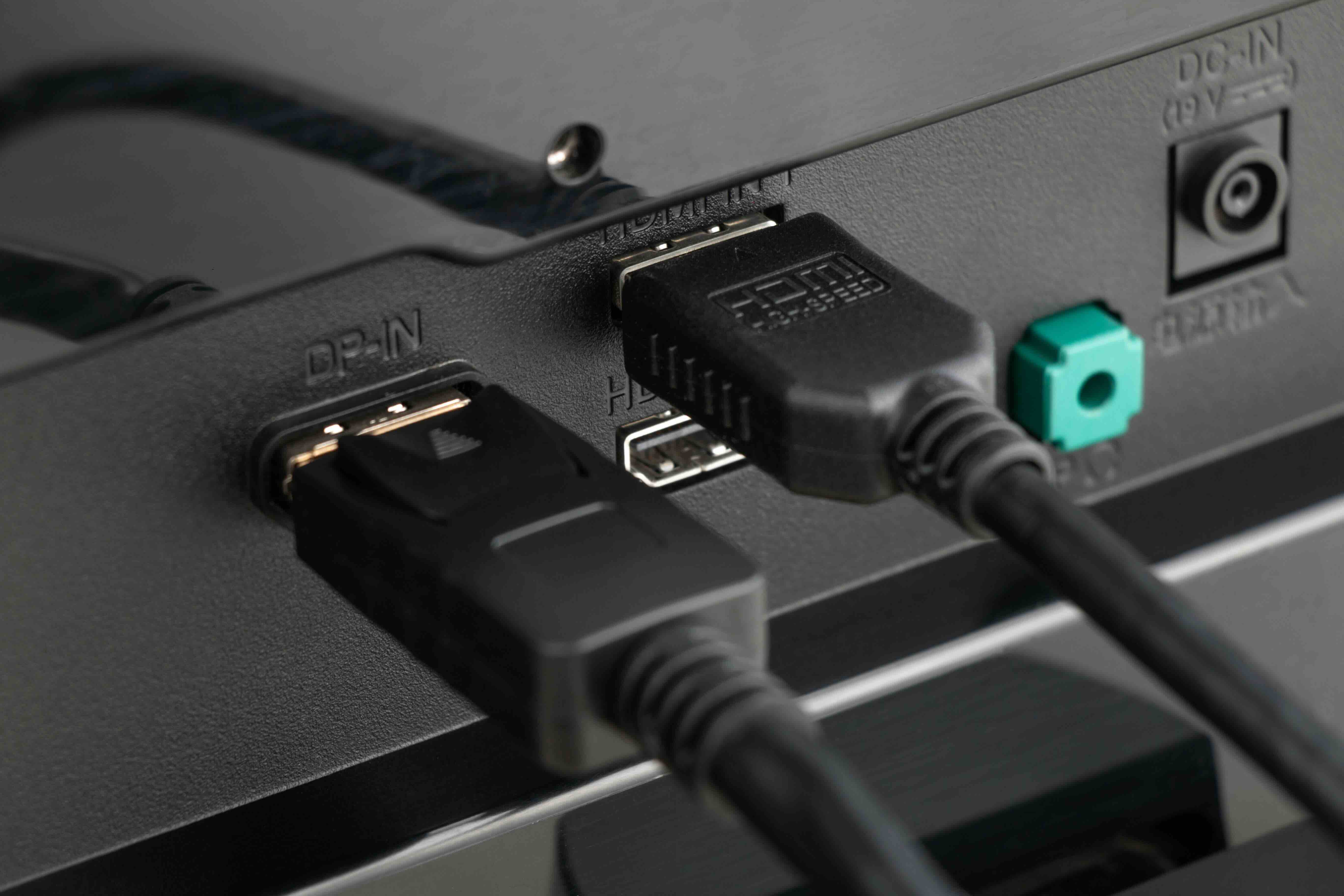
Can a DisplayPort Cable Go Into HDMI? Here Is What You Need to Know
This question comes up constantly, and honestly it makes sense why. You have a monitor, a laptop, maybe a graphics card, and suddenly you are staring at two different port shapes wondering if one cable can just bridge the gap. The short answer is no, a standard DisplayPort cable cannot physically plug directly into an HDMI port without some kind of adapter or converter in the mix. But the longer answer is where things get genuinely useful, so let us walk through all of it properly.
Understanding What DisplayPort and HDMI Actually Are
Both DisplayPort and HDMI are digital video and audio transmission standards, but they were developed by different industry groups for different purposes. HDMI, which stands for High-Definition Multimedia Interface, was designed primarily for consumer electronics like televisions, soundbars, and home theater equipment. DisplayPort was developed by VESA and is more commonly found on computer monitors, laptops, and graphics cards. They carry similar types of signals, but the connectors are physically different and the underlying protocol architecture differs enough that a simple passive cable between the two does not work on its own.
Why You Cannot Just Plug DisplayPort Into HDMI Directly
The connectors themselves are shaped differently, which is the most obvious barrier. A DisplayPort plug has a distinctive asymmetrical shape with a notched corner, while HDMI connectors are trapezoidal. Even if you filed down the edges, the pins inside are arranged differently and serve different electrical functions. The signal encoding between the two standards is also not a one-to-one match. DisplayPort uses a packet-based transmission system similar to how data moves across a network, while HDMI uses a transition-minimized differential signaling format. So there is an actual translation layer required, not just a physical shape conversion.
Active vs. Passive Adapters: What Is the Difference
This is where it gets a bit technical but stick with it because it matters. When connecting DisplayPort to HDMI, you will generally encounter two types of adapters or cables. Passive adapters work when the DisplayPort source supports what is called dual-mode DisplayPort, sometimes labeled as DP++ on the device. This mode allows the DisplayPort output to natively send an HDMI-compatible signal, meaning a passive adapter can work without any extra processing power. Active adapters, on the other hand, contain a small chip that actively converts the DisplayPort signal into a proper HDMI signal. These are necessary when the source device does not support dual-mode, or when you need to handle higher resolutions and refresh rates reliably. For most modern setups pushing 4K, HDR, or high refresh rates, an active adapter or a purpose-built DisplayPort to HDMI cable is the smarter move.
Key Advantages of Using a DisplayPort to HDMI Adapter or Cable
Once you have the right adapter or cable in place, the advantages are real and practical. Here is what you can typically expect from a properly spec'd solution:
- Resolution support up to 4K at 60Hz and in some cases higher with the right active adapter
- Audio passthrough so you do not need a separate audio connection
- Broad device compatibility between PC graphics cards and HDMI-equipped monitors or TVs
- Compact adapter form factors that do not add bulk to your workstation
- Cost-effective bridging between two ecosystems without replacing hardware
These benefits make DisplayPort to HDMI conversion a genuinely useful solution for anyone connecting a PC or laptop to a television screen, presentation display, or secondary monitor that only has HDMI inputs available.
Common Drawbacks and Limitations to Keep in Mind
No solution is without its trade-offs, and this one is no different. Passive adapters may not support all features, particularly if your source device does not advertise DP++ compatibility. You may run into refresh rate caps depending on the adapter generation and the HDMI version it outputs to. For example, an adapter limited to HDMI 1.4 will cap you at 4K 30Hz, while an adapter with HDMI 2.0 output gets you to 4K 60Hz. HDMI 2.1 support through active adapters is available but adds cost. Variable refresh rate technologies like G-Sync or FreeSync often do not carry through a DisplayPort to HDMI adapter, which matters a lot for gaming setups. And audio formats like Dolby Atmos or DTS may not pass through cleanly depending on adapter quality. Buying cheap here is where people get burned.
How to Choose the Right DisplayPort to HDMI Solution
Start by identifying what your source device actually outputs. Check the manual or manufacturer specs for DP++ compatibility. Then match your adapter or cable to the resolution and refresh rate you need. If you are running a standard 1080p or 1440p display, a quality passive adapter will likely serve you well. If you are pushing 4K at 60Hz or higher, invest in an active adapter with HDMI 2.0 output minimum. Pay attention to build quality too. Gold-plated connectors, shielded cable construction, and solid strain relief at the connector ends all contribute to signal integrity and longevity. Cheap unshielded adapters introduce noise, dropouts, and compatibility headaches that cost more in frustration than the few dollars saved upfront.
Grounding and Signal Integrity in DisplayPort to HDMI Cables
Grounding is one of those things that does not get talked about enough in consumer tech conversations, but it is foundational to clean signal transmission. Both DisplayPort and HDMI specifications include dedicated ground lines within the cable assembly to reduce electromagnetic interference and maintain stable signal reference levels. In a well-built DisplayPort to HDMI cable or adapter, the grounding paths are preserved through the conversion, which keeps the signal clean across the full run. In lower-quality products, grounding may be incomplete or poorly implemented, which can manifest as image flickering, color banding, or intermittent connection drops. This is especially noticeable in longer cable runs or in environments with a lot of electrical noise, like a production studio or a dense office space with multiple active displays.
Practical Tips Before You Buy
A few things worth confirming before adding anything to your cart. Verify the HDMI version supported by your display, because that determines your resolution and refresh rate ceiling on the receiving end. Confirm whether your GPU or laptop output supports DP++ if you are considering a passive adapter. For runs longer than six feet, lean toward active solutions regardless of your resolution target. And always buy from a brand that stands behind its products with clear specs and a warranty. Guessing on specs when it comes to video connectivity is how you end up with a drawer full of adapters that almost work.
Why Monoprice Is the Smarter Choice for DisplayPort to HDMI Cables and Adapters
If you have made it this far, you already know that the right adapter or cable makes a real difference. Monoprice has spent years building a reputation as one of the most reliable sources for high-performance video connectivity products at pricing that does not penalize you for needing quality. Whether you need a passive adapter for a quick desktop setup or a fully active converter for a demanding multi-display workstation, Monoprice offers clearly spec'd solutions with the build quality to back them up. For anyone navigating the DisplayPort to HDMI landscape, exploring the full range of DisplayPort to HDMI cables and video adapters at Monoprice is a practical starting point that covers both budget-conscious buyers and professional integrators who need reliable performance day in and day out. The specs are transparent, the warranty coverage is real, and the value proposition holds up against anything at twice the price.
Frequently Asked Questions About DisplayPort and HDMI Compatibility
Can I plug a DisplayPort cable directly into an HDMI port?
No. DisplayPort and HDMI connectors are physically different and use different signal protocols. You need a dedicated adapter or a cable designed to convert between the two standards.
What is a DP++ port and why does it matter?
DP++ stands for dual-mode DisplayPort. It indicates that the DisplayPort output on your device can also send an HDMI-compatible signal natively, which allows passive adapters to function without requiring active signal conversion.
Do I need an active or passive DisplayPort to HDMI adapter?
It depends on your source device and your target resolution. Passive adapters work when your device supports DP++. Active adapters are recommended for 4K at 60Hz and above, or when DP++ is not confirmed.
Will a DisplayPort to HDMI adapter support 4K resolution?
Yes, but only if the adapter supports HDMI 2.0 or higher output. Adapters limited to HDMI 1.4 will cap output at 4K 30Hz, which is a meaningful limitation for high-resolution use cases.
Does audio pass through a DisplayPort to HDMI adapter?
In most cases, yes. Standard stereo and surround audio formats typically pass through without issue. However, advanced lossless audio formats like Dolby Atmos may not transmit cleanly through all adapters, so verify specs before purchase.
Can I use a DisplayPort to HDMI adapter for gaming?
You can, but variable refresh rate technologies like G-Sync and FreeSync generally do not pass through DisplayPort to HDMI adapters. For competitive gaming setups, a native HDMI connection from a graphics card that supports it is a better choice.
Is there a quality difference between cheap and premium DisplayPort to HDMI adapters?
Absolutely. Build quality affects signal integrity, grounding, and long-term reliability. Cheap adapters often lack proper shielding and grounding, which can cause flickering, dropouts, and compatibility issues, especially over time or in longer cable runs.
Can a DisplayPort to HDMI cable work in reverse, meaning HDMI to DisplayPort?
No. DisplayPort to HDMI cables are directional and not reversible. Connecting an HDMI source to a DisplayPort display requires a separate, specifically designed HDMI to DisplayPort active adapter.
What HDMI version should I look for in a DisplayPort to HDMI adapter?
For most modern use cases, HDMI 2.0 support gives you 4K at 60Hz with HDR capability. If you are targeting 4K at 120Hz or 8K content, look for adapters that output HDMI 2.1, though these are typically active and cost more.
How does cable grounding affect DisplayPort to HDMI performance?
Proper grounding within the cable and adapter assembly reduces electromagnetic interference and maintains a stable signal reference, which results in cleaner picture quality and fewer connection issues, particularly in longer runs or electrically noisy environments.


