

AV Cables Explained: Types, Uses, and How to Choose
AV Cables Explained: A Complete Guide to Types, Uses, and What Actually Matters
AV cables are one of those things most people do not think about until something stops working or they are setting up a new system and suddenly staring at a tangled mess of connectors with no idea what goes where. And honestly, that is fair. The landscape of audio and video cables has expanded significantly over the decades, spanning everything from legacy analog formats to the high-bandwidth digital connections powering today's 4K and 8K displays. Whether you are building a home theater, integrating a commercial AV system, or just trying to get sound from one device to another without losing quality, understanding the types of AV cables available is genuinely useful. This guide breaks it all down in practical terms so you can make the right call the first time.
What Are AV Cables and Why Do They Matter
AV stands for audio and video, and AV cables are the physical conduit through which those signals travel between devices. Televisions, projectors, receivers, gaming consoles, Blu-ray players, computers, cameras, and professional display systems all rely on some form of AV connectivity. The cable type you choose affects signal quality, compatibility, and how much hassle you deal with during installation. It is not just about plugging something in and hoping it works. The cable spec, connector type, and shielding all play real roles in the final output you see and hear. Getting this right matters more than most people realize, especially at higher resolutions or over longer cable runs.
Analog AV Cables: The Legacy Formats Still in Use
Analog AV cables have been around for decades and while they are not the standard for new installations, they still appear frequently in older equipment, legacy commercial setups, and certain budget environments. Knowing them is still relevant. The most common analog formats include the following:
- Composite Video: A single yellow RCA connector carrying all video information in one signal. It is low resolution and prone to color bleeding, but it is compatible with older TVs and basic devices.
- Component Video: Three RCA connectors (red, green, blue) that separate video into its luma and chroma components. It supports higher resolutions than composite and handles progressive scan signals well.
- S-Video: A four-pin connector that separates the luminance and chrominance signals, offering a noticeable quality improvement over composite.
- VGA: A 15-pin analog connector used heavily in computer monitors and projectors. Still active in certain commercial and educational AV environments.
- RCA Audio (Red and White): Carries stereo audio alongside composite or component video, often used with older receivers and televisions.
Analog cables do not require any decoding or handshake between devices, which actually makes them fairly reliable for basic applications. The downside is obvious: limited resolution support and no capacity for modern audio formats like Dolby Atmos or DTS:X.
Digital AV Cables: The Modern Standard
Digital AV cables transmit encoded binary data rather than analog waveforms, which means cleaner signal transmission, support for higher resolutions, and the ability to carry multiple data streams simultaneously. This is where most modern systems operate, and for good reason. HDMI is by far the most recognized and widely deployed digital AV cable type today. It carries both high-definition video and multi-channel audio in a single connection, which is a significant convenience advantage. Current HDMI specifications support resolutions up to 10K, frame rates up to 120Hz at 4K, HDR passthrough, eARC for high-quality audio return, and Variable Refresh Rate for gaming. DisplayPort is another major digital standard, particularly dominant in PC and professional monitor setups. It supports higher bandwidth than standard HDMI in many configurations and is commonly used with multi-monitor arrangements and high-refresh-rate displays. USB-C with DisplayPort Alt Mode has also become increasingly relevant, especially in laptops and mobile workstations, allowing video output through a single multipurpose port. Thunderbolt cables, which share the same physical connector as USB-C, take this even further with bandwidth high enough for daisy-chaining multiple displays and peripherals on a single connection.
Audio-Specific Cable Types Worth Knowing
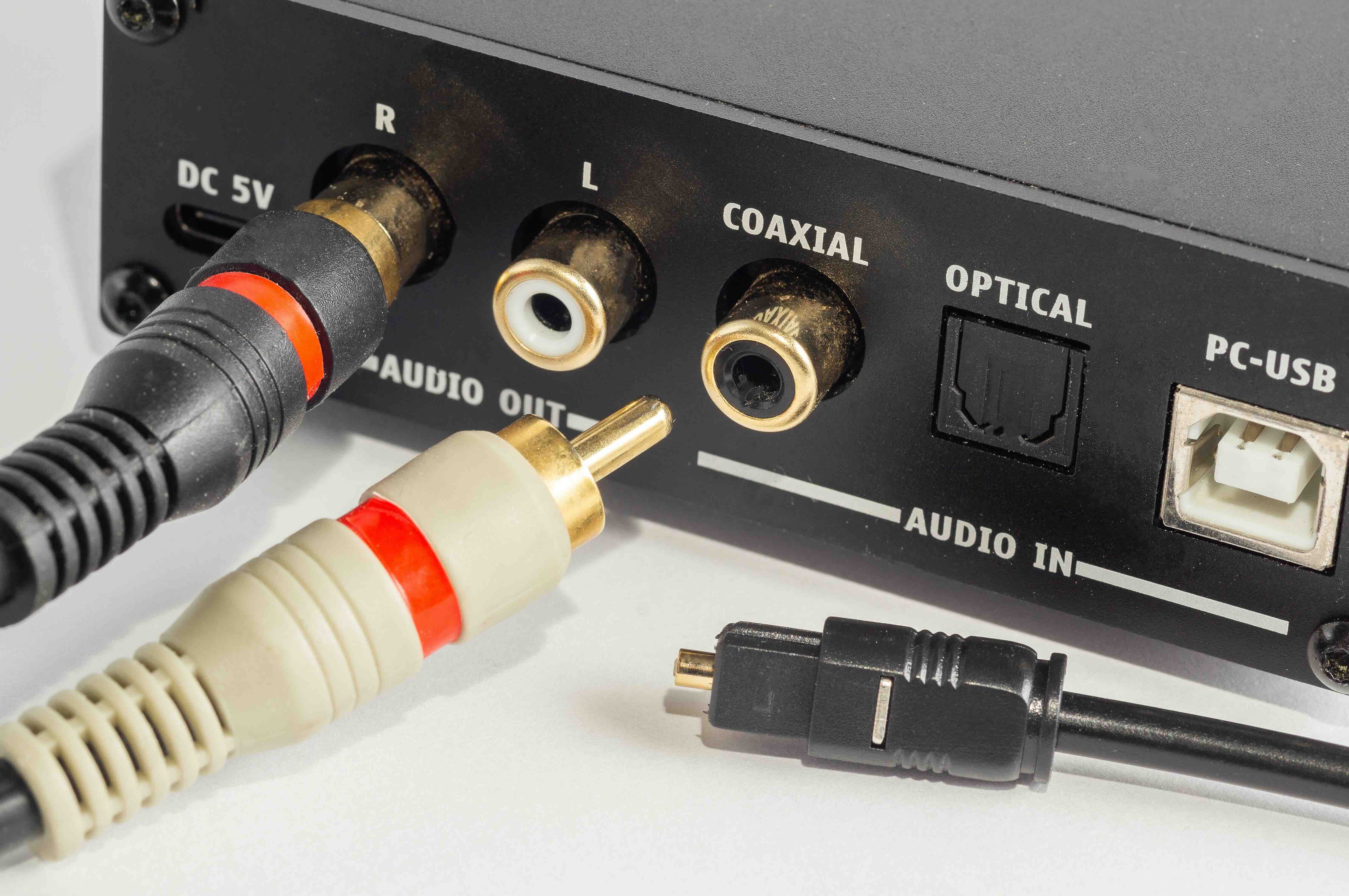
While HDMI handles audio alongside video in most modern setups, standalone audio cables remain important in dedicated audio systems, home theater configurations, and professional AV installations. Optical audio cables, also called TOSLINK, use light pulses to transmit digital audio signals without any electrical interference. They are a solid choice for connecting soundbars, receivers, and gaming consoles where a digital audio path is needed but HDMI ARC or eARC is not available. Coaxial digital audio cables use an RCA-style connector to carry the same type of digital audio signal as TOSLINK, often with slightly better performance over longer runs. XLR cables are the professional standard for balanced audio, found in live sound, recording studios, and high-end AV installations. Balanced connections reject interference over long cable runs, which is exactly why they are the go-to in professional environments. Quarter-inch TRS cables serve a similar purpose in instrument and studio settings.
HDMI Cable Versions: What the Differences Actually Mean
Not all HDMI cables are the same, and this is an area where confusion is genuinely common. HDMI 1.4 supports 4K at 30Hz, which is limiting for modern use. HDMI 2.0 brought 4K at 60Hz and wider color gamut support. HDMI 2.1 is the current performance benchmark, supporting 4K at 120Hz, 8K at 60Hz, 48Gbps bandwidth, Dynamic HDR, and Enhanced Audio Return Channel. For anyone building a system around a 4K gaming console, high-refresh-rate display, or next-generation home theater setup, HDMI 2.1 certified cables are the right foundation. Using an underpowered cable will bottleneck your display regardless of how capable the connected devices are.
Key Advantages and Common Drawbacks of Different AV Cable Types
Every cable format has trade-offs. HDMI is versatile and nearly universal for consumer AV but can be limited by version compatibility issues and licensing. DisplayPort offers excellent bandwidth and multi-display support but is less common on televisions and consumer devices. Component video offers better analog quality than composite but still cannot match digital formats. Optical audio eliminates ground loop hum and electrical noise but caps out at stereo PCM or compressed 5.1 audio without eARC. Coaxial digital audio handles bandwidth slightly better than optical but requires careful impedance matching over longer runs. For professional installs, balanced XLR connections are unmatched for reliability over distance. Choosing the right cable often comes down to matching the format to the environment, the resolution, and the specific hardware in the chain.
Practical Tips for Choosing the Right AV Cable
A few things are worth keeping in mind before you buy. First, always match the cable version to your device's capability. An HDMI 2.1 display paired with an HDMI 1.4 cable will not perform at full spec. Second, cable length matters more than people expect. For analog video, longer runs degrade signal quality noticeably. For digital signals, active cables or signal boosters are available for runs beyond standard passive cable limits. Third, shielding quality is relevant in environments with significant electrical interference, such as commercial installations or setups near high-wattage equipment. Fourth, do not over-spec for simple applications. A basic HDMI 2.0 cable is more than sufficient for a standard 1080p television. Spending on ultra-high bandwidth cable when your display tops out at 60Hz is not a smart use of budget. Focus on quality and the right spec rather than the most expensive option available.
AV Cables in Commercial and Professional AV Environments
Commercial AV installations add a layer of complexity that consumer setups do not always encounter. Long cable runs, signal distribution across multiple displays, rack-mounted equipment, and mixed signal environments all influence cable selection. In these contexts, HDMI over HDBaseT extenders, fiber optic HDMI solutions, and structured cabling approaches become relevant. Balanced audio using XLR or TRS becomes essential when running audio over any significant distance. Professional AV integrators typically design cable infrastructure around the signal path requirements first, then select hardware and cable types to match. Understanding what each cable type can and cannot do is foundational knowledge for anyone operating in this space.
Why Monoprice Is the Right Source for AV Cables
When it comes to sourcing AV cables that actually perform at spec without unnecessary cost, Monoprice has built a well-earned reputation among integrators, IT professionals, and AV enthusiasts who need reliability without overpaying. The catalog covers the full range of cable types discussed in this guide, from certified HDMI 2.1 cables and DisplayPort solutions to optical audio, RCA, XLR, and component video formats. Every cable is engineered to meet the demands of real-world installations, not just spec sheets. If you are ready to build or upgrade your system with cables you can trust, explore the full selection of high-performance AV cables and connectivity solutions at Monoprice and see exactly why professionals keep coming back for every project. Quality, value, and availability in one place makes the decision straightforward.
Frequently Asked Questions About AV Cable Types
What is the difference between composite and component video cables?
Composite video combines all video information into a single signal through one yellow RCA connector, resulting in lower image quality. Component video separates the signal into three connectors for luma and two color difference channels, supporting higher resolutions and better color accuracy.
Do I need an HDMI 2.1 cable for a 4K TV?
It depends on the content and frame rate. For standard 4K at 30Hz or 60Hz, HDMI 2.0 cables are sufficient. For 4K at 120Hz, 8K content, or VRR gaming features, an HDMI 2.1 certified cable is required to achieve full performance.
Is optical audio better than HDMI ARC for sound quality?
HDMI eARC generally outperforms optical audio because it supports uncompressed multi-channel audio formats including Dolby Atmos and DTS:X. Optical audio is limited to stereo PCM or compressed 5.1 formats, making HDMI eARC the better choice for high-quality home theater audio.
Can I use a regular HDMI cable for 8K content?
No. 8K content at 60Hz requires the 48Gbps bandwidth that only HDMI 2.1 certified cables support. Standard HDMI cables rated for lower bandwidth specifications will not pass an 8K signal correctly.
What is the maximum recommended length for a passive HDMI cable?
For reliable signal transmission without active boosting, passive HDMI cables are generally effective up to about 25 feet. Beyond that, signal degradation can occur, and active HDMI cables, fiber optic HDMI, or HDBaseT extenders are recommended for longer runs.
What makes XLR cables better for professional audio?
XLR cables carry balanced audio signals, which use a three-conductor design to cancel out electromagnetic interference and noise. This makes them highly effective over long cable runs in environments where signal integrity is critical, such as live sound, recording studios, and commercial AV systems.
Is DisplayPort or HDMI better for PC monitor setups?
DisplayPort is generally preferred for PC and workstation monitor setups because it supports higher refresh rates, daisy-chaining multiple monitors, and adaptive sync technologies without licensing restrictions. HDMI is more common for televisions and consumer AV devices.
Can I convert between AV cable types without losing quality?
Passive adapters work well for compatible digital-to-digital conversions, such as DisplayPort to HDMI. Analog-to-digital or digital-to-analog conversions require active converters, which introduce a processing step. Some quality loss or latency may occur depending on the converter quality.
What does cable shielding do and when does it matter?
Cable shielding consists of metallic layers wrapped around the internal conductors to block electromagnetic and radio frequency interference. It matters most in commercial installations, near power equipment, or in environments with significant signal noise where unshielded cables would pick up interference and degrade performance.
Are expensive HDMI cables actually better than affordable ones?
Not necessarily. HDMI is a digital signal, meaning a cable either passes the signal correctly or it does not. A well-built, properly certified HDMI cable at an affordable price point will perform identically to a premium-priced cable of the same specification in most practical applications. Focus on certification and build quality rather than price alone.


